
1. Продукт закінчивсяview
The Hisense 65E7Q QLED Smart TV offers a premium viewing experience with its 65-inch QLED display. This television integrates advanced technologies such as Dolby Vision and Dolby Atmos for immersive audio-visuals, AI Smooth Motion for fluid images, and dedicated modes for gaming and sports. Powered by the VIDAA operating system, it provides easy access to a wide range of streaming content and smart features, including voice control.

Фронт view of the Hisense 65E7Q QLED Smart TV.
Ключові характеристики:
- QLED Colour: Experience rich, vibrant, and realistic colors.
- AI Smooth Motion: Advanced MEMC and 3D Noise Reduction for fluid, blur-free images.
- Dolby Vision і Dolby Atmos: Cinematic picture and immersive sound for an enhanced entertainment experience.
- Режим гри плюс: Reduces input lag to 16ms, with 60Hz VRR and ALLM for ultra-fluid gaming.
- Спортивний режим зі штучним інтелектом: Optimizes picture and sound for sports content, reducing motion blur and enhancing stadium-like audio.
- Підвищення роздільної здатності AI 4K: Enhances blurry images to near-4K quality.
- VIDAA Smart TV OS: Fast, secure, and intuitive operating system with access to popular streaming applications.
- Голосове керування: Integrated Alexa and VIDAA Voice for convenient operation.
2. Інформація про безпеку
Please read all safety instructions carefully before using your TV. Keep this manual for future reference. Always ensure the TV is placed on a stable surface to prevent tipping. Do not expose the TV to rain or moisture. Refer to the full safety guidelines in the included safety manual.
3. Вміст упаковки
Перевірте наявність усіх елементів у коробці:
- Hisense 65E7Q QLED Smart TV
- Кабель живлення
- Remote Control (with 1 AAAA battery included)
- Тумба під телевізор (2 шт.)
- Гвинти для складання підставки
- Посібник користувача (цей документ)
- Гарантійний талон
4. Налаштування
4.1 Збірка підставки
- Обережно покладіть телевізор екраном вниз на м’яку рівну поверхню, щоб запобігти пошкодженню.
- Вирівняйте деталі підставки з відповідними пазами на нижній панелі телевізора.
- Закріпіть деталі підставки за допомогою наданих гвинтів. Переконайтеся, що вони міцно затягнуті.

Diagram illustrating TV dimensions and stand installation points.
4.2 Настінне кріплення
If you plan to wall mount your TV, ensure you use a VESA-compatible wall mount kit (not included). The Hisense 65E7Q supports a VESA mounting standard of 600 x 400 mm. Follow the instructions provided with your wall mount kit for safe installation.
4.3 Підключення периферійних пристроїв
Connect your external devices to the TV's ports as needed. Refer to the port diagram below:

Задня view showing available ports and connections.
- Порти HDMI (x3): Connect Blu-ray players, game consoles, and other HDMI devices. One port supports eARC for enhanced audio return.
- USB-порти (x2): Connect USB flash drives for media playback. (1x USB 3.0, 1x USB 2.0)
- Antenna Inputs (x2): Підключіть ефірну або кабельну антену.
- Ethernet (LAN): Для дротового мережевого підключення.
- Оптичний аудіовихід: Підключіться до саундбара або аудіоресивера для цифрового аудіо.
- Роз'єм для навушників: Для приватного прослуховування.
- AV входи: Для підключення старіших пристроїв за допомогою композитних відео- та стереоаудіокабелів.
4.4 Початкове ввімкнення
- Підключіть кабель живлення до телевізора, а потім до розетки.
- Натисніть кнопку живлення на пульті дистанційного керування або на телевізорі.
- Дотримуйтесь інструкцій на екрані, щоб завершити початкове налаштування, включаючи вибір мови, мережеве підключення та сканування каналів.
5. Керування телевізором
5.1 Пульт дистанційного керування
The included remote control allows you to navigate the TV's features. Insert the provided AAAA battery into the remote. The remote supports voice control for convenient operation.
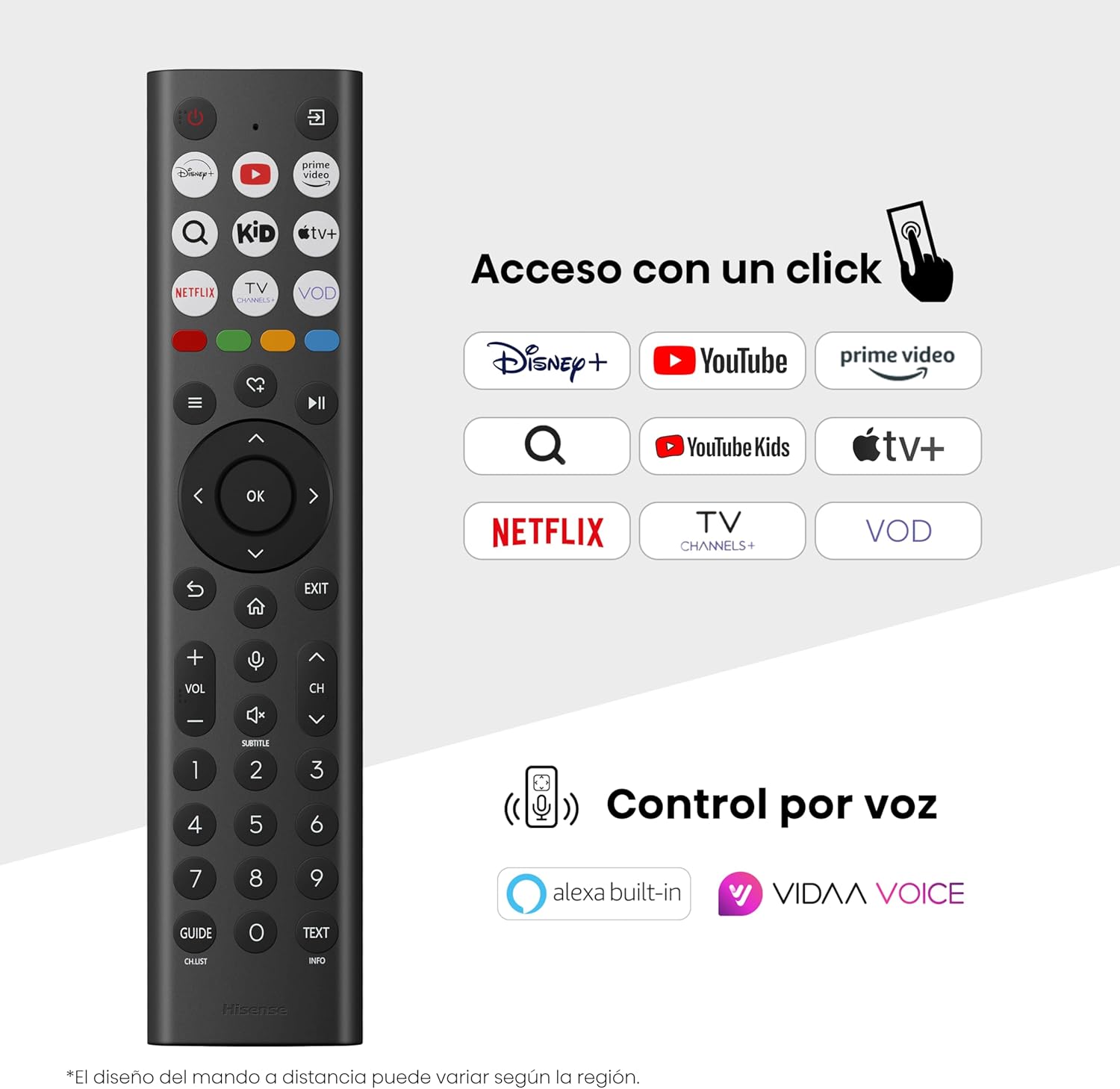
Hisense Smart TV remote control with dedicated app buttons and voice control.
5.2 Функції Smart TV (ОС VIDAA)
Your Hisense TV runs on the VIDAA operating system, offering a user-friendly interface for accessing various applications and services.

The VIDAA Smart TV interface with popular streaming applications.
- Застосування: Access pre-installed apps like Netflix, YouTube, Prime Video, and more.
- Голосове керування: Use the remote's voice function to search for content, adjust settings, or interact with Alexa built-in and VIDAA Voice.
- Screen Mirroring (AirPlay): Share content from your Apple devices directly to the TV.
- Поділитися на телевізорі: Easily send content from your mobile devices to the TV.
5.3 Налаштування зображення
Оптимізуйте свій viewing experience with various picture enhancement technologies:
- QLED Colour: Delivers over a billion shades of vibrant, lifelike colors.
- Підвищення роздільної здатності AI 4K: Automatically enhances lower-resolution content to near-4K quality.
- AI Smooth Motion: Reduces motion blur in fast-paced scenes, ensuring clear and fluid visuals.
- Dolby Vision: Provides stunning brightness, contrast, and color for a dramatic visual experience.
- Режим кінорежисера: Preserves the original aspect ratio, colors, and frame rates to display movies as intended by the director.
- AI Light Sensor: Intelligently adjusts screen brightness based on ambient light for optimal viewта енергоефективність.
- Режим догляду за очима: Зменшує випромінювання синього світла, щоб мінімізувати навантаження на очі.
- Режим енергозбереження: Optimizes power consumption without significantly compromising picture quality.

QLED technology delivers over a billion vibrant color tones.

AI 4K Upscaler enhances lower resolution content to near 4K clarity.

AI Smooth Motion ensures fluid images without blur, especially in fast-moving scenes.

Filmmaker Mode presents content exactly as the director intended.
5.4 Параметри звуку
Enhance your audio experience with:
- Dolby Atmos: Immersive, multi-dimensional sound that fills your room.
- Вбудований динамік: Built-in speakers with a maximum output of 1 Watt per channel.
- EzPlay: Seamlessly control compatible Hisense soundbars directly from your TV screen.

Dolby Vision and Dolby Atmos combine for a spectacular audio-visual experience.
5.5 Ігрові функції
For gamers, the TV offers:
- Режим гри плюс: Reduces input lag to 16ms, ensuring responsive gameplay.
- 60 Гц VRR (змінна частота оновлення): Synchronizes the TV's refresh rate with the game console's output to prevent screen tearing.
- ALLM (режим автоматичної низької затримки): Automatically switches the TV to low-latency mode when a game is detected.
- Ігрова панель: An integrated control center for quick access to game settings and real-time performance monitoring.

Game Mode Plus provides ultra-fluid, lag-free gaming.

The Game Bar offers centralized control for game settings.
5.6 Sports Features
- Спортивний режим зі штучним інтелектом: Automatically detects sports content and optimizes picture and sound settings for a stadium-like experience, enhancing clarity and audio effects.
6. Технічне обслуговування
6.1 Очищення телевізора
- Завжди відключайте телевізор від мережі перед чищенням.
- Використовуйте м’яку, суху тканину без ворсу, щоб обережно протерти екран і корпус телевізора.
- Для стійких плям злегка протрітьampпротріть тканину водою або спеціалізованим засобом для чищення екранів (не розпилюйте безпосередньо на екран).
- Уникайте використання абразивних засобів для чищення, спирту, бензолу або розчинників, оскільки вони можуть пошкодити поверхню телевізора.
6.2 Оновлення програмного забезпечення
Ваш телевізор може періодично отримувати оновлення програмного забезпечення для покращення продуктивності та додавання нових функцій. Переконайтеся, що ваш телевізор підключено до Інтернету, щоб отримувати ці оновлення. Зазвичай ви можете перевірити наявність оновлень вручну в меню налаштувань телевізора.
7. Вирішення проблем
Якщо у вас виникли проблеми з телевізором, зверніться до наступних поширених рішень:
- Немає живлення: Перевірте, чи кабель живлення надійно підключено, а розетка працює. Спробуйте іншу розетку.
- Немає зображення/звуку: Переконайтеся, що вибрано правильне джерело вхідного сигналу. Перевірте всі кабельні з’єднання (HDMI, антена).
- Пульт дистанційного керування не працює: Check the battery (1 AAAA battery). Ensure there are no obstructions between the remote and the TV.
- Проблеми з мережевим підключенням: Перевірте пароль Wi-Fi або підключення Ethernet-кабелю. Перезавантажте маршрутизатор.
- Погана якість зображення: Налаштуйте параметри зображення (яскравість, контрастність, різкість). Переконайтеся, що джерело вхідного сигналу забезпечує високоякісний сигнал.
- Спотворення звуку: Check audio settings. If using external speakers, ensure they are connected correctly.
For more detailed troubleshooting, consult the full electronic user manual or contact Hisense customer support.
8. Технічні характеристики
Detailed technical specifications for the Hisense 65E7Q QLED Smart TV:
| Особливість | Специфікація |
|---|---|
| Номер моделі | 65E7Q |
| Розмір екрана | 65 дюймів |
| Технологія дисплея | QLED |
| роздільна здатність | 4K (3840 x 2160) |
| Частота оновлення | 60 Гц |
| Підтримка формату HDR | Dolby Vision |
| Motion Enhancement Technology | Плавний рух зі штучним інтелектом |
| Покращення якості зображення | AI 4K Upscaler, AI Smooth Motion, QLED Colour |
| Час відгуку | 100 мілісекунд |
| Конфігурація підсвічування | Direct Illumination, Dimming |
| Опис спікера | Integrated speaker with Dolby Atmos |
| Максимальна вихідна потужність динаміка | 1 Вт |
| Аудіоканали | Багатоканальний |
| Surround Sound Format | Dolby Atmos |
| Операційна система | VIDAA |
| Ємність пам'яті | 1 ГБ |
| Спосіб контролю | Голос |
| Технологія підключення | Bluetooth, HDMI, Wi-Fi |
| Internet Applications | Netflix, YouTube, Prime Video, AirPlay 2 |
| Порти HDMI | 3 (including HDMI 2.1 with eARC) |
| USB порти | 2 (1x USB 3.0, 1x USB 2.0) |
| Бездротова технологія | Wi-Fi |
| Screen Mirroring Technology | AirPlay |
| Стандарт кріплення VESA | 600 х 400 мм |
| Розміри продукту (ДxШxВ) | 7.6 х 145.3 х 83.8 см |
| Вага продукту | 15.2 кг (з підставкою) |
| Клас енергоефективності | E |
| Річне споживання енергії | 84 кВт·год/1000 год (SDR), 160 кВт·год/1000 год (HDR) |
| потужність | 1 Watt (standby) |
| томtage | 100-240 VCA 50-60 Hz |
| Включені компоненти | Кабель живлення, пульт дистанційного керування, підставка |
| Рік моделі | 2025 |
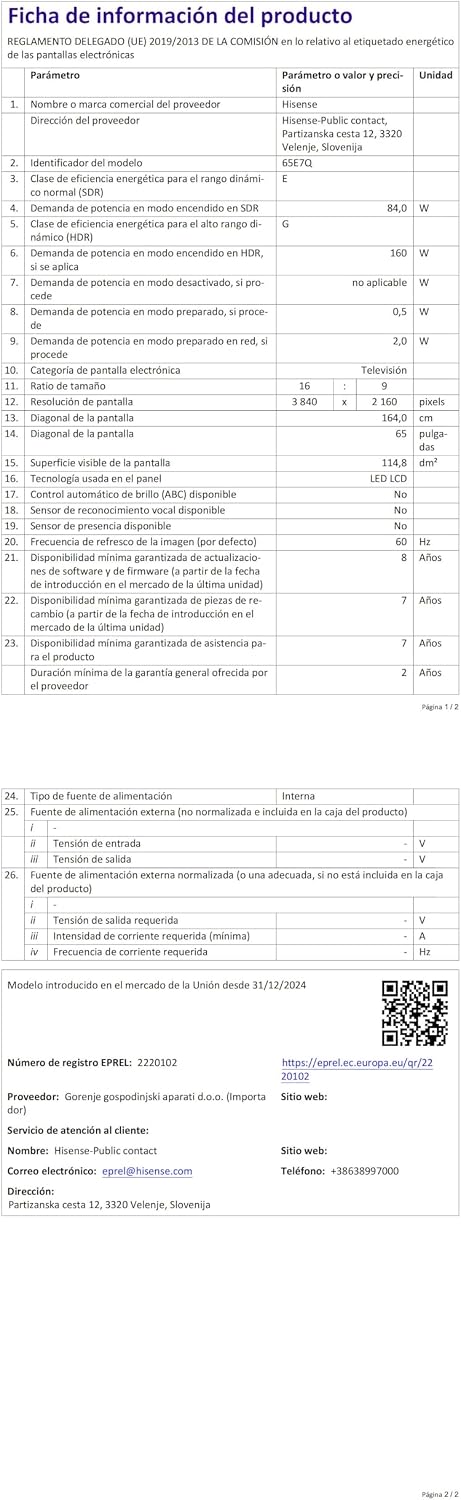
Energy label for the Hisense 65E7Q TV.
Для отримання детальнішої інформації про продукт, будь ласка, зверніться до бази даних EPREL: https://eprel.ec.europa.eu/qr/2220102
9. Гарантія та підтримка
9.1 Гарантія на виріб
This Hisense TV comes with a Гарантія на виріб 3 роківБудь ласка, збережіть чек про покупку для гарантійного обслуговування.
9.2 Наявність запасних частин
Spare parts for this model are guaranteed to be available in the EU for a duration of 10 роки from the product's market introduction.
9.3 Підтримка клієнтів
For technical assistance, troubleshooting, or warranty service, please contact Hisense customer support. Refer to the contact information provided in your warranty card or visit the official Hisense webсайт для вашого регіону.