
вступ
Дякуємо за покупкуasing the FunFlix P1 Android 4K Supported Bluetooth 5G Wi-Fi LED Full HD Projector. This manual provides essential information for setting up, operating, and maintaining your projector. Please read it thoroughly before use to ensure optimal performance and safety.
Інформація про безпеку
- Джерело живлення: Використовуйте лише зазначений адаптер живлення. Переконайтеся, що розетка відповідає потужності проектора.tage вимоги.
- Вентиляція: Не блокуйте вентиляційні отвори. Забезпечте достатній простір навколо проектора для належної циркуляції повітря, щоб запобігти перегріву.
- Захист очей: Не дивіться безпосередньо в об'єктив проектора, коли він увімкнений.amp увімкнено. Яскраве світло може пошкодити очі.
- Розміщення: Розмістіть проектор на стійкій, рівній поверхні. Уникайте його розміщення під прямими сонячними променями, поблизу джерел тепла або в середовищах з високою вологістю чи пилом.
- Прибирання: Disconnect the power before cleaning. Use a soft, dry cloth for the exterior and a lens cleaning cloth for the lens.
- Діти та домашні тварини: Тримайте проектор у недоступному для дітей та домашніх тварин місці, щоб запобігти нещасним випадкам.
Вміст упаковки
Перевірте наявність усіх елементів в упаковці:
- FunFlix P1 Projector
- Кабель живлення
- Кабель HDMI
- AV-кабель
- Пульт дистанційного керування
- Projector Lens Cap
Продукт закінченийview
Familiarize yourself with the components of your FunFlix P1 projector.
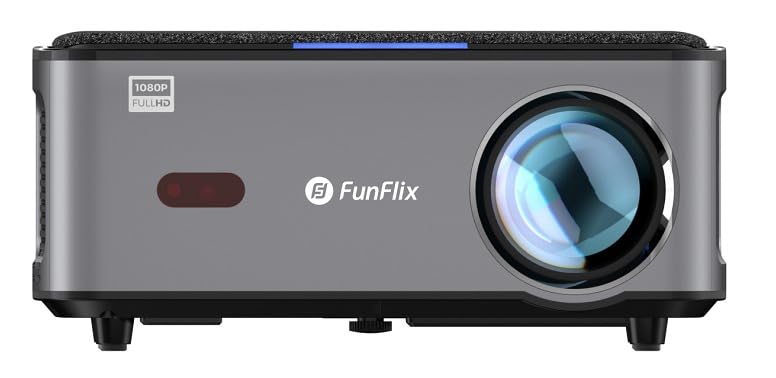
малюнок 1: Фронт view of the FunFlix P1 Projector, showing the main lens and ventilation grilles.

малюнок 2: Rear panel of the FunFlix P1 Projector, featuring the power input, RJ45 Ethernet port, IR receiver, two USB ports, AV input, and two HDMI inputs (HDMI1, HDMI2).

малюнок 3: Топ view of the FunFlix P1 Projector, displaying the integrated control panel with power, return, OK, and navigation buttons.

малюнок 4: Дно view of the FunFlix P1 Projector, showing the adjustable feet and mounting points for ceiling or wall installation.
Налаштування
1. Розміщення
Position the projector on a flat, stable surface or mount it to the ceiling/wall. Ensure the lens is perpendicular to the projection surface for the best image quality. The projector supports a maximum image size of 300 inches and a throw distance between 1.5 and 10 meters.
2. Підключення живлення
Підключіть кабель живлення до вхідного порту живлення проектора, а потім увімкніть його в розетку.
3. Початкове увімкнення
Press the power button on the projector or the remote control to turn on the device. The projector will perform automatic focus and keystone correction upon startup.
4. Налаштування зображення
- Automatic Focus & Keystone: The FunFlix P1 features automatic focus and keystone correction for quick setup.
- Manual Four-Corner Correction: For detailed adjustments, navigate to the settings menu to manually correct each corner of the image.
- Функція масштабування: Adjust the image size by up to 50% using the zoom function in the settings, without moving the projector.
5. Мережеве підключення (Wi-Fi)
Navigate to the Wi-Fi settings in the Android interface. Select your 5GHz Wi-Fi network and enter the password to connect to the internet.
6. Підключення Bluetooth
To connect external Bluetooth speakers or headphones, go to the Bluetooth settings. Enable Bluetooth, search for your device, and pair it.
Інструкція з експлуатації
1. Android Smart Interface
The FunFlix P1 runs on an Android operating system, providing access to various applications. Navigate the interface using the remote control. You can download additional applications from the app store.
2. Бездротове віддзеркалення екрана
The projector supports wireless screen mirroring (AirPlay and Miracast) from Android, iOS (Apple), and Windows devices. Select the appropriate mirroring function from the projector's menu and follow the on-screen instructions on your device.
3. Відтворення USB-носіїв
Insert a USB flash drive or hard disk into one of the two USB ports. The projector supports 4K video playback and can display documents such as Word, Excel, PowerPoint, and PDF files directly from the USB storage.
4. HDMI Input Usage
Connect external devices like gaming consoles, satellite receivers, or media sticks to the HDMI1 or HDMI2 ports. Use the input source selection on the remote control to switch to the desired HDMI input.
5. Аудіо вихід
The projector has a built-in 5W speaker. For enhanced audio, connect external speakers via Bluetooth 5.0 as described in the setup section.
6. Варіанти монтажу
The FunFlix P1 can be used on a tabletop or mounted to a ceiling or wall using compatible mounting brackets. The bottom of the projector includes mounting holes for this purpose.
Технічне обслуговування
1. Очищення об'єктива
Use a professional lens cleaning cloth or soft, lint-free cloth to gently wipe the projector lens. Avoid using abrasive cleaners or excessive force.
2. Очищення зовнішньої частини
Протріть зовнішню частину проектора м’якою сухою тканиною. Для видалення стійкого бруду злегкаamp можна використовувати тканину, а потім суху тканину.
3. HEPA Filter Maintenance
The projector is equipped with a removable and replaceable high-efficiency HEPA filter. Regularly check and clean the filter to maintain optimal performance and prevent dust buildup. Refer to the filter compartment for removal and replacement instructions.
4. Лamp життя
The LED light source has an estimated operating life of 50,000 hours, requiring minimal lamp заміна.
Усунення несправностей
| проблема | Можлива причина | Рішення |
|---|---|---|
| Немає живлення | Кабель живлення не підключено; розетка несправна. | Переконайтеся, що кабель живлення надійно підключено. Перевірте розетку за допомогою іншого пристрою. |
| Немає зображення або розмите зображення | Lens cap on; focus not adjusted; keystone not corrected; incorrect input source. | Remove lens cap. Use automatic focus or adjust manually. Perform keystone correction. Select the correct input source (HDMI, USB). |
| Ні звуку | Volume too low; external audio device not connected or selected; internal speaker disabled. | Increase volume. Check Bluetooth connection for external speakers. Ensure internal speaker is enabled in settings. |
| Проблеми з підключенням Wi-Fi | Incorrect password; out of range; router issues; temporary software glitch. | Verify Wi-Fi password. Move projector closer to router. Restart router and projector. Check for system updates. |
| Certain apps (e.g., Netflix) not working or low quality | Outdated Android OS; app compatibility issues; DRM limitations (L3 license). | Ensure apps are updated. For optimal streaming quality on platforms like Netflix, Max, or Prime, consider connecting an external L1 licensed TV Box (e.g., Amazon Fire Stick) via HDMI. The projector's internal Android system may have L3 DRM limitations. |
| Помітний шум вентилятора | Normal operation; ventilation blocked; dust buildup. | Some fan noise is normal for cooling. Ensure ventilation is not blocked. Clean the HEPA filter. |
Технічні характеристики
| Особливість | Деталь |
|---|---|
| Бренд | FunFlix |
| Рекомендоване використання | Домашній кінотеатр |
| Ключова функція | Автоматичне фокусування |
| Технологія підключення | Ethernet, HDMI, USB, Wi-Fi |
| Display Resolution (Standard) | 1920 x 1080 (Full HD) |
| Максимальна роздільна здатність дисплея | 3840 x 2160 (підтримується 4K) |
| Тип дисплея | LED |
| Форм-фактор | Портативний |
| Тип монтажу | Кріплення на стіл, кріплення на стелю |
| Яскравість | 8000 люменів (8000 люменів ANSI) |
| Сумісні пристрої | Smartphone, Laptop, Game Console, Tablet |
| Максимальна відстань кидка | 10.0 метрів |
| Термін експлуатації джерела світла | 50,000 години |
| Максимальний розмір зображення | 300 дюймів |
| Джерело світла Wattage | 150 Вт |
| Апаратний інтерфейс | HDMI, USB |
| Мінімальна відстань кидка | 1.5 метрів |
| Кодування відео | H.265 |
| Включені компоненти | AV Cable, Power Cable, HDMI Cable, Projector Lens Cap, Remote Control |
| Виробник | FunFlix |
Інформація про гарантію
The FunFlix P1 Projector comes with a 2-year importer warranty. Please retain your proof of purchase for warranty claims. The warranty covers manufacturing defects under normal use conditions. It does not cover damage caused by misuse, accidents, unauthorized modifications, or improper maintenance.
Підтримка клієнтів
If you encounter any issues or have questions regarding your FunFlix P1 Projector that are not addressed in this manual, please contact your retailer or the FunFlix customer support team. Refer to your purchase documentation for specific contact details.