
1. Вступ
Thank you for choosing the JUNJIEUNVO Q16 PRO Wireless Translation Earbuds. These earbuds are designed to provide a versatile audio experience, featuring real-time language translation, high-definition sound, and an open-ear design for comfort. This manual provides essential information for setting up, operating, and maintaining your device.
2. Вміст упаковки
- JUNJIEUNVO Q16 PRO Wireless Translation Earbuds (Left and Right)
- Charging Case with Smart Touch Screen
- Посібник користувача
- Зарядний кабель (USB-C)
3. Продукт закінчивсяview

малюнок 3.1: JUNJIEUNVO Q16 PRO Wireless Translation Earbuds and Charging Case. This image displays the white and silver earbuds with their unique ear-hook design, alongside the charging case which features a digital display showing time and battery levels.
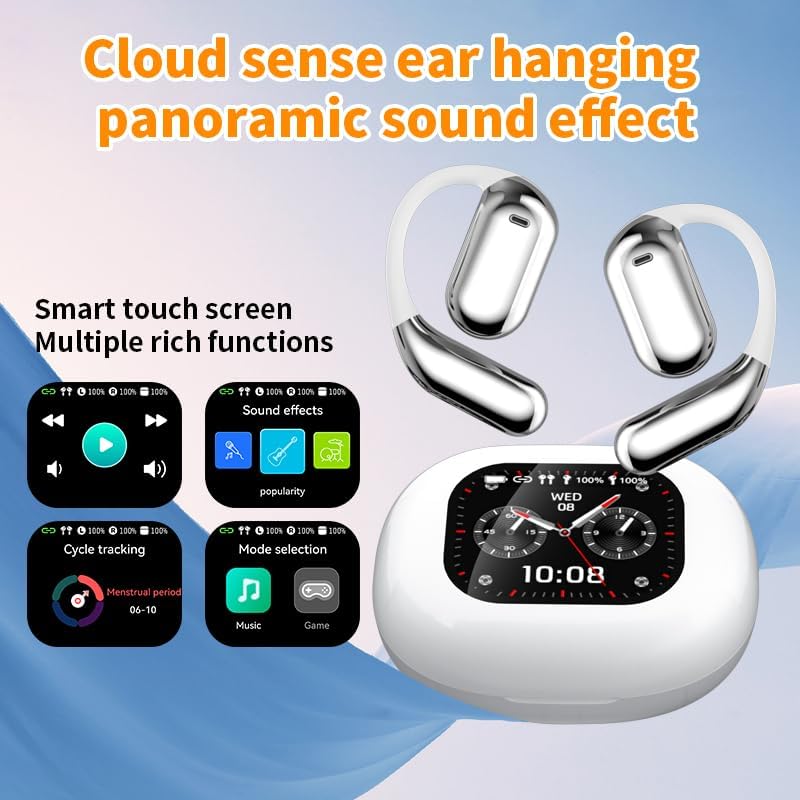
малюнок 3.2: Smart Touch Screen Functions. This image highlights the charging case's smart touch screen, illustrating various functions such as media playback controls, sound effects, cycle tracking, and mode selection (music/game).

малюнок 3.3: Environmental Noise Cancellation (ENC). This image depicts a person wearing the earbuds, with an overlay illustrating how the ENC technology reduces ambient noise by up to 99.44%, providing a clearer audio experience.

малюнок 3.4: Open-Ear Design for Comfort. This image shows a person wearing the earbuds, emphasizing the open-ear design that offers comfort and allows for awareness of external sounds, protecting ear canal health.

малюнок 3.5: Multiple Sound Adjustment Modes. This image displays the charging case's screen showing "Sound effects" with options for various music genres, indicating the ability to customize audio preferences.

малюнок 3.6: Extended Battery Life and Rich Functions. This image showcases the earbuds and charging case, highlighting a 40-hour endurance with a 500mAh charging case capacity, along with a mention of multiple functions.

малюнок 3.7: Earbuds and Charging Case (Open View). A detailed view of both earbuds and the open charging case, showing the internal design and charging contacts.

малюнок 3.8: Earbuds in Charging Case. This image shows the earbuds securely placed within their charging case, ready for charging or storage.

малюнок 3.9: Earbuds and Charging Case (Angled View). Another perspective of the earbuds and charging case, emphasizing their sleek design and compact form factor.
4. Налаштування
4.1 Заряджання навушників та футляра
Перед першим використанням повністю зарядіть навушники та зарядний футляр.
- Вставте навушники в зарядний футляр. Переконайтеся, що вони правильно встановлені у відповідних гніздах (лівий для лівого, правий для правого).
- Connect the charging cable to the USB-C port on the charging case and to a power source.
- Цифровий дисплей на зарядному футлярі показуватиме стан заряджання.
A full charge for the earbuds takes approximately 1.5 hours. The charging case has a 500mAh battery, providing extended use.
4.2 Сполучення з пристроєм
The earbuds use Bluetooth 5.4 for a stable connection up to 10 meters.
- Відкрийте зарядний футляр. Навушники автоматично перейдуть у режим сполучення.
- На вашому пристрої (смартфоні, планшеті тощо) увімкніть Bluetooth.
- шукати available Bluetooth devices and select "Q16 PRO" from the list.
- Після підключення навушники покажуть успішне сполучення, а пристрій відобразить їх як підключені.
Навушники автоматично підключаться до останнього сполученого пристрою після виймання з кейса, якщо на пристрої ввімкнено Bluetooth.
5. Інструкція з експлуатації
5.1 Функції інтелектуального сенсорного екрана
The charging case features a smart touch screen for easy control of various functions. Navigate through options by swiping or tapping on the screen.
- Відтворення мультимедіа: Control music (play, pause, skip tracks) directly from the screen.
- Звукові ефекти: Виберіть один з різних режимів звуку.
- Вибір режиму: Switch between music and game modes.
- Відстеження циклу: Access additional features if supported by the connected application.
5.2 Сенсорне керування (навушники)
The earbuds themselves also feature touch-sensitive areas for basic controls:
- Однократне натискання: Відтворення/пауза музики, відповідь/завершення дзвінка.
- Подвійне натискання (ліворуч): Попередній трек.
- Подвійне натискання (праворуч): Наступний трек.
- Тривале натискання: Активувати голосового помічника, Відхилити виклик.
5.3 Translation Function
The Q16 PRO earbuds support real-time translation for up to 144 languages. This feature typically requires a dedicated application on your connected smartphone.
- Download and install the companion translation application (refer to the app store or product packaging for details).
- Open the application and follow the on-screen instructions to connect your earbuds.
- Select the desired source and target languages within the application.
- Use the earbuds as instructed by the application for real-time translation during conversations or audio playback.
5.4 Sound Adjustment Modes
Customize your audio experience through the charging case's smart touch screen. Available sound modes include:
- нормальний
- Поп
- Рок
- Джаз
- Класичний
- Народні
- Custom (user-defined equalizer settings)
5.5 Водонепроникний клас IPX5
The earbuds are rated IPX5 waterproof, meaning they are resistant to splashes and sweat. They are suitable for sports and outdoor activities but should not be submerged in water.
6. Технічне обслуговування
- Прибирання: Використовуйте м’яку суху тканину для очищення навушників та зарядного футляра. Уникайте використання абразивних матеріалів або агресивних хімікатів.
- Зберігання: Зберігайте навушники в футлярі для зарядки, коли вони не використовуються, щоб захистити їх і підтримувати заряд.
- Уникайте екстремальних температур: Do not expose the device to extreme heat or cold, as this can damage the battery and internal components.
- Вплив води: While IPX5 rated, avoid prolonged exposure to water or high humidity. Ensure the charging port is dry before charging.
7. Вирішення проблем
| проблема | Можливе рішення |
|---|---|
| Навушники не підключаються | Ensure earbuds are charged. Turn off and on Bluetooth on your device. Forget "Q16 PRO" from your device's Bluetooth list and re-pair. |
| Немає звуку з одного навушника | Check battery level of both earbuds. Place both earbuds back in the case, close it, then reopen to reset. Re-pair with your device. |
| Зарядний футляр не заряджається | Ensure the charging cable is securely connected. Try a different USB-C cable and power adapter. |
| Функція перекладу не працює | Ensure the companion app is installed and updated. Check app permissions (microphone, internet). Verify a stable internet connection. |
| Погана якість звуку | Ensure earbuds are clean. Check the distance to your device (within 10m). Avoid obstacles between earbuds and device. |
8. Технічні характеристики
| Особливість | Деталь |
|---|---|
| Назва моделі | YYK-Q16 PRO |
| Версія Bluetooth | V5.4 + EDR |
| Чіп | Blue Flood |
| Підтримувані протоколи | AVRCP V1.6, A2DP V1.3, HFP V1.7, Simultaneous LE and BR / EDR |
| Usage/Playback Time | Приблизно 8 години (при 80% гучності) |
| Час очікування | 80 години |
| Час зарядки | Приблизно 1.5 годин |
| Бездротова відстань | 10 метрів |
| Ємність акумулятора навушника | 40mAh (кожен навушник) |
| Ємність батареї зарядного футляра | 500 мАг |
| Рейтинг водонепроникності | IPX5 |
| Вага товару | 6.4 унцій (загалом) |
| UPC | 884613749637 |
| Виробник | UNVO |
| Колір | White+Silver |
| Розташування вуха | On Ear (Open-wear design) |
| Форм-фактор | Справжня бездротова мережа |
9. Гарантія та підтримка
For warranty information and customer support, please refer to the documentation included with your purchase or contact the retailer/manufacturer directly. Keep your proof of purchase for any warranty claims.


