
1. Вступ
Thank you for choosing the Gritin 10.2-inch Rechargeable Under Cabinet Lighting. This product is designed to provide versatile and efficient illumination for various indoor spaces. It features multiple lighting modes, adjustable color temperatures, and brightness levels, along with a motion sensor for convenience and energy saving. Please read this manual thoroughly before use to ensure proper operation and maintenance.
2. Вміст упаковки
- 2 x Gritin 10.2-inch Under Cabinet Lights
- 2 зарядні кабелі USB-C
- Adhesive Iron Plates (for non-metallic surfaces)
- 1 х посібник користувача
3. Особливості продукту
- Передова світлодіодна технологія: Equipped with 84 super bright LEDs for optimal illumination.
- Міцна конструкція: Crafted from aluminum alloy and durable ABS plastic.
- Розумний датчик руху: Features a 120° wide sensing angle and a 3M/10FT detection distance. Automatically turns off after 20 seconds of no motion detected in sensing modes.
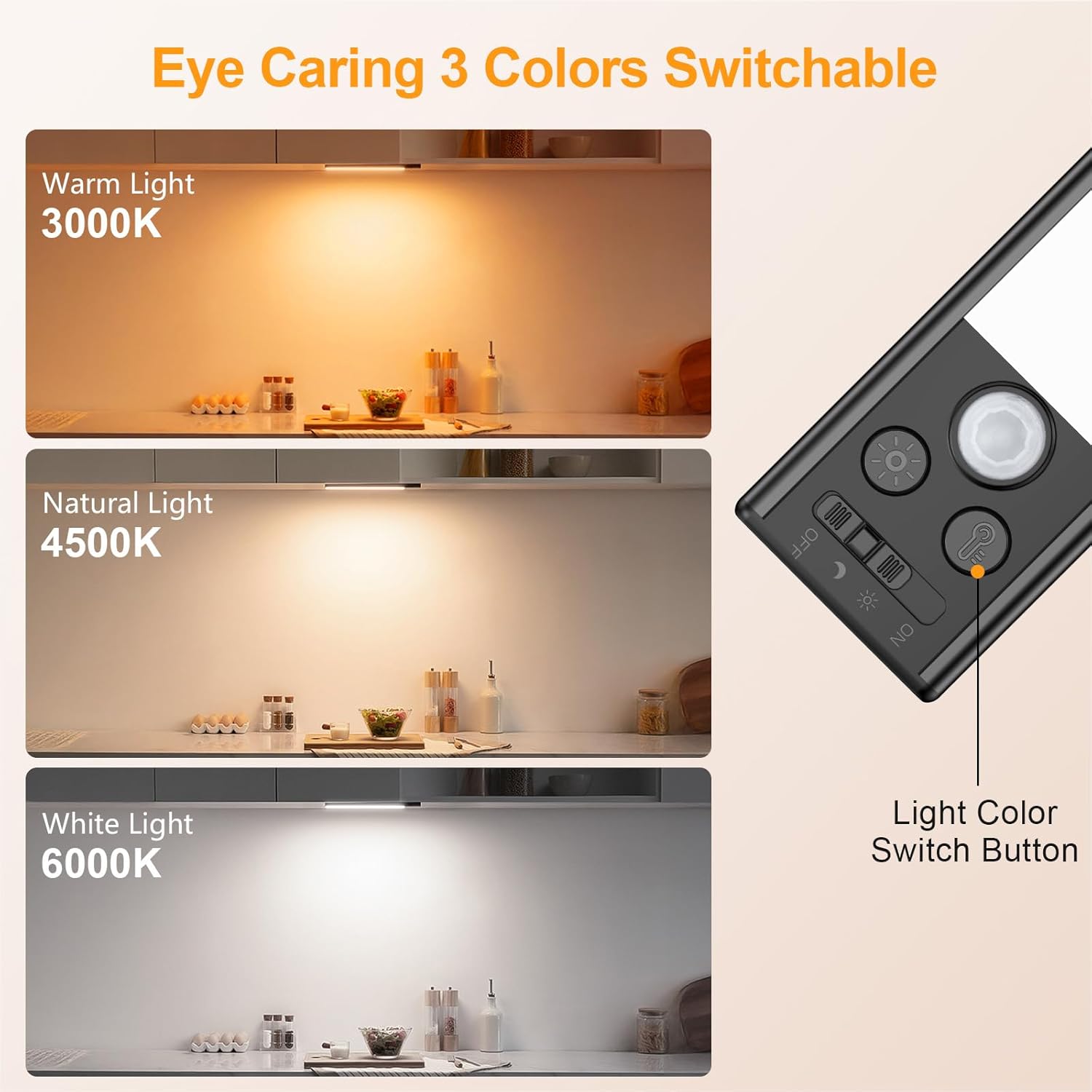
- Регульована колірна температура: Three color options: Warm (3000K), Mixed (4500K), and Cool (6000K).
- Кілька рівнів яскравості: Five preset brightness levels (10%, 25%, 50%, 75%, 100%) and stepless dimming capability.
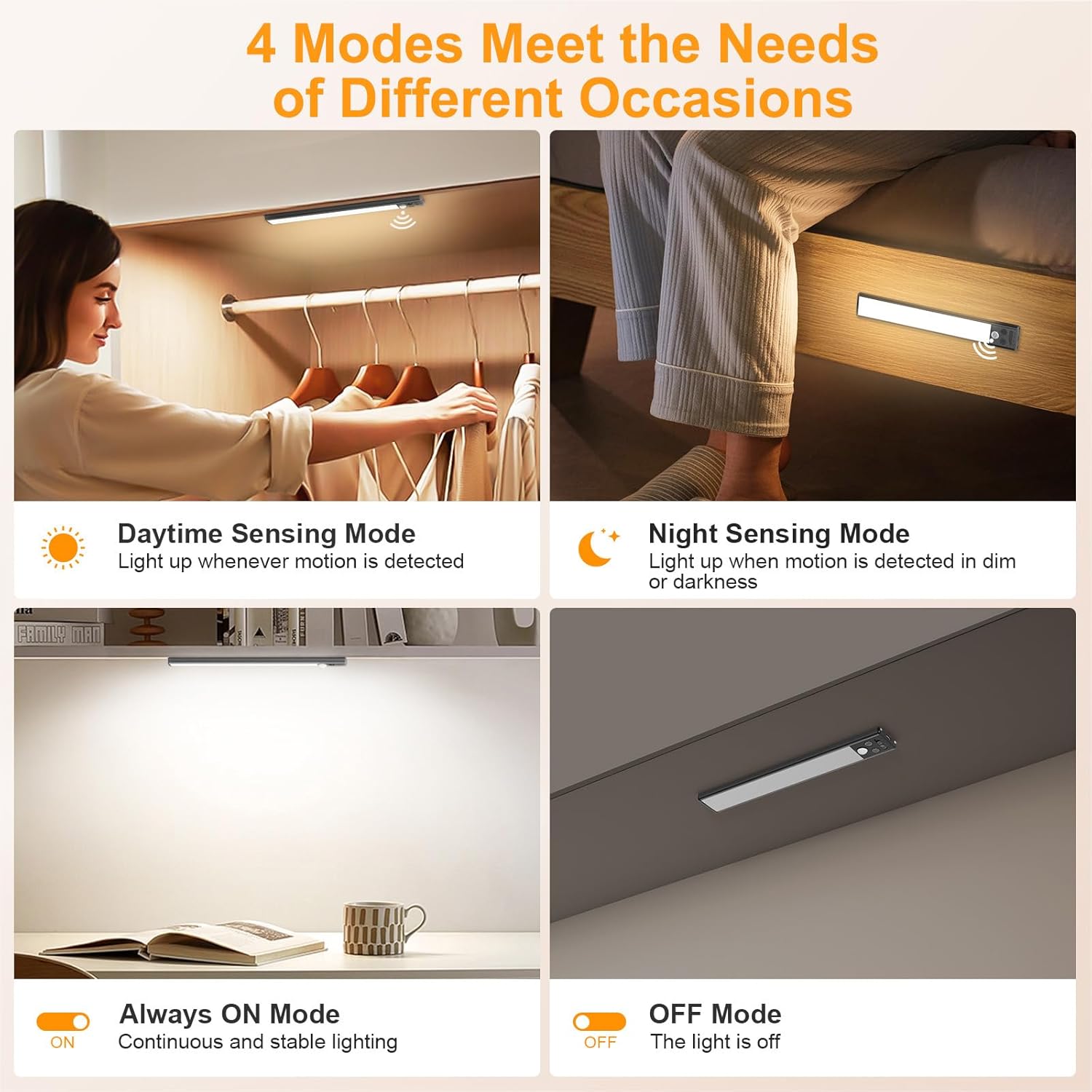
- Чотири режими освітлення: OFF, Night Sensing, Daytime Sensing, and Always On.
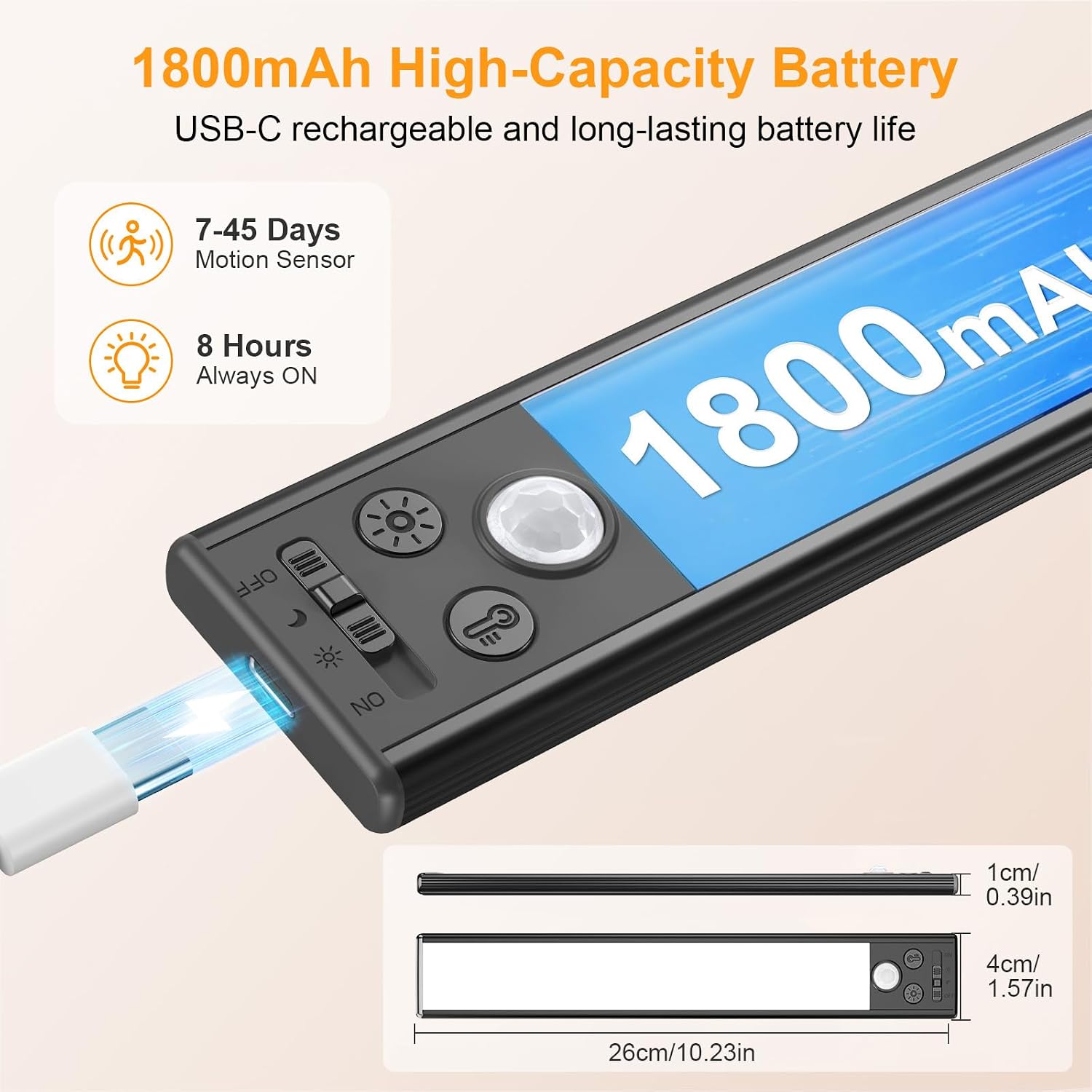
- Акумуляторна батарея: Built-in 1800mAh high-capacity battery, rechargeable via USB-C.
- Легка установка: Strong built-in magnets for iron surfaces; includes adhesive iron plates for non-metallic surfaces.

4. Налаштування та встановлення
- Підготуйте поверхню: Переконайтеся, що поверхня для встановлення чиста, суха та гладка.
- For Non-Metallic Surfaces: Peel off the protective film from one side of the adhesive iron plate and firmly press it onto the desired installation location. Repeat for the second plate, ensuring proper spacing for the light bar.
- Приєднайте світло: The light bar has built-in magnets. Simply align the light with the iron plates (or directly to an iron surface) and allow the magnets to secure it in place. This allows for easy removal for charging.
5. Інструкція з експлуатації
The Gritin under cabinet light features intuitive controls for power, color temperature, and brightness.
5.1 Вибір живлення та режиму
Use the slide switch on the side of the light to select one of the four operating modes:
- ВИМКНЕНО: Світло повністю вимкнене.
- Night Sensing Mode (Moon Icon): The light will activate only when motion is detected in a dark environment. It will turn off automatically after 20 seconds of no motion.
- Daytime Sensing Mode (Sun Icon): The light will activate when motion is detected, regardless of ambient light conditions. It will turn off automatically after 20 seconds of no motion.
- Режим «Завжди ввімкнено» (УВІМК.): Світло продовжує горіти.
5.2 Налаштування колірної температури
Натисніть Light Color Switch Button (indicated by a light bulb icon) to cycle through the three color temperature options:
- Тепле світло (3000 К)
- Mixed Light (4500K)
- Прохолодне світло (6000 К)
5.3 Налаштування яскравості
Використовуйте Кнопка затемнення (indicated by a sun icon) to control the light's intensity:
- Коротке натискання: Cycles through five preset brightness levels: 10%, 25%, 50%, 75%, and 100%.
- Тривале натискання (3 секунди): Activates stepless dimming, allowing you to fine-tune the brightness to any level between minimum and maximum. Release the button when the desired brightness is reached.

6. Зарядка
The Gritin under cabinet light is equipped with a high-capacity 1800mAh rechargeable battery. When the battery is low, the light indicator will signal the need for charging.
- Connect the provided USB-C cable to the charging port on the light and the other end to a standard USB power adapter (not included) or a computer's USB port.
- Під час заряджання світитиметься червоний індикатор.
- The indicator light will turn green when charging is complete.
A full charge provides approximately 8 hours of continuous use in high brightness mode or 7-45 days in motion sensor mode, depending on usage frequency.

7. Технічне обслуговування
- Прибирання: Протріть лампу м’якою сухою тканиною. Не використовуйте абразивні засоби для чищення або розчинники.
- Зарядка: Recharge the battery regularly to prolong its lifespan, even if not in frequent use. Avoid fully depleting the battery for extended periods.
- Зберігання: If storing the light for a long time, charge it to about 50% and store in a cool, dry place. Recharge every 3-6 months.
- Середовище: Уникайте впливу на лампу екстремальних температур, прямих сонячних променів або високої вологості.
8. Вирішення проблем
| проблема | Можлива причина | Рішення |
|---|---|---|
| Світло не вмикається. | Акумулятор розрядився. | Charge the light using the provided USB-C cable. |
| Вибрано неправильний режим. | Ensure the slide switch is set to 'ON' or a sensing mode. | |
| Датчик руху не працює. | Вибрано неправильний режим. | Ensure the slide switch is set to 'Night Sensing' or 'Daytime Sensing' mode. |
| Ambient light too bright (in Night Sensing mode). | Night Sensing mode only activates in dark environments. Switch to Daytime Sensing mode if light is needed in brighter conditions. | |
| Короткий час автономної роботи. | Frequent activation or 'Always On' mode usage. | Battery life is shorter in 'Always On' mode or with very frequent motion activations. Consider using sensing modes for longer battery life. |
| Акумулятор не повністю заряджений. | Ensure the light is fully charged until the indicator light turns green. |
9. Технічні характеристики
| Особливість | Деталь |
|---|---|
| Бренд | Гритін |
| Номер моделі | G1358 |
| Розміри (Д x Ш x В) | 10.23 дюйма x 1.57 дюйма x 0.39 дюйма (26 см x 4 см x 1 см) |
| вага | 245 грамів |
| матеріал | Алюміній, Пластик |
| Джерело світла | 84 світлодіодів |
| Яскравість | 180 люмен (макс.) |
| Кольорові температури | 3000K (Warm), 4500K (Mixed), 6000K (Cool) |
| Джерело живлення | Живлення від батареї (1800 мАг) |
| Тип перемикача | Motion sensor, Manual switch |
| Тип монтажу | Magnetic and adhesive |
| Використання в приміщенні/зовні | закритий |
10. Гарантія та підтримка
This Gritin product comes with a 1-річна гарантія виробника. For warranty claims, technical support, or any inquiries regarding your product, please contact Gritin customer service through the retailer where the product was purchased or visit the official Gritin webсайт для контактної інформації.