
1. Вступ
This manual provides detailed instructions for the safe and effective use of your TOTAL TMT57026 Laser Distance Meter. Please read this manual thoroughly before operating the device and keep it for future reference. This device is designed for accurate distance measurements up to 70 meters, suitable for various professional and DIY applications.
2. Техніка безпеки
- Лазерне випромінювання: This device emits Class 2 laser radiation. Do not stare into the laser beam or direct it at other people or animals.
- Захист очей: Уникайте прямого впливу лазерного променя на очі.
- Операційне середовище: Do not operate the device in explosive atmospheres or near flammable materials.
- Водонепроникність: Цей пристрій є не водостійкийУникайте впливу води або високої вологості.
- Технічне обслуговування: Only qualified personnel should repair the device.
- Акумулятори: Використовуйте лише батарейки типу AAA, зазначені в інструкції. Не змішуйте старі та нові батарейки або батарейки різних типів.
3. Продукт закінчивсяview
Familiarize yourself with the components of your TOTAL TMT57026 Laser Distance Meter.
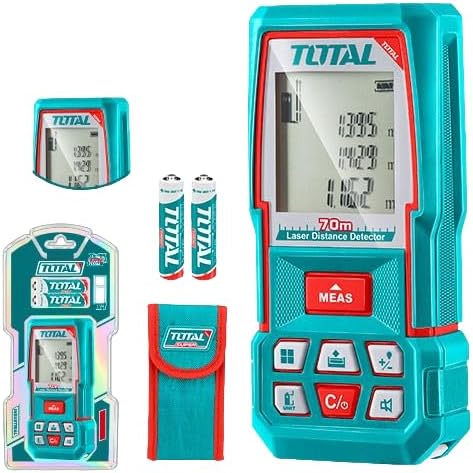
Figure 1: The TOTAL TMT57026 Laser Distance Meter, showing the device itself, two AAA batteries, a carrying pouch, and retail packaging. The device features a digital display and multiple function buttons.
Ключові компоненти:
- Лазерний випромінювач/приймач: Розташований у верхній частині пристрою.
- Екран дисплея: Відображає вимірювання, одиниці вимірювання та індикатори режимів.
- Кнопка ВИМІРЮВАННЯ: Initiates single or continuous measurement.
- Кнопка UNIT: Changes measurement units (e.g., meters, feet, inches).
- C/O Button: Clears the last measurement or turns the device off.
- Функціональні кнопки: For area, volume, addition, subtraction, and other calculations.
- Батарейний відсік: Located at the rear of the device.
4. Налаштування
4.1 Встановлення батареї
- Знайдіть кришку відсіку для батареї на задній панелі пристрою.
- Зсуньте або відкріпіть кришку, щоб відкрити її.
- Insert two (2) AAA 1.5V disposable batteries, ensuring correct polarity (+/-). The device includes two AAA batteries.
- Надійно закрийте кришку батарейного відсіку.
4.2 Увімкнення/вимкнення
- Щоб увімкнути: Натисніть ВИМІР button briefly. The display will light up.
- Щоб вимкнути: Натисніть і утримуйте C/O button for approximately 3 seconds. The device will also automatically power off after a period of inactivity to conserve battery life.
5. Інструкція з експлуатації
5.1 Основи вимірювання відстані
- Переконайтеся, що пристрій увімкнено.
- Направте лазерний промінь на цільову поверхню.
- Натисніть ВИМІР button once. The laser will activate, and the measurement will appear on the display.
- The measurement will be held on the screen until a new measurement is taken or the device is turned off.
5.2 Безперервне вимірювання (відстеження)
- Натисніть і утримуйте ВИМІР приблизно 2 секунди.
- The device will enter continuous measurement mode, displaying real-time distance as you move the device.
- Натисніть ВИМІР button again to stop continuous measurement and hold the last value.
5.3 Зміна одиниць вимірювання
- Натисніть ОДИНИЦЯ button repeatedly to cycle through available units: meters (m), feet (ft), and inches (in).
- Вибраний блок буде відображено на дисплеї.
5.4 Вимірювання площі та об'єму
The device supports calculation of area and volume. Refer to the icons on the function buttons for specific modes.
- Press the appropriate function button (e.g., the button with the square icon for area, or cube icon for volume).
- Follow the on-screen prompts to take the required measurements (e.g., length, width for area; length, width, height for volume).
- The calculated result will be displayed.
5.5 Додавання та віднімання
Використовуйте +/- button to add or subtract measurements.
- Take the first measurement.
- Натисніть +/- button to select addition or subtraction mode.
- Take the second measurement. The device will automatically perform the calculation and display the result.
6. Технічне обслуговування
6.1 Очищення
- Протріть пристрій м’якою, damp тканина. Не використовуйте абразивні засоби чи розчинники.
- Clean the laser lens carefully with a soft, lint-free cloth, similar to cleaning camera lenses.
6.2 Зберігання
- Зберігайте пристрій у сухому, прохолодному місці, подалі від прямих сонячних променів та екстремальних температур.
- Якщо зберігатиметься протягом тривалого часу, вийміть батарейки, щоб запобігти витіканню.
6.3 Заміна батареї
- When the battery indicator on the display shows low power, replace both AAA batteries following the instructions in Section 4.1.
7. Вирішення проблем
| проблема | Можлива причина | Рішення |
|---|---|---|
| Пристрій не включається. | Батареї розряджені або встановлені неправильно. | Перевірте полярність батарейок або замініть їх новими батарейками типу AAA. |
| Неточні вимірювання. | Laser lens is dirty; target surface is too reflective/non-reflective; device is unstable. | Clean the laser lens. Measure against a suitable, stable surface. Ensure device is held steady. |
| Лазерний промінь не видно. | Bright ambient light; laser is off. | Operate in lower light conditions. Ensure device is powered on and MEAS button is pressed. |
| На дисплеї відображається код помилки. | Вимірювання поза діапазоном; внутрішня помилка. | Ensure target is within 0.05m to 70m range. Try restarting the device. If error persists, contact support. |
8. Технічні характеристики
- модель: TMT57026
- Бренд: РАЗОМ
- Діапазон вимірювання: Від 0.05 до 70 метрів
- Одиниці вимірювання: Метри (м), Фути (фт), Дюйми (дюйми)
- Лазерний клас: 2 клас
- Акумулятори: 2 x AAA, 1.5V (included)
- Тип батареї: Одноразовий
- Automatic Laser Shut-off: Так (після бездіяльності)
- Automatic Device Shut-off: Так (після бездіяльності)
- Розміри продукту: Приблизно 17 х 5 х 0.1 см
- Вага товару: Approximately 160 g (0.16 Kilograms)
- матеріал: пластик
- колір: Бірюзовий
- Рівень водонепроникності: Не водостійкий
- Виробник: Всього
- Країна походження: Китай
9. Гарантія та підтримка
For warranty information and technical support, please contact TOTAL customer service. Keep your purchase receipt as proof of purchase.
For further assistance, please refer to the official TOTAL webсайт або зверніться до місцевого дистриб'ютора.