
1. Вступ
The Fanvil V66-Pro is a professional IP phone designed for modern business communication. It features a 7-inch adjustable touch screen, supports 20 SIP lines, and includes built-in 2.4G/5G Wi-Fi (Wi-Fi 6) and a wireless Bluetooth handset. This manual provides detailed instructions for the proper installation, configuration, and operation of your Fanvil V66-Pro IP Phone.
2. Вміст упаковки
Verify that all items are present in your package. If any item is missing or damaged, contact your vendor immediately.
- Fanvil V66-Pro IP Phone Unit
- Бездротова трубка Bluetooth
- Шнур слухавки
- Кабель Ethernet
- Адаптер живлення
- Настільна підставка
- Посібник із швидкого встановлення
3. Фізичний overview
Familiarize yourself with the components of your Fanvil V66-Pro IP Phone.
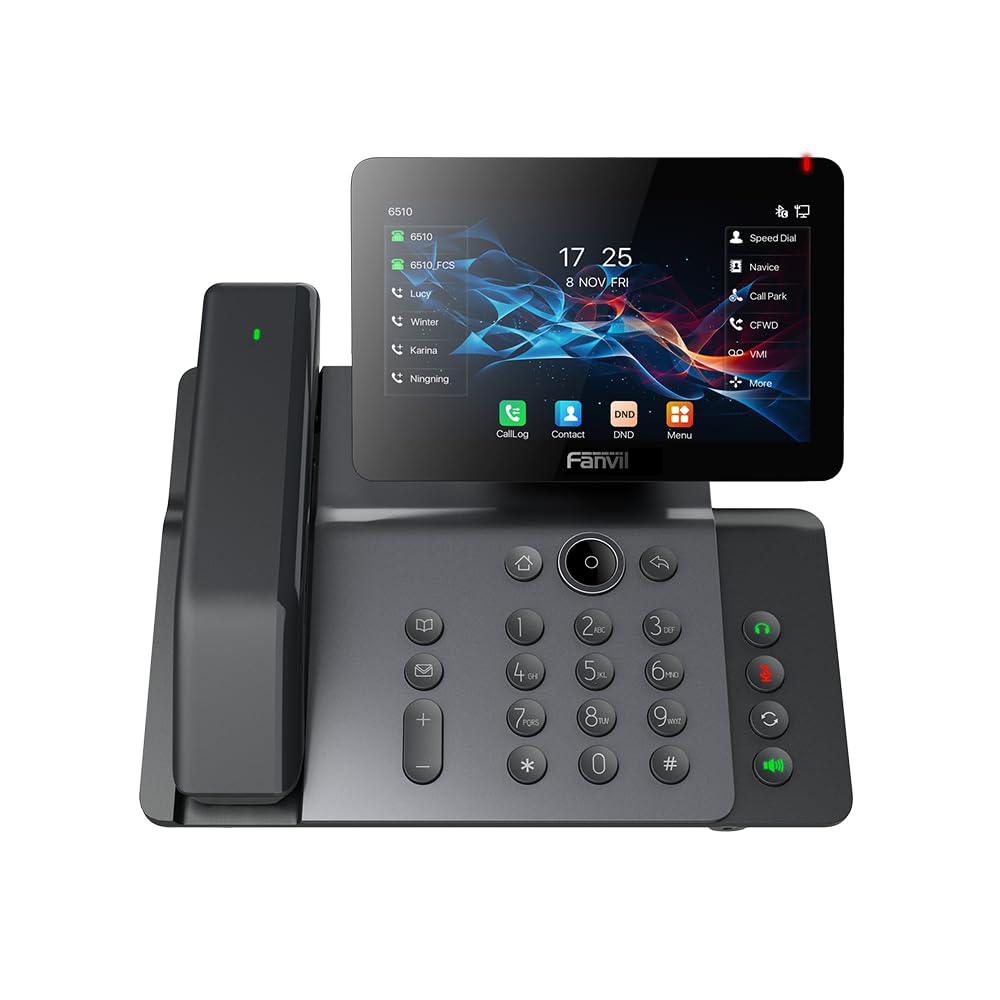
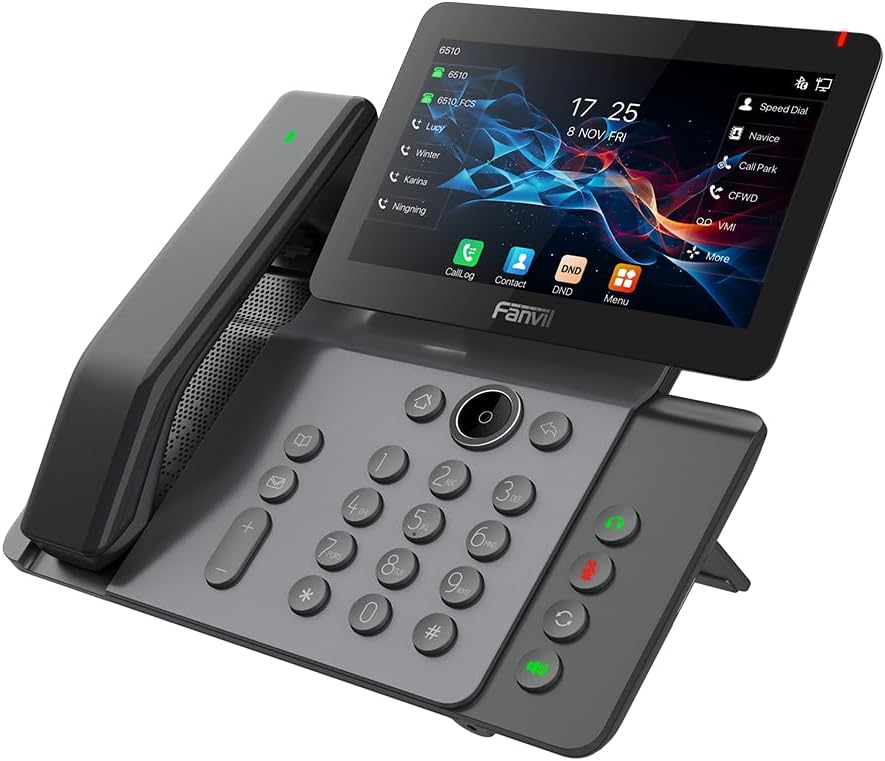
Figure 3.1: Fanvil V66-Pro IP Phone with its wireless Bluetooth handset shown separately.
Малюнок 3.2: Спереду view of the Fanvil V66-Pro IP Phone with the handset attached to the main unit.
3.1 Ключові компоненти
- Регульований сенсорний екран: 7-inch color display for navigation and information.
- Клавіатура: Standard numeric and function keys for dialing and control.
- Wireless Bluetooth Handset: For cordless communication.
- гучний зв'язок: Integrated speaker and microphone for hands-free calls.
- Функціональні клавіші: Dedicated buttons for common features like message, hold, transfer, and conference.
- Порти: Ethernet ports (LAN/PC), Power port, USB port, Headset port.
4. Налаштування
4.1 Збирання телефону
- Attach the desk stand to the main phone unit.
- Connect the coiled handset cord to the main unit and the wired handset (if using a wired handset). For the wireless Bluetooth handset, ensure it is placed on the charging cradle.
4.2 Connecting to Network and Power
- Підключення до мережі: Connect one end of the Ethernet cable to the LAN port on the back of the phone and the other end to your network switch or router. If connecting a PC, use the PC port on the phone.
- Підключення живлення: Connect the power adapter to the power port on the phone and then plug it into an electrical outlet. The phone will automatically power on.
4.3 Initial Boot-Up and Configuration
Upon first power-up, the phone will display a boot-up sequence. Once complete, it will attempt to obtain network settings via DHCP. If your network requires static IP configuration or specific SIP server details, these can be configured via the phone's menu or a web interface. Consult your network administrator for specific settings.
5. Інструкція з експлуатації
5.1 Здійснення та отримання дзвінків
- Щоб зателефонувати: Pick up the handset, press the speakerphone button, or press a line key. Dial the number and press the Dial soft key or #.
- Щоб відповісти на дзвінок: Підніміть слухавку, натисніть кнопку гучного зв’язку або натисніть програмну клавішу «Відповісти».
- Щоб завершити дзвінок: Hang up the handset, press the speakerphone button again, or press the End Call soft key.
5.2 Використання сенсорного екрана
The 7-inch touch screen allows for intuitive navigation. Tap icons to access features like Call Log, Contacts, DND (Do Not Disturb), and Menu. Swipe gestures may be supported for additional screens or options.
5.3 основних функцій виклику
- Тримайте: Під час активного дзвінка натисніть кнопку Тримайте soft key. Press it again to resume the call.
- Передача: Під час активного дзвінка натисніть кнопку Трансфер soft key. Dial the number to transfer to, then press the Трансфер soft key again (blind transfer) or wait for the party to answer and then press Трансфер (присутній на перевезенні).
- Конференція: Під час активного дзвінка натисніть кнопку Конференція soft key. Dial the second party's number and wait for them to answer. Press the Конференція ще раз натисніть програмну клавішу, щоб об’єднати всіх учасників.
5.4 Wi-Fi and Bluetooth Setup
- Wi-Fi: Navigate to the phone's menu, select 'Settings' > 'Wi-Fi'. Enable Wi-Fi, scan for available networks, select your network, and enter the password if required.
- Bluetooth: Navigate to the phone's menu, select 'Settings' > 'Bluetooth'. Enable Bluetooth. For the wireless handset, ensure it is charged and in pairing mode. Select the handset from the discovered devices list to pair.
6. Технічне обслуговування
6.1 Очищення пристрою
Use a soft, dry cloth to clean the phone's surface and screen. Avoid using liquid cleaners or abrasive materials, as they may damage the device. For stubborn marks, a slightly damp cloth with water may be used, ensuring no moisture enters openings.
6.2 Оновлення програмного забезпечення
Periodically check for firmware updates to ensure optimal performance and access to new features. Updates can typically be performed via the phone's web interface or through your service provider's provisioning system. Consult your network administrator or service provider for guidance on updates.
7. Вирішення проблем
7.1 Немає гудка
- Check all cable connections (Ethernet, power, handset).
- Ensure the phone is powered on and the screen is active.
- Перевірте підключення до мережі.
- Contact your service provider to confirm SIP registration status.
7.2 Cannot Connect to Network
- Ensure the Ethernet cable is securely connected to the LAN port and your network.
- Check if your network switch or router is functioning correctly.
- If using Wi-Fi, verify the correct network is selected and the password is entered accurately.
- Restart the phone and your network equipment.
7.3 Проблеми з дисплеєм
- If the screen is blank, ensure the phone is powered on.
- Adjust screen brightness settings in the phone's menu.
- Перезавантажте телефон.
8. Технічні характеристики
| Особливість | Деталь |
|---|---|
| Розміри продукту | 9 x 7 x 5.6 дюймів |
| Вага товару | 3.3 фунта |
| ASIN | B0DYKWF779 |
| Виробник | Фанвіл |
| Колір | чорний |
| Тип телефону | Проводиться |
| матеріал | Метал, пластик |
| Джерело живлення | Провідний електричний |
| Тип автовідповідача | цифровий |
| Сумісні пристрої | VoIP Services, Traditional Phone Networks |
| Можливість конференц-дзвінків | Базовий |
| Багаторядкова робота | Багатолінійна робота |
9. Інформація про гарантію
Fanvil products are typically covered by a limited manufacturer's warranty. The specific terms and duration of the warranty may vary by region and retailer. Please refer to the warranty card included with your product or visit the official Fanvil website for detailed warranty information. Keep your purchase receipt as proof of purchase for warranty claims.
10. Підтримка
For technical assistance, product inquiries, or further support, please contact your vendor or visit the official Fanvil support webсайт:
Fanvil Official Webсайт: www.fanvil.com
You may find FAQs, firmware downloads, and additional documentation on their support pages.