
1. Вступ
Thank you for choosing the JUNJIEUNVO Q16 Wireless Translation Earbuds. These open-ear design earbuds offer a comfortable listening experience, advanced Bluetooth 5.4 connectivity, IPX5 waterproof rating, and support for real-time language translation across over 100 countries. This manual provides detailed instructions on how to set up, operate, and maintain your earbuds to ensure optimal performance.
2. Вміст упаковки
Будь ласка, перевірте упаковку на наявність наступних предметів:
- JUNJIEUNVO Q16 Wireless Translation Earbuds (Left and Right)
- Зарядний футляр
- Посібник користувача
- Charging Cable (USB-C, not always included, please check packaging)
3. Продукт закінчивсяview
The Q16 earbuds feature an open-ear design for comfort and situational awareness, housed in a compact charging case. The case includes a digital display for battery status.

малюнок 3.1: Q16 Earbuds in their charging case, showing the left (L) and right (R) indicators along with the digital battery display.

малюнок 3.2: The open-ear design of the Q16 earbuds, emphasizing comfort and awareness of surroundings.

малюнок 3.3: Diagram illustrating the directional sound transmission technology, designed to protect privacy and reduce sound leakage.
4. Налаштування
4.1 Заряджання навушників та футляра
Before first use, fully charge the earbuds and the charging case. The charging case has a 500mAh battery, and each earbud has a 40mAh battery. A full charge takes approximately 1.5 hours.
- Connect the charging cable (typically USB-C) to the charging port on the case and to a USB power source.
- The digital display on the charging case will show the charging progress.
- Place the earbuds into the charging case. Ensure they are correctly seated; the case will indicate if they are charging.
4.2 Створення пари Bluetooth
The Q16 earbuds use Bluetooth 5.4 for a stable and efficient connection. The pairing process is automatic upon opening the case.
- Ensure your smartphone or device's Bluetooth is turned on.
- Відкрийте кришку зарядного футляра. Навушники автоматично перейдуть у режим сполучення.
- На своєму пристрої знайдіть пристрої Bluetooth і виберіть зі списку «Q16».
- Після підключення ви почуєте звуковий сигнал підтвердження, і навушники будуть готові до використання.
- For subsequent connections, simply open the charging case, and the earbuds will automatically reconnect to the last paired device.
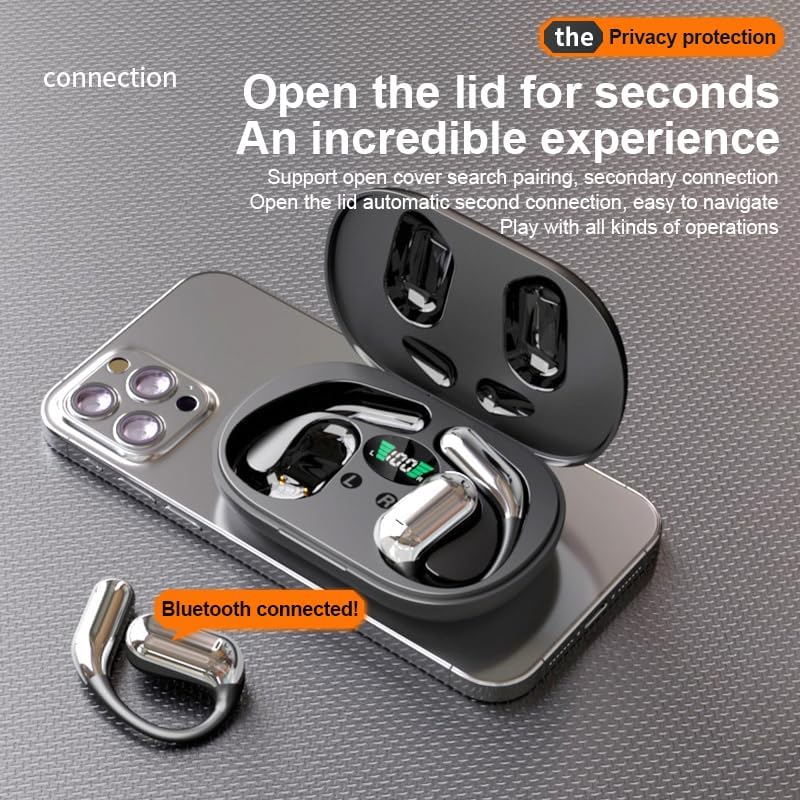
малюнок 4.1: The Q16 earbuds connected to a smartphone, indicating successful Bluetooth pairing.
5. Інструкція з експлуатації
5.1 Увімкнення/вимкнення живлення
- Увімкнення: Відкрийте кришку зарядного футляра, і навушники автоматично увімкнуться.
- Вимкнення живлення: Помістіть навушники назад у зарядний футляр і закрийте кришку. Вони автоматично вимкнуться та почнуть заряджатися.
5.2 Відтворення музики
(Specific touch controls are not detailed in the provided product data. The following are common gestures; refer to the manufacturer's official app or website for precise controls.)
- Відтворення/пауза: Торкніться одного навушника один раз.
- Наступний трек: Двічі торкніться правого навушника.
- Попередній трек: Двічі торкніться лівого навушника.
- Регулювання гучності: (Typically a long press or triple tap, specific action not provided. Adjust via your connected device if not available on earbuds.)

малюнок 5.1: Illustration of the panoramic stereo surround sound feature, enhancing the audio experience.
5.3 Керування викликами
- Відповісти/закінчити виклик: Торкніться одного навушника один раз.
- Відхилити виклик: Утримуйте будь-який навушник протягом 2 секунд.
5.4 Language Translation Function
The Q16 earbuds support real-time translation for over 100 languages. This feature typically requires a dedicated translation application on your paired smartphone.
- Download and install the recommended translation app (refer to product packaging or manufacturer's website for app details) on your smartphone.
- Ensure the earbuds are connected to your smartphone via Bluetooth.
- Open the translation app and follow its instructions to initiate real-time translation. The earbuds will act as your audio input/output device for the translation.
5.5 Водонепроникний клас IPX5
The earbuds are rated IPX5 waterproof, meaning they are resistant to splashing water from any direction. This makes them suitable for sports and outdoor activities. Note: The charging case is not waterproof. Avoid exposing the charging case to water.
6. Технічне обслуговування та догляд
- Прибирання: Обережно протріть навушники та зарядний футляр м’якою, сухою тканиною без ворсу. Не використовуйте агресивні хімікати або абразивні матеріали.
- Зберігання: Коли навушники не використовуються, зберігайте їх у зарядному футлярі, щоб захистити їх та підтримувати зарядженими. Зберігайте у прохолодному, сухому місці, подалі від екстремальних температур.
- Уникайте води: While the earbuds are IPX5 waterproof, avoid submerging them in water. The charging case is not waterproof.
- Догляд за акумулятором: Щоб продовжити термін служби батареї, уникайте частого повного розрядження навушників та зарядного футляра. Регулярно заряджайте їх, навіть якщо вони не використовуються постійно.
7. Вирішення проблем
| проблема | Рішення |
|---|---|
| Навушники не сполучаються з пристроєм. |
|
| Немає звуку з навушників. |
|
| Навушники не заряджаються. |
|
| Функція перекладу не працює. |
|
8. Технічні характеристики
| Особливість | Деталь |
|---|---|
| Назва моделі | YYK-Q16 |
| Версія Bluetooth | V5.4+EDR |
| Чіп | Blue Flood |
| Підтримувані протоколи | AVRCP V1.6, A2DP V1.3, HFP V1.7 (Simultaneous LE and BR / EDR) |
| Usage/Playback Time | Приблизно 8 години (при 80% гучності) |
| Час очікування | 80 години |
| Час зарядки | Приблизно 1.5 годин |
| Бездротова відстань | 10 метрів |
| Ємність акумулятора навушника | 40mAh (кожен) |
| Ємність батареї зарядного футляра | 500 мАг |
| Рейтинг водонепроникності | IPX5 (тільки для навушників) |
| Підтримка перекладу | Over 100 languages |
| Розташування вуха | On Ear (Open-ear design) |
| Імпеданс | 32 Ом |
| Вага нетто | 84 г (всього) |
9. Гарантія та підтримка
For warranty information and customer support, please refer to the documentation included with your purchase or visit the official JUNJIEUNVO webсайт. Якщо у вас виникнуть будь-які проблеми, не розглянуті в цьому посібнику, зверніться за допомогою до нашої служби підтримки клієнтів.
Виробник: UNVO
Бренд: JUNJIEUNVO