
1. Вступ
This manual provides essential instructions for the safe assembly, operation, and maintenance of your isinwheel M10 Electric Bike. Please read this manual thoroughly before your first ride to ensure proper usage and to maximize the lifespan of your e-bike. Retain this manual for future reference.
Попередження про безпеку: Always wear a helmet and appropriate safety gear when riding. Familiarize yourself with local traffic laws and regulations. Regular maintenance is crucial for safe operation.
2. Вміст упаковки
Upon unpacking, verify that all components listed below are present and undamaged. If any items are missing or damaged, please contact customer support.
- isinwheel M10 Electric Bike Frame (partially assembled)
- Переднє колесо
- Removable Lithium-Ion Battery (36V 10.4AH)
- 42V 2A Fast Charger
- Педалі (ліва і права)
- Сидіння з підсідельним штирем
- Передня фара
- Задній відбивач
- Toolkit (including Allen wrenches and spanner)
- Насос для шин
- Посібник користувача

Image: All components included in the isinwheel M10 Electric Bike package.
3. Налаштування та складання
The isinwheel M10 Electric Bike comes 85% pre-assembled. Follow these steps to complete the assembly:
- Розпакування: Carefully remove all components from the packaging. Keep the packaging materials until assembly is complete and you are satisfied with the product.
- Встановлення керма: Attach the handlebar to the stem using the provided Allen wrenches. Ensure the handlebar is centered and tightened securely.
- Установка переднього колеса: Secure the front wheel to the front fork. Ensure the brake rotor aligns correctly with the caliper and the quick-release skewer is properly tightened.
- Установка фар: Mount the front headlight onto the designated bracket on the front fork or handlebar, and connect its cable.
- Установка педалі: Identify the left (L) and right (R) pedals. The left pedal tightens counter-clockwise, and the right pedal tightens clockwise. Use the spanner to secure them firmly.
- Установка сидіння: Insert the seatpost into the frame's seat tube. Adjust the height for comfortable riding and secure it with the quick-release lever.
- Rear Reflector Installation: Attach the rear reflector to the seatpost or rear rack (if applicable) for increased visibility.
- Установка батареї: Slide the battery into its designated slot on the frame and lock it with the key.
- Управління кабелем: Ensure all cables are neatly routed and secured, away from moving parts.

Image: Installing the handlebar.
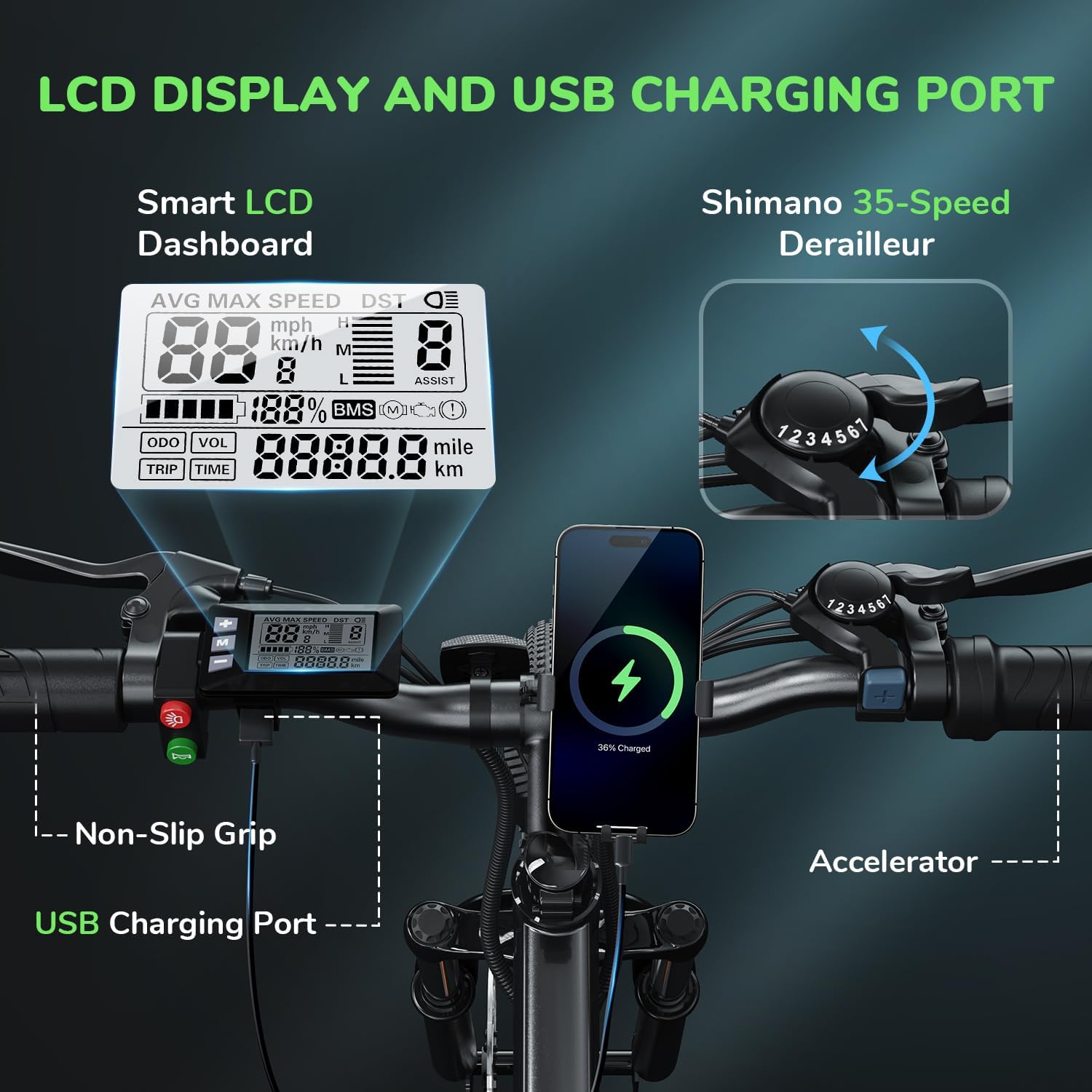
Image: Attaching the front wheel.

Image: Installing the pedals.

Image: Adjusting and securing the seat.

Image: Installing the removable battery.
Відеоінструкція зі складання
Video: A comprehensive guide demonstrating the assembly process of the isinwheel M10 Electric Bike, including handlebar, wheel, pedal, and battery installation.
4. Інструкція з експлуатації
4.1 Увімкнення/вимкнення живлення
- To power on the bike, press and hold the power button on the LCD display for a few seconds until the screen illuminates.
- Щоб вимкнути живлення, знову натисніть і утримуйте кнопку живлення, доки дисплей не вимкнеться.
4.2 Режими їзди
The M10 Electric Bike offers multiple riding modes:
- Режим допомоги при педалях (PAS): Provides motor assistance as you pedal. Adjust the assist level (1-5) using the '+' and '-' buttons on the control panel. Higher levels provide more assistance.
- Повністю електричний режим (дросельна заслінка): Engage the throttle for motor power without pedaling. This mode is typically used for quick acceleration or when you need a break from pedaling.
- Ручний режим: Їздіть на велосипеді як на традиційному велосипеді без будь-якої допомоги двигуна.
4.3 Shimano 7-Speed Gear System
The bike is equipped with a Shimano 7-speed transmission system. Use the gear shifter on the handlebar to change gears according to terrain and desired speed. Lower gears are for uphill climbing, and higher gears are for flat terrain or downhill riding.
4.4 Функції РК-дисплея
The smart LCD display provides real-time riding data:
- швидкість: Current, average, and maximum speed.
- Час їзди: Тривалість вашої поїздки.
- Пробіг: Відстань поїздки та загальний одометр.
- Рівень заряду батареї: Залишок заряду акумулятора.
- Рівень допомоги: Поточний рівень асистенції педалювання (1-5).
Power On Operation Video
Video: Demonstrates how to power on the isinwheel M10 Electric Bike and navigate the LCD display functions.
5. Керування батареєю
5.1 Видалення та встановлення батареї
The 36V 10.4AH Lithium-Ion battery is removable for convenient charging or storage.
- Видалення: Unlock the battery with the provided key, then slide it out from the frame.
- Установка: Align the battery with the frame slot and slide it in until it clicks into place. Lock it with the key to secure.
5.2 Інструкції з заряджання
Use only the provided 42V 2A Fast Charger.
- Переконайтеся, що велосипед вимкнено.
- Знайдіть порт зарядки на акумуляторі.
- Підключіть зарядний пристрій до зарядного порту.
- Підключіть зарядний пристрій до стандартної розетки.
- The charger indicator light will show red during charging and turn green when fully charged.
- Зазвичай повна зарядка займає 3-4 години.
- Після завершення заряджання від’єднайте зарядний пристрій.
Battery Removal and Charging Video
Video: Instructions for removing and installing the battery, and connecting the charger to the isinwheel M10 Electric Bike.
6. Технічне обслуговування
Регулярне технічне обслуговування забезпечує довговічність та безпечну експлуатацію вашого електровелосипеда.
- Прибирання: Протріть велосипед рекламоюamp тканиною. Уникайте миття під високим тиском безпосередньо на електричних компонентах.
- Тиск в шинах: Check tire pressure before each ride. Maintain recommended pressure (usually indicated on the tire sidewall) using the included pump.
- Гальма: Regularly inspect brake pads and rotors for wear. Ensure brake levers engage smoothly and provide adequate stopping power. Adjust or replace as needed.
- ланцюг: Тримайте ланцюг чистим і змащеним, щоб запобігти іржі та забезпечити плавне перемикання передач.
- Кріплення: Periodically check all bolts and nuts for tightness, especially on the handlebars, seatpost, and wheels.
- Догляд за акумулятором: Зберігайте акумулятор у прохолодному, сухому місці. Якщо зберігатимете його протягом тривалого часу, заряджайте його до 50-70% кожні 2-3 місяці.
Air Inflation Instructions Video
Video: Demonstrates how to properly inflate the tires of the isinwheel M10 Electric Bike using the provided pump.
7. Вирішення проблем
If you encounter issues with your isinwheel M10 Electric Bike, refer to the following common problems and solutions:
| проблема | Можлива причина | Рішення |
|---|---|---|
| Велосипед не вмикається | Battery not installed correctly or discharged; loose electrical connection. | Ensure battery is fully inserted and locked. Check battery charge level and charge if necessary. Verify all visible electrical connections are secure. |
| Мотор не допомагає | Low battery; assist level set to 0; brake lever engaged; motor cable disconnected. | Charge battery. Increase assist level on the display. Release brake levers. Check motor cable connection. |
| Акумулятор не заряджається | Charger not connected properly; faulty charger/battery; power outlet issue. | Ensure charger is securely plugged into battery and outlet. Check if the outlet is working. Contact support if issues persist. |
| Гальма слабкі | Зношені гальмівні колодки; ослаблений гальмівний трос; повітря в гідравлічній системі (якщо є). | Inspect and replace worn brake pads. Adjust brake cable tension. For hydraulic brakes, professional service may be required. |
If you cannot resolve an issue using the troubleshooting guide, please contact isinwheel customer support for assistance.
8. Технічні характеристики
Key technical specifications for the isinwheel M10 Electric Bike:
| Особливість | Специфікація |
|---|---|
| Модель | M10 |
| Мотор | Безщітковий двигун пікової потужності 500 Вт |
| Максимальна швидкість | Up to 32 KM/H (20 MPH) |
| Акумулятор | 36V 10.4AH (375WH) Removable Li-ion, IPX5 waterproof |
| Час зарядки | 3-4 hours (with 42V 2A Fast Charger) |
| Запас ходу (повністю електричний) | 39-43 miles (63-70 KM) |
| Запас ходу (допомога при обертанні педалей) | 50-60 miles (80-96 KM) |
| Спосіб передавання | Shimano 7-швидкісний |
| Матеріал рами | Алюмінієвий сплав |
| Вага велосипеда | 21.3 кг (47 фунтів) |
| Розмір колеса | 26 дюймів |
| Підвіска | Підвіска передньої вилки |
| Гальма | Передні та задні механічні дискові гальма |
| Особливості | Digital LCD Display, Height Adjustable Seat, Lightweight & Portable |
| Сертифікати | UL 2271 (Li-ion battery), UL 2789 (whole e-bike) |

Image: isinwheel M10 Electric Bike dimensions and rider height guide.
9. Гарантія та підтримка
The isinwheel M10 Electric Bike comes with a 12-month warranty from the date of purchase. This warranty covers manufacturing defects in materials and workmanship. It does not cover damage caused by misuse, accidents, unauthorized modifications, or normal wear and tear.
For warranty claims, technical support, or any questions regarding your e-bike, please contact isinwheel customer service. Provide your purchase details and a description of the issue for prompt assistance.
Контактна інформація: Please refer to your purchase documentation or the official isinwheel webсайт для отримання найактуальнішої контактної інформації служби підтримки клієнтів.