
вступ
This manual provides detailed instructions for the assembly, operation, maintenance, and troubleshooting of your Claiks 24-Inch Sit-Stand Workstation. Please read this manual thoroughly before use to ensure proper function and safety. This workstation is designed to convert a traditional desk into a height-adjustable ergonomic setup, promoting a healthier work environment.
Інформація про безпеку
- Ensure all components are securely fastened before placing equipment on the workstation.
- Не перевищуйте максимальну вантажопідйомність 22 кг (10 фунтів).
- Під час регулювання висоти тримайте руки та пальці подалі від рухомих частин.
- Place the workstation on a stable, level surface.
- Avoid placing liquids directly on the workstation surface to prevent damage.
Налаштування та збірка
The Claiks 24-Inch Sit-Stand Workstation features tool-free assembly for quick setup.
- Розпакуйте компоненти: Carefully remove all parts from the packaging and verify against the parts list (not included in this manual, refer to packaging for full list).
- Attach to Desk: Position the workstation on your existing desk. Utilize the dual fixation clamps to secure the unit firmly to the desk edge. Tighten the clamps until the workstation is stable and does not wobble.
- Place Monitor and Keyboard: Place your monitor(s) on the upper platform and your keyboard and mouse on the lower tray. Ensure cables are routed safely and do not interfere with movement.

Інструкція з експлуатації
The workstation allows for seamless transitions between sitting and standing positions.
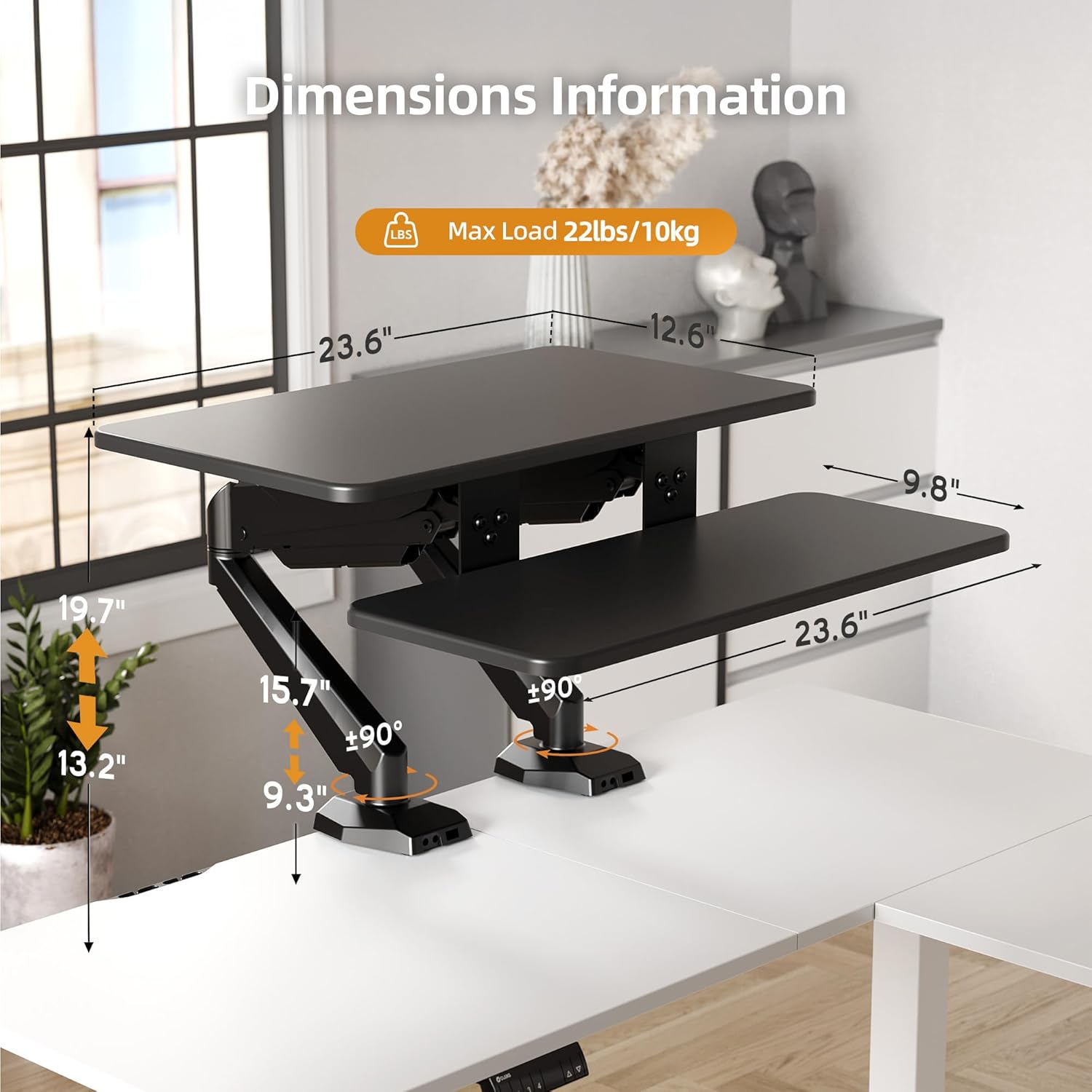
- Регулювання висоти: To adjust the height, gently press the levers located on the sides of the workstation. Apply slight upward or downward pressure to guide the platforms to your desired height. The upper platform adjusts from 13.2 inches to 19.7 inches, and the lower tray adjusts from 9.3 inches to 15.9 inches. Release the levers to lock the workstation in place.
- Platform Rotation: The platforms offer 180-degree rotation, allowing for flexible viewing angles and workspace configurations. Gently rotate the platforms to achieve the desired orientation.


Технічне обслуговування
- Прибирання: Протріть поверхні м’якою, damp тканиною. Уникайте абразивних засобів для чищення або розчинників.
- Огляд: Періодично перевіряйте всі гвинти таamps to ensure they remain tight and secure.
- Газова пружина: The pneumatic gas spring mechanism is designed for long-term use and generally requires no maintenance. If you notice any issues with height adjustment, refer to the troubleshooting section.
Усунення несправностей
| проблема | Можлива причина | Рішення |
|---|---|---|
| Workstation is difficult to raise or lower. | Obstruction or incorrect lever operation. | Ensure no objects are blocking the mechanism. When lowering, the unit may require a slight backward lean to clear the desk edge if positioned too close to a wall. Ensure both levers are fully engaged. |
| Workstation feels unstable or wobbles. | Clamps are not sufficiently tightened or uneven load distribution. | Знову затягніть кріплення столуamps securely. Distribute weight evenly across the platforms. Ensure the desk surface itself is stable. |
| Platforms do not rotate smoothly. | Friction or obstruction. | Check for any debris or obstructions around the rotation points. Ensure no cables are caught. |
Технічні характеристики
| Особливість | Деталь |
|---|---|
| Бренд | Claiks |
| Номер моделі | CL-SDC-SZZSZ |
| Розміри продукту (Д x Ш x В) | 10.04 см x 34.25 см x 6.69 см |
| Upper Platform Dimensions | 23.6 дюймів x 13.6 дюйма |
| Lower Tray Dimensions | 23.6 дюймів x 9.8 дюйма |
| Upper Platform Height Range | від 13.2 до 19.7 дюймів |
| Lower Tray Height Range | від 9.3 до 15.9 дюймів |
| Максимальна вантажопідйомність | 22 фунти (10 кг) |
| Колір | чорний |
| матеріал | Wood (Top), Metal (Base) |
| Особливість | Adjustable Height, Flexible Rotation, Dual Fixation |
| Тип монтажу | Настільна клamp |
| Вага товару | 12.04 кілограма |
Інформація про гарантію
This Claiks Sit-Stand Workstation is backed by a 5-річна структурна гарантія. This warranty covers defects in materials and workmanship under normal use. For specific terms and conditions, please refer to the warranty card included with your product or contact customer support.
Підтримка клієнтів
For further assistance, technical support, or warranty claims, please contact Claiks customer service. Contact information can typically be found on the product packaging or on the official Claiks webсайт.
Інтернет-підтримка: Visit the official Claiks webсайт із поширеними запитаннями та ресурсами підтримки.
Підтримка електронною поштою: Зверніться до документації до продукту, щоб дізнатися адресу електронної пошти служби підтримки клієнтів.