
1. Продукт закінчивсяview
The zelotes C-12 Professional Wired Gaming Mouse is designed for high-performance gaming and office use. It features an ergonomic design, 12 programmable buttons, adjustable DPI settings, multi-modes RGB backlighting, and a customizable weight system.

Image 1.1: The zelotes C-12 Professional Wired Gaming Mouse, showcasing its ergonomic shape and customizable RGB lighting.
Вміст упаковки:
- 1 x zelotes C-12 Gaming Mouse
- 1 х Інструкція з експлуатації
- 1 компакт-диск із програмним забезпеченням
- 1 x Foot Pad Set
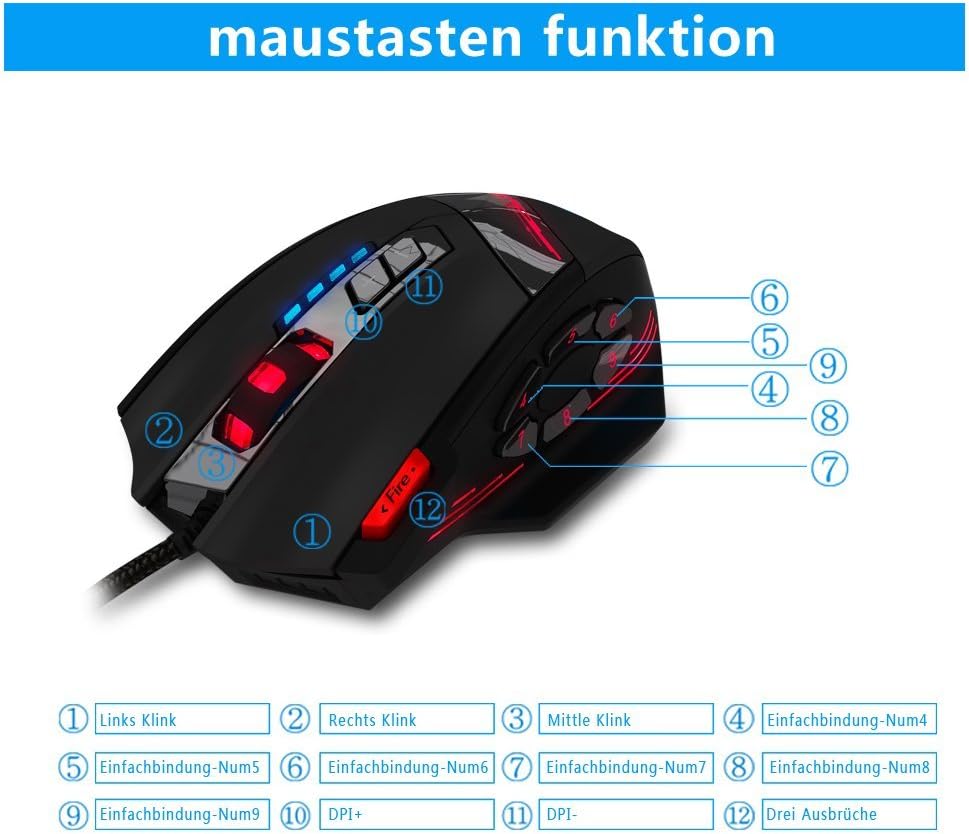
Image 1.2: The complete package contents of the zelotes C-12 Gaming Mouse.
2. Налаштування
2.1 Підключення миші
Connect the USB cable of the zelotes C-12 Gaming Mouse to an available USB port on your computer. The mouse is plug-and-play for basic functionality.
2.2 Встановлення програмного забезпечення (необов'язково)
For full customization of buttons, DPI, and lighting, install the provided software from the included CD. Insert the CD into your computer's optical drive and follow the on-screen instructions. If your computer does not have an optical drive, please visit the official zelotes website to download the latest software driver.
Note: The programming software is not fully compatible with Mac operating systems.
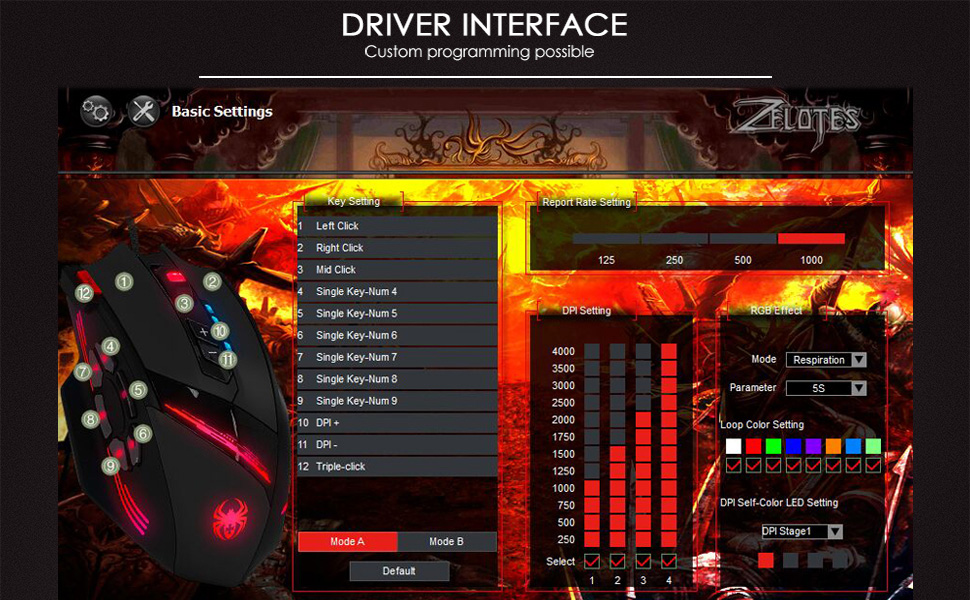
Image 2.1: The software interface for customizing the zelotes C-12 Gaming Mouse.
2.3 Weight Tuning
The mouse includes 8 removable weight blocks, each weighing 2.5 grams, located in a compartment on the underside of the mouse. To adjust the mouse's weight:
- Gently twist and remove the circular cover on the bottom of the mouse.
- Add or remove the 2.5g weight blocks as desired to achieve your preferred mouse feel.
- Replace the circular cover by twisting it back into place.
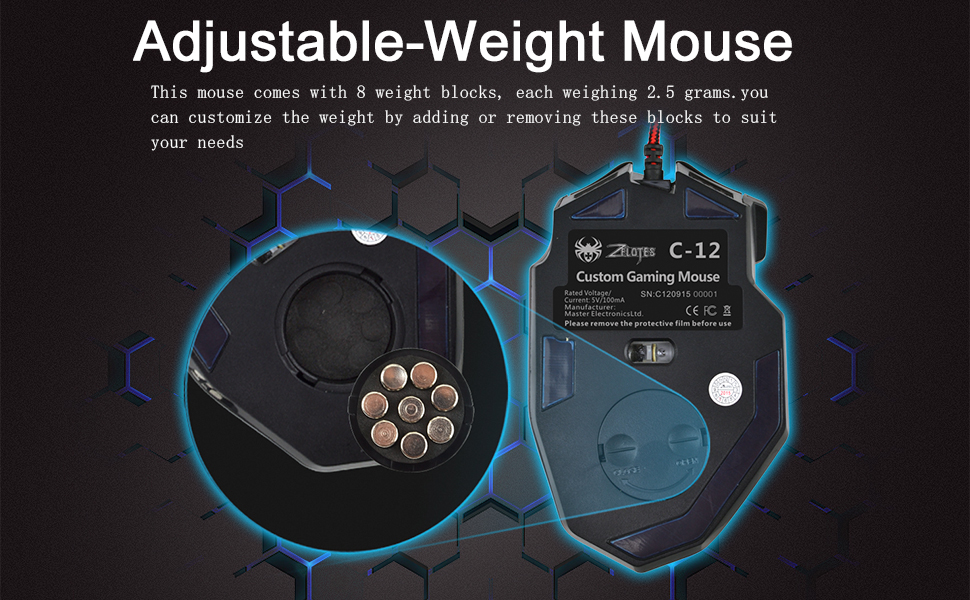
Image 2.2: Adjusting the weight of the zelotes C-12 mouse by adding or removing the 2.5g blocks.
Video 2.1: A demonstration of the weight tuning feature and programmable buttons on the zelotes C-12 Gaming Mouse.
3. Інструкція з експлуатації
3.1 Функції кнопок
The zelotes C-12 mouse features 12 programmable buttons. The default functions are:
- Клацніть лівою кнопкою миші (Кнопка 1)
- Клацніть правою кнопкою миші (Кнопка 2)
- Середній клік/колесо прокручування (Кнопка 3)
- Бічні кнопки (Buttons 4-9): Default to various functions, customizable via software.
- DPI+ (Button 10): Increases DPI sensitivity.
- DPI- (Button 11): Decreases DPI sensitivity.
- Кнопка вогню (Button 12): Default to triple-click, customizable via software.

Image 3.1: Labeled diagram of the zelotes C-12 mouse buttons.
3.2 Налаштування DPI
The mouse offers 4 default DPI levels: 1000/1500/2000/4000 DPI. You can cycle through these levels using the dedicated DPI+ and DPI- buttons. For finer control and to reach up to 8000 DPI, use the included software.
3.3 RGB-підсвічування
The mouse features multi-modes RGB backlighting, including 7-color cycle breathing and monochromatic constant bright modes. Lighting effects can be customized through the software to match your preferences.
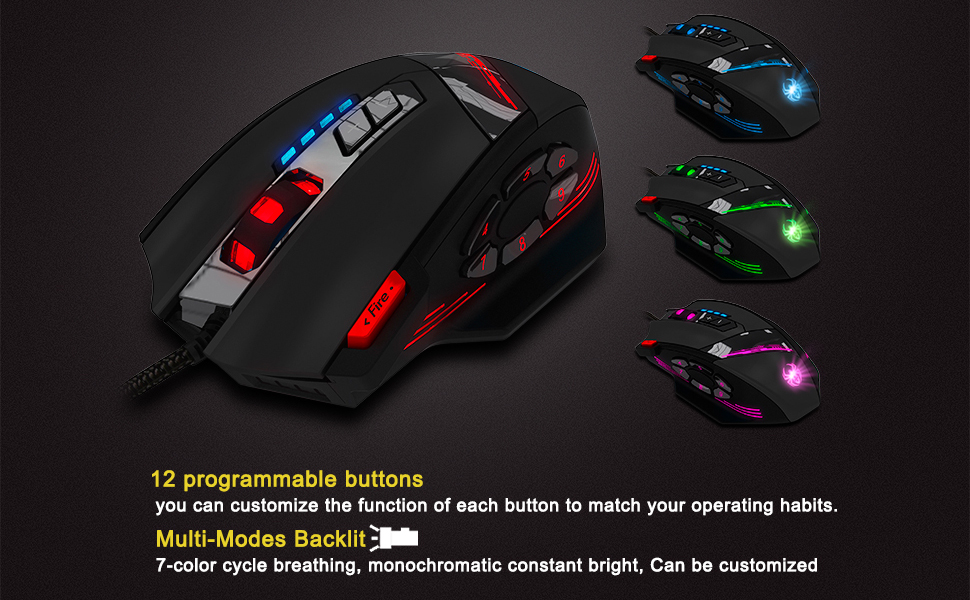
Image 3.2: The zelotes C-12 mouse showcasing its multi-color RGB lighting options.
3.4 Ергономічний дизайн
The mouse is designed for comfort during extended use, featuring a sweat-resistant and anti-slip rubber surface. Its ergonomic shape helps prevent wrist fatigue.

Image 3.3: The ergonomic design of the zelotes C-12 mouse provides a comfortable grip.
4. Технічне обслуговування
To ensure the longevity and optimal performance of your zelotes C-12 Gaming Mouse, follow these maintenance guidelines:
- Прибирання: Використовуйте м’яку суху тканину для протирання поверхні миші. Для стійкого бруду злегкаampПротріть тканину водою або м’яким миючим розчином. Уникайте агресивних хімікатів або абразивних матеріалів.
- Догляд за датчиком: Тримайте оптичний датчик на нижній стороні миші чистим та без пилу чи сміття. За потреби використовуйте ватний тампон або стиснене повітря.
- Управління кабелем: Уникайте різких згинів або надмірного натягування USB-кабелю, щоб запобігти його пошкодженню.
- Зберігання: Коли миша не використовується, зберігайте її в чистому, сухому місці, подалі від екстремальних температур.
5. Вирішення проблем
5.1 Миша не реагує
- Переконайтеся, що кабель USB надійно під’єднано до комп’ютера.
- Спробуйте підключити мишу до іншого USB-порту.
- Test the mouse on another computer to rule out a computer-specific issue.
- Перезавантажте комп'ютер.
5.2 DPI or Button Settings Not Changing
- Ensure the zelotes C-12 software is correctly installed and running.
- Check if the settings are saved within the software after making changes.
- For Mac users, note that the programming software has limited compatibility. Basic DPI changes via mouse buttons should still function.
5.3 RGB-підсвічування не працює або працює неправильно
- Verify lighting settings within the zelotes C-12 software.
- Переконайтеся, що миша правильно підключена та отримує живлення.
5.4 Mouse Movement Is Erratic
- Очистіть оптичний датчик на нижній частині миші.
- Переконайтеся, що ви використовуєте мишу на відповідній поверхні (наприклад, килимку для миші). Уникайте поверхонь із високим рівнем відбиття або прозорих поверхонь.
6. Технічні характеристики
| Особливість | опис |
|---|---|
| Бренд | zelotes |
| Назва моделі | С-12 |
| Технологія підключення | USB дротовий |
| Технологія виявлення руху | Optical (A3050 Gaming Chip) |
| Налаштування DPI | 1000/1500/2000/4000 (Adjustable up to 8000 DPI via software) |
| Кількість кнопок | 12 Програмовані кнопки |
| Настройка ваги | 8 x 2.5g removable weights |
| Орієнтація руки | Правша |
| Сумісність операційної системи | Win11, Win10, Win8, Win7, Mac OS (limited software compatibility for Mac) |
| Розміри (Д x Ш x В) | 130 мм x 81.5 мм x 39.8 мм |
| Швидкість опитування | 125-1000 Гц |
| Довжина кабелю | 1.8м |
| матеріал | Пластик (матове покриття) |

Image 6.1: Detailed technical specifications and dimensions of the zelotes C-12 Gaming Mouse.
7. Інформація про гарантію
The zelotes C-12 Professional Wired Gaming Mouse comes with a 1-річна гарантія виробника з дати покупки. Ця гарантія поширюється на дефекти матеріалів та виготовлення за умов нормального використання. Вона не поширюється на пошкодження, спричинені неправильним використанням, нещасним випадком, несанкціонованою модифікацією або зовнішніми причинами.
Зберігайте підтвердження покупки для гарантійних претензій.
8. Підтримка
For further assistance, technical support, or warranty inquiries, please refer to the contact information provided with your product packaging or visit the official zelotes webсайт.