
1. Продукт закінчивсяview
The Fanvil V60P is a professional IP phone designed for business communication. It features a color display, programmable keys, and Power over Ethernet (PoE) support for simplified installation and operation. This manual provides essential information for setting up, operating, and maintaining your device.
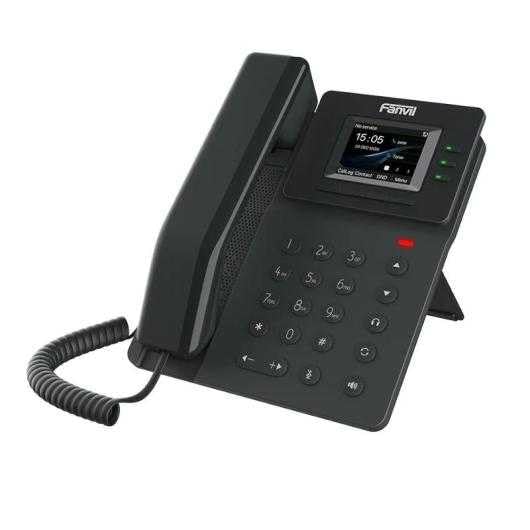
Figure 1: Fanvil V60P Professional IP Phone. This image shows the black IP phone with its handset, color display, and numeric keypad. The display shows "15:05" and menu options.
2. Налаштування та встановлення
2.1 Вміст упаковки
Before installation, verify that all items are present in the package:
- Fanvil V60P IP Phone unit
- Трубка та спіральний шнур
- Кабель Ethernet
- стенд
- Короткий посібник з встановлення (якщо входить до комплекту)
2.2 Фізичне підключення
- Прикріпіть підставку: Надійно прикріпіть настільну підставку до задньої частини телефонного блоку.
- Підключіть телефон: Підключіть один кінець спірального шнура до телефонної трубки, а інший кінець – до порту для телефонної трубки на базі телефону.
- Connect to Network and Power (PoE):
- Підключіть один кінець кабелю Ethernet до LAN порт на телефоні.
- Connect the other end of the Ethernet cable to a Power over Ethernet (PoE) enabled switch or injector. The phone will power on automatically.
- Підключення до ПК (необов'язково): If you need to connect a computer through the phone, connect an Ethernet cable from your PC to the PC порт на телефоні.
Note: If PoE is not available, a separate power adapter (not included) may be required. Refer to the product specifications for compatible power adapter details.
3. Інструкція з експлуатації
3.1 Основні функції викликів
- Здійснення дзвінка:
- Підніміть слухавку або натисніть кнопку гучного зв'язку.
- Наберіть потрібний номер за допомогою клавіатури.
- Натисніть Циферблат програмну клавішу або зачекайте часу очікування автоматичного набору.
- Відповідь на дзвінок:
- Зніміть слухавку.
- Alternatively, press the Speakerphone button or the Відповідь програмна клавіша.
- Завершення дзвінка: Hang up the handset or press the Speakerphone button.
3.2 Using Programmable DSS Keys
The Fanvil V60P features 6 programmable DSS (Direct Station Select) keys. These keys can be configured for various functions such as speed dial, line keys, busy lamp field (BLF), or other custom features as defined by your system administrator.
- To use a programmed DSS key, simply press the corresponding button.
- Configuration of DSS keys is typically done via the phone's web interface or your IP PBX system.
3.3 Local Phonebook
The phone supports a local phonebook with up to 1000 entries.
- Доступ до телефонної книги через Довідник or Контакти програмну клавішу на дисплеї.
- Use the navigation keys to browse entries.
- Select an entry and press the Циферблат soft key to initiate a call.
3.4 Audio Conferencing
The V60P supports local 6-party audio conferencing.
- Establish a call with the first participant.
- Натисніть конф soft key. The first participant will be put on hold.
- Dial the number of the second participant and establish the call.
- Натисніть конф soft key again to merge all participants into a conference.
- Repeat steps 2-4 to add more participants, up to a total of 6.
4. Технічне обслуговування
4.1 Очищення пристрою
To maintain the appearance and functionality of your Fanvil V60P IP Phone (made of plastic material), follow these cleaning guidelines:
- Disconnect the phone from its power source (PoE) before cleaning.
- Використовуйте м’який, злегка damp, lint-free cloth to wipe the surfaces.
- Avoid using harsh chemicals, abrasive cleaners, or solvents, as these can damage the plastic and display.
- Не розпилюйте засоби для чищення безпосередньо на телефон.
4.2 оновлень мікропрограми
Firmware updates may be released periodically to improve performance, add features, or fix bugs. Consult your IT administrator or Fanvil's official website for information on available updates and instructions for installation.
5. Вирішення проблем
This section addresses common issues you might encounter with your Fanvil V60P IP Phone.
| проблема | Можлива причина | Рішення |
|---|---|---|
| Телефон не вмикається. | Немає з'єднання PoE або несправний кабель Ethernet. | Ensure the Ethernet cable is securely connected to the LAN port and a PoE-enabled switch/injector. Verify the PoE source is active. |
| Немає тону набору. | SIP registration failure or network issue. | Check network connectivity. Verify SIP account settings with your IT administrator. Restart the phone. |
| Не вдається здійснювати/приймати дзвінки. | Network issues, incorrect SIP configuration, or firewall blocking. | Confirm network connection. Check SIP registration status on the phone's display. Contact your IT administrator for network and SIP configuration verification. |
| Погана якість звуку. | Network congestion or faulty handset/speaker. | Check network bandwidth and latency. Try using a different handset or speaker mode. If the issue persists, contact support. |
6. Технічні характеристики
| Особливість | Деталь |
|---|---|
| Модель | V60P |
| система | Linux |
| Дисплей | 2.4-inch, 320 x 240 Color Screen |
| Ключі DSS | 6 програмовані клавіші |
| SIP-лінії | 4 |
| Місцева телефонна книга | 1000 записи |
| Слухавка | Дротова трубка |
| Аудіоконференції | 6-party Local Conference |
| Wideband Codecs | G.722, опус |
| Narrowband Codecs | G.711, G.723.1, G.726, G.729, G.729A, G.729B, G.729AB, iLBC |
| PoE | так |
| Мережеві порти | 2 x 10/100 Mbps Ethernet Ports |
| EHS Support | так |
| Підтримка IPv6 | так |
| матеріал | пластик |
| Розміри (ДxШxВ) | 15 х 200 х 15 см |
| вага | 600 грамів |
| Ідентифікатор абонента | так |
| Багатолінійна робота | так |
| Conference Call Functionality | Support Multiple Conferences |
| Standby Duration (if applicable) | 10 години |
7. Гарантія та підтримка
7.1 Гарантія на виріб
The Fanvil V60P IP Phone comes with a трирічна гарантія від виробничих дефектівЦя гарантія поширюється на дефекти матеріалів та виготовлення за умов нормального використання. Будь ласка, збережіть чек про покупку для пред'явлення претензій за гарантією.
7.2 Технічна підтримка
For technical assistance, troubleshooting beyond this manual, or warranty inquiries, please contact your reseller or Fanvil's official customer support channels. You may need to provide your product model (V60P) and serial number.