
1. Вступ
Дякуємо за покупкуasing the Trevi RA 7F50 BT Portable Multiband Radio. This device offers versatile audio entertainment with FM, AM, and SW radio bands, wireless connectivity, and MP3 playback via USB and Micro SD. Its integrated solar panel and USB Type-C charging port ensure power availability wherever you go. Please read this manual carefully to ensure proper use and maintenance of your radio.
2. Інформація про безпеку
- Не піддавайте пристрій впливу дощу, вологи або екстремальних температур.
- Уникайте падіння радіостанції та сильних ударів.
- Do not disassemble the unit. Repairs should only be performed by qualified personnel.
- Зберігати в недоступному для дітей місці.
- Забезпечте належну вентиляцію під час заряджання.
- Use only the provided USB Type-C cable for charging or a certified equivalent.
3. Продукт закінчивсяview
Familiarize yourself with the components and controls of your Trevi RA 7F50 BT radio.
Фронт View
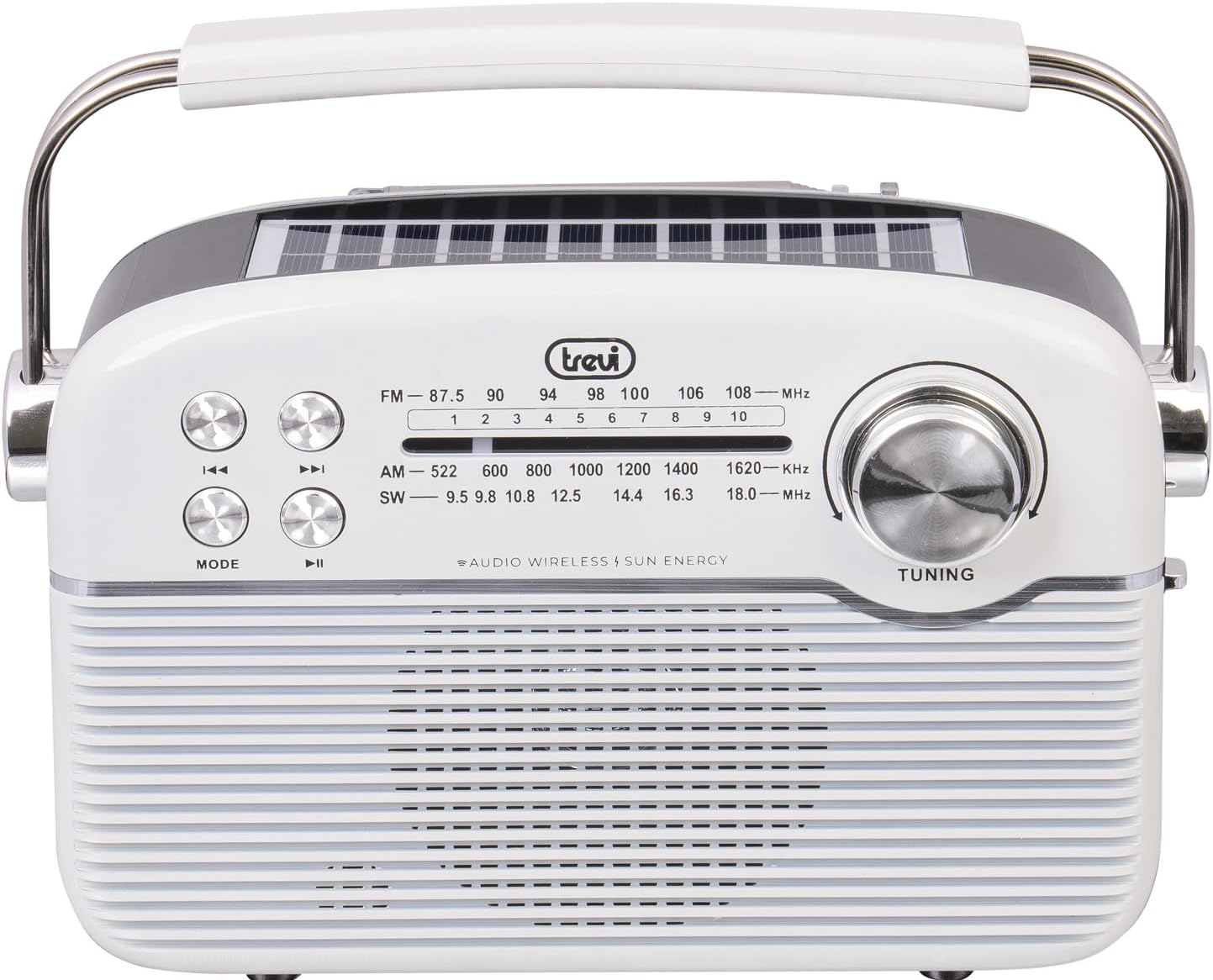
Зображення: спереду view of the Trevi RA 7F50 BT radio. Visible elements include the main speaker grille, frequency display for FM, AM, and SW bands, control buttons for playback and mode selection, and a large tuning dial on the right side. The Trevi logo is centered above the frequency display.
Зверху та збоку View

Зображення: Зверху та збоку view of the Trevi RA 7F50 BT radio. This perspective clearly shows the integrated solar panel on the top surface, designed for charging. The sturdy carrying handle is also prominent, extending across the top of the unit. The side view reveals the rounded edges and overall compact design.
Задня View

Зображення: Задня частина view of the Trevi RA 7F50 BT radio. The telescopic antenna is visible at the top. Below it, the various input ports are shown, including a USB port for flash drives, a Micro SD card slot for memory cards, and a USB Type-C port for charging the internal battery. The back panel also features a textured design.
Елементи керування та порти:
- Налаштування циферблата: For selecting radio frequencies.
- Кнопка режиму: Switches between radio (FM/AM/SW), Wireless, and MP3 (USB/Micro SD) modes.
- Кнопка відтворення/паузи: Controls playback in MP3 and Wireless modes.
- Кнопки попереднього/наступного треку: Navigates tracks in MP3 and Wireless modes, or fine-tunes radio frequency.
- Регулювання гучності: Регулює рівень вихідного аудіо.
- Порт USB: Для підключення USB-флеш-накопичувачів.
- Слот для карти Micro SD: For inserting Micro SD memory cards.
- Порт USB Type-C: Для заряджання внутрішнього акумулятора.
- Телескопічна антена: Для покращення прийому радіосигналу.
- Панель сонячних батарей: Integrated on top for solar charging.
4. Налаштування
4.1 Заряджання батареї
The Trevi RA 7F50 BT radio is equipped with a rechargeable lithium battery (1500 mAh) and offers two charging methods:
- Зарядка USB Type-C: Connect the provided USB Type-C cable to the radio's charging port and the other end to a standard USB power adapter (not included) or a computer's USB port. The charging indicator light will illuminate.
- Сонячна зарядка: Place the radio with its solar panel facing direct sunlight. The integrated 80 mA solar panel will slowly recharge the battery. This method is ideal for maintaining charge or for emergency power in outdoor environments.
Перед першим використанням рекомендується повністю зарядити акумулятор.
4.2 Початкове ввімкнення
Locate the Power On/Off switch, usually on the side or back of the unit. Slide it to the "ON" position. The radio will power on, and the display (if available) will light up.
5. Інструкція з експлуатації
5.1 Робота радіо (FM/AM/SW)
- Select Radio Mode: Натисніть РЕЖИМ button repeatedly until you reach the desired radio band (FM, AM, or SW).
- Розширена антена: For optimal FM and SW reception, fully extend the telescopic antenna. For AM, the internal ferrite antenna is typically sufficient.
- Налаштуйтеся на станцію: Обертайте ТЮНІНГ dial to scan for stations. The frequency display will show the current frequency.
- Регулювання гучності: Use the volume control knob to set the desired listening level.
5.2 Wireless Connectivity (Bluetooth)
- Enter Wireless Mode: Натисніть РЕЖИМ button repeatedly until "BT" or "Wireless" appears on the display (if applicable), or you hear an audible prompt indicating Bluetooth pairing mode.
- Сполучення з пристроєм: On your smartphone, tablet, or other Bluetooth-enabled device, go to the Bluetooth settings and search for available devices. Select "Trevi RA 7F50 BT" from the list.
- Підтвердження: Once paired, the radio will indicate a successful connection (e.g., an audible tone or stable indicator light).
- Відтворення аудіо: You can now play audio from your connected device through the radio's speaker. Use the radio's playback controls (Play/Pause, Previous/Next) or your device's controls.
5.3 Відтворення MP3 (USB/Micro SD)
- Вставити медіафайл: Insert a USB flash drive into the USB port or a Micro SD card into the Micro SD slot. Ensure the media contains MP3 audio files.
- Enter MP3 Mode: Натисніть РЕЖИМ button repeatedly until the radio automatically switches to MP3 playback mode, or you hear an audible prompt.
- Елементи керування відтворенням: Використовуйте Відтворення/Пауза button to start or pause playback. Use the Попередній/наступний трек кнопки для перемикання між треками.
6. Технічне обслуговування
- Прибирання: Протирайте радіо м’якою сухою тканиною. Не використовуйте абразивні засоби для чищення або розчинники.
- Догляд за акумулятором: To prolong battery life, avoid fully discharging the battery frequently. Recharge regularly, especially if the unit will be stored for an extended period.
- Зберігання: Зберігайте радіоприймач у прохолодному, сухому місці, подалі від прямих сонячних променів та екстремальних температур.
7. Вирішення проблем
| проблема | Можлива причина | Рішення |
|---|---|---|
| Немає живлення | Акумулятор розряджений; живлення вимкнено. | Charge the battery via USB-C or solar panel; Ensure power switch is ON. |
| Поганий радіоприйом | Антена не висунута; Слабкий сигнал; Перешкоди. | Fully extend the telescopic antenna; Reposition the radio; Try tuning to a stronger station. |
| Cannot connect via Wireless (Bluetooth) | Radio not in Wireless mode; Device not discoverable; Already connected to another device. | Press MODE to enter Wireless mode; Ensure your device's Bluetooth is on and discoverable; Disconnect from other devices. |
| MP3 fileне грає | Невірно file format; USB/Micro SD not inserted correctly; Corrupted media. | Забезпечити files are MP3 format; Reinsert USB/Micro SD; Try different media. |
8. Технічні характеристики
- модель: RA 7F50 БТ
- Радіо діапазони: FM, AM, Пд-Зх
- Підключення: Wireless (Bluetooth), USB, Micro SD
- Джерело живлення: Rechargeable Lithium Battery (1500 mAh), Solar Panel (80 mA max), USB Type-C
- Вхідний об'ємtage: 3.7 В постійного струму
- Розміри: 25Д x 11Ш x 20В см (приблизно)
- вага: 0.98 кг (прибл.)
- Включені компоненти: USB / Type-C charging cable, User Manual
9. Що в коробці
- Портативна багатодіапазонна радіостанція Trevi RA 7F50 BT
- USB / Type-C Charging Cable
- Посібник користувача
10. Гарантія та підтримка
This product is covered by a standard manufacturer's warranty. For detailed warranty information, technical support, or service inquiries, please refer to the warranty card included with your product or visit the official Trevi webсайт. Зберігайте чек про покупку для гарантійних претензій.