
1. Вступ
The EPOMAKER P65 QMK/VIA Wireless Aluminum Gaming Keyboard is designed to enhance both your gaming and typing experience. This compact 65% layout keyboard features a silver glossy knob for quick multimedia access. Its durable CNC aluminum construction ensures longevity, while customizable QMK/VIA programmability allows you to tailor the layout and macros to your specific workflow. With multiple connectivity options and vibrant RGB backlighting, the EPOMAKER P65 is a versatile tool for productivity and immersive gaming.

Image: The EPOMAKER P65 QMK/VIA Wireless Aluminum Mechanical Keyboard, showcasinйого компактний дизайн та функції.

Зображення: Оверview of the EPOMAKER P65, highlighting its tri-mode wireless capability, gasket-mount design, sound-dampening features, Linux/Mac/PC/Android compatibility, RGB backlight, and anti-ghosting.
2. Вміст упаковки
Перевірте наявність усіх елементів в упаковці:
- 1x EPOMAKER P65 Keyboard
- 1x знімач для клавіш та перемикачів 2-в-1
- 1x 2.4Ghz Wireless Receiver
- 1x Detachable USB A to USB C cable
- 1x Багатомовний посібник
- 3 запасні перемикачі
Video: An unboxing and typing demonstration of the EPOMAKER P65 keyboard, showing the contents of the package and the keyboard in use.
Video: A detailed unboxing video of the EPOMAKER P65, showcasing the keyboard and its accessories.
3. Налаштування
3.1 Початкове підключення
- Розпакуйте клавіатуру та всі аксесуари.
- Connect the keyboard to your device using the provided USB-A to USB-C cable for wired mode and initial charging.
- Ensure the mode switch on the back of the keyboard is set to the desired connection type (USB, 2.4G, or BT).
3.2 Сумісність з операційними системами
The P65 keyboard supports a variety of operating systems and devices:
- Windows (FN+A to switch modes)
- macOS (FN+S to switch modes)
- Linux
- PC
- Ноутбуки
- Таблетки
- Смартфони
- Gaming Consoles (PS/Xbox)

Image: The EPOMAKER P65 demonstrating wide compatibility with Windows, macOS, Tablets, Laptops, PCs, and Phones.

Image: The EPOMAKER P65 showing compatibility with Windows, macOS, Tablets, Laptops, PC, PlayStation, Switch, and Xbox.
4. Режими підключення
The P65 offers three versatile connectivity options:
4.1 Wired Mode (USB-C)
- Connect the keyboard directly to your device using the provided USB-A to USB-C cable.
- Set the switch on the back of the keyboard to 'USB'.
- This mode provides ultra-fast, low-latency performance with a 1000Hz polling rate.
4.2 Бездротовий режим 2.4 ГГц
- Plug the 2.4GHz wireless receiver into an available USB port on your device.
- Set the switch on the back of the keyboard to '2.4G'.
- The keyboard will automatically connect. This mode offers a 1000Hz polling rate.
4.3 Режим Bluetooth 5.0
- Set the switch on the back of the keyboard to 'BT'.
- On your device, search for Bluetooth devices and select 'EPOMAKER P65'.
- The keyboard supports BT 5.0 for stable wireless connection with a 125Hz polling rate.
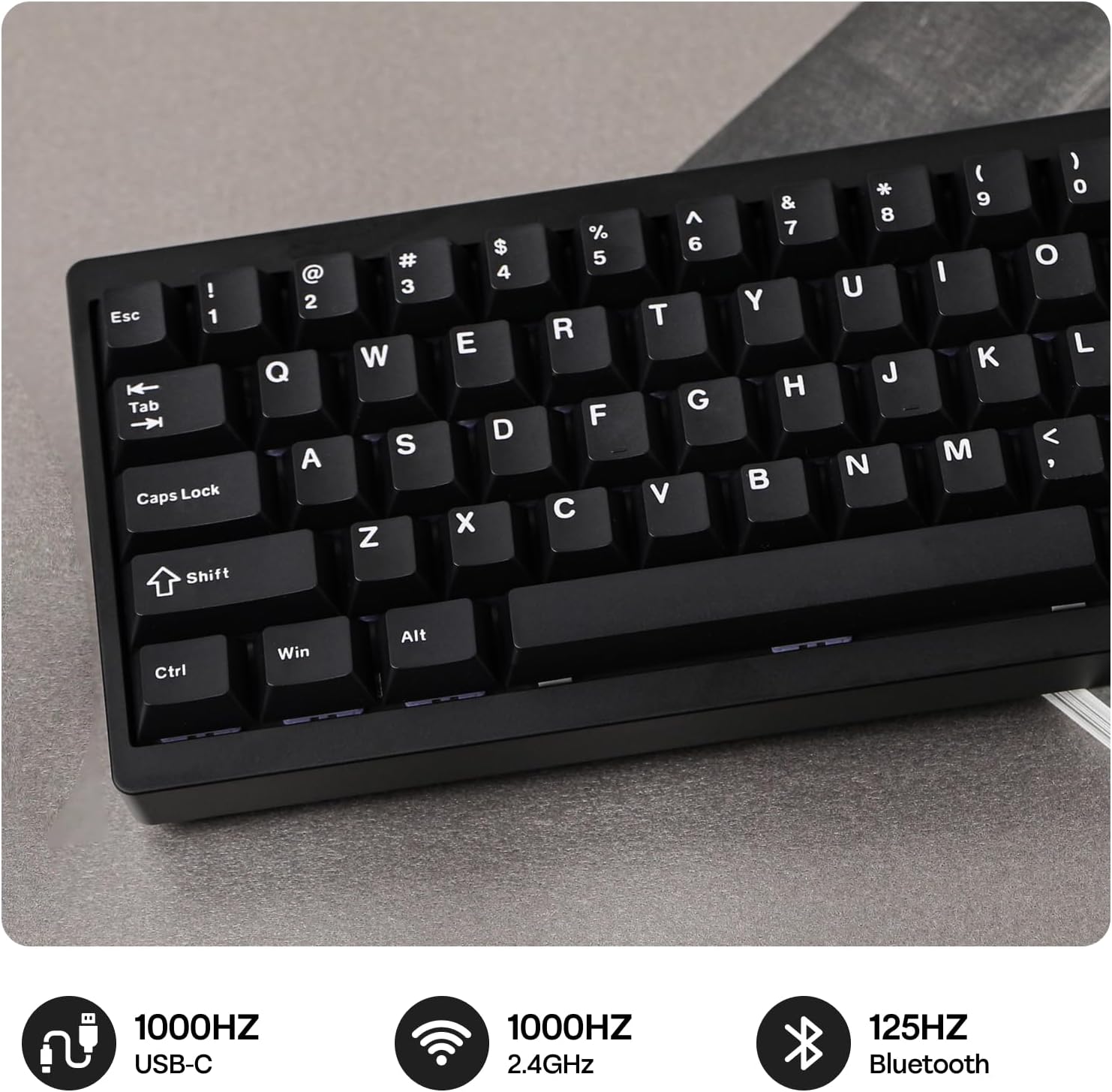
Image: The EPOMAKER P65 showing its 1000Hz USB, 1000Hz 2.4GHz, and 125Hz Bluetooth connectivity options.

Image: The EPOMAKER P65 displaying polling rates: USB (3ms) at 1000Hz, 2.4GHz (5ms) at 1000Hz, and Bluetooth (15ms) at 125Hz.

Image: A close-up of the EPOMAKER P65's side, showing the switch for Bluetooth, Wireless (2.4G), and USB-C connections.
5. QMK/VIA Customization
The P65 keyboard is fully programmable with QMK/VIA support, allowing extensive customization of key layouts and macros. This feature optimizes workflow for various tasks, including coding, gaming, or project work. The keyboard features NKRO for anti-ghosting and on-board memory to store layouts without requiring background software.
5.1 Using VIA Software
- Download the VIA software from the official EPOMAKER webсайт або VIA webсайт.
- Connect your keyboard in wired mode.
- The VIA software allows real-time layout modifications, RGB lighting adjustments, macro creation, and special function assignments without needing to download additional programs.

Image: The EPOMAKER P65 demonstrating web driver customization via VIA software or QMK firmware, allowing personalization of settings, RGB lights, macros, key layout, and mod tap functions.

Image: The EPOMAKER P65 showing QMK/VIA customization options for RGB Lights, Macros, Settings, Key Layout, and Mod Tap and Special Functions.
6. Комутатори з можливістю гарячої заміни
The P65 features a hot-swappable PCB, allowing for easy switch replacement without soldering. This enables you to customize your typing experience by choosing your preferred switches (tactile, linear, or clicky feedback).
6.1 Заміна перемикачів
- Use the provided 2-in-1 keycap-and-switch puller to carefully remove the keycap.
- Use the switch puller to gently remove the switch from the PCB.
- Align the pins of the new 3/5-pin mechanical switch with the holes on the PCB.
- Press the new switch firmly until it clicks into place. Ensure the pins are not bent.
- Замініть ковпачок клавіші.

Image: The EPOMAKER P65 showcasing its hot-swappable PCB, south-facing per-key LEDs, plate-mounted stabilizers, and factory-lubed linear switches.

Image: The EPOMAKER P65 displaying details of Wisteria Linear V1 and Zebra (Linear) pre-lubed mechanical switches, including pin count, actuation force, actuation travel, spring length, and lifespan.
Video: An unboxing and typing demonstration of the EPOMAKER P65 keyboard, showing the contents of the package and the keyboard in use, including switch removal.
7. Підсвічування RGB
The P65 features south-facing RGB backlighting, creating a visually appealing setup in various lighting conditions. The per-key RGB backlighting improves visibility and allows for extensive customization through the VIA software.
7.1 Customizing RGB Effects
- Use the VIA software to select from various pre-set RGB effects, adjust brightness, speed, and color patterns.
- Створіть професійне освітлення на замовленняfiles to match your preferences or setup.
Video: A demonstration of the EPOMAKER P65's RGB lighting effects, showcasing various colors and patterns.
8. Керування батареєю
The P65 is equipped with a built-in 4000mAh large-capacity rechargeable battery, offering long-lasting wireless performance.
8.1 Зарядка
- Connect the keyboard to a USB power source using the provided USB-C cable.
- Клавіатуру можна використовувати під час заряджання.
8.2 Термін служби батареї
- With RGB backlighting ON, the battery can last approximately 16 hours.
- With RGB backlighting OFF, the battery can last approximately 260 hours.

Image: The EPOMAKER P65 highlighting its 4000mAh battery, offering 16 hours with RGB backlight ON and 260 hours with RGB backlight OFF.
Image: The EPOMAKER P65 demonstrating a convenient battery check feature, where pressing FN+P displays the battery level via key lighting.
9. Інструкція з експлуатації
9.1 Основні функції клавіш
- Функціональна клавіша (Fn): Used in combination with other keys to access secondary functions (e.g., multimedia controls, lighting adjustments).
- Мультимедійна ручка: The silver glossy knob provides quick access to multimedia functions, typically volume control. Its function can be customized via VIA software.
- N-клавішне перемикання (NKRO): Ensures that every key press is registered, even when multiple keys are pressed simultaneously, which is beneficial for fast typing and gaming.
9.2 Ергономіка
The keyboard is designed with an ergonomic typing angle to provide comfort during extended use.

Image: The EPOMAKER P65 featuring a 65% ergonomic compact layout with 66 keys, showing its dimensions and space-saving design.
Video: A typing sound test of the EPOMAKER P65 keyboard, demonstrating the acoustic feedback of the keys.
10. Технічне обслуговування
10.1 Очищення
- Регулярно протирайте клавіатуру м’якою сухою тканиною.
- For deeper cleaning, remove keycaps using the provided puller and use compressed air to clear debris.
- Уникайте використання агресивних хімікатів або абразивних матеріалів.
10.2 Догляд за перемикачами та ковпачками клавіш
- When removing keycaps or switches, do so gently to avoid damaging the components.
- Store spare switches and keycaps in a safe place.

Image: The EPOMAKER P65 highlighting its sleek modern aluminum CNC metal case with an anodized finish, emphasizing durability and aesthetic appeal.
11. Вирішення проблем
11.1 Проблеми з підключенням
- Keyboard not connecting in 2.4GHz or BT mode: Ensure the mode switch on the back of the keyboard is set correctly. For 2.4GHz, ensure the receiver is properly plugged in. For Bluetooth, ensure your device's Bluetooth is enabled and the keyboard is in pairing mode.
- Періодичне з'єднання: Try moving the keyboard closer to the receiver/device. Ensure there are no strong interference sources nearby.
11.2 Клавіші не реагують
- Single key not working: The switch might be faulty or not properly seated. Try removing and re-inserting the switch. If the issue persists, replace the switch with a spare.
- Multiple keys not working: Ensure the keyboard is properly connected. Try restarting your device or reconnecting the keyboard.
11.3 Проблеми з RGB-підсвічуванням
- Не вмикаються фари: Check if the RGB is enabled via the VIA software or keyboard shortcuts. Ensure the battery has sufficient charge if in wireless mode.
- Incorrect colors/patterns: Use the VIA software to reset or reconfigure the lighting effects.
12. Технічні характеристики
| Особливість | Деталь |
|---|---|
| Бренд | ЕПОМАКЕР |
| Назва моделі | P65 |
| Опис клавіатури | Механічний |
| Кількість клавіш | 66 |
| Розкладка клавіатури | QWERTY |
| Технологія підключення | 2.4GHz Wireless, BT 5.0, USB-A to C |
| Сумісні пристрої | Ігрова консоль, ноутбук, ПК, смартфон, планшет |
| Особливості | Aluminum, Backlit, Gasket-Mount, Hot-Swappable, N-key Rollover |
| матеріал | Алюміній |
| Розміри продукту (Д x Ш x В) | 12.6 см (Д) x 4.57 см (Ш) x 1.71 см (В) |
| Підтримка кольорів підсвічування клавіатури | RGB |
| Джерело живлення | Живлення від батареї (4000 мАг) |
| Тип перемикача | Linear (Wisteria/Zebra options) |
13. Гарантія та підтримка
The EPOMAKER P65 keyboard comes with a 1 роки гарантії з дати покупки.
For technical support, warranty claims, or further inquiries, please visit the official EPOMAKER webсайту або зв’яжіться з їхньою службою обслуговування клієнтів.
Ви можете знайти більше інформації та підтримки на EPOMAKER Store.