
вступ
Thank you for choosing the Casio MWA-300H Series watch. This manual provides essential information regarding the setup, operation, and maintenance of your new timepiece. Please read this manual carefully to ensure proper use and to fully understand the features of your watch.
The Casio MWA-300H is an analog watch featuring a chronograph, 100-meter water resistance, and luminous hands for enhanced readability. It is designed for versatile wear, suitable for both daily use and recreational water activities.
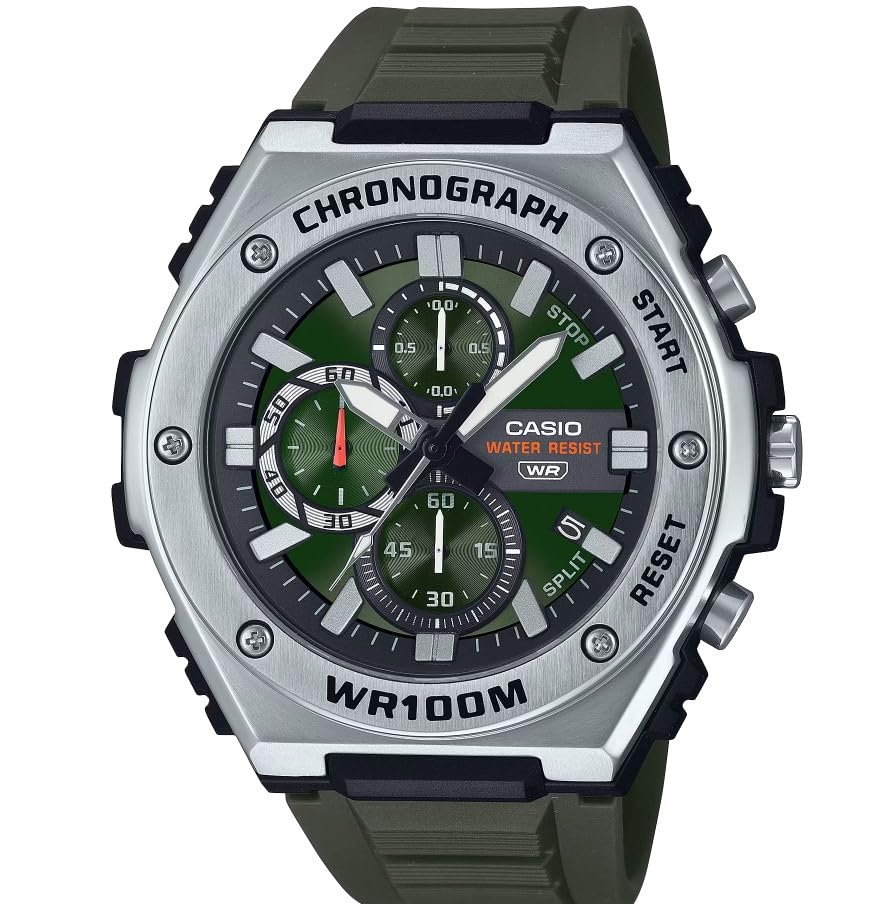
Зображення: спереду view of the Casio MWA-300H Series watch, highlighting its green dial, chronograph sub-dials, and black resin band.
Setup: Initial Settings
Встановлення часу
- Pull the crown out to the second click (time setting position). The second hand will stop.
- Rotate the crown to set the hour and minute hands. Ensure the AM/PM setting is correct if your watch has a 24-hour indicator or date changes at midnight.
- Поверніть заводну головку у нормальне положення. Секундна стрілка відновить рух.
Встановлення дати
- Витягніть заводну головку до першого клацання (положення для встановлення дати).
- Rotate the crown to set the date. Avoid setting the date between 9:00 PM and 1:00 AM, as this may interfere with the automatic date change mechanism.
- Поверніть коронку назад у нормальне положення.
Інформація про акумулятор
Your Casio MWA-300H watch is powered by 1 LR44 battery, which is included. The battery life is approximately 3 years. When the battery runs low, the watch may exhibit irregular movement or stop. It is recommended to have the battery replaced by a qualified watch technician to maintain water resistance.
Operating: Watch Functions
Використання хронографа (секундоміра)
The chronograph function allows for precise timing of events. Your watch features a 1/10-second stopwatch that captures elapsed, split, and 1st/2nd place times across three dedicated sub-dials.
- Starting the Stopwatch: Press button A (typically the upper right button) to start the stopwatch.
- Stopping the Stopwatch: Press button A again to stop the stopwatch.
- Resetting the Stopwatch: After stopping, press button B (typically the lower right button) to reset the stopwatch hands to zero.
- Вимірювання розділеного часу: While the stopwatch is running, press button B to measure split times. The stopwatch hands will momentarily stop to indicate the split time, then resume timing. Press button B again to release the split time and display the current elapsed time.
Note: Refer to the specific button layout on your watch for exact button assignments.
Water Resistance (100 Meters)
Your Casio MWA-300H watch is water resistant up to 100 meters (330 feet). This rating means the watch is suitable for swimming, showering, and recreational water activities. It is not suitable for diving or snorkeling where significant water pressure changes occur.
- Не користуйтеся заводною головкою або кнопками, коли годинник мокрий або занурений у воду.
- Після контакту з солоною водою промийте годинник прісною водою та витріть його насухо.
Світлові стрілки та маркери
The watch features luminous hands and markers that absorb light and glow in the dark, providing readability in low-light conditions. The intensity and duration of the glow depend on the amount and type of light exposure.
Технічне обслуговування
Загальний догляд
- Регулярно протирайте годинник м’якою сухою тканиною, щоб видалити бруд і вологу.
- Уникайте тривалого перебування годинника під екстремальними температурами, прямими сонячними променями або сильними магнітними полями.
- Keep the watch away from solvents, detergents, perfumes, and cosmetics, as these can damage the resin materials.
Заміна батареї
When the battery needs replacement, it is highly recommended to take your watch to an authorized Casio service center or a reputable watch repair shop. This ensures that the watch is properly sealed and its water resistance is maintained after battery replacement.
Water Resistance Checks
To maintain the water resistance of your watch, it is advisable to have it inspected periodically (e.g., every 2-3 years) by an authorized service center, especially if it is frequently exposed to water.
Усунення несправностей
| проблема | Можлива причина | Рішення |
|---|---|---|
| Watch hands do not move or move irregularly. | Низький заряд батареї. | Замініть батарейку. Зверніться до професійного годинникаря. |
| Час неправильний. | Час встановлено неправильно; годинник зупинився та перезапустився. | Reset the time according to the "Setting the Time" instructions. |
| Дата змінюється опівдні замість опівночі. | Налаштування AM/PM неправильне. | Пересуньте час на 12 годин вперед. |
| Стрілки хронографа не скидаються до нуля. | Зміщення стрілок хронографа. | Consult the full Casio module manual for chronograph hand adjustment procedures, or contact customer support. |
| Волога всередині годинника. | Crown or buttons operated underwater; seals compromised. | Негайно зверніться до авторизованого сервісного центру для перевірки та ремонту, щоб запобігти подальшим пошкодженням. |
Технічні характеристики
| Назва моделі | MWA-300H |
| Тип дисплея | Аналоговий |
| Тип руху | Кварц |
| Глибина водонепроникності | 100 метрів (330 фут) |
| Додаткові функції | Chronograph, Date Display, Luminous Hands |
| Джерело живлення | Battery Powered (1 x LR44 included) |
| Матеріал корпусу | смола |
| Матеріал стрічки | смола |
| Кришталевий матеріал | смола |
| Діаметр корпусу | 50.9 міліметрів |
| Товщина корпусу | 14.3 міліметрів |
| Ширина стрічки | 22 міліметрів |
| Тип застібки | Пряжка |
Гарантія та підтримка
Обмежена гарантія
Your Casio MWA-300H watch comes with a limited warranty. Please refer to the warranty card included with your purchase for specific terms, conditions, and duration of coverage. The warranty typically covers manufacturing defects under normal use.
Підтримка клієнтів
For further assistance, technical support, or warranty claims, please contact Casio customer service. You can find contact information on the official Casio webсайті або в документації, що додається до вашого годинника.
For more detailed information, including specific module operations or advanced settings, please visit the official Casio support website or refer to the full module manual for your watch.