
вступ
This manual provides essential information for the safe and effective use of your Minolta MNB5Z 56MP Dual Lens Point & Shoot Digital Camera. Please read this manual thoroughly before using the camera and keep it for future reference. The Minolta MNB5Z is designed to capture high-quality photos at 56MP and record videos in 5K Ultra HD, featuring a 5x optical zoom and a user-friendly 2.8-inch IPS touchscreen.
Інформація про безпеку
- Не піддавайте камеру впливу води або вологи. Ця камера не є водонепроникною.
- Уникайте падіння камери та сильних ударів.
- Keep the camera away from direct sunlight, high temperatures, and dusty environments.
- Використовуйте лише зазначені батареї та аксесуари.
- Не намагайтеся розбирати або модифікувати камеру. Звертайтеся до кваліфікованого персоналу для проведення будь-яких технічних робіт.
- Зберігати в недоступному для дітей місці.
Вміст упаковки
Перевірте наявність усіх предметів у вашій упаковці:
- Minolta MNB5Z 56MP Digital Camera
- USB-кабель для зарядки
- Акумуляторна літій-іонна батарея
- MicroSDHC Ultra 64GB Memory Card
- Flexible Vlogging Tripod
- Гаманець для карт пам'яті
- USB-картридер (SD/microSD)
- Сумка для камери
- Набір для чищення
- Corel Photo, Video, & Art Suite Deluxe Software (Download information may be included)
Налаштування
1. Встановлення батареї
- Знайдіть кришку відсіку для батареї на нижній частині камери.
- Посуньте засувку кришки, щоб відкрити відсік.
- Insert the Lithium-Ion battery according to the polarity indicators (+/-).
- Щільно закривайте кришку відсіку для батарейок, доки вона не зафіксується почутим клацанням.
2. Встановлення карти пам'яті
The Minolta MNB5Z supports microSD and microSDHC cards up to 256GB.
- Open the battery compartment cover. The microSD card slot is usually located near the battery.
- Insert the microSD card with the gold contacts facing down, gently pushing until it clicks into place.
- Щоб вийняти, знову натисніть на карту, доки вона не вискочить.
- Закрийте кришку батарейного відсіку.
3. Зарядка батареї
- Підключіть менший кінець USB-кабелю для заряджання до USB-порту камери.
- Підключіть інший кінець USB-кабелю до USB-адаптера живлення (не входить до комплекту) або USB-порту комп’ютера.
- The charging indicator light (CHG) will illuminate during charging and turn off when fully charged.
4. Початкове увімкнення
- Натисніть і утримуйте УВІМК./ВИМК кнопка, розташована у верхній частині камери.
- The camera will power on, and the display screen will activate.
- Виконайте будь-які підказки на екрані для початкового налаштування, наприклад, встановлення дати й часу.
Керування камерою
1. Розташування та елементи керування камерою
Familiarize yourself with the camera's buttons and touchscreen interface.

Зображення: Задня частина view of the Minolta MNB5Z camera, highlighting the touchscreen display and physical control buttons for navigation and function selection.
- Кнопка ON/OFF: Вмикає або вимикає камеру.
- Кнопка затвора: Press halfway to focus, fully to take a photo.
- Важіль масштабування: Керує 5-кратним оптичним зумом.
- Кнопка режиму: Switches between different shooting modes (Photo, Video, Playback, etc.).
- Directional Pad (DISP/OK): Навігація по меню та підтвердження вибору.
- Кнопка відтворення: Входить у режим відтворення, щоб view фотографії та відео.
- Кнопка меню: Доступ до налаштувань і опцій камери.
- 2.8-дюймовий сенсорний IPS-екран: For intuitive navigation and reviewвмісту.
2. Фотографування
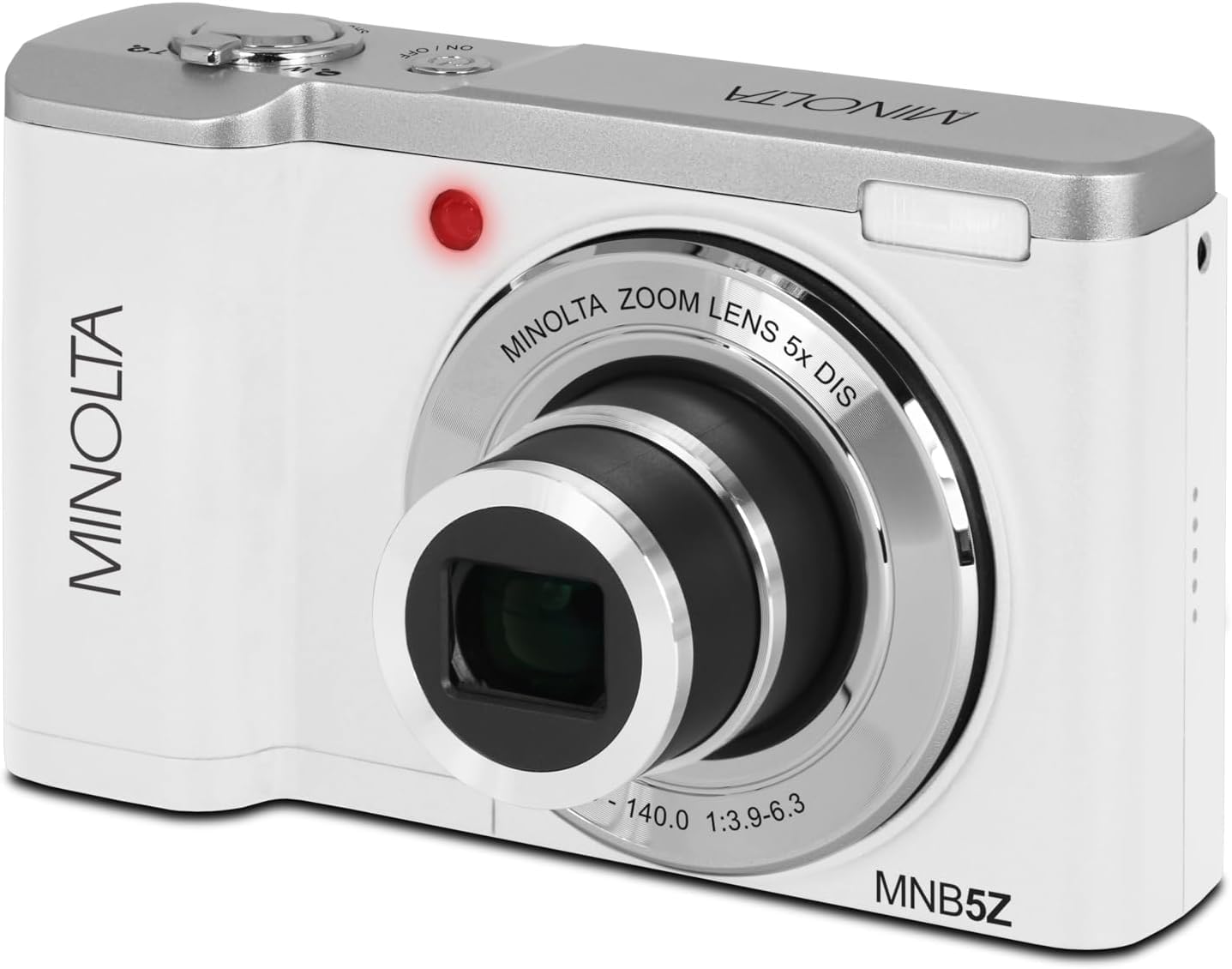
Зображення: спереду view of the Minolta MNB5Z camera, showing the lens extended for capturing images, with the Minolta branding visible.
- Turn on the camera and ensure it is in Photo mode.
- Frame your shot using the 2.8-inch IPS touchscreen.
- Використовуйте важіль масштабування, щоб налаштувати 5-кратний оптичний зум.
- Натисніть кнопку спуску затвора наполовину, щоб камера сфокусувалася. Індикатор фокусування підтвердить фокусування.
- Press the shutter button fully to capture the photo.
- Спалах: The built-in flash can be set to Auto, On/Fill, or Off via the menu.
- Режими зйомки: Access various modes like Photo Burst, Time-Lapse, and Slow Motion via the Mode button or touchscreen menu.
3. Запис відео
- Turn on the camera and switch to Video mode using the Mode button.
- Frame your subject on the touchscreen.
- Press the shutter button to start recording. A recording indicator will appear on the screen.
- Натисніть кнопку затвора ще раз, щоб зупинити запис.
- The camera records in 5K Ultra HD resolution and includes a built-in microphone for audio capture.
4. Відтворення
- Натисніть кнопку відтворення, щоб перейти в режим відтворення.
- Use the directional pad or swipe on the touchscreen to browse through your photos and videos.
- Натисніть кнопку OK, щоб view a video or zoom into a photo.
- Press the Playback button again to exit playback mode.
5. Налаштування камери
- Press the Menu button to access camera settings.
- Use the directional pad or touchscreen to navigate through options such as resolution, white balance, ISO, exposure compensation, and color filters.
- Select an option and press OK to confirm or adjust.
- Натисніть кнопку «Меню» ще раз, щоб вийти з меню.
6. Connecting to a Computer (USB)
- Переконайтеся, що камеру вимкнено.
- Підключіть камеру до комп’ютера за допомогою USB-кабелю, що входить до комплекту.
- Turn on the camera. It should be recognized as a removable disk or media device.
- You can now transfer photos and videos to your computer.
7. Підключення Wi-Fi
The Minolta MNB5Z features Wi-Fi connectivity for wireless transfer of images and remote control via a compatible smartphone application (if available). Refer to the camera's on-screen menu for Wi-Fi setup instructions and pairing with your device.
Технічне обслуговування
1. Очищення камери
- Використовуйте м’яку тканину без ворсу для очищення корпусу камери.
- For the lens and screen, use a specialized lens cleaning cloth and solution. Avoid harsh chemicals.
- Gently blow away dust from the lens surface before wiping.
2. Зберігання

Зображення: спереду view of the Minolta MNB5Z camera with its lens retracted, demonstrating its compact form factor for easy storage in the included camera bag.
- When not in use, store the camera in the provided camera bag to protect it from dust and scratches.
- Вийміть батарею, якщо камера не використовуватиметься протягом тривалого часу.
- Зберігати в прохолодному, сухому місці, подалі від екстремальних температур та вологості.
Усунення несправностей
| проблема | Рішення |
|---|---|
| Камера не вмикається. | Ensure the battery is correctly inserted and fully charged. Try charging the battery for at least 2 hours. |
| Не вдається робити фото/відео. | Check if the memory card is inserted correctly and has sufficient free space. Ensure the camera is in the correct mode (Photo/Video). |
| Зображення розмиті. | Ensure the lens is clean. Press the shutter button halfway to allow the camera to focus before fully pressing. Use digital image stabilization in shaky conditions. |
| Спалах не працює. | Check flash settings in the menu to ensure it is not set to 'Off'. |
| Камера зависає або перестає реагувати. | Remove the battery, wait a few seconds, and reinsert it to reset the camera. |
Технічні характеристики
| Особливість | Деталь |
|---|---|
| Назва моделі | МНБ5З |
| Роздільна здатність фото | 56 мегапікселів |
| Роздільна здатність відео | 5K Ultra HD (30 FPS) |
| Оптичний зум | 5x |
| Стабілізація зображення | цифровий |
| Розмір екрана | 2.8-дюймовий сенсорний IPS-екран |
| Підтримка карт пам'яті | microSD, microSDHC (up to 256GB) |
| Підключення | USB, Wi-Fi |
| Тип батареї | Літій-іонний |
| Спалах | Built-In (Auto, On/Fill) |
| Тип датчика | CMOS |
| Мінімальна витримка | 1/4000 сек |
| Підтримується File Формати | JPEG (Photos), MP4 (Videos) |
| Вага товару | 2.37 фунта |
Гарантія та підтримка
Minolta products are manufactured to the highest quality standards. For information regarding your product's warranty, please refer to the warranty card included in your package or visit the official Minolta support website. For technical assistance, troubleshooting, or service inquiries, please contact Minolta customer support.
Інтернет-підтримка: Visit the official Minolta webсайт із поширеними запитаннями, завантаженням драйверів та контактною інформацією.
Обслуговування клієнтів: Зверніться до упаковки вашого продукту або до Minolta webсайт для контактної інформації служби підтримки клієнтів.