
1. Вступ
Thank you for choosing the ZHANGUSY Car Video Smart Box. This device is designed to enhance your in-car entertainment and connectivity by providing wireless CarPlay, wireless Android Auto, and smart TV box functionalities, including access to streaming services like Netflix and YouTube, directly on your vehicle's display. This manual provides essential information for setup, operation, maintenance, and troubleshooting to ensure optimal performance and a seamless user experience.
2. Продукт закінчивсяview
The ZHANGUSY Car Video Smart Box is a compact and powerful accessory that transforms your wired CarPlay or Android Auto system into a versatile smart entertainment hub. It features a 2024 upgraded core chip for stable and fast wireless connections, supporting Bluetooth 5.0 and 5G WiFi for superior performance.
Ключові характеристики:
- Бездротовий CarPlay та Android Auto: Convert your vehicle's wired CarPlay or Android Auto to wireless for convenient smartphone integration.
- Smart TV Box Functionality: Access popular streaming applications like Netflix and YouTube directly on your car's screen.
- Plug and Play: Simple three-step installation with automatic reconnection after initial setup.
- Висока продуктивність: Equipped with a 2024 upgraded core chip, Bluetooth 5.0, and 5G WiFi for fast and stable connectivity.
- Універсальна сумісність: Supports iPhone 6 and later (iOS 10+) and Android 11 and later (with latest Android Auto function), compatible with over 800 vehicle models that have factory wired CarPlay or Android Auto.
- Портативний дизайн: Compact and lightweight for easy integration into your vehicle.

Image: The ZHANGUSY Car Video Smart Box, a compact black device with a glossy finish and silver trim.
3. Інформація про безпеку
Please read and follow these safety guidelines to prevent damage to the device or vehicle, and to ensure safe operation:
- Не намагайтеся розібрати чи модифікувати пристрій.
- Тримайте пристрій подалі від води, вологи та екстремальних температур.
- Переконайтеся, що пристрій надійно розміщено та не заважає view або заважати керуванню автомобіля.
- Avoid operating the device in a manner that distracts you from driving. Always prioritize road safety.
- Використовуйте лише надані кабелі та аксесуари, щоб запобігти пошкодженням.
4. Вміст упаковки
Будь ласка, перевірте наявність усіх предметів у вашій упаковці:
- ZHANGUSY Car Video Smart Box
- Кабель USB-A – USB-C
- Кабель USB-C – USB-C
- Посібник користувача (цей документ)
5. Налаштування
The ZHANGUSY Car Video Smart Box is designed for a simple plug-and-play setup. Follow these steps for initial installation:
Перевірка на сумісність:
Before installation, confirm that your vehicle has a factory-installed wired CarPlay or wired Android Auto system. This device requires an existing wired connection to function wirelessly.
- Для користувачів iPhone: Your vehicle must have wired CarPlay.
- Для користувачів телефонів Android: Your vehicle must have wired Android Auto.
Note: This adapter does not convert wired CarPlay to wireless for Android phones, nor wired Android Auto to wireless for iPhones.

Image: Diagram illustrating vehicle and mobile phone compatibility. It shows that the device works with cars having wired CarPlay (for iPhone 6+ and iOS 10+) or wired Android Auto (for Android 11+).
Кроки встановлення:
- Підключіть пристрій: Plug one end of the provided USB cable into the ZHANGUSY Car Video Smart Box and the other end into your vehicle's USB port that supports wired CarPlay or Android Auto.
- Vehicle Display: Once connected, your vehicle's display should recognize the Smart Box and show its interface.
- Підключіть свій телефон: On the Smart Box interface, navigate to the Wireless CarPlay or Wireless Android Auto option. Enable Bluetooth and Wi-Fi on your smartphone and pair it with the Smart Box via Bluetooth. Follow the on-screen prompts to complete the connection.
After the initial pairing, the Smart Box will automatically connect to your phone each time you start your vehicle, provided Bluetooth and Wi-Fi are enabled on your phone.
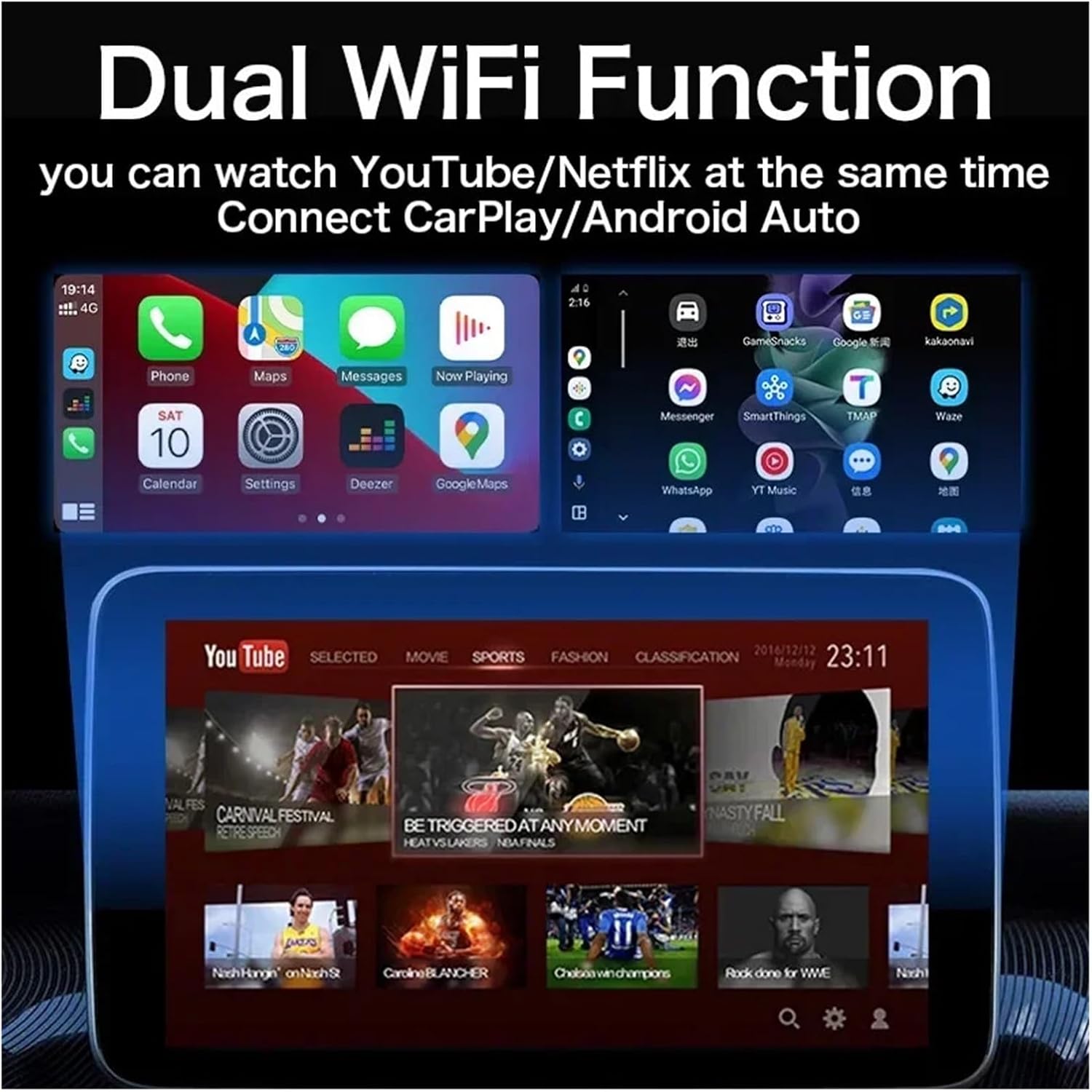
Image: A visual representation of the Wireless CarPlay and Android Auto interfaces displayed on a car's infotainment screen, showing compatible iPhone and Android phone models.
6. Інструкція з експлуатації
Using Wireless CarPlay / Android Auto:
Once your phone is successfully paired, the Smart Box will launch the corresponding wireless CarPlay or Android Auto interface. You can then use your phone's features, such as navigation, music, calls, and messages, directly from your car's display using touch controls, voice commands, or steering wheel controls.
Accessing Smart TV Box Features (Netflix, YouTube):
The ZHANGUSY Car Video Smart Box comes with pre-installed applications like Netflix and YouTube. To use these features:
- Ensure the Smart Box is connected to a Wi-Fi network (e.g., your phone's hotspot or an in-car Wi-Fi).
- From the Smart Box's main menu, select the desired application (Netflix or YouTube).
- Увійдіть, використовуючи дані свого облікового запису, якщо буде запропоновано.
- Enjoy streaming content on your car's display.

Image: A car's infotainment screen displaying the interfaces for YouTube and Netflix, indicating built-in app functionality.
Dual WiFi Function:
The device supports Dual WiFi functionality, allowing you to connect to a Wi-Fi network for streaming (e.g., YouTube/Netflix) while simultaneously maintaining a connection for Wireless CarPlay/Android Auto. This ensures uninterrupted entertainment and navigation.
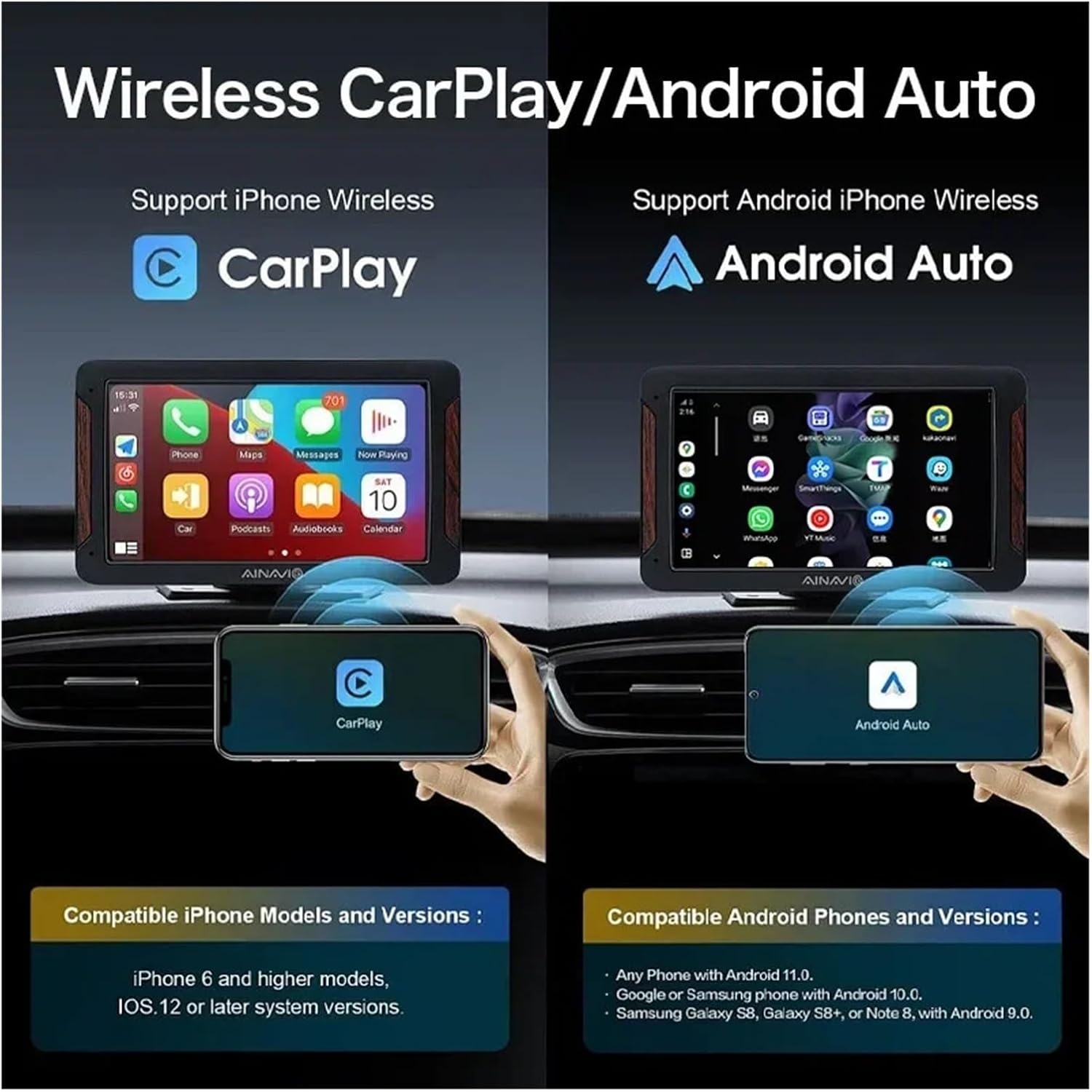
Image: An illustration showing a car's screen simultaneously displaying a phone's CarPlay interface at the top and a YouTube video at the bottom, demonstrating the dual WiFi capability.
7. Технічне обслуговування
To ensure the longevity and optimal performance of your ZHANGUSY Car Video Smart Box, follow these simple maintenance guidelines:
- Прибирання: Використовуйте м’яку суху тканину для протирання пристрою. Уникайте використання рідких засобів для чищення або абразивних матеріалів.
- Зберігання: Якщо пристрій не використовується протягом тривалого часу, зберігайте його в прохолодному, сухому місці, захищеному від прямих сонячних променів.
- Догляд за кабелем: Handle USB cables gently. Avoid bending or twisting them excessively to prevent internal damage.
- Оновлення програмного забезпечення: Periodically check for firmware updates (if available) through the device's settings to ensure the best performance and compatibility.
8. Вирішення проблем
If you encounter issues with your ZHANGUSY Car Video Smart Box, please refer to the following common problems and solutions:
Пристрій не вмикається:
- Ensure the USB cable is securely connected to both the Smart Box and the vehicle's USB port.
- Try a different USB port in your vehicle, if available.
- Verify that the vehicle's USB port provides power.
No Wireless CarPlay / Android Auto Connection:
- Confirm your vehicle has factory wired CarPlay or Android Auto.
- Переконайтеся, що Bluetooth і Wi-Fi увімкнено на вашому смартфоні.
- Delete previous Bluetooth pairings for the Smart Box on your phone and re-pair.
- Restart your smartphone and the vehicle's infotainment system.
- Check the compatibility note in Section 5: The device does not convert wired CarPlay to wireless for Android phones, nor wired Android Auto to wireless for iPhones.
Streaming Apps (Netflix/YouTube) Not Working:
- Ensure the Smart Box is connected to a stable Wi-Fi network with internet access.
- Перевірте швидкість вашого інтернет-з’єднання.
- Verify that you are logged into your streaming service accounts.
- Clear the cache of the respective app within the Smart Box settings, if available.
Slow Performance or Lag:
- Переконайтеся, що операційна система вашого телефону оновлена.
- Minimize background applications on your smartphone.
- Check for any firmware updates for the Smart Box.
9. Технічні характеристики
| Особливість | Специфікація |
| Модель | Car Video Smart Box |
| Бездротове підключення | Bluetooth 5.0, 5G WiFi |
| Операційна система | Android 12 (3-in-1 system) |
| Попередньо встановлені програми | Netflix, YouTube |
| Compatibility (iPhone) | iPhone 6 and later, iOS 10 and above (with wired CarPlay) |
| Compatibility (Android) | Android 11 and later (with wired Android Auto) |
| Розміри | Приблизно 3 х 2 х 1 см |
| вага | Приблизно 50 г |
| Виробник | Haibinbaihuoshanghang |

Image: A detailed diagram highlighting the BT 5.0 chip module and 5G WiFi chip module, emphasizing the powerful performance and faster transmission capabilities.
10. Гарантія та підтримка
For warranty information and technical support, please refer to the seller's policies on the platform where you purchased the ZHANGUSY Car Video Smart Box. If you encounter any issues not covered in this manual, please contact the seller directly for assistance.
Будь ласка, збережіть чек про покупку для будь-яких гарантійних претензій.