
1. Вступ
This manual provides essential instructions for the safe and efficient operation of your EPEVER Tracer4210ANG3 MPPT Solar Charge Controller. This device is designed to manage power flow from your solar panels to your battery bank, ensuring optimal charging and extending battery life. Please read this manual thoroughly before installation and use.
2. Інформація про безпеку
Будь ласка, дотримуйтесь наступних запобіжних заходів під час встановлення та експлуатації:
- Переконайтеся, що вся проводка має правильну полярність та надійно підключена, щоб запобігти пошкодженню контролера або інших компонентів.
- Завжди спочатку підключайте акумулятор, потім сонячну панель і, нарешті, навантаження. Від’єднуйте у зворотному порядку.
- Не намагайтеся розбирати або ремонтувати контролер самостійно. Зверніться до кваліфікованого персоналу для обслуговування.
- Встановіть контролер у добре провітрюваному приміщенні, подалі від легкозаймистих матеріалів та прямих сонячних променів.
- Use appropriate circuit breakers or fuses for all connections to protect against overcurrent.
- Використовуйте захисні окуляри під час роботи з акумуляторами.
3. Продукт закінчивсяview
The EPEVER Tracer4210ANG3 is an advanced Maximum Power Point Tracking (MPPT) solar charge controller designed for off-grid solar systems. It automatically identifies 12V or 24V system voltages and supports various battery types, including Lithium. Key features include high tracking and conversion efficiency, and comprehensive electronic protections.
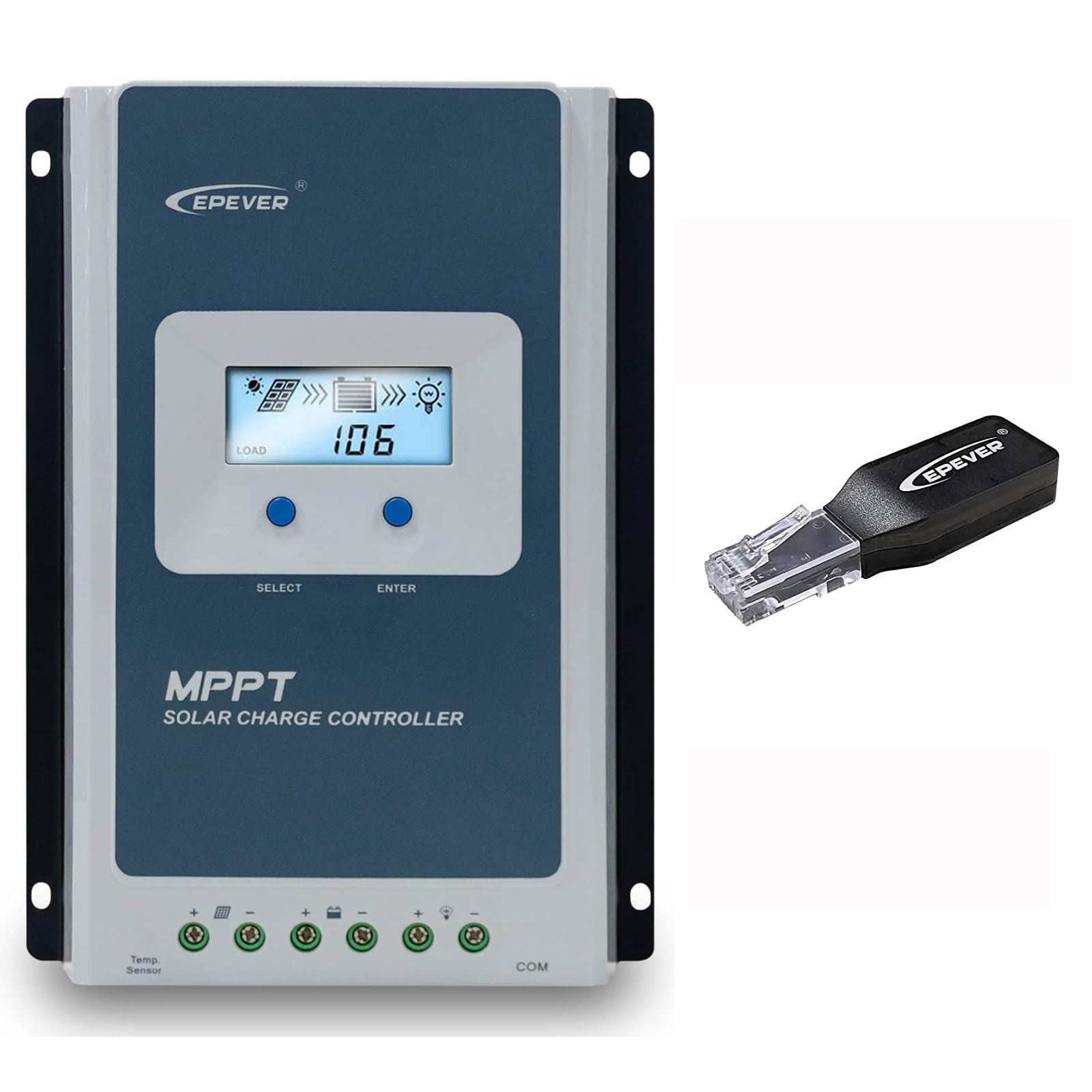
Figure 3.1: EPEVER Tracer4210ANG3 MPPT Solar Charge Controller with LCD display and connection terminals.
3.1 Основні характеристики
- Автоматична система 12V/24V volumetage ідентифікація.
- Advanced MPPT technology with tracking efficiency above 99.5% and conversion efficiency up to 98%.
- Чотири-сtage charging (Bulk, Boost, Float, Equalization) to optimize battery health and lifespan.
- Supports various battery types including Sealed, Gel, Flooded, and Lithium.
- Comprehensive electronic protection functions: PV over current, short-circuit, reverse polarity, night reverse charging, battery reverse, over voltage, over-discharging, overheating, Lithium battery low temperature, load short circuit/overload, device overheating, and TVS high voltage transients protection.
- Remote control and monitoring capabilities via BLE (Bluetooth Low Energy) module (included with this model).

Figure 3.2: The Tracer4210ANG3 controller is compatible with multiple battery types, including Lithium (LI), Sealed (SLD), Flooded (FLD), Gel, and AGM, automatically identifying 12V/24V battery voltage.

Figure 3.3: System diagram illustrating the high tracking efficiency (above 99.5%) and conversion efficiency (98%) of the MPPT solar charge controller within a typical solar power setup for a home.

Figure 3.4: The controller offers real-time monitoring via a mobile application using BLE (Bluetooth Low Energy) or an optional MT50 remote meter. Note: BLE module is included with this model, while MT50 or WiFi modules are sold separately.
4. Налаштування та встановлення
4.1 Встановлення контролера
- Виберіть сухе, добре провітрюване місце, захищене від прямих сонячних променів, високих температур та вологи.
- Ensure sufficient clearance around the controller for heat dissipation.
- Mount the controller vertically on a wall or suitable surface using appropriate fasteners.
4.2 Підключення проводів
Важливо: Always connect in the following order: Battery → Solar Panel → Load. Disconnect in the reverse order.
- Підключіть батарею: Підключіть позитивний та негативний клеми акумулятора до відповідних клем на контролері. Переконайтеся в правильній полярності. Контролер автоматично визначить рівень напруги системи.tage (12 В або 24 В).
- Підключіть сонячну панель: Підключіть позитивний та негативний клеми сонячної панелі до відповідних фотоелектричних клем на контролері. Переконайтеся в правильній полярності.
- Підключіть навантаження: Підключіть позитивний та негативний клеми навантаження постійного струму до відповідних клем навантаження на контролері.
After all connections are made, the controller's LCD display should illuminate, indicating proper power-up.
5. Інструкція з експлуатації
5.1 РК-дисплей та кнопки
The controller features an LCD display for real-time system status and parameters, along with buttons for navigation and settings adjustment.
- Кнопка ВИБІР: Used to cycle through display screens and menu options.
- Кнопка ENTER: Used to confirm selections or enter parameter editing mode.
Refer to the detailed user manual (available for download from the manufacturer's website) for a complete guide on LCD navigation and parameter settings.
5.2 Вибір типу батареї
It is crucial to select the correct battery type in the controller's settings to ensure proper charging algorithms and prevent battery damage. The Tracer4210ANG3 supports various battery types, including:
- Герметичний (SLD)
- гель
- Затоплений (FLD)
- Літій (LI)
- User-defined (for custom parameters)
Access the battery settings via the LCD menu and select the type that matches your connected battery bank. For Lithium batteries, ensure the correct voltage and charging parameters are set, especially if using user-defined settings.
5.3 Remote Monitoring (BLE)
This model includes a Bluetooth Low Energy (BLE) module, allowing you to monitor and configure the controller wirelessly via a smartphone application. Download the official EPEVER app from your device's app store, connect to the controller via Bluetooth, and follow the in-app instructions for monitoring system data and adjusting parameters.
6. Технічне обслуговування
Регулярне технічне обслуговування забезпечує оптимальну продуктивність та довговічність вашого контролера сонячного заряду:
- Перевірте підключення: Періодично перевіряйте всі з'єднання проводів на міцність та наявність корозії. Затягніть будь-які нещільні з'єднання.
- Очистіть контролер: Keep the controller clean and free of dust and debris. Use a dry cloth for cleaning. Do not use liquids.
- Вентиляція: Переконайтеся, що вентиляційні отвори не заблоковані, щоб забезпечити належний відвід тепла.
- Перевірка батареї: Regularly check your battery bank for signs of damage, corrosion, or electrolyte levels (for flooded batteries).
7. Вирішення проблем
If you encounter issues with your Tracer4210ANG3 controller, refer to the following common problems and solutions:
| проблема | Можлива причина | Рішення |
|---|---|---|
| Дисплей контролера вимкнений. | No power from battery or solar panel; reversed battery polarity. | Перевірте підключення акумулятора та обtage. Ensure solar panels are receiving sunlight. Verify battery polarity. |
| Акумулятор не заряджається. | Solar panel not connected; low solar input; incorrect battery type setting; faulty wiring. | Check solar panel connections and ensure sufficient sunlight. Verify battery type setting. Inspect all wiring. |
| Навантаження не працює. | Load disconnected; battery voltage too low; load overcurrent protection activated. | Check load connections. Allow battery to charge. Reduce load or check for short circuits. |
| Попередження про перегрів. | Погана вентиляція; надмірна температура навколишнього середовища; перевантажена система. | Ensure adequate airflow around the controller. Reduce load if possible. Relocate to a cooler environment. |
For more complex issues, please contact EPEVER customer support.
8. Технічні характеристики
| Параметр | Значення |
|---|---|
| Системний номінальний обсягtage | 12V / 24V Auto Identify |
| Номінальний струм заряду | 40А |
| Макс. PV вхідний випtage | 100 В |
| Макс. Вхідна потужність PV | 520 Вт (система 12 В) / 1040 Вт (система 24 В) |
| Ефективність відстеження MPPT | >99.5% |
| Ефективність перетворення заряду | до 98% |
| Підтримувані типи батарей | Sealed, Gel, Flooded, Lithium, User-defined |
| Зарядка Сtages | Bulk, Boost, Float, Equalization |
| Комунікаційний порт | RS485 (for BLE module, MT50, or PC connection) |
| Включені компоненти | MPPT Solar Controller, BLE Module |
9. Гарантія та підтримка
EPEVER products are designed for reliability and performance. For warranty information, please refer to the warranty card included with your product or visit the official EPEVER website. If you have any questions, require technical assistance, or need to report an issue, please contact EPEVER customer support directly. Contact details can typically be found on the manufacturer's webсайту або в упаковці продукту.
Ви також можете відвідати EPEVER Store on Amazon для отримання додаткової інформації про продукт та ресурсів підтримки.