
1. Вступ
This user manual provides detailed instructions for the installation, operation, and maintenance of your BoyKeep D112-10 Light Bulb Security Camera. Please read this manual thoroughly before using the product to ensure proper functionality and safety.

Figure 1.1.1: BoyKeep D112-10 Light Bulb Security Camera (10-pack). This image displays the product as a bundle of ten light bulb-shaped security cameras.
2. Продукт закінчивсяview
2.1. Вміст упаковки
The package for the BoyKeep D112-10 Light Bulb Security Camera (10-pack) includes:
- 10 x BoyKeep D112-10 Light Bulb Security Camera bodies
- Посібник користувача (цей документ)
2.2. Ключові характеристики
- 1080P High-Resolution Video: Забезпечує чіткі та деталізовані зображення.
- Кольорове нічне бачення: Покращена видимість в умовах слабкого освітлення.
- 24/7 Real-time Motion Alerts: Notifies your device upon motion detection.
- Двостороння розмова: Вбудований мікрофон і динамік для зв'язку.
- One-Touch Connection: Simplifies pairing with your device.
- Багатопристрої Viewing & Sharing: Monitor multiple cameras and share access.
- Cloud & Memory Card Storage: Flexible recording options (memory card not included).
- Панорамування на 360° та нахил на 95°: Wide area coverage with remote control.
- Легка установка: Designed for standard E27 light sockets.
2.3. Компоненти камери

Figure 2.3.1: Camera Component Diagram. This image illustrates the various parts of the BoyKeep D112-10 camera, including the E27 light socket base, enhanced WiFi module, microphone, 4 array LEDs, HD lens, 4 white LEDs, light sensor, memory card slot, and reset button. Dimensions are also shown: 6 cm (2.35 in) width and 15 cm (5.9 in) height.
3. Налаштування
3.1. Монтаж
The BoyKeep D112-10 camera is designed for easy installation into a standard E27 light bulb socket.
- Вимкнення живлення: Ensure the power to the light socket is turned off before installation to prevent electrical shock.
- Вкручування: Carefully screw the camera into a standard E27 light socket until it is securely fastened.
- Увімкнення: Відновіть живлення розетки освітлювача. Камера увімкнеться та розпочне послідовність запуску.
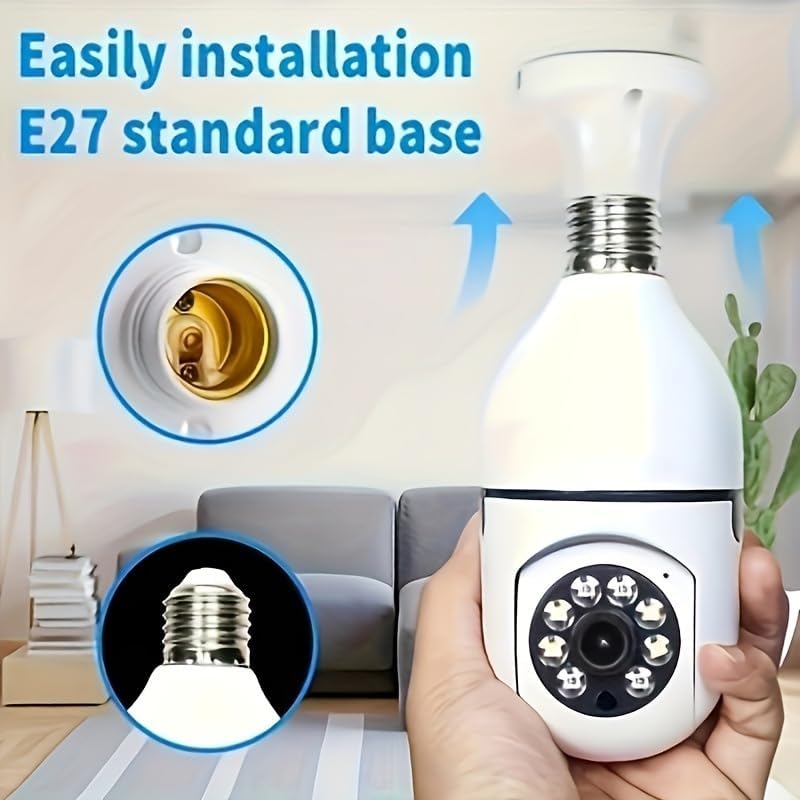
Рисунок 3.1.1: Просте встановлення. This image demonstrates the simple process of screwing the camera into a standard E27 light bulb socket for quick setup.
3.2. Завантаження програми та підключення
To operate the camera, you need to download the dedicated mobile application.
- Завантажити додаток: шукати the "BoyKeep" app (or specified app name in product packaging) on your smartphone's app store (Google Play Store for Android or Apple App Store for iOS).
- Реєстрація/Вхід: Відкрийте програму та дотримуйтесь інструкцій на екрані, щоб зареєструвати новий обліковий запис або увійти, якщо у вас вже є обліковий запис.
- Додати пристрій: In the app, select "Add Device" or the '+' icon. Choose the camera type (e.g., "Smart Camera" or "Light Bulb Camera").
- Підключіться до Wi-Fi: Ensure your smartphone is connected to a 2.4GHz Wi-Fi network. The camera only supports 2.4GHz Wi-Fi. Follow the app's instructions to connect the camera to your Wi-Fi network. This usually involves scanning a QR code generated by the app with the camera, or entering Wi-Fi credentials.
- Завершення: Після підключення камера з’явиться у списку пристроїв у додатку.
Примітка: Ensure your Wi-Fi router supports 2.4GHz and that your phone is connected to the 2.4GHz band during setup. 5GHz networks are not supported by this device.
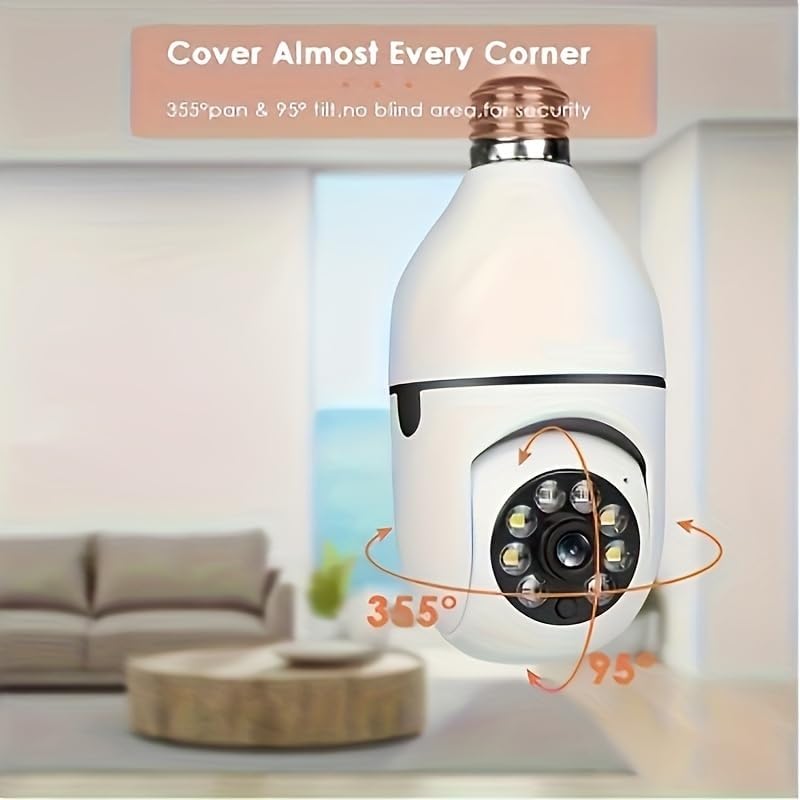
Figure 3.2.1: Wi-Fi Connection and Two-Way Talk. This diagram illustrates how the camera connects to a 2.4GHz Wi-Fi network and enables two-way communication between the camera and a smartphone or computer via the internet, allowing for interactions like speaking to a delivery person.
4. Інструкція з експлуатації
4.1. Жити View і Відтворення
- Жити View: Open the app and select the camera from your device list to view живий корм.
- Відтворення: Доступ до записаного footage by selecting the "Playback" option within the camera's interface in the app. You can navigate through the timeline to view конкретні події.
4.2. Керування панорамуванням та нахилом
The camera offers 360° horizontal pan and 95° vertical tilt capabilities.
- КОНТРОЛЬ: У прямому ефірі view interface of the app, use the directional controls (usually a joystick or arrow icons) to remotely adjust the camera's viewкут.
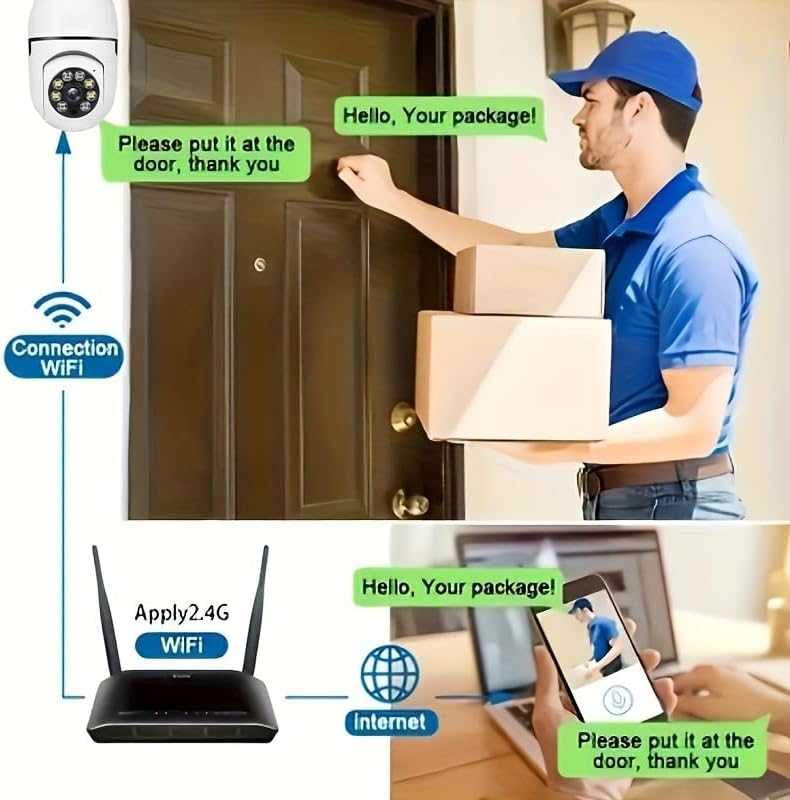
Figure 4.2.1: Pan and Tilt Coverage. This image demonstrates the camera's ability to cover almost every corner with its 355° pan and 95° tilt functions, eliminating blind spots for comprehensive security.
4.3. Виявлення руху та сповіщення
- Увімкнути/вимкнути: Navigate to the camera settings in the app to enable or disable motion detection.
- Чутливість: Adjust the motion detection sensitivity level to minimize false alarms.
- Сповіщення: When motion is detected, the camera will send push notifications to your smartphone. Recorded events will be stored in the cloud (if subscribed) or on the inserted memory card.
4.4. Двосторонній аудіозв'язок
- активувати: У прямому ефірі view, tap the microphone icon to speak through the camera's speaker. Tap it again to mute.
- Слухай: The camera's microphone is active during live view, що дозволяє чути звук поблизу камери.
- Виклик одним дотиком: If available, press the physical one-touch call button on the camera (if present) to initiate a call to your linked smartphone.
4.5. Режими нічного бачення
The camera supports both infrared and full-color night vision.
- Автоматичний режим: The camera automatically switches between day and night vision based on ambient light.
- Інфрачервоне нічне бачення: Забезпечує чітке чорно-біле зображення в повній темряві.
- Повнокольорове нічне бачення: Utilizes built-in white LEDs to provide color images in low light, similar to daytime viewing. This mode can be activated manually or set to trigger upon motion detection.

Figure 4.5.1: Smart Dual Light LED Night Vision. This image compares the visual output of infrared night vision (top, black and white) and full-color night vision (bottom, color) provided by the camera's smart dual light LEDs, showcasing improved visibility in low-light conditions.
4.6. Параметри зберігання
- Memory Card (MicroSD): Insert a compatible MicroSD card (up to 128GB, Class 10 or higher recommended, not included) into the camera's memory card slot for local storage of recordings. The camera supports 24/7 continuous recording to the memory card.
- Хмарне сховище: The camera offers cloud storage services (e.g., a 30-day trial may be included). Refer to the app for subscription details and management.
5. Технічне обслуговування
- Прибирання: Використовуйте м’яку суху тканину для очищення об’єктива та корпусу камери. Не використовуйте рідкі засоби для чищення або абразивні матеріали.
- Оновлення прошивки: Regularly check the app for firmware updates. Keeping the firmware updated ensures optimal performance and security.
- Стабільність мережі: Ensure your Wi-Fi network is stable and strong in the camera's location for uninterrupted operation.
- Умови навколишнього середовища: The camera is designed for indoor use. Avoid exposing it to extreme temperatures, direct sunlight, or high humidity.
6. Вирішення проблем
| проблема | Можлива причина | Рішення |
|---|---|---|
| Камера не вмикається. | No power to the light socket; camera not screwed in properly. | Ensure the light socket has power. Re-screw the camera firmly into the socket. |
| Неможливо підключитися до Wi-Fi. | Incorrect Wi-Fi password; connecting to 5GHz network; weak Wi-Fi signal. | Verify Wi-Fi password. Ensure you are connecting to a 2.4GHz network. Move camera closer to router or use a Wi-Fi extender. Reset camera and try again. |
| Сповіщення про рух не отримано. | Motion detection disabled; app notifications turned off; low sensitivity. | Enable motion detection in app settings. Check phone's notification settings for the app. Increase motion detection sensitivity. |
| Погана якість відео. | Слабкий сигнал Wi-Fi; брудний об'єктив. | Improve Wi-Fi signal strength. Clean the camera lens with a soft, dry cloth. |
| Двосторонній аудіозв'язок не працює. | Microphone/speaker muted in app; network issues. | Перевірте налаштування звуку в додатку. Переконайтеся в стабільному мережевому з’єднанні. |
7. Технічні характеристики
| Особливість | Деталь |
|---|---|
| Назва моделі | D112-10 |
| Роздільна здатність відео | 1080P |
| Підключення | 2.4 ГГц Wi-Fi (IEEE 802.11b/g/n) |
| Джерело живлення | Corded Electric (E27 Light Socket) |
| Діапазон повороту/нахилу | 355° по горизонталі, 95° по вертикалі |
| Нічне бачення | Infrared & Full-Color Night Vision |
| Параметри зберігання | Карта MicroSD (до 128 ГБ, не входить до комплекту), хмарне сховище |
| Аудіо | Двосторонній зв'язок (вбудований мікрофон і динамік) |
| Використання в приміщенні/зовні | закритий |
| Розміри (корпус камери) | Approx. 6 cm (2.35 in) diameter, 15 cm (5.9 in) height |
| Включені компоненти | Корпус камери |
8. Інформація про гарантію
BoyKeep products are manufactured to the highest quality standards. This product comes with a standard manufacturer's warranty. Please refer to the product packaging or the official BoyKeep webсайт для отримання конкретних гарантійних умов, включаючи тривалість та деталі щодо покриття.
9. Підтримка клієнтів
For technical support, troubleshooting assistance, or any inquiries regarding your BoyKeep D112-10 Light Bulb Security Camera, please contact our customer support team:
- Інтернет-підтримка: Visit the official BoyKeep store on Amazon: BoyKeep Store
- Підтримка електронною поштою: Refer to the contact information provided in your product packaging or on the BoyKeep webсайт.
When contacting support, please have your product model number (D112-10) and purchase details ready.