
1. Вступ
The UanTii All-in-One Smart Matter Plug is a versatile smart home device designed to integrate seamlessly with various smart home ecosystems, including Apple HomeKit, Amazon Alexa, Google Home, Samsung SmartThings, and Tuya/Smart Life. This smart plug allows you to control your home appliances remotely, set schedules, and use voice commands for a truly automated experience. Its Matter certification ensures enhanced compatibility and stability within your local network.

Figure 1: UanTii Smart Matter Plug and its multi-platform compatibility.
2. Інформація про безпеку
Будь ласка, прочитайте та зрозумійте всі інструкції з безпеки перед використанням цього виробу. Недотримання цих інструкцій може призвести до ураження електричним струмом, пожежі або інших небезпек.
- Не розбирайте та не змінюйте пристрій.
- Не піддавайте пристрій впливу води або надмірної вологості.
- Do not use the device with appliances that exceed its maximum load capacity (16A, 3680W).
- Переконайтеся, що вилка повністю вставлена в розетку.
- Зберігати в недоступному для дітей місці.
- Використовувати лише в сухих приміщеннях.
3. Вміст упаковки
Your UanTii Smart Matter Plug package should contain the following:
- 1 x UanTii All-in-One Smart Matter Plug
- 1 x Інструкція з експлуатації (цей документ)
4. Налаштування
Before setting up your UanTii Smart Matter Plug, ensure your smartphone's operating system is iOS 16.1 or later, or Android 8.1 or later. The plug requires a 2.4GHz Wi-Fi network for initial setup and operation.
4.1 Matter Hub Requirement
A Matter-enabled hub is required to add Matter devices to Apple HomeKit, Google Home, and Alexa apps. Ensure your hub and the plug are on the same local area network (LAN) and that Bluetooth is enabled on your phone during the initial pairing process.

Малюнок 2: Впрamples of Matter-compatible hubs required for integration.
4.2 Додавання пристрою
- Plug the UanTii Smart Matter Plug into a standard wall outlet.
- Переконайтеся, що Bluetooth на вашому смартфоні увімкнено.
- Open your preferred smart home app (e.g., Apple Home, Google Home, Alexa, Tuya Smart, or Smart Life).
- Follow the app's instructions to add a new device. You will typically be prompted to scan the QR code located on the device or its packaging.
- Once scanned, the app will guide you through connecting the plug to your 2.4GHz Wi-Fi network.
- For Tuya/Smart Life App, no separate hub is needed, only a 2.4GHz Wi-Fi connection.

Figure 3: Scan the QR code on the device to add it to your smart home system. Example QR code: 0000-123-0000
4.3 Important Notes for Specific Apps:
- HomeKit/Google Home/Alexa APP: Primarily supports voice function and on/off control.
- Додаток Туя: Offers timer function, on/off control, and voice function (when integrated with Alexa and Google Home).
5. Експлуатація розумної розетки
5.1 Дистанційне керування за допомогою додатка
Once connected, you can control the smart plug from anywhere using the Tuya/Smart Life APP. Turn appliances on or off, and manage schedules directly from your smartphone.

Figure 4: Remote control of appliances via the Tuya Smart or Smart Life app.
5.2 Голосове керування
The UanTii Smart Matter Plug supports voice commands through Siri, Amazon Alexa, and Google Assistant, providing a hands-free control experience.

Figure 5: Use voice commands with your preferred assistant to control the plug.
5.3 Функції таймера та розкладу
Automate your appliances by setting timers and schedules. This feature is exclusively available through the Tuya/Smart Life APP.

Figure 6: Set daily schedules for your appliances using the Tuya/Smart Life app.
5.4 Network Stability with Matter
Thanks to Matter certification, devices in your local network can operate smoothly even if your internet connection goes offline, ensuring reliable performance.

Figure 7: Enjoy stable control even without an internet connection. Learn more about Matter at 168150
5.5 High Power Capacity
The UanTii Smart Matter Plug supports a maximum current of 16A, making it suitable for a wide range of household appliances.
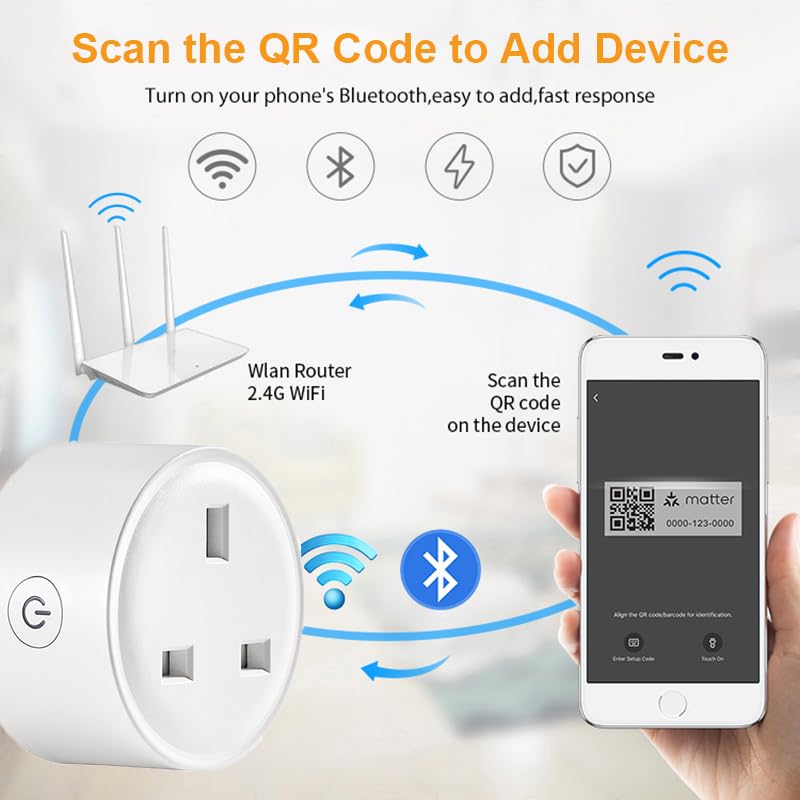
Figure 8: The 16A capacity allows connection to most electrical appliances.
6. Технічне обслуговування
To ensure the longevity and proper functioning of your UanTii Smart Matter Plug, follow these simple maintenance guidelines:
- Протирайте пристрій м’якою сухою тканиною. Не використовуйте рідкі або аерозольні засоби для чищення.
- Уникайте розміщення пристрою під прямими сонячними променями або поблизу джерел тепла.
- Не піддавайте пристрій дії екстремальних температур або вологості.
- Ensure the plug pins are clean and free from debris before inserting into a socket.
7. Вирішення проблем
If you encounter issues with your UanTii Smart Matter Plug, refer to the following common solutions:
| проблема | Можлива причина / рішення |
|---|---|
| Пристрій не підключається до програми. |
|
| Голосове керування не працює. |
|
| Timer/Schedule not working. |
|
| Plug is unresponsive. |
|
8. Технічні характеристики
| Особливість | Специфікація |
|---|---|
| Номер моделі | UTMAPS012 |
| Номінальна потужність | Змінний струм 100~240 В 50/60 Гц |
| Номінальний струм | 16А |
| Максимальна вантажопідйомність | 3680 Вт |
| Споживання в режимі очікування | 0.46 Вт |
| Тип Wi-Fi | 2.4 ГГц |
| Стандартний Wi-Fi | IEEE 802.11b/g/n |
| Робоча вологість | 0% ~ 85%RH (Non-Condensing) |
| Робоча температура | 0℃ ~ 50℃ (32°F ~ 122°F) |
| матеріал | Мідь (контактний матеріал) |
| Розміри | 7 х 7 х 6 см |
| вага | 80 г |
| Країна походження | Китай |
9. Гарантія та підтримка
For warranty information and technical support, please refer to the contact details provided with your purchase or visit the official UanTii webсайт. Зберігайте чек про покупку як підтвердження покупки для будь-яких гарантійних претензій.