
1. Продукт закінчивсяview
The Greencycle Wireless Door Open Sensor Chime provides a reliable alert system for various applications. This system includes one plug-in receiver and two magnetic door sensors. It features adjustable volume, multiple chime options, an LED flash indicator, and a nightlight function, making it suitable for homes, offices, and businesses.
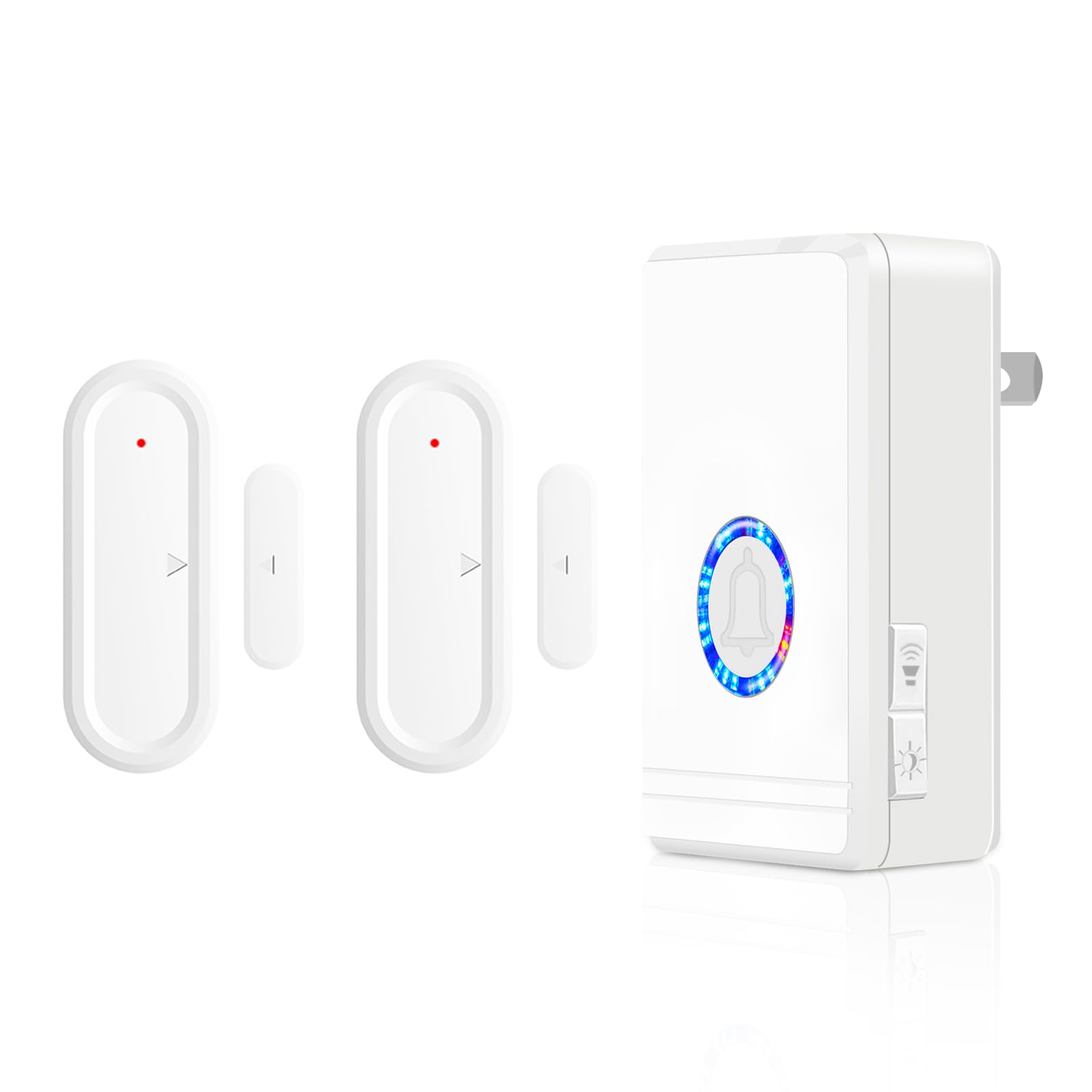
Image 1: Greencycle Wireless Door Open Sensor Chime components.
2. Компоненти продукту
- 1 х плагінний приймач
- 2 x Magnetic Door Sensors (each requires 1 AAA battery, not included)
3. Налаштування та встановлення
The Greencycle Wireless Door Open Sensor Chime is designed for easy installation. The receiver and sensors are pre-paired from the factory, allowing for a plug-and-play experience.
3.1. Встановлення ресивера
- Plug the receiver into a standard electrical socket in your desired location.
- Ensure the socket is easily accessible and provides a stable power supply.
3.2. Установка датчика
- Insert one AAA battery into each magnetic door sensor.
- Identify the desired door or window for monitoring.
- Clean the surface where the sensors will be mounted to ensure proper adhesion.
- Attach the two parts of a magnetic sensor to the door/window and its frame using the provided adhesive. Ensure the two parts are aligned and the distance between them is no more than 0.4 inches (approximately 1 cm) when the door/window is closed.
- When the door or window opens, the magnetic contact separates, triggering the chime.

Image 2: Illustration of magnetic sensor installation and operation.
Відео 1: Кінецьview of Greencycle Wireless Door Open Contact Sensor Alarm, including installation and features.
4. Інструкція з експлуатації
4.1. Регулювання гучності
The receiver offers 5 adjustable volume levels, with a maximum volume of 97dB. To adjust the volume, locate the volume setting key on the side of the receiver and press it repeatedly until the desired volume level is reached.
4.2. Changing Ringtones
The chime features 48 pleasant ringtones. To cycle through the ringtones, press the ringtone selection key on the receiver. Once you find a desired tone, it will be saved automatically.
4.3. Функція нічника
The receiver includes a nightlight function with 7 adjustable brightness levels. Press the nightlight setting key on the receiver to activate and adjust the brightness of the nightlight.
4.4. Mute Mode with LED Flash
For situations requiring silence, such as during naps or for individuals with hearing impairments, the chime can be set to mute mode. In this mode, the LED indicator will flash when a sensor is triggered, providing a visual alert without sound.

Image 3: Visual representation of chime features including volume, ringtones, mute mode, and nightlight.

Image 4: The device retains settings due to its memory function.

Image 5: Mute mode allows for silent operation, ideal for sleeping environments.

Image 6: The nightlight function provides ambient illumination.
5. Інструкції зі сполучення
If you need to re-pair sensors or add new ones, follow these steps:
5.1. Pairing for Normal Bells
- Press and hold the volume button on the receiver for 3 seconds until the LED indicator flashes.
- Separate the magnetic sensor parts (or trigger the sensor) within 5 seconds. The receiver will chime, indicating successful pairing.
5.2. Pairing for Private Bells (Specific Ringtones)
- First, select your desired ringtone by pressing the ringtone selection key.
- Then, press and hold the ringtone selection key for 3 seconds until the LED indicator flashes.
- Separate the magnetic sensor parts (or trigger the sensor) within 5 seconds. The receiver will chime with the selected ringtone, indicating successful pairing.
5.3. Changing Ringtones for Paired Sensors
- Press the ringtone selection key to choose a new song.
- Trigger the sensor (separate the magnetic parts). The receiver will play the new ringtone, and it will be saved for that sensor.
5.4. Deleting All Pairings
- Press and hold the volume button on the receiver for 10 seconds. The receiver will chime twice, indicating all pairings have been deleted.
Video 2: Detailed instructions on Greencycle door chime pairing methods.
6. Технічне обслуговування
- Заміна батареї: Each magnetic door sensor is powered by one AAA battery, which can last for over 2 years under normal use. Replace the battery when the sensor's performance diminishes or the LED indicator on the sensor no longer flashes upon activation.
- Прибирання: Wipe the receiver and sensors with a soft, dry cloth. Avoid using harsh chemicals or abrasive cleaners.
- Receiver Power Consumption: The receiver has a low standby power consumption of approximately 100mW (0.8 kWh per year).
7. Вирішення проблем
If you encounter issues with your Greencycle Wireless Door Open Sensor Chime, consider the following:
- Немає звуку дзвінка:
- Check if the receiver is properly plugged into a working power outlet.
- Ensure the volume is not set to mute (0dB). Adjust the volume using the volume button.
- Verify that the sensor battery is not depleted. Replace if necessary.
- Re-pair the sensor with the receiver following the pairing instructions in Section 5.
- Датчик не спрацьовує:
- Ensure the magnetic sensor parts are installed correctly and the gap between them is no more than 0.4 inches when closed.
- Check the sensor battery and replace if needed.
- Confirm the sensor is within the 600 ft operating range of the receiver, free from major obstructions.
- Перешкоди:
- If experiencing inconsistent performance, try relocating the receiver or sensor to minimize interference from other wireless devices or large metal objects.
8. Технічні характеристики
| Особливість | опис |
|---|---|
| Бренд | Зелений цикл |
| Модель | Wireless Door Open Sensor Chime (1 Receiver + 2 Sensors) |
| Робочий діапазон | До 180 метрів (600 футів) на відкритій місцевості |
| Рінгтони | 48 мелодій на вибір |
| Рівні гучності | 5 adjustable levels (0dB to 97dB) |
| Функція нічного освітлення | 7 регульованих рівня яскравості |
| Сенсорна батарея | 1 x AAA battery (per sensor, not included) |
| Ресурс батареї датчика | Більше 2 років |
| Живлення приймача в режимі очікування | 100mW (~0.8 kWh per year) |
| Вимога до зазору датчика | Max 0.4 inches (1 cm) between magnetic parts |
| Можливість розширення | Supports pairing up to 32 sensors/buttons with one receiver |

Image 7: Dimensions and key features of the Greencycle Wireless Door Open Sensor Chime.

Image 8: The system offers a 600 ft range and can be used on various entry points.
9. Гарантія та підтримка
Greencycle provides an after-sale guarantee and lifelong enthusiastic customer service support for this product. If you have any questions, concerns, or require assistance with your Wireless Door Open Sensor Chime, please contact Greencycle customer support for prompt resolution.