
1. Вступ
Дякуємо за покупкуasing the WVCLTVJA 318C Digital Microscope Camera. This device is designed for detailed observation and analysis, featuring a 12MP camera, up to 1600X magnification, and a 7-inch IPS touch screen for intuitive control. This manual provides essential information for the safe and effective use of your microscope. Please read it thoroughly before operation and retain it for future reference.
2. Інформація про безпеку
To ensure safe operation and prolong the lifespan of your device, please observe the following precautions:
- Не піддавайте мікроскоп впливу екстремальних температур, вологості або агресивних речовин.
- Уникайте прямого впливу на об'єктив сильних джерел світла, оскільки це може пошкодити сенсор.
- Використовуйте лише наданий адаптер живлення. Використання неправильного адаптера може пошкодити пристрій або створити небезпеку пожежі.
- Тримайте пристрій подалі від дітей, щоб запобігти нещасним випадкам.
- Не намагайтеся розбирати або модифікувати мікроскоп. Звертайтеся до кваліфікованого персоналу з будь-яким обслуговуванням.
- Clean the device with a soft, dry cloth. Avoid liquid cleaners directly on the screen or lens.
3. Вміст упаковки
Please check the package contents upon receipt. If any items are missing or damaged, contact your retailer immediately.
- WVCLTVJA 318C Digital Microscope Camera
- Ordinary Lens
- Регульована підставка
- USB кабель живлення
- Адаптер живлення
- Калібрувальна лінійка
- Посібник користувача (цей документ)
4. Продукт закінчивсяview
Familiarize yourself with the main components and controls of your WVCLTVJA 318C Digital Microscope.
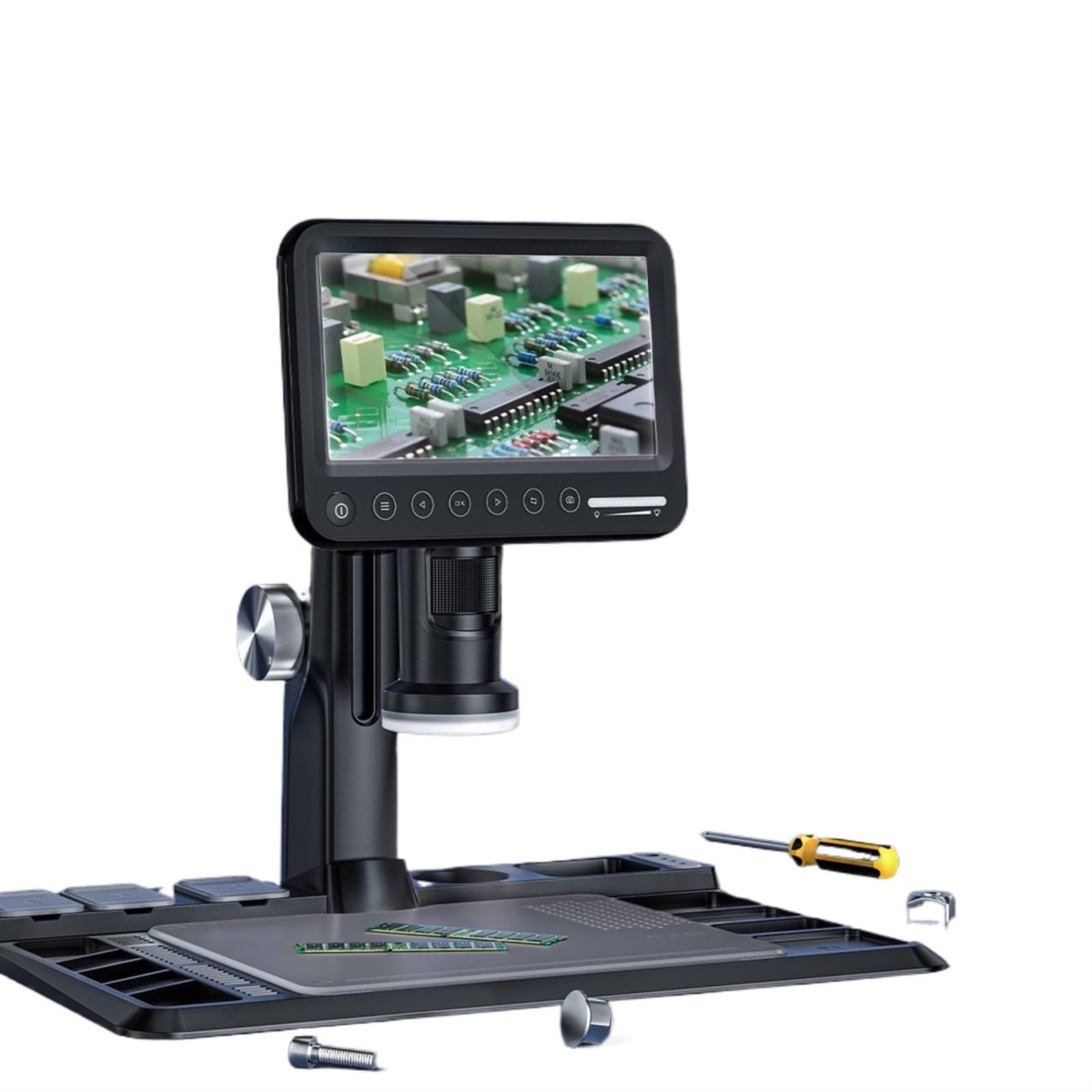
малюнок 4.1: WVCLTVJA 318C Digital Microscope Camera. This image illustrates the main unit, including the 7-inch IPS touch screen, the adjustable stand, and the attached ordinary lens. Key components include the screen, focus wheel, magnification adjustment, and power input port.
Ключові компоненти:
- 7-дюймовий сенсорний IPS-екран: для viewing live images, navigating menus, and adjusting settings.
- Ordinary Lens: The primary lens for standard magnification.
- Колесо фокусування: Adjusts the focus for clear images.
- Регулювання збільшення: Controls the optical magnification level.
- Світлодіодне підсвічування: Built-in lights to illuminate the specimen.
- Кнопка живлення: Вмикає і вимикає пристрій.
- Порт USB: Для введення живлення та передачі даних.
- Слот для карт MicroSD: For storing captured images and videos.
5. Налаштування
5.1 Розпакування та складання
- Акуратно вийміть усі компоненти з упаковки.
- Place the adjustable stand on a stable, flat surface.
- Attach the microscope main unit to the stand, ensuring it is securely fastened.
5.2 Встановлення об'єктива
- Gently screw the ordinary lens onto the microscope body until it is firm. Do not overtighten.
- Ensure the lens is clean and free of dust before use.
5.3 Підключення живлення
- Connect the USB power cable to the microscope's USB port.
- Підключіть інший кінець USB-кабелю до наданого адаптера живлення.
- Вставте адаптер живлення у стандартну електричну розетку.
5.4 Початкове ввімкнення
- Press and hold the Power button on the microscope for a few seconds until the screen illuminates.
- The device will boot up and display the live view з камери.
6. Інструкція з експлуатації
6.1 Увімкнення/вимкнення живлення
- Щоб увімкнути: Натисніть і утримуйте кнопку живлення, доки екран не увімкнеться.
- Щоб вимкнути: Press and hold the Power button until a shutdown prompt appears on the screen. Confirm to power off.
6.2 Placing a Specimen
Place the object you wish to observe directly on the stage beneath the lens. Ensure it is stable and centered.
6.3 Налаштування фокусу
- Adjust the distance between the lens and the specimen using the stand's height adjustment mechanism.
- Rotate the Focus Wheel slowly until the image on the screen becomes clear and sharp.
6.4 Регулювання збільшення
The 318C offers digital magnification up to 1600X. Optical magnification is adjusted by rotating the lens barrel or by changing the distance between the lens and the object. Digital zoom can be controlled via the touch screen interface.
6.5 Захоплення зображень та відео
The 318C allows you to capture high-resolution images and videos directly to a MicroSD card (not included).
- Ensure a MicroSD card (Class 10 or higher, up to 32GB recommended) is inserted into the card slot.
- З прямого ефіру view, tap the camera icon on the touch screen to take a photo.
- Tap the video camera icon to start recording. Tap again to stop recording.
- захоплений files можна повторноviewed in the gallery mode, accessible via the main menu.
6.6 Menu Navigation (Touch Control)
The 7-inch IPS screen supports touch control for navigating the microscope's settings and features.
- Торкніться: Select an option or icon.
- Проведіть пальцем: Scroll through lists or images in gallery mode.
- Масштабування за допомогою розведення пальців: Adjust digital zoom in live view or gallery (if supported by software).
Звичайні опції меню включають:
- роздільна здатність: Adjust image/video capture resolution.
- Контакт: Control brightness.
- Баланс білого: Налаштуйте колірну температуру.
- Дата/час: Встановити системну дату й час.
- мова: Виберіть мову відображення.
- Форматувати SD-карту: Видаліть усі дані на картці MicroSD.
6.7 Передача даних
Передавати files до комп’ютера:
- Connect the microscope to your computer using the USB cable.
- The microscope should appear as a removable storage device.
- Alternatively, remove the MicroSD card from the microscope and insert it into a card reader connected to your computer.
7. Технічне обслуговування
7.1 Очищення
- Об'єктив: Use a soft, lint-free lens cleaning cloth and specialized lens cleaning solution. Do not use abrasive materials.
- екран: Wipe the touch screen gently with a microfiber cloth. For stubborn smudges, slightly dampпротріть тканину водою або засобом для чищення екранів.
- Тіло: Use a soft, dry cloth to wipe the microscope body. Avoid harsh chemicals.
7.2 Зберігання
When not in use, store the microscope in a clean, dry, and dust-free environment. Use the original packaging or a protective case to prevent damage.
7.3 Догляд за акумулятором (якщо застосовується)
If your model includes a rechargeable battery, ensure it is charged periodically even when not in use to maintain battery health. Avoid fully discharging the battery for extended periods.
8. Вирішення проблем
If you encounter issues with your WVCLTVJA 318C Digital Microscope, refer to the following table for common problems and solutions.
| проблема | Можлива причина | Рішення |
|---|---|---|
| Пристрій не включається. | Немає живлення, погане з'єднання або розряджений акумулятор. | Check power adapter and cable connection. Ensure the power outlet is functional. Charge the device if it has an internal battery. |
| Зображення розмите. | Out of focus, dirty lens, or incorrect working distance. | Adjust the focus wheel. Clean the lens. Adjust the height of the microscope relative to the specimen. |
| Не вдається зробити знімок/відео. | No MicroSD card, full card, or card error. | Insert a MicroSD card. Check if the card is full and delete unnecessary files or replace it. Format the MicroSD card (this will erase all data). |
| Екран не реагує. | Програмний збій або тимчасове зависання. | Restart the device by holding the power button. If unresponsive, disconnect power and reconnect after a few seconds. |
| Зображення занадто темне/яскраве. | Incorrect LED illumination or exposure settings. | Adjust the brightness of the LED lights. Modify exposure settings in the menu. |
Якщо проблема не зникає після спроби цих рішень, зверніться до служби підтримки клієнтів.
9. Технічні характеристики
Technical specifications for the WVCLTVJA 318C Digital Microscope Camera:
| Особливість | Деталь |
|---|---|
| Модель | 318C |
| Роздільна здатність камери | 12 мегапікселів |
| Збільшення | Up to 1600X (Digital) |
| Дисплей | 7-дюймовий сенсорний екран IPS |
| Зберігання | MicroSD Card (up to 32GB, Class 10 recommended) |
| Підключення | USB |
| освітлення | Регульовані світлодіодні ліхтарі |
| Вхідна потужність | 5V DC via USB |
| вага | Approximately 50 Grams (main unit) |
10. Гарантія та підтримка
The WVCLTVJA 318C Digital Microscope Camera comes with a standard manufacturer's warranty. Please refer to the warranty card included in your package for specific terms and conditions. For technical support, troubleshooting assistance, or warranty claims, please contact your retailer or the manufacturer directly using the contact information provided with your purchase.
Please have your model number (318C) and purchase date available when contacting support.