
TOWODE SKHBA
TOWODE Light Bulb Security Camera User Manual
Model: SKHBA
Бренд: TOWODE
вступ
The TOWODE Light Bulb Security Camera combines high-intensity LED lighting with advanced surveillance capabilities. Designed for easy installation into standard E26 outlets, this device offers 3MP HD video, AI human detection, two-way audio, and color night vision, providing comprehensive monitoring for your garage or other indoor spaces. It integrates seamlessly with smart home systems like Alexa for convenient voice control.
Що в коробці
- 1 x TOWODE Light Bulb Security Camera
- 1 x TF-карта 128 ГБ
- 1 x адаптер живлення
- Посібник користувача (цей документ)

Figure 1: Product and included accessories.
Технічні характеристики
| Особливість | Деталь |
|---|---|
| Номер моделі | SKHBA |
| Використання в приміщенні/зовні | закритий |
| Сумісні пристрої | iOS, Smartphone |
| Джерело живлення | Провідний електричний |
| Протокол підключення | Wi-Fi (2.4G/5G supported) |
| Тип контролера | APP (AJCloud) |
| Тип монтажу | Light Socket (E26) |
| Роздільна здатність захоплення відео | 3MP HD (2K) |
| Колір | Білий |
| Включені компоненти | 128G TFcard, 1*light bulb camera |
| Viewкут нахилу | 360 градусів (панорамування 355°, нахил 90°) |
| Діапазон нічного бачення | 20 Feet (Color Night Vision available) |
| матеріал | пластик |
| Розміри (Д x Ш x В) | 6 x 3 x 3 дюймів |
| Вага товару | 15.8 унції |
| Тип джерела світла | LED (30W, 3000 Lumens) |
| Особливості | 2-Way Audio, Night Vision, Motion Sensor, AI Human Detection, Works with Alexa |

Малюнок 2: Детально view of camera components and dimensions.
Посібник із налаштування
1. Фізичне встановлення
- Виберіть місце: Select an indoor location with a standard E26 light bulb socket. Ensure the area provides adequate Wi-Fi signal strength.
- Вимкнення живлення: Before installation, ensure the power to the light socket is turned off at the circuit breaker to prevent electrical shock.
- Вкручування: Carefully screw the TOWODE Light Bulb Security Camera into the E26 light socket. Ensure it is securely fastened but do not overtighten. If using the included power adapter, connect the camera to the adapter first, then plug the adapter into a standard wall outlet.
- Увімкнення: Відновіть живлення розетки освітлювача. Камера увімкнеться та розпочне послідовність запуску.

Figure 3: Installation into an E27 (compatible with E26) light socket.
2. Завантаження програми та підключення
- Завантажити додаток: Download the "AJCloud" app from your smartphone's app store (iOS or Android).
- Реєстрація облікового запису: Open the AJCloud app and follow the on-screen instructions to register a new account or log in if you already have one.
- Додати пристрій: In the app, tap the "+" icon to add a new device. Select "Light bulb camera" or similar option.
- Налаштування Wi-Fi: Ensure your smartphone's Bluetooth is enabled. The app will guide you through connecting the camera to your Wi-Fi network. The camera supports 2.4G and 5G Wi-Fi. Enter your Wi-Fi password when prompted.
- Сполучення: The app will attempt to pair with the camera. This process may take 1-2 minutes. Once successful, you will receive a confirmation.
- Назва пристрою: Assign a name to your camera (e.g., "Garage Camera," "Living Room Camera") for easy identification.
Video 1: Demonstrates the setup and connection process of the TOWODE Light Bulb Security Camera with the mobile application.
Інструкція з експлуатації
1. Жити View та керування панорамуванням/нахилом
Once connected, open the AJCloud app and select your camera to access the live video feed. You can control the camera's viewing angle directly from the app:
- Пан: Swipe horizontally on the live view screen to rotate the camera 355 degrees.
- Нахил: Swipe vertically on the live view screen to adjust the camera's vertical angle by 90 degrees.
- Попередньо встановлені позиції: The app allows you to save specific viewing angles as presets for quick navigation.
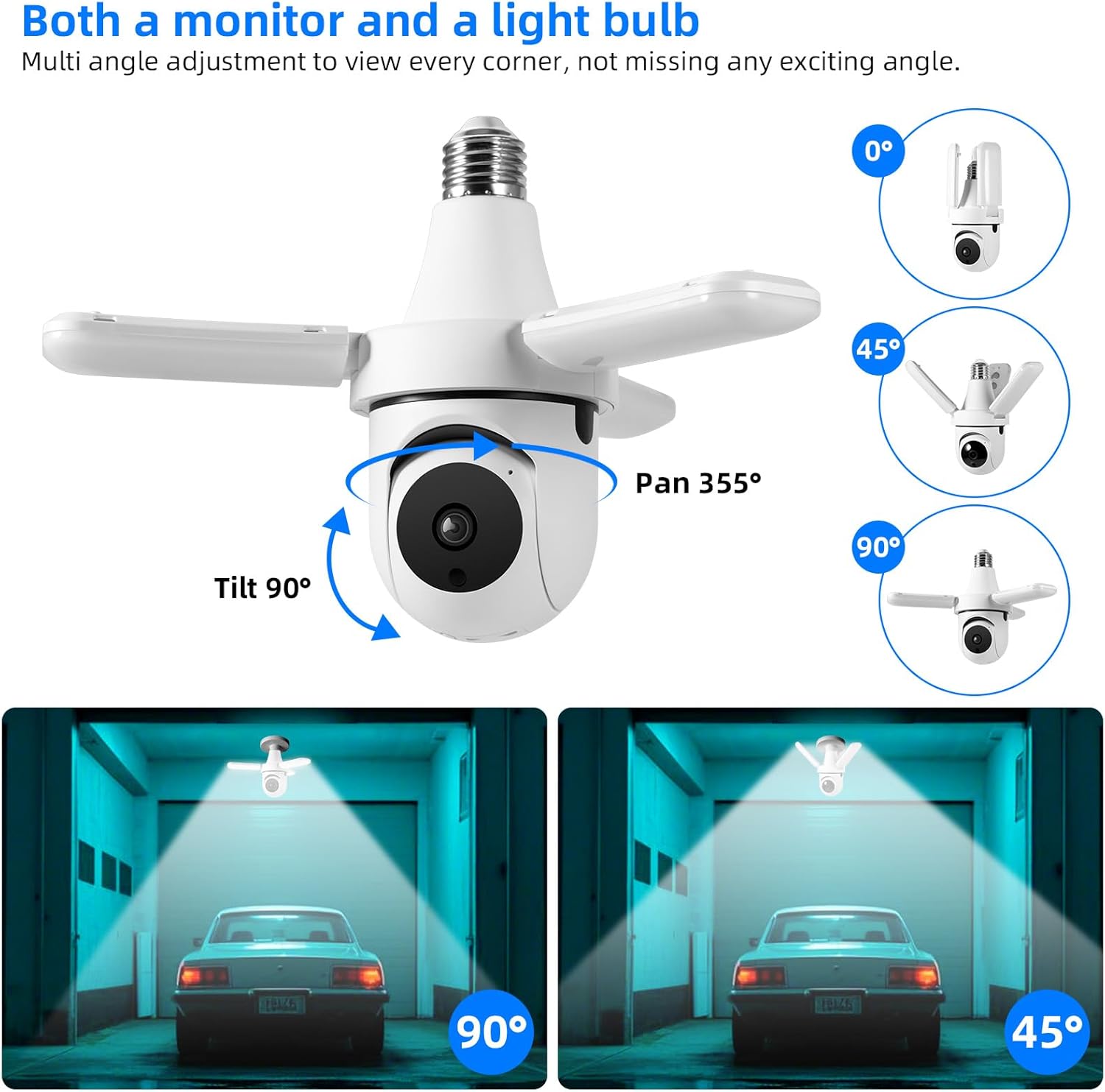
Figure 4: Camera pan and tilt functionality.
2. Двосторонній аудіозв'язок
The camera features a built-in microphone and speaker, enabling two-way communication. Tap the microphone icon in the app's live view to speak through the camera, and listen to audio from the camera's location.

Рисунок 5: Двосторонній аудіозв'язок.
3. Виявлення та відстеження руху
The camera is equipped with intelligent motion detection and AI human detection. When motion or a human figure is detected, the camera can:
- Send instant push notifications to your mobile device.
- Automatically track the detected movement across its field of view.
- Trigger an audible alarm to deter intruders.
Adjust motion sensitivity and notification settings within the AJCloud app.
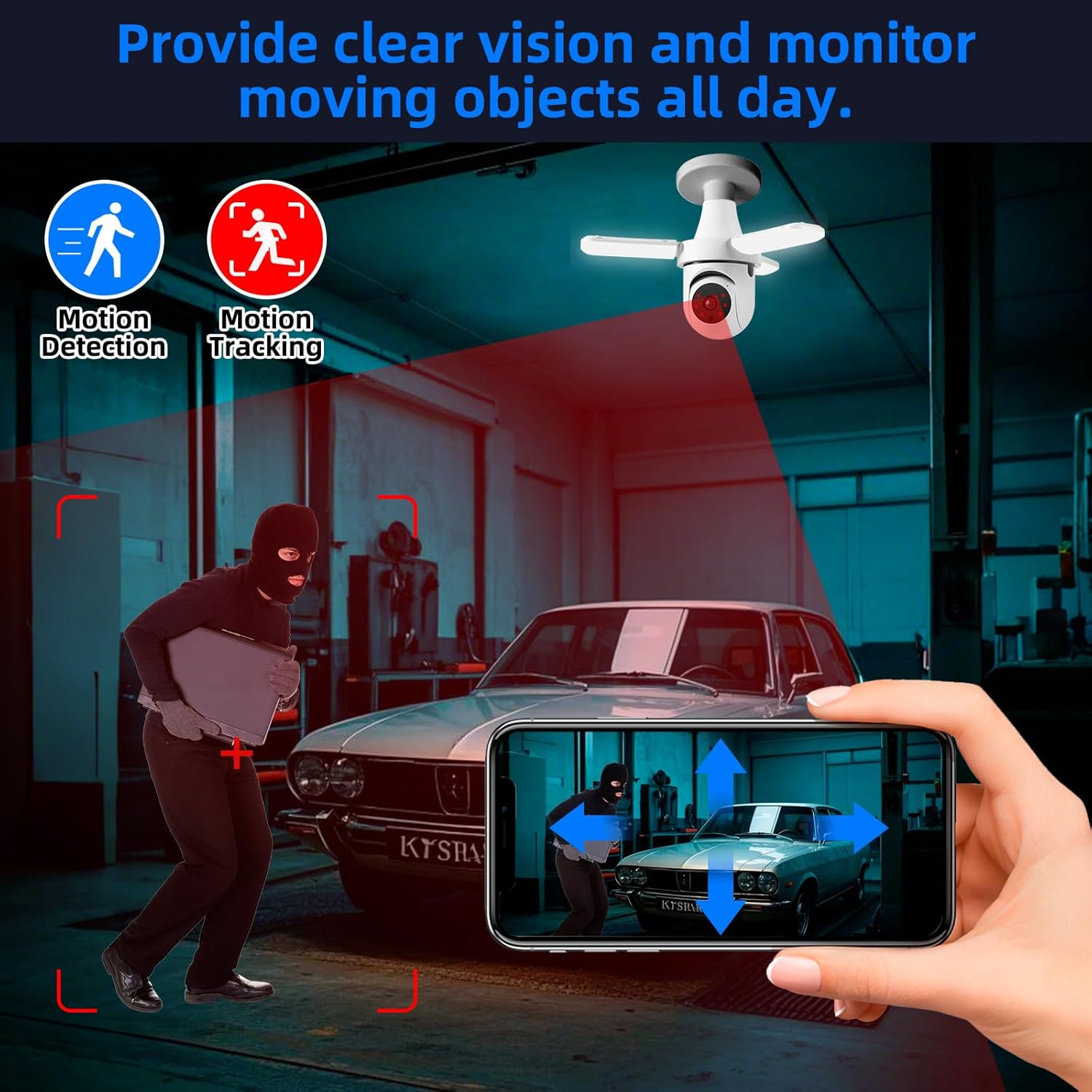
Figure 6: Motion detection and tracking in action.
4. Режими нічного бачення
Камера пропонує різноманітні можливості нічного бачення:
- Інфрачервоне (ІЧ) нічне бачення: Provides clear black-and-white video in complete darkness.
- Кольорове нічне бачення: When the integrated LED lights are activated (manually or by motion), the camera can capture full-color video even at night.
You can configure the night vision mode and LED light activation settings in the app.

Figure 7: Comparison of color and infrared night vision.
5. Керування світлодіодним світлом
The camera features powerful 30W LEDs providing 3000 lumens of illumination. You can control the light's brightness and on/off state via the AJCloud app. The light can also be set to activate upon motion detection.

Figure 8: Stepless adjustment of LED light brightness via app.
6. Зберігання та відтворення відео
The camera supports local storage via the included 128G TF card. Recorded footage can be accessed and played back directly through the AJCloud app. Cloud storage options may also be available through the app (subscription may be required).
7. Інтеграція з Alexa
The TOWODE Light Bulb Security Camera works with Alexa, allowing for voice control of certain functions. To enable this, link your AJCloud account with your Alexa app and discover devices. You can then use voice commands to view the camera feed on compatible Alexa-enabled devices with screens.
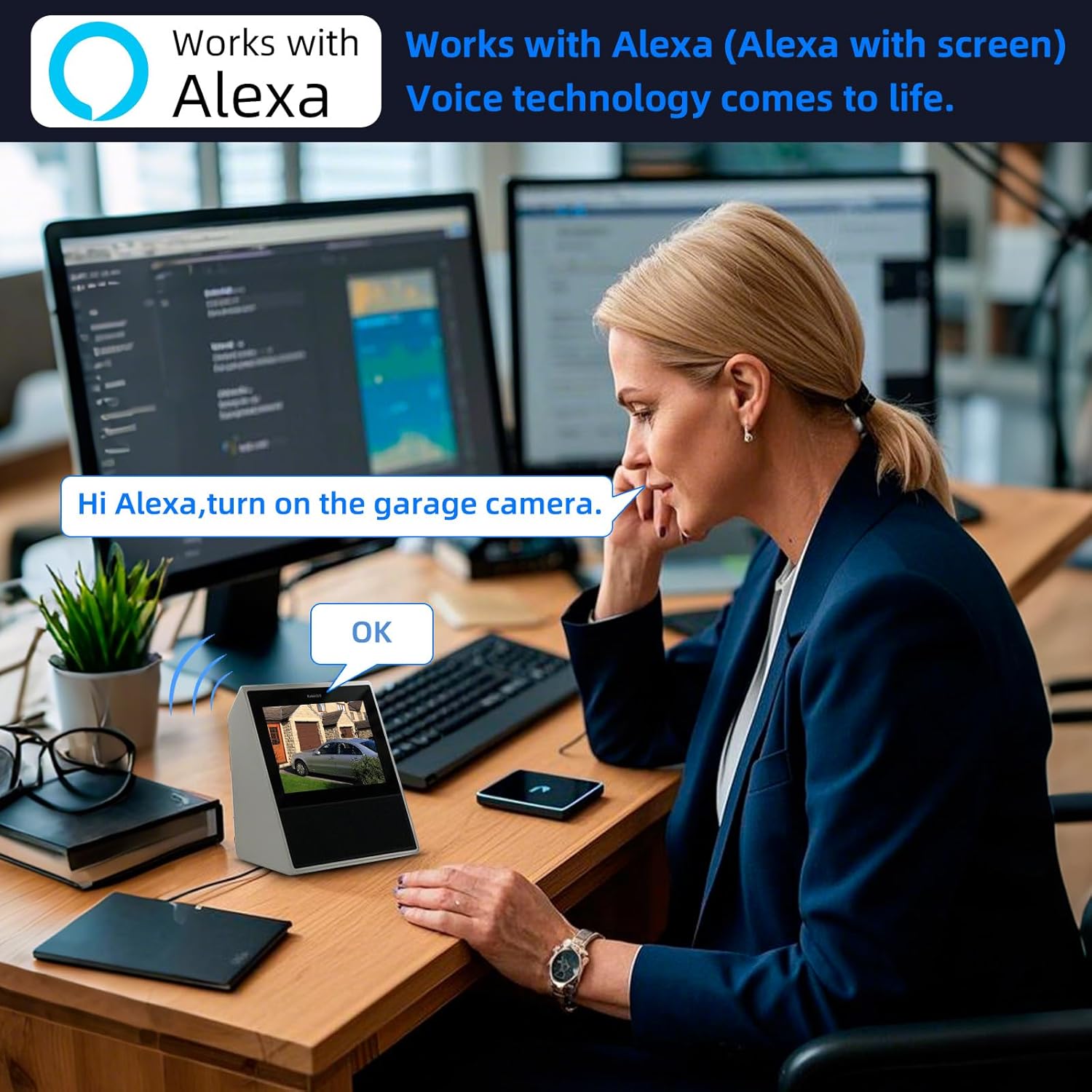
Figure 9: Alexa integration for voice control and viewінж.
Технічне обслуговування
- Прибирання: Обережно протріть об’єктив та корпус камери м’якою сухою тканиною. Не використовуйте агресивні хімікати або абразивні засоби для чищення.
- Оновлення прошивки: Regularly check the AJCloud app for available firmware updates to ensure optimal performance and security.
- Управління сховищем: Періодично переview записаний footage on the TF card and delete unnecessary files, щоб звільнити місце.
Усунення несправностей
| проблема | Можлива причина | Рішення |
|---|---|---|
| Камера не підключається до Wi-Fi. | Incorrect Wi-Fi password, weak signal, unsupported Wi-Fi band (5G only). | Double-check password. Move camera closer to router. Ensure your router supports 2.4G Wi-Fi (camera supports both 2.4G and 5G). Restart camera and router. |
| Ні в прямому ефірі view or black screen. | Camera offline, network issue, app glitch. | Check camera's power and Wi-Fi connection. Restart the app. Restart the camera. |
| Виявлення руху не працює. | Sensitivity too low, detection zone not set, notifications disabled. | Adjust motion sensitivity in app settings. Define detection zones. Enable push notifications for the app. |
| Погана якість зображення вночі. | Infrared mode active, insufficient ambient light for color night vision. | Ensure LED lights are on for color night vision. Clean the camera lens. |
| Проблеми з двостороннім аудіозв'язком. | Microphone/speaker blocked, volume settings, network latency. | Ensure nothing is obstructing the microphone or speaker. Check volume levels in the app and on your phone. Ensure stable network connection. |
Гарантія та підтримка
For warranty information, technical support, or service inquiries, please contact TOWODE customer support through the contact details provided on the product packaging or the official TOWODE webсайт. Зберігайте чек про покупку як підтвердження покупки для гарантійних претензій.
Додаткові плани захисту можуть бути доступні для придбання окремо, щоб розширити покриття понад стандартну гарантію виробника.
Пов'язані документи - SKHBA
 |
Smart Wi-Fi Camera User Manual - Connecting and Setup Guide Comprehensive user manual for the Smart Wi-Fi Camera, detailing setup, connection, troubleshooting, and technical specifications. Learn how to connect your camera using the TuyaSmart app and resolve common issues. |
 |
SUSIKUM 3MP E27 Bulb WIFI Camera User Manual & Specifications Technical specifications and safety information for the SUSIKUM 3MP E27 Bulb WIFI Camera, compatible with the V380 Pro app. |
 |
Застереження щодо застосунку Ctronics та посібник із підключення до застосунку CamHI Важливі запобіжні заходи щодо застосунку Ctronics, зокрема інструкції щодо завантаження застосунку CamHI та підключення камери через мережі Wi-Fi або 4G. Дізнайтеся, як підключити камеру Ctronics. |
 |
Imou Ranger 2 Pro 3MP Wi-Fi Pan & Tilt Camera Datasheet Technical specifications and features of the Imou Ranger 2 Pro 3MP, a 3MP 2K Wi-Fi pan and tilt security camera with human/pet detection, smart tracking, and cloud storage options. |
 |
CW-FL2512-3MP 2.5mm Wide Angle CS Mount Lens Specifications Technical specifications and dimensions for the CW-FL2512-3MP 3MP 2.5mm CS Mount surveillance lens, featuring a 155° field of view and IR correction. |
 |
Night Owl X Remote Viewing Guide - Setup and Usage Comprehensive guide to setting up and using the Night Owl X mobile application for remote viewing of your security camera system. Learn how to download, create an account, add devices, view live feeds, playback recordings, and manage notifications. |
Ask a question about this manual
Ask about setup, troubleshooting, compatibility, parts, safety, or missing instructions. Manuals+ will review the question and use this page’s manual context to help answer it.