
1. Продукт закінчивсяview
The TOWODE Light Bulb Security Camera (Model TAHEIS) is a versatile surveillance device designed for indoor use, primarily in areas like garages, homes, and offices. It features 3MP HD video, AI human detection, two-way audio, color night vision, and compatibility with Alexa. The camera is designed for easy installation into a standard E27 light socket.

Figure 1: Product components including the camera, mobile application interface, 64GB TF card, and power adapter.
Ключові характеристики:
- 3-мегапіксельне HD-відео: Provides clear 2K resolution video for detailed monitoring.
- Панорамування на 355° та нахил на 90°: Offers wide-angle viewing to cover large areas and reduce blind spots.
- Виявлення людини та відстеження руху за допомогою штучного інтелекту: Intelligently identifies human movement and tracks subjects.
- Двостороннє аудіо: Enables communication through the camera's built-in microphone and speaker.
- Кольорове нічне бачення: Utilizes LED lights for full-color video in low-light conditions, with an infrared option.
- Сумісність Alexa: Integrates with Alexa-enabled devices for voice control and viewінж.
- Локальне та хмарне сховище: Supports up to 64GB TF card (included) and optional cloud storage for video recording.
- 30W 3000 Lumens LED Lighting: Functions as an adjustable LED light source.
2. Налаштування та встановлення
Вміст упаковки:
- TOWODE Light Bulb Security Camera (Model TAHEIS)
- 64G TFcard
- Power Adapter (if applicable for non-E27 direct installation)
- Mounting Screws (if applicable for alternative mounting)
Фізична установка:
- Identify Installation Location: Choose an indoor E27 light socket in your desired monitoring area (e.g., garage, living room, basement). Ensure the socket is powered off before installation.
- Вставте TF-карту: Locate the SD card slot on the camera body. Gently insert the included 64GB TF card until it clicks into place.
- Прикрутіть камеру: Carefully screw the camera into the E27 light socket. Ensure it is securely fastened.
- Увімкнення: Turn on the power to the light socket. The camera will initiate its startup sequence.

Video 1: Demonstrates the location of the SD card slot and reset button on the camera.

Figure 2: Visual guide for screwing the camera into a standard E27 light socket for power and mounting.
Завантаження програми та підключення:
- Завантажити додаток: Scan the QR code in the product packaging or search for the 'AJCloud' app in your smartphone's app store (iOS/Android).
- Реєстрація облікового запису: Open the AJCloud app and follow the on-screen instructions to register a new account. This typically requires an email address and phone number.
- Додати пристрій: In the app, select 'Add Device' or the '+' icon. Choose 'Light Bulb Camera' from the device list.
- Підключіться до Wi-Fi: The app will guide you through connecting the camera to your Wi-Fi network. Ensure your Wi-Fi is 2.4GHz, as 5GHz networks may not be supported. Enter your Wi-Fi password when prompted.
- Сполучення: Follow the app's instructions for pairing. This may involve scanning a QR code displayed on your phone with the camera or listening for an audible prompt.
- Назва пристрою: Once paired, name your camera (e.g., "Garage Camera", "Living Room").
Video 2: Demonstrates the process of connecting the light bulb camera to the mobile application, including Wi-Fi setup and device pairing.
3. Інструкція з експлуатації
Жити View та контроль:
- Доступ до прямої трансляції: Open the AJCloud app and select your camera to view живе відео.
- Керування панорамуванням/нахилом: Use the on-screen joystick or swipe gestures to remotely control the camera's 355° pan and 90° tilt movements.
- Двостороннє аудіо: Торкніться значка мікрофона в додатку, щоб говорити через динамік камери, і слухати через її мікрофон.
- Контроль світла: The camera features a 30W LED light. Use the app to turn the light on/off and adjust its brightness (stepless adjustment).
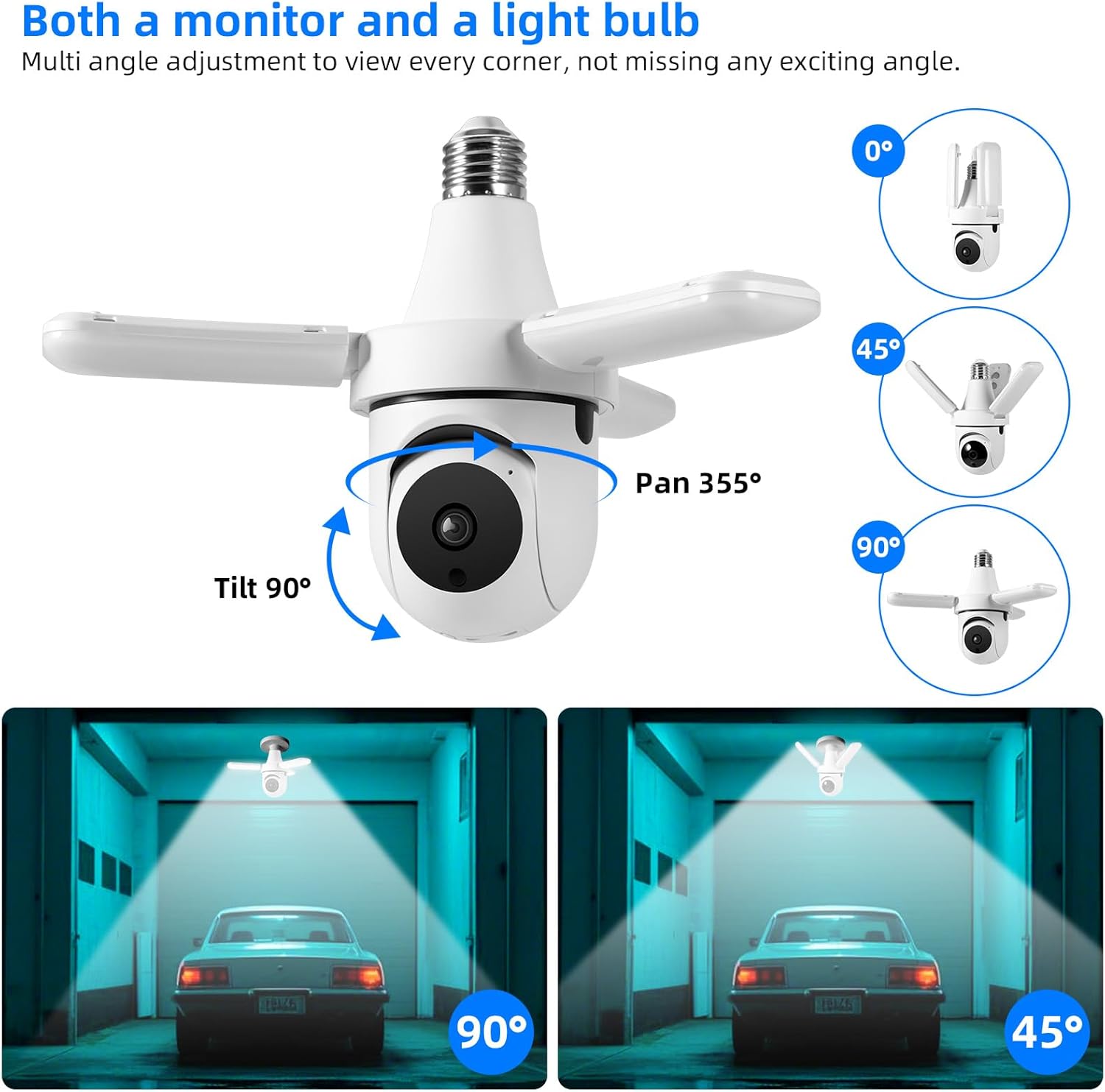
Figure 3: The camera offers extensive pan and tilt functionality to monitor a wide area.

Figure 4: Control the camera's integrated 30W LED light directly from the mobile application.
Recording and Alerts:
- Виявлення руху: The camera is equipped with AI human detection. When motion is detected, the camera can automatically track the subject and send alerts to your phone.
- Нічне бачення: The camera offers both color night vision (with LED lights on) and infrared night vision (LED lights off) for clear visibility in the dark.
- Зберігання відео: Recordings are saved to the installed 64GB TF card. You can review playback directly from the app. Cloud storage options may also be available through the app for an additional subscription.
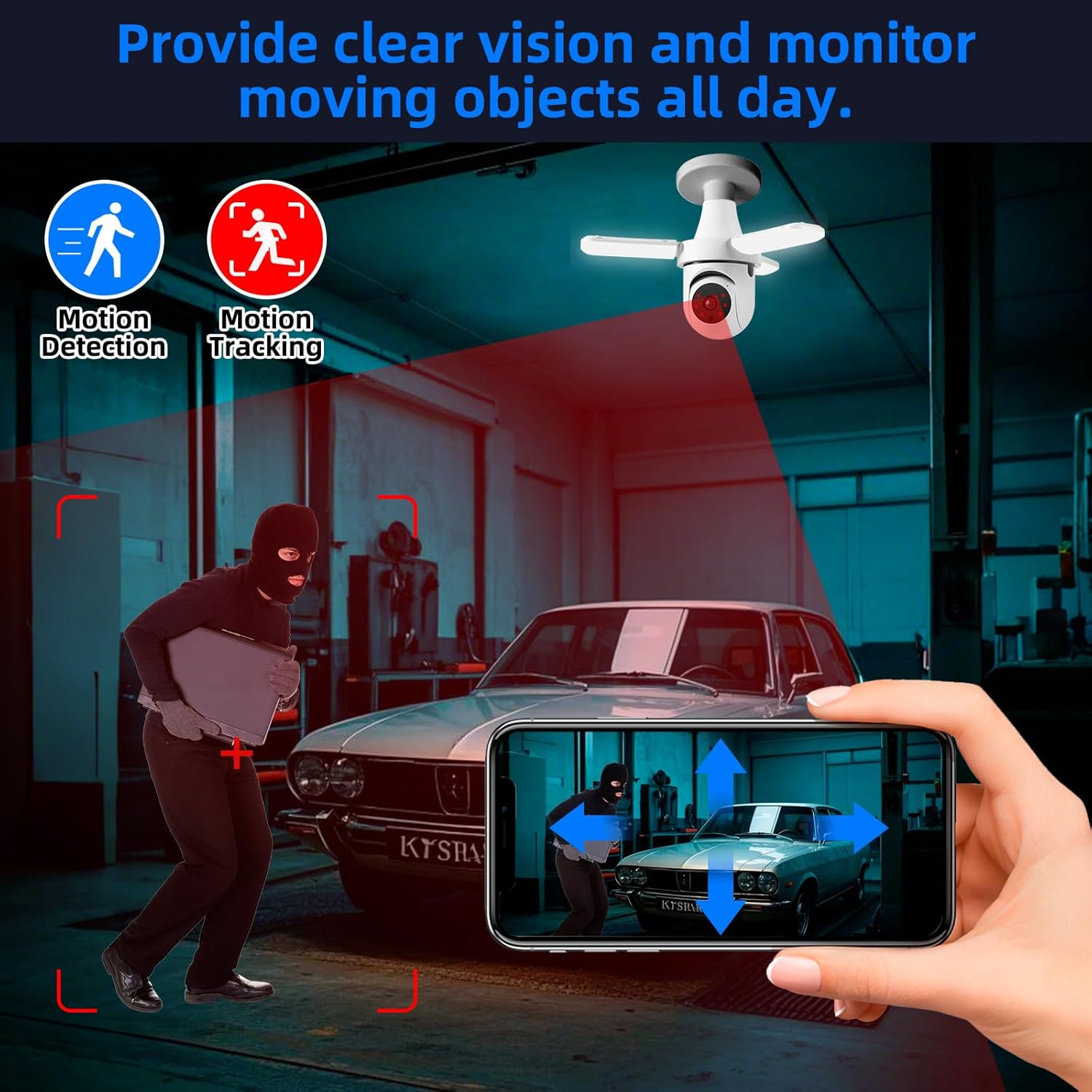
Figure 5: The camera's motion detection and tracking features provide real-time alerts and continuous monitoring.

Figure 6: Experience clear visibility day and night with 3MP HD video and color night vision capabilities.
Інтеграція розумного будинку:
- Сумісність Alexa: The camera is compatible with Alexa. Link your AJCloud account to your Alexa app to enable voice commands for viewing the camera feed on compatible Alexa devices with screens.
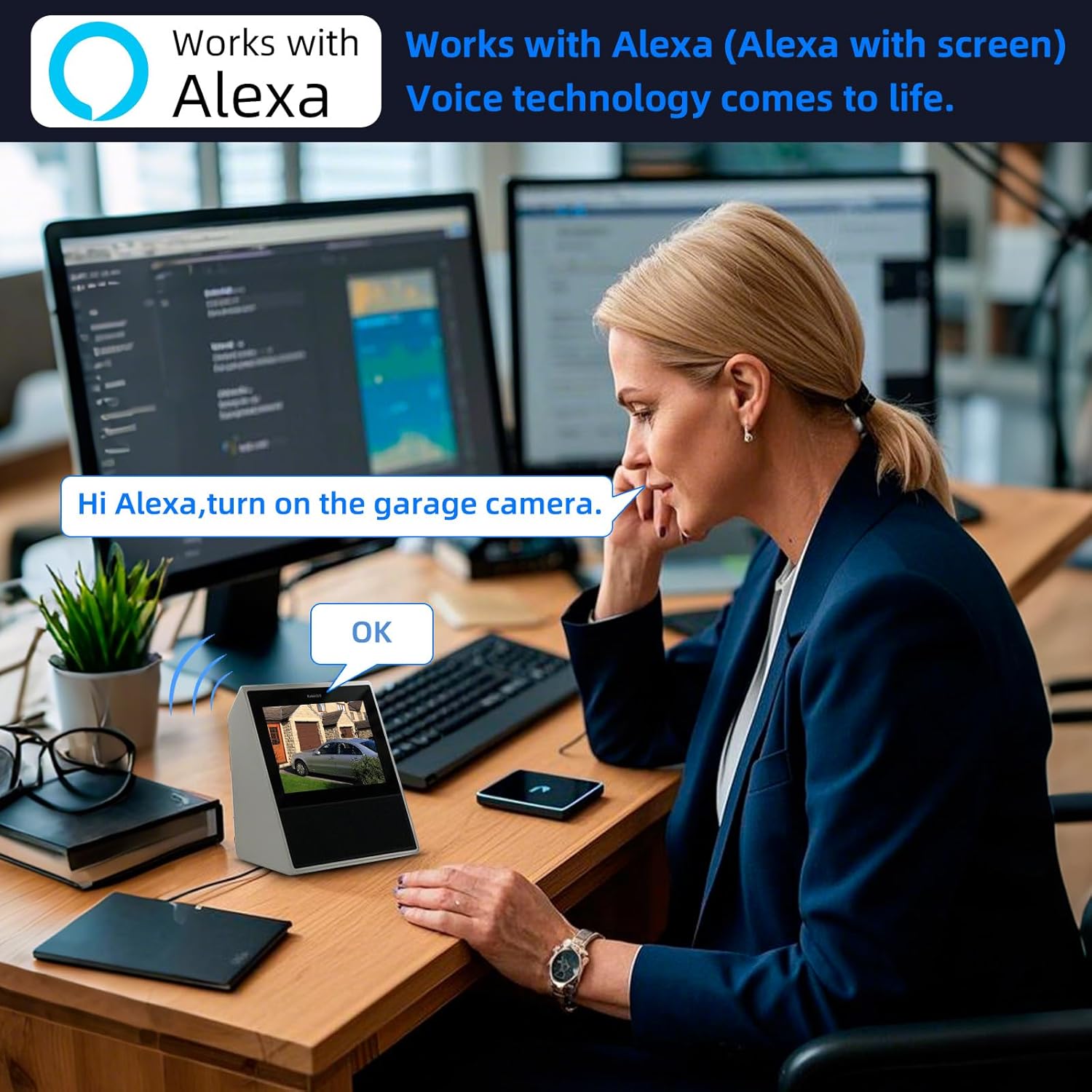
Figure 7: Control and view your camera feed using Alexa voice commands on compatible smart displays.
4. Технічне обслуговування
- Прибирання: Regularly wipe the camera lens and body with a soft, dry cloth to remove dust and smudges. Do not use harsh chemicals or abrasive cleaners.
- Керування TF-картами: Periodically check the TF card storage status in the app. Format the card if necessary to ensure continuous recording. Back up important footagе перед форматуванням.
- Оновлення прошивки: Check the AJCloud app regularly for available firmware updates. Keeping the firmware updated ensures optimal performance and security.
- Цикл живлення: If the camera experiences issues, try turning off the power to the light socket for a few seconds, then turning it back on to restart the device.
5. Вирішення проблем
- Камера не підключається до Wi-Fi:
- Переконайтеся, що ваша мережа Wi-Fi працює на частоті 2.4 ГГц. Камера не підтримує Wi-Fi 5 ГГц.
- Перевірте правильність пароля Wi-Fi.
- Check the camera's proximity to the Wi-Fi router for a strong signal.
- Perform a factory reset on the camera by pressing the reset button (often located near the SD card slot) for several seconds until you hear a prompt. Then, attempt to pair again.
- Сповіщення про відсутність руху:
- Check the motion detection settings in the AJCloud app. Ensure it is enabled and sensitivity is adjusted appropriately.
- Перевірте, чи сповіщення програм увімкнено на вашому смартфоні.
- No Recording/Playback Issues:
- Ensure the 64GB TF card is correctly inserted and not full. Format the card if needed (this will erase all data).
- If using cloud storage, verify your subscription is active.
- Погана якість відео:
- Перевірте силу сигналу Wi-Fi. Слабкий сигнал може вплинути на якість потокового відео.
- Переконайтеся, що об'єктив камери чистий і не має перешкод.
- Двосторонній аудіо не працює:
- Перевірте налаштування мікрофона та динаміків у додатку.
- Переконайтеся, що гучність вашого телефону підвищена, а додаток має дозволи на доступ до мікрофона.
6. Технічні характеристики
| Особливість | Специфікація |
|---|---|
| Назва моделі | TAHEIS |
| Ефективне вирішення проблеми | 3 Мп |
| Роздільна здатність захоплення відео | 2K |
| Viewкут нахилу | 360 градусів (панорамування 355°, нахил 90°) |
| Діапазон нічного бачення | 20 футів |
| Тип джерела світла | LED (30W, 3000 Lumens) |
| Технологія підключення | Бездротовий зв'язок (Wi-Fi 2.4 ГГц) |
| Сумісні пристрої | iOS, Smartphone, Alexa |
| Тип монтажу | Light Socket (E27) |
| Включені компоненти | 64G TFcard |
| Джерело живлення | Провідний електричний |
| Використання в приміщенні/зовні | закритий |
| матеріал | пластик |
| Розміри продукту | 6 x 3 x 3 дюймів |
| Вага товару | 11.7 унції |
7. Гарантія та підтримка
Інформація про гарантію: For detailed warranty terms and conditions, please refer to the product packaging or the official TOWODE webсайт. Зберігайте чек про покупку для гарантійних претензій.
Технічна підтримка: If you encounter any issues not covered in this manual or require further assistance, please contact TOWODE customer service through their official webсайт або платформа, де було придбано товар.