
Важливі інструкції з безпеки
Please read all instructions carefully before using this product and retain for future reference.
- Consult a physician before use if you have pre-existing medical conditions, are pregnant, have pacemakers, or any other health concerns.
- Не використовувати на набряклих, запалених або пошкоджених ділянках шкіри.
- Discontinue use immediately if you experience discomfort, pain, or adverse reactions.
- Тримайте пристрій у недоступному для дітей та домашніх тварин місці.
- Не занурюйте пристрій у воду та не використовуйте його в надмірно вологому середовищі.
- Use only the provided Type-C charging cable and a compatible 5V/2A adapter.
- This device is intended for temporary relief of minor muscle aches and to temporarily increase circulation to treated areas. It is not intended to diagnose, treat, cure, or prevent any disease or health condition.
Продукт закінченийview
The Comfytemp Air Compression Therapy Device K1006 is a cordless knee massager designed to provide soothing relief and improve circulation. It combines advanced air compression with heat therapy in a comfortable, ergonomic design.
Ключові характеристики:
- Advanced Air Compression Massage: Utilizes rhythmic inflation and deflation to gently apply pressure around the knee.
- Comprehensive Knee Therapy: Features 3 independent airbags targeting 7 specific massage zones for precise relief, combined with a soothing heat function.
- Бездротові та акумуляторні: Equipped with a built-in 2500mAh rechargeable battery, offering 90 to 150 minutes of use per charge. Charges via Type-C (5V/2A adapter).
- Adjustable for Perfect Fit: Dual adjustable straps ensure a snug, personalized fit for various knee sizes (upper circumference up to 24.4", lower up to 20.5").
- Ergonomic 3D Fit: The curved shape conforms to the knee's natural bend, optimizing contact and pressure distribution.
- Подвійна система управління: Operate using the intuitive buttons on the device or through a dedicated mobile application for more customized settings.
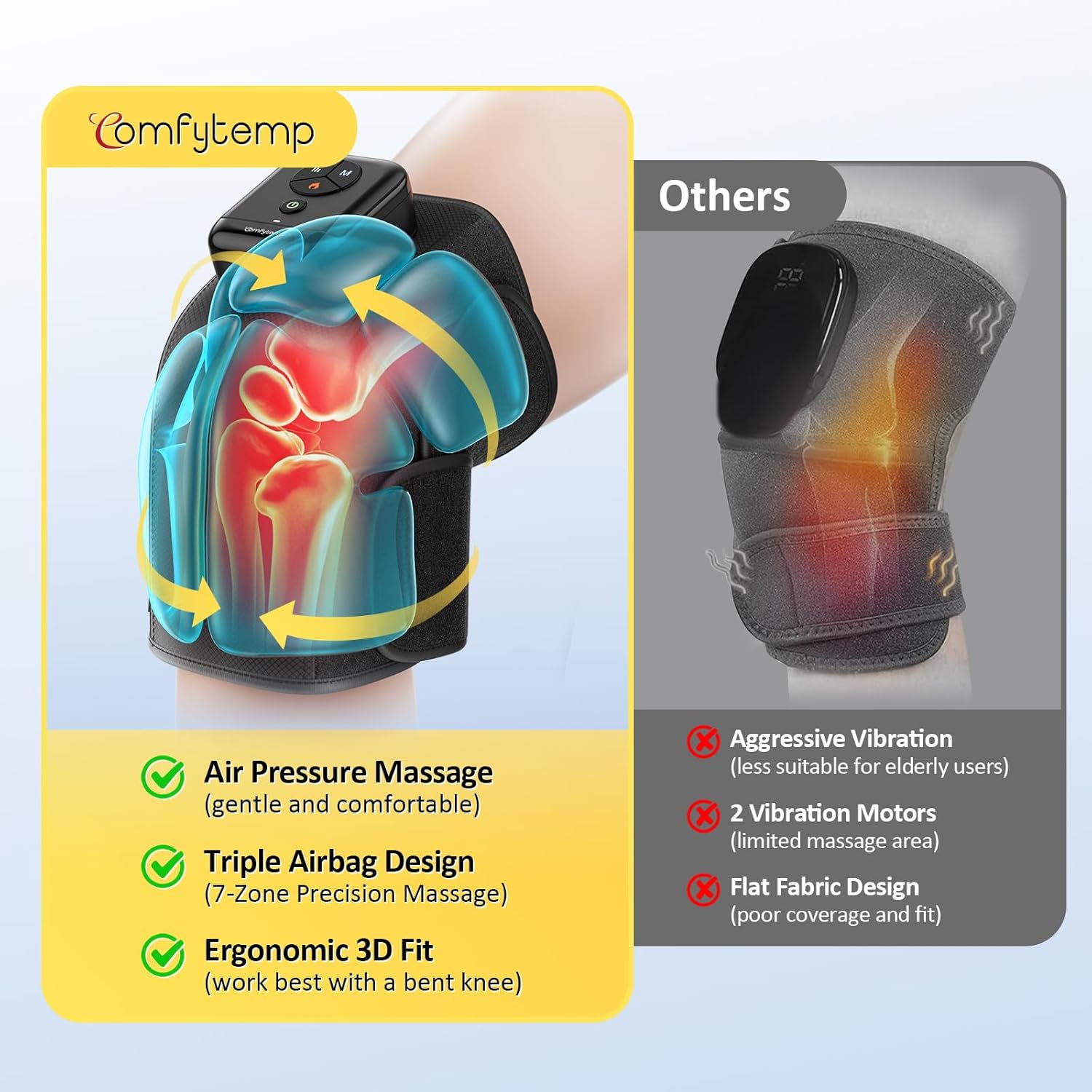
Image: The Comfytemp K1006 Air Compression Therapy Device, showcasinйого дизайн та панель керування.

Зображення: Оверview of the device's advanced features including cordless design, ergonomic fit, soothing heat, app control, 3-zone airbags, and extended use time.
Налаштування
- Зарядіть пристрій: Before first use, fully charge the device. Connect the provided Type-C charging cable to the device's charging port and plug the other end into a 5V/2A power adapter (not included). The charging indicator light will show charging status. A full charge typically takes about 2 hours.
- Розташування масажера: Place the massager around your knee, ensuring the main control unit is positioned comfortably on top of your knee.
- Закріпіть ремені:
- First, secure the upper strap around your thigh for a stable fit. Ensure the strap fabric is smooth and flat against your leg.
- Next, secure the lower strap around your calf, overlapping it on the upper strap for a firm hold.
- Adjust the dual straps to achieve a comfortable yet snug fit. If the pressure feels too strong during massage, slightly loosen the straps. If the pressure feels too weak, tighten the straps slightly for a better fit.
- Optimal Position for Use: For best results and enhanced effectiveness, use the massager while seated or reclining with your knee gently bent. A 90-degree bend is recommended, especially when using the heat function.
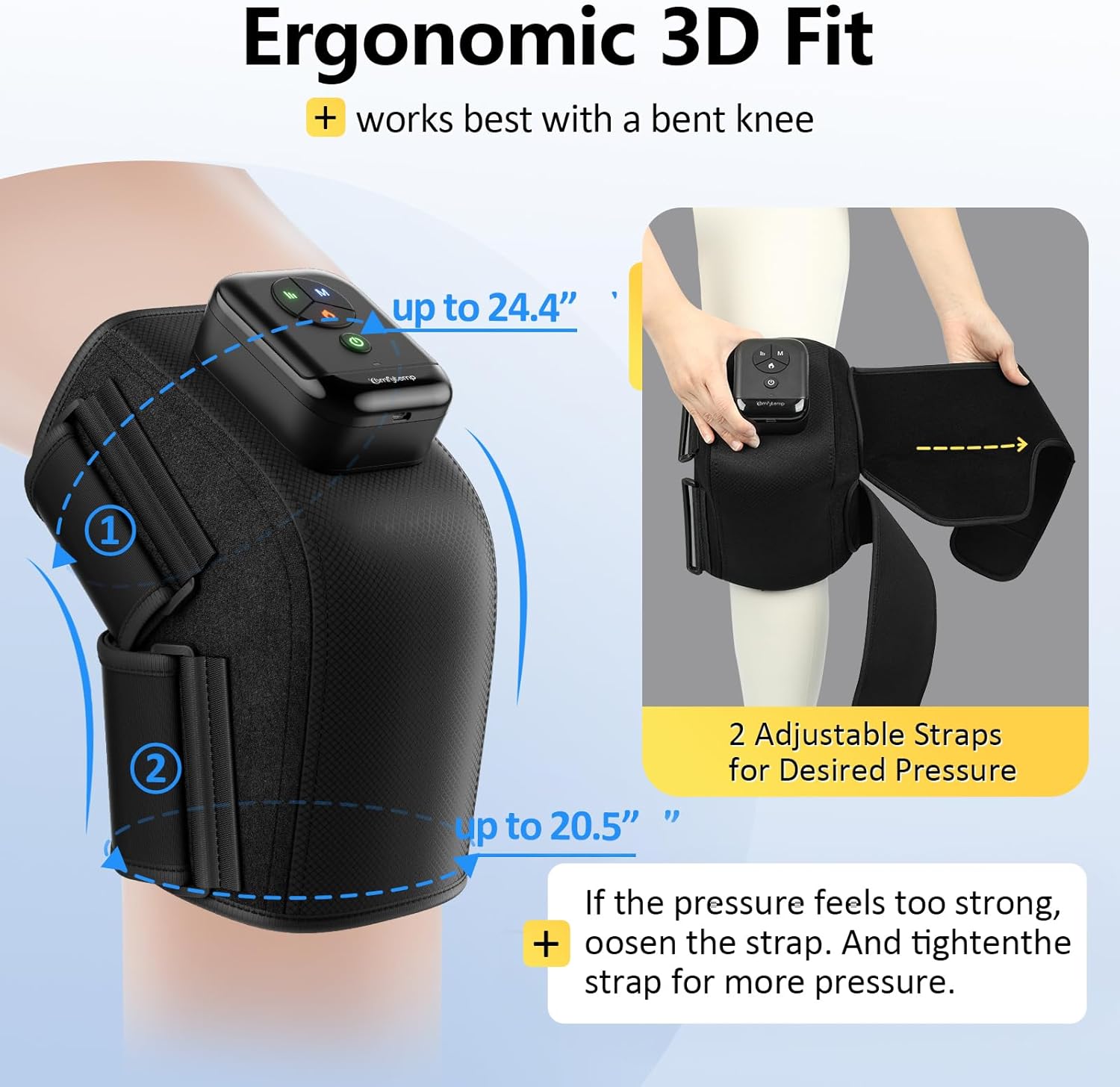
Image: The device demonstrating its ergonomic 3D fit and adjustable straps for a personalized and secure application on the knee.
Video: A demonstration of how to correctly position and secure the Comfytemp Cordless Knee Compression Massager with Heat on the knee for optimal comfort and effectiveness.
Інструкція з експлуатації
The Comfytemp K1006 offers both on-device button control and optional app control for a tailored massage experience.
Using On-Device Buttons:
- Увімкнення/вимкнення живлення: Натисніть і утримуйте Кнопка живлення (green circle icon) for 2-3 seconds to turn the device on or off. The indicator lights will illuminate when powered on.
- Виберіть режим масажу: Натисніть 'M' Button to cycle through the 3 available massage modes (e.g., Intensive, Relax, Comfort). Each mode offers a different compression pattern.
- Налаштування рівня інтенсивності: Натисніть Кнопка інтенсивності (three vertical lines icon) to select from 3 intensity levels (low, medium, high) for the air compression.
- Активація функції обігріву: Натисніть Кнопка тепла (flame icon) to turn on the soothing heat therapy. The heat indicator light will turn red. For a better heat experience, ensure your knee is bent to approximately 90 degrees.
Using App Control (Optional):
For advanced customization, including various DIY modes and additional timer settings, you can connect your device to the Comfytemp mobile application. Refer to the app's instructions for pairing and detailed usage. Please note that some users have reported initial challenges with app connectivity; ensure your device's Bluetooth is active and follow the app's pairing guide carefully.

Image: The dual control system, illustrating both the physical buttons on the device and the interface for app control.
Video: A comprehensive guide on operating the Comfytemp Cordless Knee Massager, demonstrating how to select modes, adjust intensity, and activate heat for a personalized experience.
Технічне обслуговування
Прибирання:
- Перед очищенням переконайтеся, що пристрій вимкнено та відключено від мережі.
- Протріть поверхню масажера м’якою, злегка втираною ганчіркоюamp тканина.
- Не використовуйте абразивні засоби для чищення, розчинники або агресивні хімікати, оскільки вони можуть пошкодити пристрій.
- Не занурюйте пристрій або будь-які його компоненти у воду.
Зберігання:
- Зберігайте пристрій у прохолодному сухому місці, коли він не використовується.
- Уникайте зберігання під прямими сонячними променями або в місцях з екстремальними температурами.
- Тримайте пристрій подалі від гострих предметів, щоб запобігти пошкодженню тканини або внутрішніх компонентів.
Усунення несправностей
If you encounter any issues with your Comfytemp K1006 device, please refer to the following common troubleshooting steps:
- Пристрій не включається: Переконайтеся, що пристрій повністю заряджений. Підключіть його до зарядного пристрою та зачекайте достатньо часу для заряджання.
- No compression or weak compression: Check that the straps are securely fastened and adjusted correctly around your knee. Ensure there are no kinks in the air tubes or any signs of air leakage.
- No heat or weak heat: Verify that the heat function is activated (red flame icon). For optimal heat sensation, ensure your knee is bent to approximately 90 degrees during use.
- Проблеми з підключенням до додатків: Ensure Bluetooth is enabled on your mobile device. Try restarting both the device and the app. If issues persist, consult the app's specific troubleshooting guide or reinstall the app.
- Uncomfortable pressure: Adjust the tightness of the straps. The device is designed to be used with a gently bent knee; using it on a straight leg may cause discomfort.
If these steps do not resolve the issue, please contact Comfytemp customer support for further assistance.
Технічні характеристики
| Особливість | Деталь |
|---|---|
| Номер моделі | K1006 |
| Розміри продукту | 2 x 1 x 3 дюймів |
| Вага товару | 1.61 фунта (0.73 кілограма) |
| Джерело живлення | Працює від батареї |
| Цільове використання частини тіла | коліно |
| Форма масажера | Масажний пояс |
| Переваги продукту | Pain Relief, Muscle Therapy |
| Бездротові | так |
| Тип матеріалу | Поліестер |
| Колір | чорний |
| Виробник | Shenzhen Yicai Health Technology Co., Ltd |
Гарантія та підтримка
The Comfytemp Air Compression Therapy Device K1006 comes with a standard manufacturer's warranty. For detailed information regarding warranty coverage, terms, and conditions, please refer to the warranty card included in your product packaging or visit the official Comfytemp webсайт.
For any product-related inquiries, technical support, or assistance with troubleshooting, please contact Comfytemp customer service. Contact details can typically be found on the product packaging, the official webсайті або в мобільному додатку.