
вступ
Thank you for choosing the Irfora Multifunction Bamboo 12-Digit Calculator. This eco-friendly calculator combines classic design with modern functionality, featuring a durable bamboo casing and dual power source. This manual provides essential information for setting up, operating, and maintaining your calculator to ensure optimal performance.

Малюнок 1: Спереду view of the Irfora Bamboo Calculator, showcasing its natural bamboo finish and large LCD display.
1. Налаштування
1.1 Розпакування
Carefully remove the calculator from its packaging. Inspect the device for any signs of damage. Retain the packaging for future storage or transport.
1.2 Увімкнення
The calculator features a dual power system: solar and button battery. It automatically switches between power sources for efficient operation.
- Сонячна енергія: Place the calculator in a well-lit area. The solar panel will convert light into energy, powering the device.
- Потужність батареї: In low-light conditions, the calculator will automatically switch to button battery power.
- Щоб увімкнути калькулятор, натисніть кнопку ON/C/CE or AC ключ.

Рисунок 2: Кутовий view of the Irfora Bamboo Calculator, showing the solar panel and LCD display.
2. Інструкція з експлуатації
The calculator features 29 large, comfortable keys with carved numbers that are designed not to fade over time.
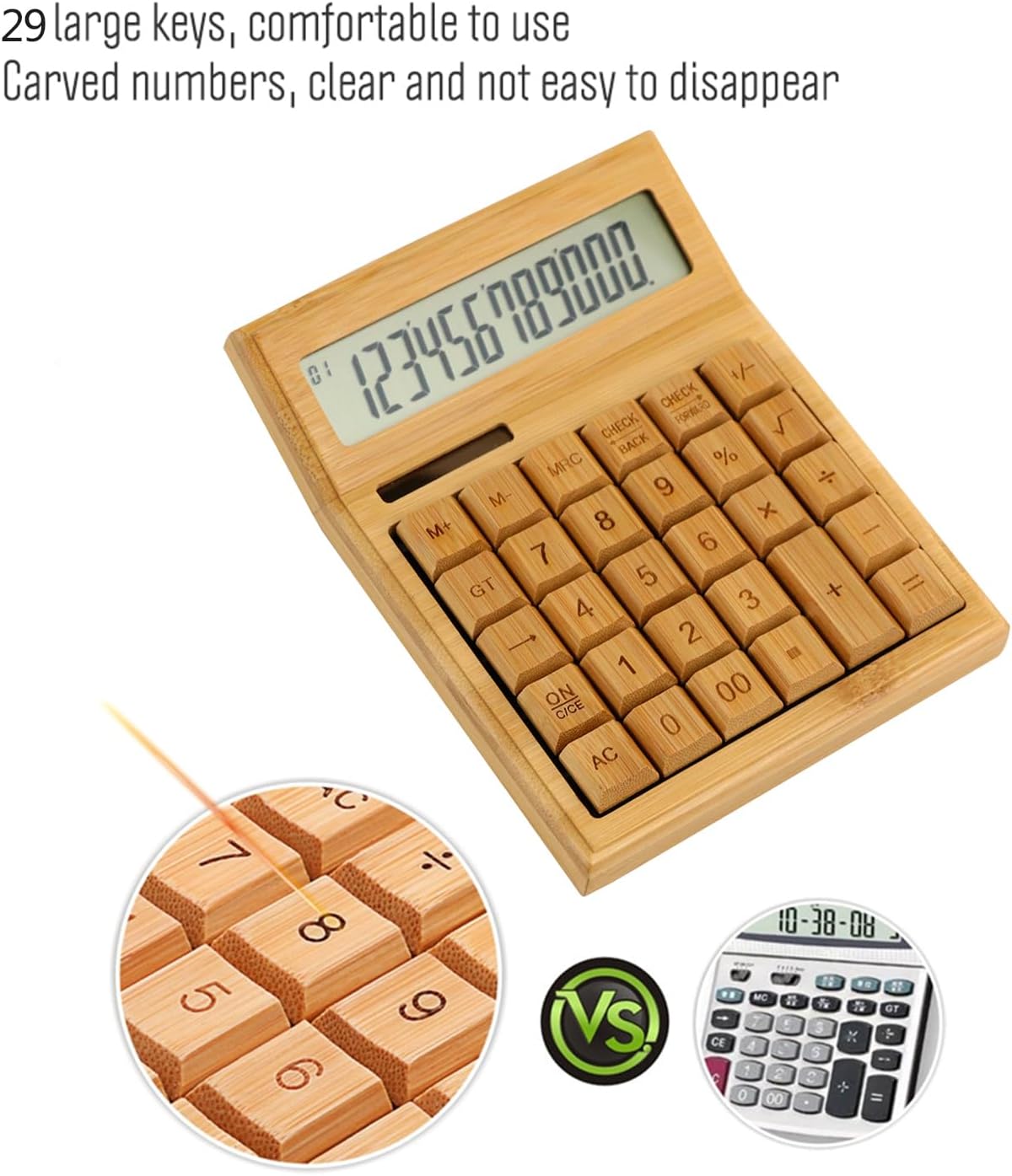
Малюнок 3: Збільшений план view highlighting the large, carved bamboo keys for comfortable and durable use.
2.1 Основні арифметичні операції
Perform standard calculations using the following keys:
- + (доповнення)
- - (віднімання)
- × (Множення)
- ÷ (Division)
- = (Дорівнює)
2.2 Функції пам'яті
The calculator includes memory functions for complex calculations:
- M+Додає відображене значення до пам'яті.
- M-: Віднімає відображене значення з пам'яті.
- MRC: Recalls the memory value. Pressing twice clears the memory.
2.3 Спеціальні функції
- % (Процентtage): Calculates percentagес.
- √ (Square Root): Calculates the square root of the displayed number.
- +/- (Sign Change): Changes the sign of the displayed number (positive to negative, or vice versa).
- AC (All Clear): Clears all entries and memory.
- ON/C/CE (On/Clear Entry): Turns on the calculator. When on, clears the last entry. Pressing twice clears all entries.

Figure 4: A hand demonstrating the use of the calculator for daily tasks.
2.4 Автоматичне вимкнення
To conserve energy, the calculator will automatically power off after approximately 12 minutes of inactivity. Press ON/C/CE or AC щоб увімкнути його знову.
3. Технічне обслуговування
3.1 Очищення
Щоб очистити калькулятор, обережно протріть його поверхню м’якою сухою тканиною. Для видалення стійкого бруду злегкаamp Можна використовувати тканину, але переконайтеся, що волога не потрапляє всередину пристрою. Уникайте використання агресивних хімікатів або абразивних засобів для чищення.
3.2 Зберігання
Store the calculator in a cool, dry place away from direct sunlight and extreme temperatures. Prolonged exposure to direct sunlight can affect the bamboo finish.
3.3 Заміна батареї
The calculator uses a button battery (type not specified, typically AG10 or LR1130). If the display becomes dim or unresponsive in low light, the battery may need replacement. Consult a qualified technician or refer to the product packaging for specific battery type and replacement instructions. Improper battery replacement can damage the device.
4. Вирішення проблем
| проблема | Можлива причина | Рішення |
|---|---|---|
| Дисплей порожній або тьмяний. | Недостатньо світла для сонячної енергії або низький заряд батареї. | Move the calculator to a brighter area. If the problem persists, the button battery may need replacement. |
| Калькулятор не вмикається. | No power, or device is in auto-off mode. | Ensure adequate light for solar power. Press ON/C/CE or AC. If still unresponsive, replace the button battery. |
| Неправильні результати розрахунків. | Incorrect key input, or temporary internal error. | Прес AC to clear all entries and restart the calculation. Double-check your input. |
5. Технічні характеристики
- Бренд: Ірфора
- модель: LAKJPOS0867
- Дисплей: 12-розрядний великий РК-дисплей
- Джерело живлення: Dual Power (Solar & Button Battery)
- Ключі: 29 Bamboo Keys with Carved Numbers
- функції: Basic Arithmetic, Square Root, Percentage, Memory (M+, M-, MRC), Sign Change
- Автоматичне вимкнення: Приблизно 12 хвилин бездіяльності
- Розміри продукту: 19 x 14 x 4 см (приблизно 7.5 x 5.5 x 1.6 дюймів)
- Вага продукту: 295 г (приблизно 0.65 фунта)
6. Гарантія та підтримка
For warranty information and customer support, please refer to the documentation included with your purchase or contact your retailer. Keep your proof of purchase for any warranty claims.
Для отримання додаткової допомоги, будь ласка, відвідайте Irfora brand page on Amazon.co.jp.