
1. Вступ
This manual provides detailed instructions for the CRKD NEO S Controller Purple Wave, Model 24-NS-FC. This versatile controller is designed for an immersive gaming experience across multiple platforms, including PC, iPhone, iPad, Android, Nintendo Switch/Switch 2, and Smart TV. It features a detachable 5-fret attachment, Hall Effect thumbsticks, and customizable controls via the CRKD Companion app.
Що входить до комплекту:
- CRKD NEO S Purple Wave Edition Controller
- 5-Fret Guitar Grip Attachment
- Microfiber String Bag
- Velcro Wrist Strap
- Зарядний кабель від USB-C до USB-A
2. Інформація про безпеку
Please read all safety instructions before using the CRKD NEO S Controller. Failure to follow these instructions may result in injury or damage to the device.
- Do not expose the controller to extreme temperatures, direct sunlight, or high humidity.
- Уникайте падіння або сильних ударів контролера.
- Не намагайтеся розбирати або модифікувати контролер. Це призведе до анулювання гарантії.
- Зберігайте контролер та його аксесуари у недоступному для маленьких дітей місці.
- Use only the provided USB-C to USB-A cable for charging.
- If the controller becomes hot, emits smoke, or shows any signs of malfunction, discontinue use immediately and contact support.
3. Продукт закінчивсяview
Familiarize yourself with the components and features of your CRKD NEO S Controller.

Малюнок 3.1: Спереду view of the CRKD NEO S Controller Purple Wave, showing the D-pad, action buttons, Hall Effect thumbsticks, and central function buttons.
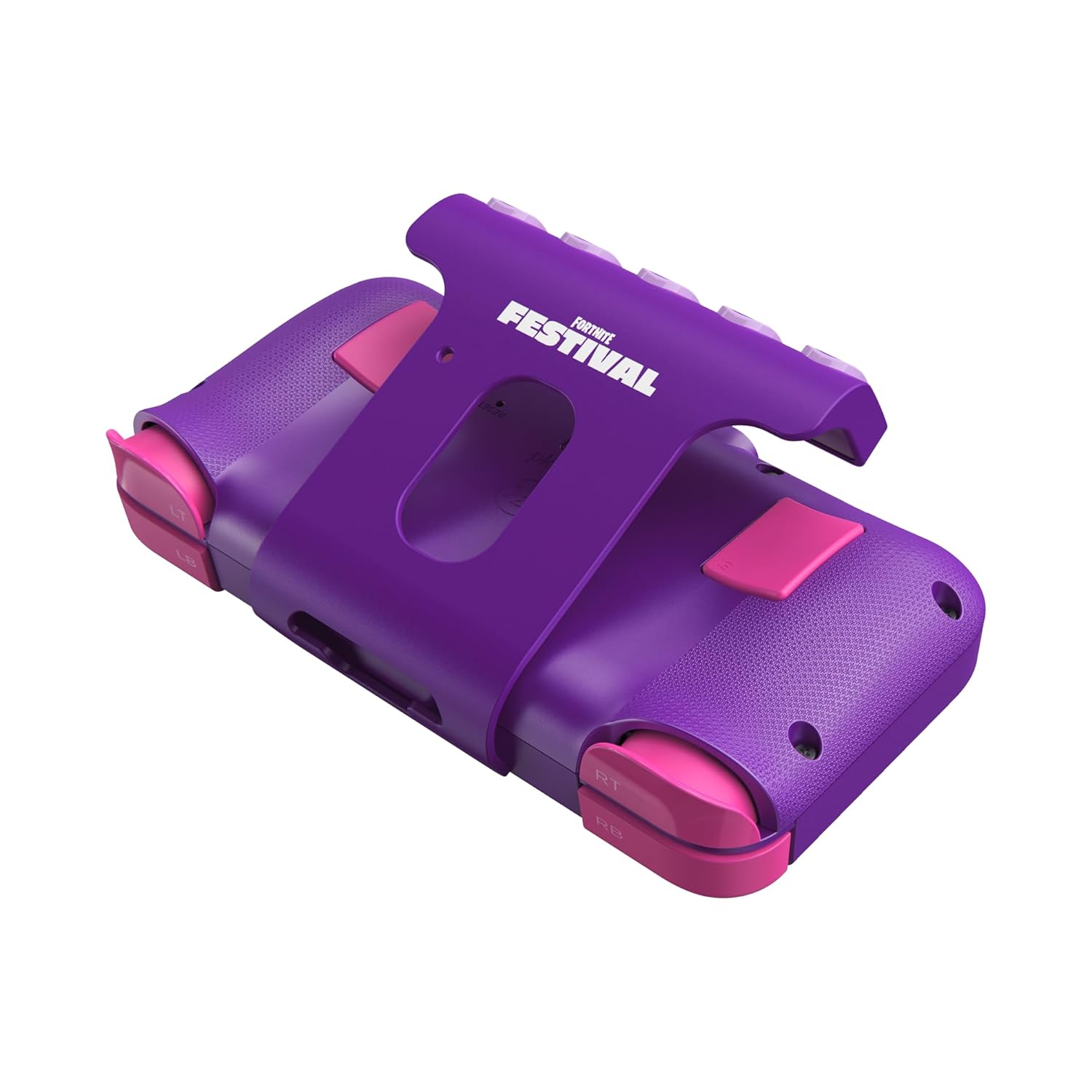
Малюнок 3.2: Задня частина view of the CRKD NEO S Controller with the 5-fret guitar grip attachment installed, highlighting the shoulder buttons and back paddles.

Figure 3.3: The CRKD NEO S Controller being held, demonstrating its ergonomic design and compact size.
Ключові характеристики:
- Hall Effect Thumbsticks: Provides zero stick drift and precise control.
- Ергономічний дизайн: Comfortable for extended gaming sessions.
- Бездротове підключення Bluetooth: Seamless pairing with various devices.
- Дротове підключення: Optional USB-C wired mode for low-latency gaming.
- No Deadzone Mode: Enhances thumbstick responsiveness.
- Swappable Stick Tops: Customize the feel of your thumbsticks.
- Adjustable Trigger Actuation Points: Точне налаштування чутливості тригера.
- Регульована вібрація: Customize haptic feedback.
- Re-mappable Back Buttons: Assign single inputs or sequences for added versatility.
- Елементи управління рухом: Supported for Nintendo Switch only.
- Rumble Support: Provides immersive feedback.
- Турбофункція: Enables rapid input for specific buttons.
- CRKD Companion App: Connects to the app for advanced customization and firmware updates.
4. Налаштування
4.1 Початкове заряджання
Before first use, fully charge your CRKD NEO S Controller. Connect the provided USB-C to USB-A charging cable to the controller's USB-C port and the other end to a compatible USB-A power source (e.g., computer, wall adapter).
4.2 Attaching the 5-Fret Guitar Grip
The 5-fret attachment is designed for rhythm games like Fortnite Festival. To attach:
- Align the attachment with the bottom edge of the controller.
- Gently slide the attachment onto the controller until it clicks securely into place.
To detach, press the release buttons (if present) or gently slide the attachment off.

Figure 4.2.1: The 5-fret attachment connected to the CRKD NEO S Controller.
4.3 Бездротове сполучення
The CRKD NEO S Controller supports Bluetooth wireless connectivity. Follow these steps to pair with your device:
- Nintendo Switch: Go to 'Controllers' > 'Change Grip/Order' on your Switch. Press and hold the Home button on the NEO S Controller for several seconds until the indicator lights flash, then release. The controller will appear on the Switch screen.
- PC (Windows), Android, Steam Deck, Legion Go, Rog Ally: Ensure Bluetooth is enabled on your device. On the NEO S Controller, press and hold the Home button and the Up directional button simultaneously for several seconds until the indicator lights flash rapidly. This puts the controller into Xbox/PC pairing mode. Select 'CRKD NEO S' from your device's Bluetooth settings.
- iPhone/iPad: Ensure Bluetooth is enabled on your iOS device. Press and hold the Home button on the NEO S Controller for several seconds until the indicator lights flash. Select 'CRKD NEO S' from your device's Bluetooth settings.
- Smart TV: Refer to your Smart TV's manual for Bluetooth pairing instructions. Generally, enable Bluetooth on the TV and put the controller into the appropriate pairing mode (Home button for general Bluetooth, Home + Up for Xbox/PC mode if supported).

Figure 4.3.1: Illustration of the wireless connection capability of the CRKD NEO S Controller.
5. Інструкція з експлуатації
5.1 Основні елементи керування
The CRKD NEO S Controller features standard gaming controls:
- D-Pad: Спрямований вхід.
- Кнопки дій (A, B, X, Y): Primary game actions.
- палички: Analog input for movement and camera control.
- Плечові кнопки (LB, RB) та тригери (LT, RT): Secondary actions and analog input.
- Кнопки «Назад»: Programmable for custom inputs.
5.2 Using the 5-Fret Attachment
When the 5-fret attachment is connected, it functions as dedicated input for rhythm games. The five frets correspond to specific notes or actions within compatible games. Ensure the attachment is securely connected for optimal performance.

Рисунок 5.2.1: Крупний план view of the 5-fret attachment, showing the individual fret buttons.
5.3 CRKD Companion App
The CRKD Companion app (available for mobile devices) allows for advanced customization and management of your controller. Features include:
- Перепризначення кнопок: Customize the function of any button, including the back buttons.
- Trigger Sensitivity Adjustment: Fine-tune the actuation points of the LT/RT triggers.
- Thumbstick Deadzone Adjustment: Optimize thumbstick responsiveness.
- Інтенсивність вібрації: Adjust rumble feedback.
- Оновлення прошивки: Keep your controller's software up-to-date.
- Реєстрація товару: Register your controller and view its unique product number and rarity ranking.

Figure 5.3.1: The CRKD CTRL Dashboard within the companion app, showing various customization options.

Figure 5.3.2: The 'Configure Attachment' screen in the CRKD Companion app, allowing customization of the 5-fret attachment buttons.

Figure 5.3.3: Adjusting trigger sensitivity within the CRKD Companion app.

Figure 5.3.4: The 'Deadzone Adjustment' interface for thumbsticks in the CRKD Companion app.
6. Технічне обслуговування
6.1 Очищення
Для очищення контролера використовуйте м’яку суху тканину. Для стійкого бруду злегкаampen the cloth with water. Do not use harsh chemicals, solvents, or abrasive cleaners, as these can damage the controller's finish or internal components.
6.2 Зберігання
Store the controller in a cool, dry place away from direct sunlight and extreme temperatures. Use the provided microfiber string bag for protection when not in use or during transport.
7. Вирішення проблем
If you encounter issues with your CRKD NEO S Controller, refer to the following common solutions:
| проблема | Можливе рішення |
|---|---|
| Контролер не включається. | Переконайтеся, що контролер повністю заряджений. Підключіть його до джерела живлення за допомогою кабелю USB-C. |
| Не вдається підключитися через Bluetooth. |
|
| Buttons or thumbsticks are unresponsive. |
|
| 5-Fret attachment not working correctly. | Ensure the attachment is securely connected. Check the CRKD Companion app for specific settings related to the attachment. |
| Контролер часто відключається. |
|
8. Технічні характеристики
| Особливість | Деталь |
|---|---|
| Номер моделі | 24-NS-FC |
| Підключення | Bluetooth Wireless, USB-C Wired |
| Сумісність | PC, iPhone, iPad, Android, Nintendo Switch/Switch 2, Smart TV |
| Великі палички | Датчики на ефекті Холла |
| Акумулятор | 1 батарея LR44 (у комплекті) |
| Розміри | 8.86 x 5.63 x 2.24 дюйми (приблизно) |
| вага | 1.04 фунти (приблизно) |
| Виробник | CRKD |
9. Гарантія та підтримка
For warranty information, technical support, or further assistance, please visit the official CRKD webсайт або зверніться до служби підтримки клієнтів. Зберігайте чек про покупку для гарантійних випадків.
CRKD Official Webсайт: Visit the CRKD Store on Amazon