
1. Вступ
Thank you for choosing the Inskam 451 Handheld Endoscope. This device is designed for visual inspection in hard-to-reach areas, offering clear imaging and ease of use. Please read this manual carefully before operating the device to ensure proper usage and to maximize its lifespan.
Ключові характеристики:
- 4.5-дюймовий IPS-екран: Provides instant, high-definition viewing of images and videos.
- 720p Camera: Captures clear visuals for detailed inspection.
- 5-meter Rigid Cable: Allows access to deep or distant areas.
- Водонепроникна камера IP67: Suitable for use in wet or submerged environments.
- 6 регульованих світлодіодних ліхтарів: Illuminates dark inspection areas.
- Акумулятор 2000 мАг: Забезпечує подовжений час роботи.
- Вбудована підставка: Frees your hands for easier operation.
2. Продукт закінчивсяview та зміст пакету
Familiarize yourself with the components of your Inskam 451 Endoscope.

малюнок 2.1: The Inskam 451 Handheld Endoscope, showing the main display unit and the attached flexible camera cable with its LED-equipped lens.
Вміст упаковки:
- 1 x Inskam 451 Handheld Endoscope Unit
- 1 x Lens Cable (5-meter rigid cable)
- 1 x USB кабель зарядки типу C
3. Налаштування
3.1 Зарядка пристрою
Before first use, fully charge the endoscope. Connect the provided USB Type-C charging cable to the device's charging port and a suitable USB power adapter (not included).

малюнок 3.1: The endoscope features a 2000mAh battery, providing approximately 3 hours of use on a full charge, with a charging time of about 2 hours.
3.2 Inserting TF Card (Optional)
To save images and videos, insert a Micro SD (TF) card (up to 32GB, not included) into the designated TF card slot on the side of the device. Ensure the device is powered off before inserting or removing the card.

малюнок 3.2: Detail showing the USB Type-C charging port and the hidden TF card slot, covered by a silicone flap for protection.
3.3 Attaching the Lens Cable
Connect the rigid lens cable to the main unit. Ensure it clicks securely into place. The cable is detachable for easy storage and replacement.
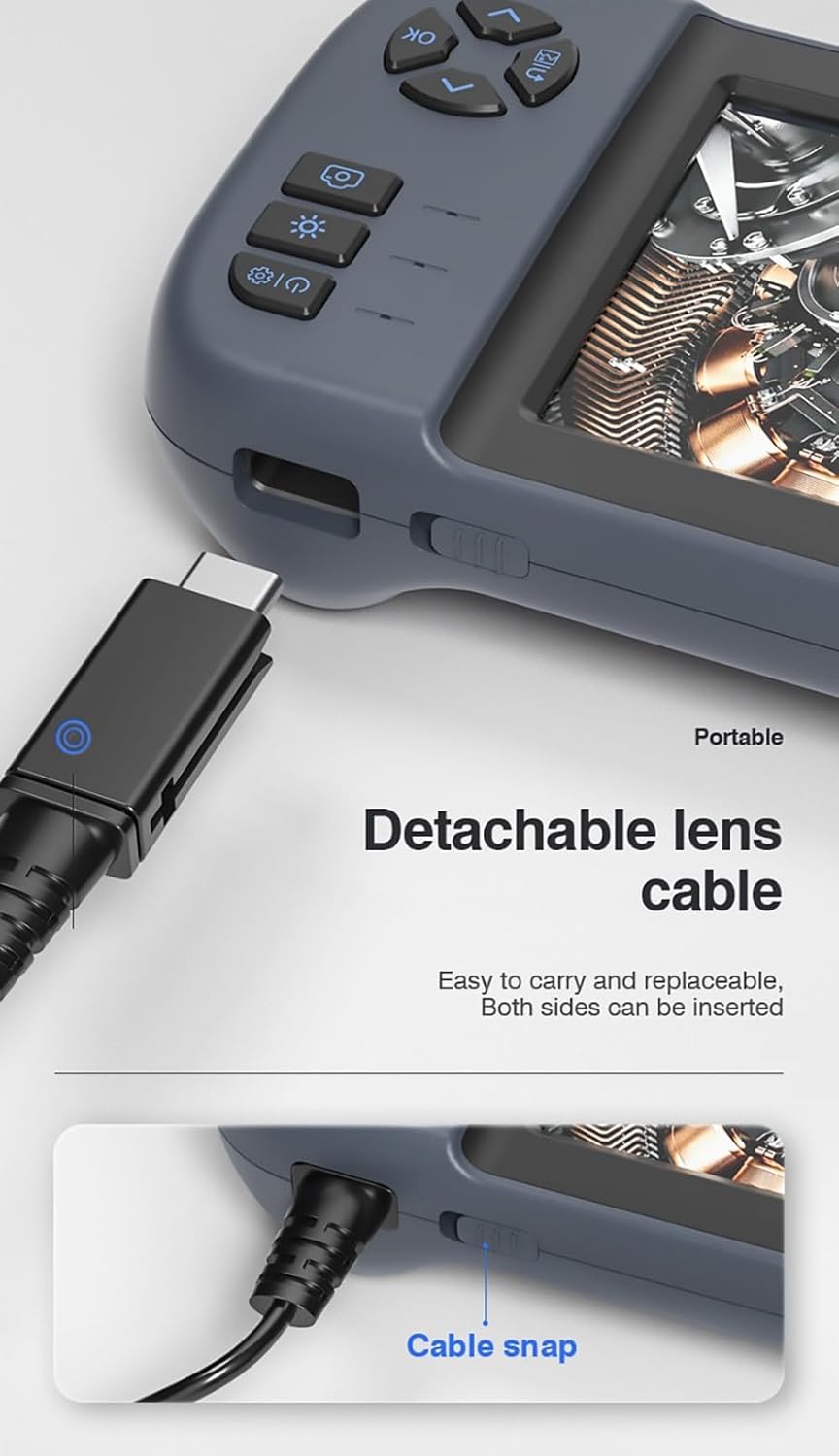
малюнок 3.3: The detachable lens cable, designed for easy connection and removal. Both sides of the connector can be inserted.
3.4 Використання вбудованої підставки
The Inskam 451 features a built-in bracket on the back, allowing it to stand upright on a flat surface. This frees your hands during inspection tasks.

малюнок 3.4: The integrated bracket on the back of the device, which can be extended to allow the endoscope to stand on a desktop.
4. Інструкція з експлуатації
4.1 Увімкнення/вимкнення
Press and hold the power button (usually marked with ⑂) to turn the device on or off. The IPS screen will illuminate upon startup.

малюнок 4.1: The 4.5-inch IPS HD screen provides vivid colors and a wide viewing angle for clear inspection.
4.2 Регулювання яскравості світлодіодів
The camera head is equipped with 6 adjustable LED lights. Use the dedicated brightness control button (often marked with an asterisk or light icon) to cycle through different brightness levels or turn the lights off.

малюнок 4.2: The IP67 waterproof camera head with 6 adjustable LED lights, suitable for harsh environments including submerged conditions.
4.3 Capturing Images and Recording Videos
Once the device is powered on and the camera is positioned, use the dedicated buttons to capture still images or start/stop video recording. Refer to the on-screen icons for current mode (photo/video).
4.4 Viewмедіа
Navigate to the playback mode using the menu buttons to review captured images and videos stored on the TF card. You can scroll through files and play videos directly on the screen.
5. Технічне обслуговування
5.1 Очищення об'єктива та екрана
Gently wipe the camera lens and the IPS screen with a soft, lint-free cloth. For stubborn smudges, a small amount of lens cleaning solution can be applied to the cloth (not directly to the lens/screen).
5.2 Догляд за акумулятором
Щоб продовжити термін служби акумулятора, уникайте частого повного розряджання акумулятора. Регулярно заряджайте пристрій, навіть якщо він не використовується протягом тривалого часу (наприклад, раз на 3 місяці).
5.3 Зберігання
Store the endoscope in a cool, dry place, away from direct sunlight and extreme temperatures. Ensure the lens cable is neatly coiled without sharp bends.
5.4 Застереження щодо водонепроникності
While the camera head is IP67 waterproof, the main unit is not. Do not submerge the main unit in water or expose it to heavy rain. Ensure the USB and TF card ports are properly sealed with their silicone covers when not in use, especially in damp середовищ.
6. Вирішення проблем
| проблема | Можлива причина | Рішення |
|---|---|---|
| Пристрій не вмикається | Низький заряд батареї; кнопка живлення натиснута недостатньо довго | Charge the device; Press and hold the power button for 3-5 seconds |
| На екрані немає зображення | Lens cable not connected properly; Camera lens obstructed | Ensure lens cable is securely connected; Clean the camera lens |
| Не вдається зберегти зображення/відео | No TF card inserted; TF card full or corrupted; TF card not supported | Insert a TF card; Delete old files or use a new card; Use a TF card up to 32GB, formatted to FAT32 |
| Світлодіодні лампи не працюють | Brightness set to minimum; Malfunction | Press the LED brightness button to increase illumination; Contact support if issue persists |
7. Технічні характеристики
| Особливість | Специфікація |
|---|---|
| Модель | 451 |
| Розмір екрана | 4.5 дюйма IPS |
| Роздільна здатність екрана | 480 x 854 пікселів |
| Роздільна здатність зображення | 1920 x 1080 (JPG) |
| Роздільна здатність запису відео | 1280 x 720 (AVI) |
| Рейтинг водонепроникності камери | IP67 |
| Довжина кабелю | 5 meters (Rigid) |
| Глибина різкості | 4-10 см |
| Viewкут нахилу | 70 градусів |
| Джерело світла | 6 регульованих світлодіодних ламп |
| Ємність акумулятора | 2000 мАг |
| Робоча температура | від -10 ℃ до 50 ℃ |
| Підключення | USB Type-C |
| Підтримка зберігання | TF карта (до 32 ГБ) |
| Сертифікати | CE/RoHS/ISO9001 |
| Вага продукту | 488 грами |
| Розміри продукту (Д x Ш x В) | 18 х 11 х 7 см |
8. Гарантія та підтримка
The Inskam 451 Handheld Endoscope comes with a standard manufacturer's warranty. Please refer to your purchase documentation for specific warranty terms and duration. For technical support, troubleshooting assistance, or warranty claims, please contact the retailer or manufacturer directly.
Виробник: Інскам
ASIN: B0DNFSDNXC
For further assistance, please visit the official Inskam webсайту або зв’яжіться з їхньою службою обслуговування клієнтів.