вступ
The Neoteck ZT-FS1 Anemometer Wind Meter is a multifunctional digital instrument designed for measuring wind speed, air volume, temperature, and humidity. It is suitable for various applications including HVAC system testing, outdoor activities, and environmental monitoring. This manual provides detailed instructions for the proper use and maintenance of your device.
Що в коробці
- 1 x Neoteck ZT-FS1 Wind Speed Gauge
- 2 батареї AAA
- 1 х посібник користувача
- 1 х викрутка
Продукт закінченийview
Familiarize yourself with the components and controls of your Neoteck ZT-FS1 Anemometer.

Рисунок 1: Передня та задня частини View of the Neoteck ZT-FS1 Anemometer with labeled components.
- Лопаті вентилятора: Rotates to measure wind speed and airflow.
- Датчик температури та вологості: Detects ambient temperature and relative humidity.
- Дизайн проти ковзання: Provides a secure grip.
- РК-екран: Displays measurement readings and unit indicators.
- Кнопка живлення (U): Вмикає або вимикає пристрій.
- Backlight Button (BL): Активує або деактивує підсвічування РК-дисплея.
- Кнопка UNIT: Cycles through different measurement units.
- HOLD MAX/MIN Button: Toggles between data hold, maximum value, and minimum value display.
- VEL FLOW/AREA Button: Switches between wind speed (VEL) and air volume (FLOW/AREA) measurement modes.
- Кришка акумулятора: Захищає батарейний відсік.
Налаштування
Установка батареї
- Знайдіть кришку батарейного відсіку на задній панелі пристрою.
- Використовуйте надану викрутку, щоб відкрити кришку батарейного відсіку.
- Вставте дві батарейки типу AAA, дотримуючись правильної полярності (+/-).
- Встановіть кришку акумулятора та закріпіть її гвинтом.
Інструкція з експлуатації
Power On/Off and Backlight
- Натисніть Power Button (U) щоб увімкнути пристрій.
- Натисніть і утримуйте Power Button (U) щоб вимкнути пристрій.
- Натисніть Backlight Button (BL) to activate the LCD backlight for low-light conditions. Press again to turn it off.

Figure 2: The backlit LCD screen provides clear readings in various lighting conditions.
Wind Speed Measurement
To measure wind speed:
- Переконайтеся, що пристрій увімкнено.
- Натисніть VEL FLOW/AREA button until 'VEL' is displayed on the screen, indicating wind speed mode.
- Point the fan blades directly into the wind. The display will show the current wind speed.
- Натисніть ОДИНИЦЯ button to cycle through the available wind speed units: Knots, km/h, mph, m/s, ft/s, ft/min.
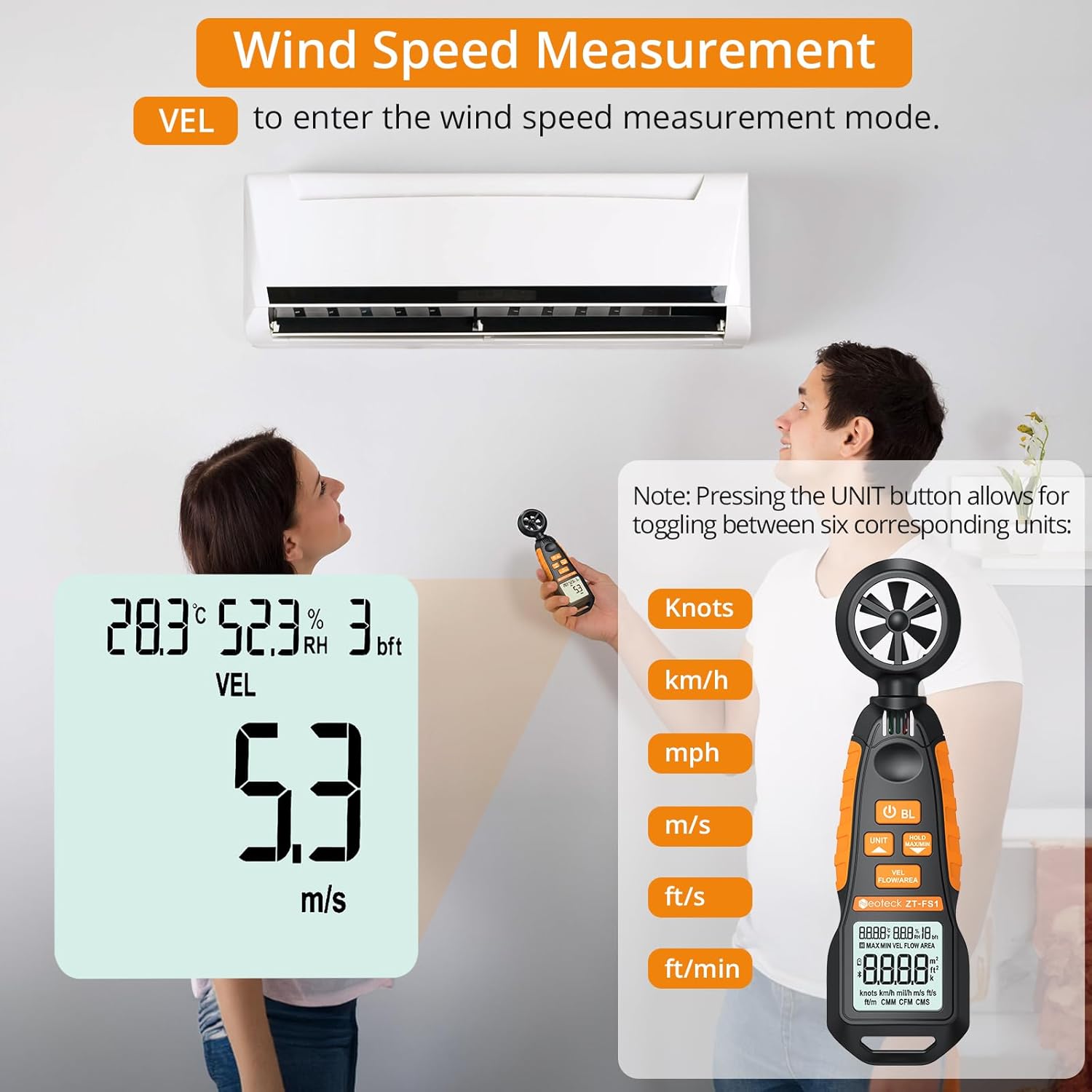
Figure 3: Measuring wind speed with the anemometer. The display shows current speed and unit options.
Air Volume Measurement (CFM/CMM/CMS)
To measure air volume:
- Переконайтеся, що пристрій увімкнено.
- Натисніть VEL FLOW/AREA button until 'FLOW' is displayed on the screen, indicating air volume mode.
- Before measurement, you must input the cross-sectional area of the duct or vent. Refer to the full manual for detailed instructions on entering area values.
- Align the fan of the instrument vertically with the air outlet. The display will show the air volume.
- Натисніть ОДИНИЦЯ button to cycle through the available air volume units: CMM (Cubic meter/minute), CFM (Cubic inch/minute), CMS (Cubic meter per second).
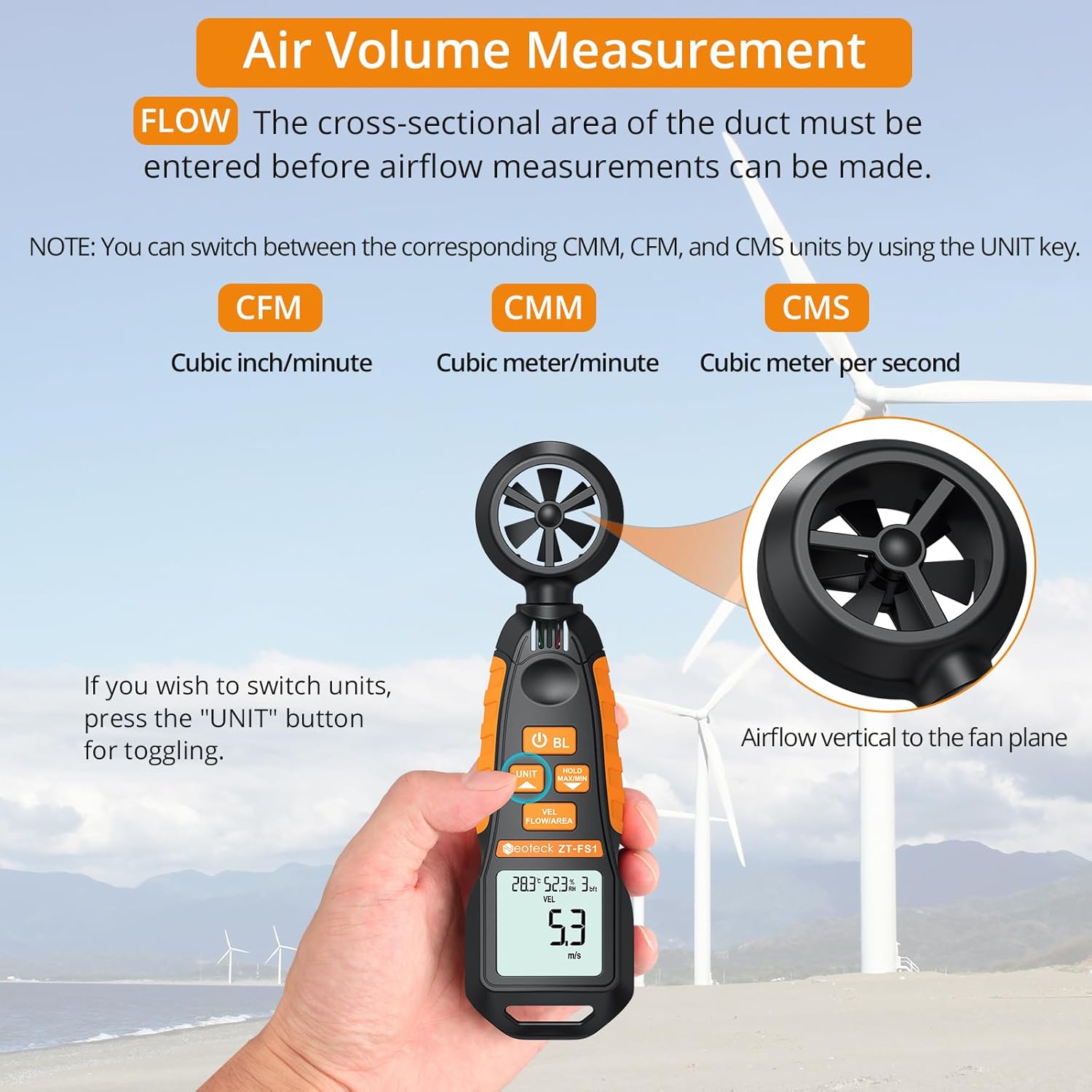
Figure 4: Measuring air volume from a duct. Ensure the cross-sectional area is correctly entered.
Вимірювання температури та вологості
The device continuously measures ambient temperature and relative humidity. These readings are displayed on the upper part of the LCD screen. Note that the temperature and humidity sensor may require at least 30 minutes to adapt to a new environment for accurate readings.
Data Hold and Max/Min Functions
- Натисніть HOLD MAX/MIN button once to activate the Data Hold function. The current reading will be frozen on the display. Press again to exit.
- Натисніть і утримуйте HOLD MAX/MIN button for more than 2 seconds to enter the Maximum/Minimum measurement mode. The display will cycle between the maximum (MAX) and minimum (MIN) values recorded since entering this mode. Press and hold again to exit.
Auto-Shutdown Function
The device features an auto-shutdown function to conserve battery power. If no button is pressed for a certain period (typically 15 minutes), the device will automatically turn off.
- To disable auto-shutdown: While the device is off, hold the HOLD MAX/MIN а потім натисніть кнопку Power Button (U) for 2 or more seconds. Five beeps will confirm that auto-shutdown is disabled.
Медіа ресурси
Офіційне відео продукту
Video 1: An official product video demonstrating the Neoteck Anemometer's functions for testing wind speed and airflow.
Технічні характеристики
| Особливість | Деталь |
|---|---|
| Бренд | неотех |
| Номер моделі | NTK259 |
| матеріал | Скло, Метал, Пластик |
| Розміри (Д x Ш x В) | 6.97 x 1.97 x 1.18 дюймів |
| Вага товару | 85 грамів (3 унції) |
| Діапазон швидкості вітру | 0.4-30 m/s (0.895-67.11 mph) |
| Точність швидкості вітру | ± 2% |
| Роздільна здатність швидкості вітру | 0.1 м/с |
| Діапазон температур | -20.0℃ до 60.0℃ |
| Точність температури | ± 2 ℃ |
| діапазон вологості | Від 0.0% до 99.9% відносної вологості |
| Точність вологості | ± 2% відносної вологості |
| Sampлінг -курс | Кожні 5 секунд |
| Джерело живлення | 2 батареї AAA (у комплекті) |
| Дисплей | РК -дисплей з підсвічуванням |
| Автоматичне відключення | Так (можна вимкнути) |
Технічне обслуговування
- Зберігайте пристрій у чистоті та сухості. Використовуйте м’який, damp серветка для чищення. Не використовуйте абразивні засоби чи розчинники.
- Уникайте тривалого перебування пристрою під екстремальними температурами, вологістю або прямими сонячними променями.
- Якщо пристрій не використовуватиметься протягом тривалого часу, вийміть батарейки, щоб запобігти їх витіканню.
- Handle the fan blades carefully to prevent damage, as this can affect measurement accuracy.
Усунення несправностей
- Пристрій не вмикається: Перевірте, чи батарейки встановлено правильно та чи достатньо заряджені. За потреби замініть батарейки.
- Неточні показники: Ensure the fan blades are clean and unobstructed. Allow the temperature/humidity sensor sufficient time (approx. 30 minutes) to adapt to the environment.
- Дисплей тьмяний або мерехтить: Замініть батареї.
- Auto-shutdown occurs too quickly: Verify if the auto-shutdown feature is enabled or disabled as desired (refer to Auto-Shutdown Function section).
Гарантія та підтримка
For warranty information, technical support, or service inquiries, please refer to the product packaging or contact Neoteck customer service directly. Contact details can typically be found on the manufacturer's official webсайт.