
1. Вступ
Welcome to the user manual for your Emerson CKSS7071 Sunrise Smartset Alarm Clock Radio. This device is designed to enhance your daily routine with its unique features, including a sunrise simulation, soothing sound options, Bluetooth connectivity, and an 8-color dimmable LED display. Please read this manual thoroughly to understand the full functionality and ensure proper use and care of your new alarm clock radio.
Відео 1: закінченоview of the Emerson CKSS7071 Sunrise Smartset Alarm Clock Radio. This video demonstrates the key features and design of the product.
2. Важлива інформація з безпеки
- Перед використанням приладу прочитайте всі інструкції.
- Збережіть ці інструкції для використання в майбутньому.
- Не використовуйте цей пристрій поблизу води.
- Чистіть тільки сухою ганчіркою.
- Не блокуйте вентиляційні отвори. Встановлюйте відповідно до інструкцій виробника.
- Не встановлюйте поблизу будь-яких джерел тепла, таких як радіатори, обігрівачі, печі або інші пристрої (включаючи ampліфікатори), які виробляють тепло.
- Захищайте шнур живлення від наступання або защемлення, особливо біля вилок, розеток і в місці виходу з пристрою.
- Використовуйте лише насадки/аксесуари, зазначені виробником.
- Відключайте цей пристрій від мережі під час грози або якщо він не використовується протягом тривалого часу.
- Звертайтеся до кваліфікованого сервісного персоналу. Обслуговування потрібне, якщо пристрій було пошкоджено будь-яким чином, наприклад, пошкоджено шнур живлення або вилка, була пролита рідина або всередину пристрою потрапили предмети, пристрій піддався впливу дощу або вологи, не працює належним чином , або було видалено.
3. Вміст упаковки
Переконайтеся, що всі предмети присутні після відкриття упаковки:
- Emerson CKSS7071 Sunrise Smartset Alarm Clock Radio
- Адаптер змінного струму
- Посібник користувача
4. Продукт закінчивсяview
4.1 Спереду View

Зображення 1: Фронт view of the alarm clock, featuring the digital time display and the sunrise simulation light panel.
The front of the unit features the main 1.2-inch LED time display and the large circular light panel for sunrise simulation and ambient lighting. Indicators for AM/PM, Alarm 1/2, and Bluetooth status are also visible.
4.2 Сторона View (Керування)
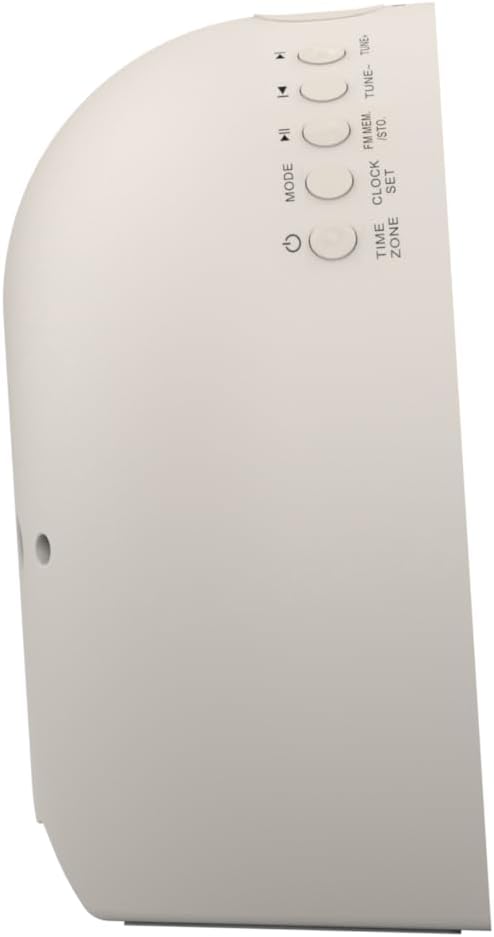
Зображення 2: сторона view of the alarm clock, highlighting the control buttons for various functions.
The side panel houses the primary control buttons, including Power, Mode, Clock Set, Time Zone, Tune/Skip, and Volume controls. These buttons are used for setting time, alarms, and navigating audio functions.
4.3 Задня частина View

Зображення 3: Задня view of the alarm clock, showing the speaker grille and power connection port.
The rear of the unit features the main speaker grille and the power input port for connecting the AC adapter.
5. Налаштування
5.1 Підключення живлення
- Plug the AC power adapter into the DC IN jack located on the back of the unit.
- Plug the other end of the adapter into a standard wall outlet (AC 100-240V, 50/60Hz).
- Пристрій увімкнеться автоматично.
5.2 SmartSet Automatic Time Setting
The SmartSet system automatically sets the correct time and date as soon as you plug in the unit. It also maintains time and alarm settings during power disruptions or outages, provided the button cell battery is installed.
5.3 Встановлення резервного акумулятора
A button cell battery (CR2032, included) is required for battery backup. This ensures that time and alarm settings are retained during a power outage.
- Знайдіть батарейний відсік на нижній панелі пристрою.
- Відкрийте кришку батарейного відсіку.
- Вставте одну батарейку-ґудзик CR2032, дотримуючись правильної полярності (+/-).
- Надійно закрийте кришку батарейного відсіку.
6. Інструкція з експлуатації
6.1 Setting the Clock Manually
- Натисніть і утримуйте ГОДИННИК кнопку. Цифри години блиматимуть.
- Використовуйте НАСТРОЙКА -/+ кнопки для налаштування години. Натисніть ГОДИННИК для підтвердження.
- Цифри хвилин блиматимуть. Використовуйте НАСТРОЙКА -/+ кнопки для налаштування хвилин. Натисніть ГОДИННИК для підтвердження.
- Continue this process to set the year, month, and day.
- Прес ГОДИННИК ще раз, щоб вийти з режиму налаштування часу.
6.2 Налаштування будильників (Будильник 1 та Будильник 2)
The unit features dual alarms. Follow these steps for each alarm:
- Натисніть і утримуйте ТРИВОГА 1 or ТРИВОГА 2 кнопка. Цифри годин будильника блиматимуть.
- Використовуйте НАСТРОЙКА -/+ кнопки для налаштування години будильника. Натисніть відповідну кнопку ТРИВОГА кнопку для підтвердження.
- The alarm minute digits will flash. Use the НАСТРОЙКА -/+ кнопки для налаштування хвилин будильника. Натисніть відповідні ТРИВОГА кнопку для підтвердження.
- Select the alarm source (Buzzer, FM Radio, or Soothing Sound). Press the respective ТРИВОГА кнопку для підтвердження.
- Відрегулюйте гучність будильника за допомогою ГУЧНІСТЬ -/+ buttons. Press the respective ТРИВОГА кнопку для підтвердження.
- The alarm is now set. The alarm indicator (AL1 or AL2) will appear on the display.
6.3 Моделювання сходу сонця
The sunrise simulation feature gradually brightens the light panel before your set alarm time, mimicking a natural sunrise to gently wake you.
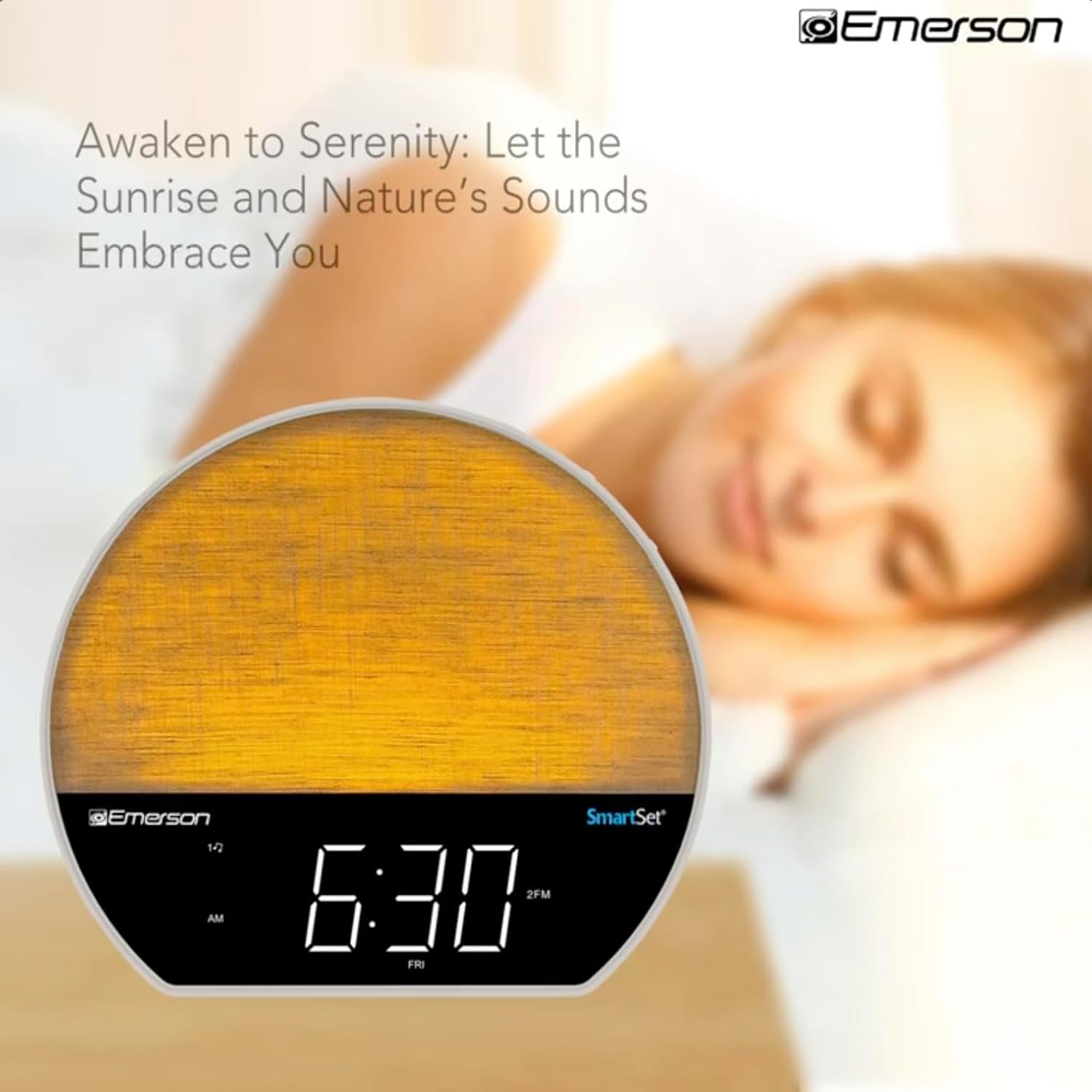
Зображення 4: The alarm clock simulating a sunrise with a warm, increasing light intensity.
To activate, ensure the sunrise option is selected during alarm setup. The light will begin to brighten 30 minutes before the alarm sounds.
6.4 Soothing Sounds and White Noise
The unit includes 6 soothing sounds and white noise to help with relaxation or waking up.
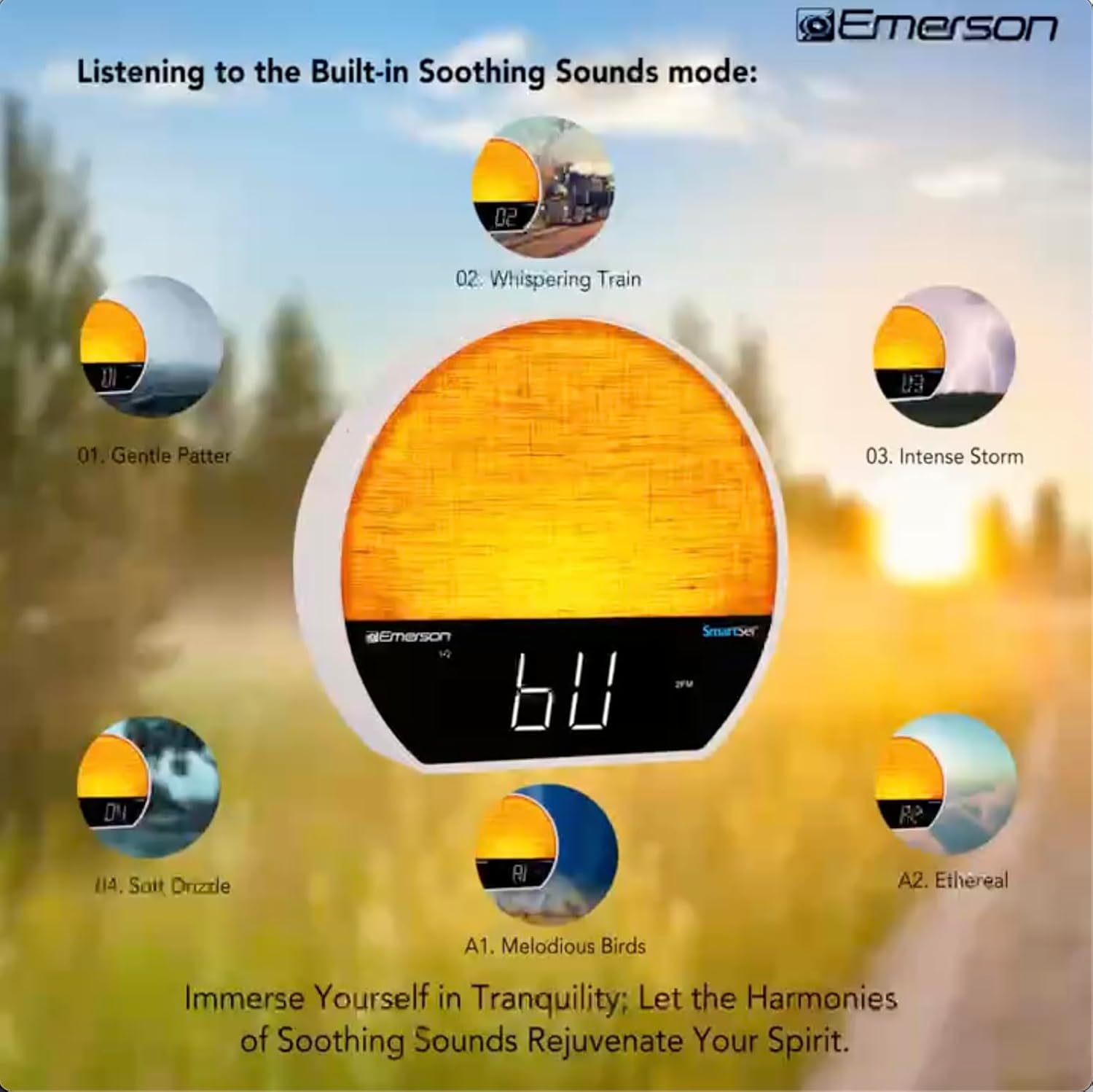
Зображення 5: Visual representation of the six soothing sound modes available on the alarm clock.
- Натисніть РЕЖИМ button repeatedly until the Soothing Sound mode is selected.
- Використовуйте НАСТРОЙКА -/+ buttons to cycle through the available sounds (e.g., Gentle Patter, Whispering Train, Intense Storm, Soft Drizzle, Melodious Birds, Ethereal, White Noise).
- Відрегулюйте гучність за допомогою ГУЧНІСТЬ -/+ кнопки.
Функція динаміка Bluetooth 6.5
Підключіть свій смартфон або інший пристрій із підтримкою Bluetooth для бездротової потокової передачі аудіо.

Зображення 6: The alarm clock in Bluetooth mode, paired with a mobile device for audio streaming.
- Натисніть РЕЖИМ button until 'BT' appears on the display, indicating Bluetooth mode.
- On your device, enable Bluetooth and search for 'Emerson CKSS7071'.
- Виберіть пристрій для сполучення. Після успішного сполучення пролунає звуковий сигнал підтвердження.
- Тепер ви можете відтворювати аудіо зі свого пристрою через динамік будильника.
6.6 Робота FM-радіо
Налаштуйтеся на свої улюблені FM-радіостанції.
- Натисніть РЕЖИМ кнопку , доки на дисплеї не з’явиться напис «FM».
- Натисніть НАСТРОЙКА -/+ buttons briefly to manually tune to a station.
- Натисніть і утримуйте НАСТРОЙКА -/+ кнопки для автоматичного сканування наступної доступної станції.
- Щоб зберегти станцію, натисніть і утримуйте FM MEM кнопку, доки не почне блимати номер попереднього запису. Використовуйте НАСТРОЙКА -/+ щоб вибрати номер попереднього налаштування, а потім натисніть FM MEM знову, щоб зберегти.
6.7 LED Decor and Dimmer Control
Customize the ambient light with 8 different colors and adjust the brightness.

Зображення 7: The alarm clock demonstrating its 8-color dimmable LED decor options.
- Натисніть СВІТЛО button to cycle through the 8 available colors or turn the light off.
- To adjust the brightness of the LED decor light, press and hold the СВІТЛО button. The brightness will cycle through 5 levels. Release the button at your desired brightness.
6.8 Керування регулюванням яскравості дисплея
Adjust the brightness of the 1.2-inch LED time display.

Зображення 8: The alarm clock illustrating the five distinct levels of display luminescence.
Натисніть ДИММЕР button (often combined with another function, refer to button labels) to cycle through 4 levels of display brightness (Bright, Moderate, Dim, Faint).
6.9 Таймер сну
Set a timer for the audio to automatically turn off after a specified duration.

Зображення 9: The alarm clock set for a sunset sleep timer, providing a harmonious end to the day.
- While audio is playing (FM or Soothing Sound), press the СПАТИ кнопку.
- Кілька разів натисніть СПАТИ button to cycle through available sleep timer durations (e.g., 15, 30, 60, 90 minutes, or OFF).
- The audio will automatically turn off after the selected time.
6.10 Функція відкладання
Коли лунає будильник, натисніть кнопку СНОЙЗ button (usually a large button on top) to temporarily silence the alarm for a few minutes. The alarm will sound again after the snooze period.
7. Технічне обслуговування
7.1 Очищення
- Завжди відключайте пристрій від розетки перед очищенням.
- Для очищення зовнішніх поверхонь використовуйте м’яку суху тканину.
- Do not use liquid cleaners, abrasive cleaners, or chemical sprays, as these may damage the finish.
7.2 Заміна батареї
If the time and alarm settings are not retained during a power outage, the button cell backup battery may need to be replaced. Follow the instructions in section 5.3 to replace the CR2032 battery.
8. Вирішення проблем
| проблема | Можлива причина | Рішення |
|---|---|---|
| Пристрій не вмикається. | Адаптер живлення не підключений або несправний. | Переконайтеся, що адаптер змінного струму надійно підключено до пристрою та до справної розетки. |
| Налаштування часу/будильника втрачаються після відключення живленняtage. | Резервний акумулятор розряджений або не встановлений. | Install or replace the CR2032 button cell battery (see section 5.3). |
| Сигналізація не звучить. | Будильник не активовано або гучність занадто низька. | Ensure the alarm is set and activated (AL1/AL2 indicator on). Increase alarm volume. |
| Не вдається підключити пристрій Bluetooth. | Unit not in Bluetooth mode or device too far. | Ensure the unit is in Bluetooth mode ('BT' displayed). Move your device closer to the unit. Try unpairing and re-pairing. |
| Поганий прийом FM-радіо. | Антена не висунута або є перешкоди. | Extend the FM wire antenna fully and reposition it for better reception. Avoid placing near other electronic devices. |
| Дисплей занадто яскравий/тьмяний. | Потребує налаштування затемнення дисплея. | Натисніть ДИММЕР button to cycle through brightness levels (see section 6.8). |
9. Технічні характеристики
| Особливість | Деталь |
|---|---|
| Номер моделі | CKSS7071 |
| Джерело живлення | AC 100-240V, 50/60Hz (via AC adapter) |
| Резервний акумулятор | 1 x CR2032 Button Cell Battery (included) |
| Тип дисплея | 1.2-inch LED Display |
| Версія Bluetooth | V5.4 |
| Заспокійливі звуки | 6 Nature Sounds + White Noise |
| LED Decor Colors | 8 Dimmable Colors |
| Розміри виробу (Ш x Г x В) | 7.09 см x 3.15 см x 6.37 см |
| вага | Не вказано |
10. Інформація про гарантію
Emerson products are manufactured to the highest quality standards. This product is covered by a limited warranty against defects in materials and workmanship for a period of one (1) year from the original date of purchase. This warranty does not cover damage caused by misuse, accident, unauthorized modification, or normal wear and tear. Proof of purchase is required for all warranty claims. Please retain your receipt.
11. Підтримка клієнтів
If you have any questions, require assistance, or experience issues with your Emerson CKSS7071 Sunrise Smartset Alarm Clock Radio, please contact our customer support team.
- Webсайт: Visit the official Emerson webсайт із поширеними запитаннями та ресурсами підтримки.
- Електронна пошта: Зверніться до упаковки вашого продукту або до офіційного website for customer service email contact.
- телефон: Зверніться до упаковки вашого продукту або до офіційного webсайт з номерами телефонів служби підтримки клієнтів.
Please have your model number (CKSS7071) and proof of purchase ready when contacting support.