
1. Вступ
The ASUS ROG Swift PG27UCDM is a high-performance 27-inch 4K QD-OLED gaming monitor designed to deliver an exceptional visual experience. Featuring a 240Hz refresh rate and an ultra-fast 0.03ms response time, it ensures smooth, blur-free gameplay and crisp imagery. This monitor incorporates the latest fourth-generation QD-OLED technology for superior image quality, vibrant colors, and true blacks, along with enhanced panel longevity. Advanced features like the Neo Proximity Sensor and OLED Care Pro suite are integrated to protect the display from burn-in and ensure comfortable viewінж.

Figure 1.1: ASUS ROG Swift PG27UCDM Gaming Monitor
2. Вміст упаковки
Будь ласка, уважно перевірте вміст упаковки. Якщо будь-які елементи відсутні або пошкоджені, негайно зверніться до продавця.
- ASUS ROG Swift PG27UCDM Monitor
- DisplayPort 2.1 (DP40) Cable
- Надшвидкісний кабель HDMI
- USB-кабель 3.2
- Кабель USB-C
- Сумка ROG
- Наклейка ROG
- Серветка з мікрофібри
- Комплект кріплення VESA
- Шнур живлення
- Короткий посібник
- Гарантійний талон

Рисунок 2.1: Що в коробці
3. Налаштування
3.1 Фізичне налаштування
Carefully remove the monitor and its components from the packaging. Attach the stand to the monitor following the instructions in the Quick Start Guide. Ensure all connections are secure before powering on the device.

Рисунок 3.1: Задні порти підключення
The monitor offers extensive adjustability for optimal viewing comfort. You can adjust the height, swivel, pivot (rotate to portrait mode), and tilt the screen.

Figure 3.2: Monitor Adjustability
3.2 Підключення до пристрою
Connect the appropriate video cable (DisplayPort 2.1a, HDMI 2.1, or USB-C) from your computer or gaming console to the corresponding input port on the monitor. For optimal performance, especially at 4K 240Hz, use the included DisplayPort 2.1a cable. Connect the power cord to the monitor and then to a power outlet.
3.3 Початкове ввімкнення
Press the power button located on the monitor to turn it on. The monitor will automatically detect the active input source. If no signal is detected, ensure all cables are securely connected and your source device is powered on.
4. Експлуатація монітора
4.1 Key Display Technologies
The PG27UCDM features 4th-gen QD-OLED technology, providing supersharp images and crisp text with enhanced pixel density. This technology also contributes to a longer lifespan compared to previous OLED generations.

Figure 4.1: 4th-gen QD-OLED Technology for Sharper Visuals
OLED Anti-Flicker 2.0 technology reduces flicker by 20% compared to previous-generation panels, ensuring a more comfortable viewing experience, even when frame rates fluctuate during dynamic content.
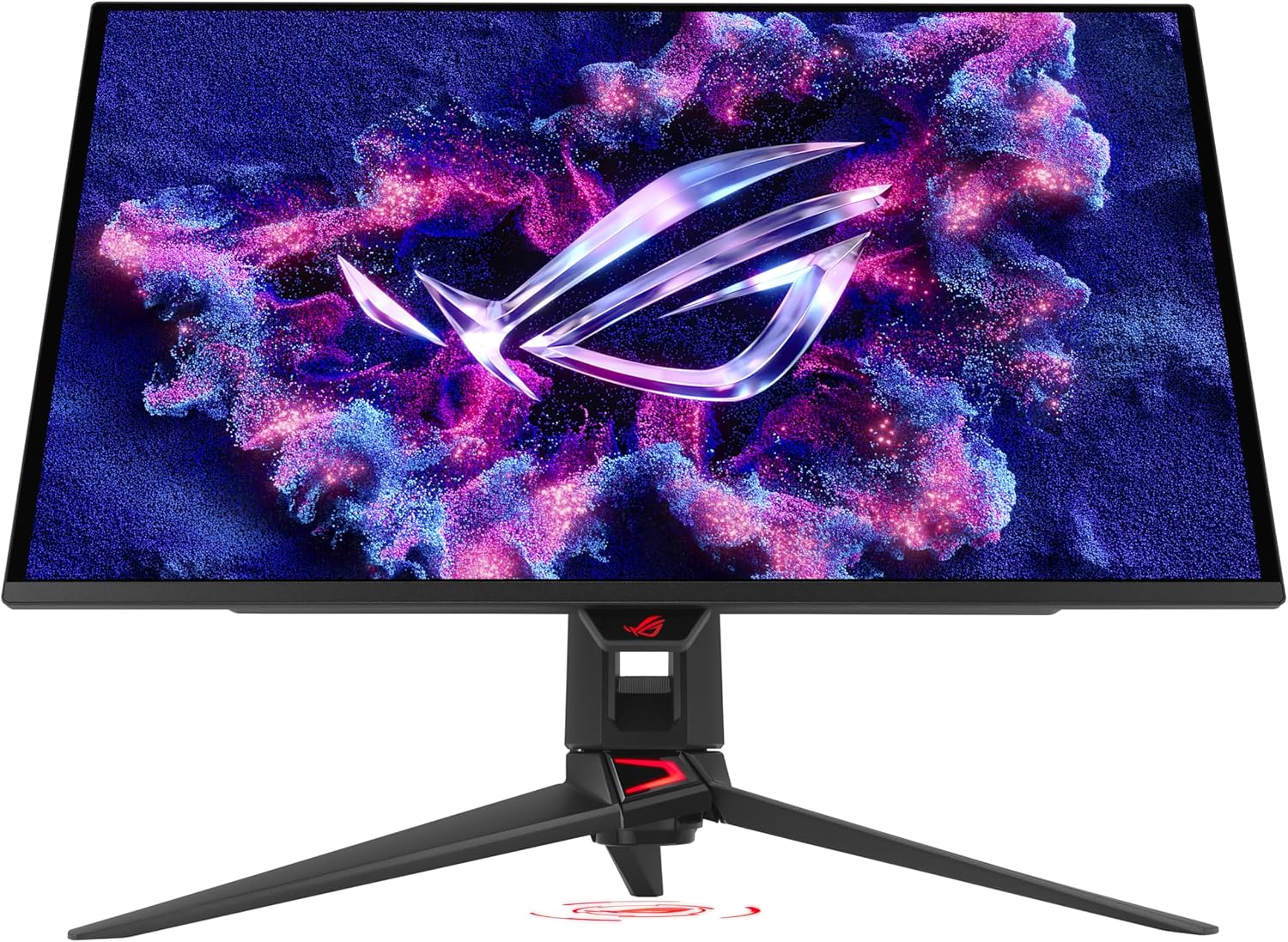
Figure 4.2: OLED Anti-Flicker 2.0 in Action
4.2 ASUS OLED Care Pro
The ASUS OLED Care Pro suite is designed to protect your OLED panel from potential burn-in and ensure its longevity. Key features include:
- Датчик наближення Neo: Automatically detects when the user is away and switches to a black screen to reduce burn-in risk.
- Очищення пікселів: A routine maintenance process to refresh pixels.
- Переміщення екрана: Shifts the display content slightly to prevent static image retention.
- Boundary Detection: Identifies and mitigates static elements at screen edges.
- Заставка: Activates a screen saver when idle.
- Регулювання яскравості логотипу: Reduces brightness of static logos.
- Виявлення панелі завдань: Automatically dims or hides the Windows taskbar.
- Цільовий режим: Optimizes display for specific content areas.
- Outer Dimming Control & Global Dimming Control: Advanced dimming features for uniform brightness and burn-in prevention.

Figure 4.3: ASUS OLED Care Pro Functions
4.3 Програмне забезпечення Центру віджетів дисплея
The DisplayWidget Center software provides an intuitive interface for easily accessing OLED Care Pro functions and adjusting various monitor settings using your mouse. This includes customizable monitor settings, auto firmware update notifications, multiscreen control, and OLED protection features.

Figure 4.4: DisplayWidget Center Software Interface
4.4 Connectivity and HDR
The monitor offers robust connectivity options:
- DisplayPort 2.1a UHBR20: Provides a full 80Gbps bandwidth for uncompressed 4K visuals at 240Hz.
- HDMI 2.1: Supports 48Gbps full bandwidth.
- USB-C: Offers 90W Power Delivery (PD).
- USB 3.2: Додаткові USB-порти для периферійних пристроїв.

Рисунок 4.5: Варіанти підключення
The monitor supports Dolby Vision і є VESA DisplayHDR 400 True Black compliant, offering 99% DCI-P3 gamut and true 10-bit color for astonishing HDR performance, suitable for both gaming and professional content creation.
4.5 Ігрові функції
The PG27UCDM is Сумісний з G-SYNC and supports AMD FreeSync Premium Pro, ensuring tear-free and low-latency gaming experiences by synchronizing the monitor's refresh rate with your GPU's frame rate.

Figure 4.6: G-SYNC Compatibility for Smooth Gameplay
Інтегрований ШІ помічник provides in-game enhancements, such as customizable crosshairs and display optimization for various game genres, giving you a competitive edge.

Figure 4.7: AI Assistant Features
5. Технічне обслуговування
To ensure the longevity and optimal performance of your ASUS ROG Swift PG27UCDM monitor, regular maintenance is recommended.
5.1 Очищення монітора
Gently wipe the screen with the provided microfiber cloth to remove dust and fingerprints. For stubborn smudges, lightly dampПротріть тканину водою або неабразивним, безпечним для монітора розчином для чищення. Уникайте розпилення рідини безпосередньо на екран.
5.2 OLED Panel Care
Utilize the ASUS OLED Care Pro functions accessible via the DisplayWidget Center software to maintain the health of your OLED panel. Regularly perform Pixel Cleaning and ensure the Neo Proximity Sensor and other burn-in prevention features are active. Avoid displaying static images for extended periods at high brightness levels.
6. Вирішення проблем
У цьому розділі наведено рішення поширених проблем, які можуть виникнути під час використання монітора.
6.1 Немає зображення або сигналу
- Переконайтеся, що шнур живлення надійно підключено до монітора та розетки.
- Verify that the video cable (DisplayPort, HDMI, or USB-C) is firmly connected to both the monitor and your source device.
- Check if your source device (PC, console) is powered on and outputting a signal.
- Try selecting the correct input source manually using the monitor's OSD (On-Screen Display) menu.
6.2 Flickering or Unstable Image
- Ensure the video cable is not damaged and is properly connected.
- Adjust the refresh rate settings on your computer to match the monitor's capabilities (up to 240Hz).
- Enable or adjust the OLED Anti-Flicker 2.0 setting in the DisplayWidget Center or OSD menu.
- If using G-SYNC/FreeSync, ensure your graphics card drivers are up to date.
6.3 Image Retention or Burn-in Concerns
- Activate and regularly use the ASUS OLED Care Pro functions (Pixel Cleaning, Screen Move, Neo Proximity Sensor).
- Avoid displaying static images, logos, or taskbars for prolonged periods. Utilize screen savers and auto-hide features for your operating system's taskbar.
- Reduce screen brightness when not actively using the monitor.
7. Технічні характеристики
Below are the key technical specifications for the ASUS ROG Swift PG27UCDM monitor.
| Особливість | Специфікація |
|---|---|
| Розмір екрана | 26.5 дюймів |
| Тип панелі | QD-OLED |
| роздільна здатність | 4K UHD (3840 x 2160) |
| Частота оновлення | 240 Гц |
| Час відгуку | 0.03 мс (GtG) |
| Співвідношення сторін | 16:9 |
| Колірна гамма | 99% DCI-P3 |
| Глибина кольору | Справжня 10-бітна |
| Підтримка HDR | Dolby Vision, VESA DisplayHDR 400 True Black |
| Адаптивна синхронізація | G-SYNC Compatible, AMD FreeSync Premium Pro |
| Підключення | DisplayPort 2.1a (UHBR20), HDMI 2.1, USB-C (90W PD), USB 3.2 |
| вага | 16.8 фунта |
| Розміри (ДxШxВ) | 8.6 x 24 x 21.6 дюймів |
8. Гарантія та підтримка
The ASUS ROG Swift PG27UCDM monitor comes with a Гарантія 3 рік, covering manufacturing defects and ensuring peace of mind for your investment. This warranty reflects ASUS's commitment to quality and durability, especially with the advanced OLED panel technology.
For technical support, warranty claims, or further assistance, please visit the official ASUS support website or contact their customer service. Keep your purchase receipt and the monitor's serial number handy for faster service.
Additional resources, including driver updates and the latest version of the DisplayWidget Center software, can be found on the ASUS support portal.
Примітка: A 3-month Adobe Creative Cloud complimentary access is included with the purchase of this product (valid from 9/1/2023 to 8/31/2025).


