
НОЙЛЕР ZY-BB2
Посібник користувача відеоняні NOILLER 4.3 дюйма
Модель: ZY-BB2
вступ
Thank you for choosing the NOILLER 4.3" Video Baby Monitor. This device is designed to provide a reliable and convenient way to monitor your baby, offering both a dedicated monitor unit and smartphone app connectivity. Please read this manual thoroughly before use to ensure proper operation and safety.
Вміст упаковки
- Baby Camera Unit
- 4.3" LCD Monitor Unit
- Адаптер живлення для камери
- Адаптер живлення для монітора
- USB-кабель для зарядки
- Посібник користувача (цей документ)
Продукт закінченийview
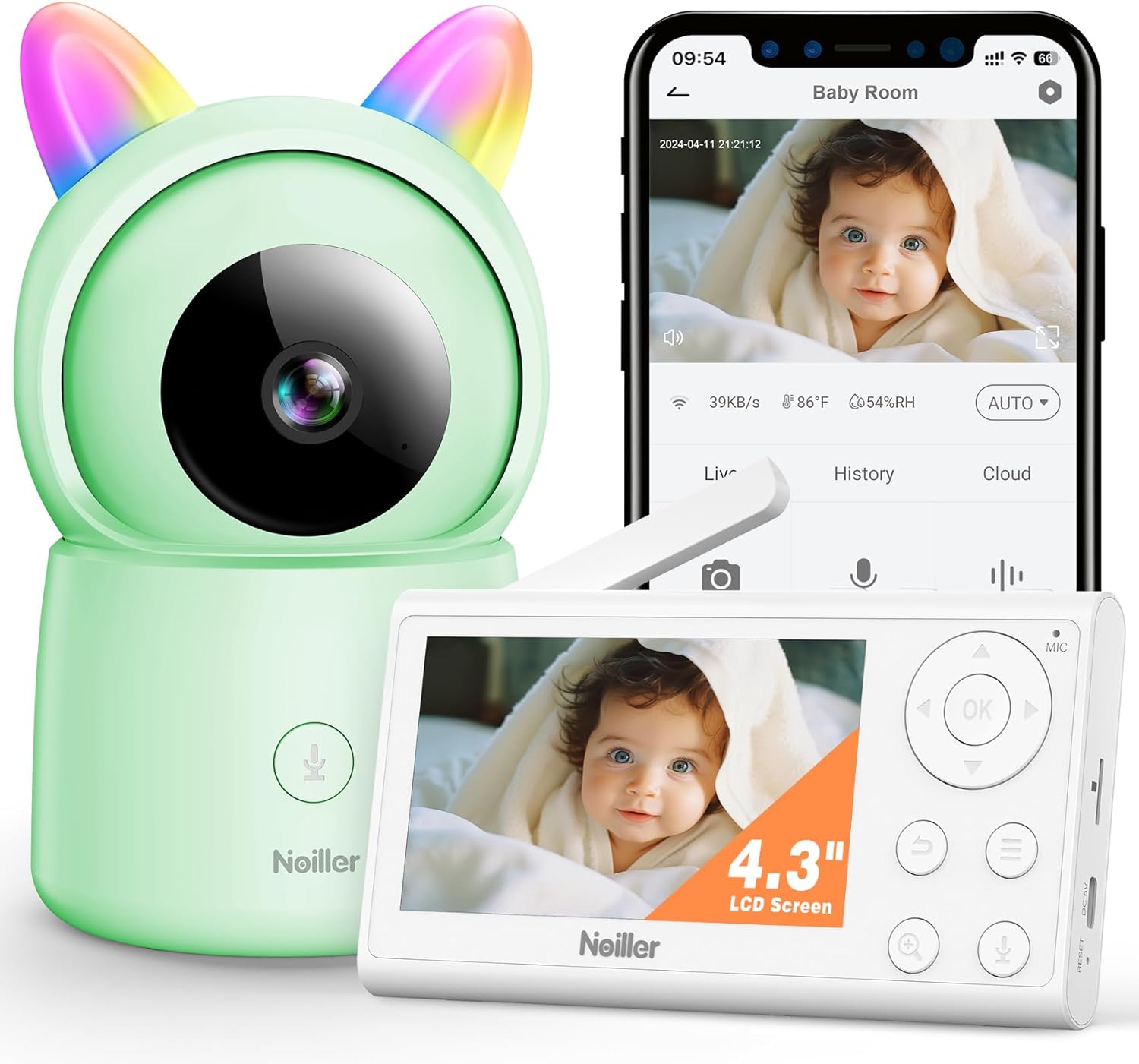
зображення: The NOILLER 4.3" Video Baby Monitor system, featuring the green camera unit with rainbow ears, the white 4.3-inch LCD monitor, and a smartphone displaying the "Safeview" app interface with a live baby feed. The monitor shows control buttons for navigation, microphone, and zoom. The camera has a microphone button on its base.
The NOILLER Baby Video Monitor system consists of two main components: the Camera Unit and the Monitor Unit. It also supports a smartphone application for remote viewінж.
Camera Unit Features:
- 1080P HD Camera Lens
- Інфрачервоні світлодіоди для нічного бачення
- Microphone and Speaker for Two-Way Talk
- Датчики температури та вологості
- RGB Night Lights (on ears)
- Порт живлення
- Кнопка скидання
Monitor Unit Features:
- 4.3-дюймовий РК-дисплей
- Кнопки навігації (Вгору, Вниз, Вліво, Вправо, ОК)
- Мікрофон і динамік
- Регулювання гучності
- Функція масштабування
- Кнопка меню
- Two-Way Talk Button
- Порт живлення
- антена
Посібник із налаштування
1. Powering On the Units
- Connect the camera unit to a power outlet using its dedicated power adapter. Ensure the adapter is securely plugged in.
- Connect the monitor unit to a power outlet using its dedicated power adapter. The monitor unit has a built-in rechargeable battery for portable use, but it is recommended to charge it fully before first use.
- Press and hold the power button on the monitor unit to turn it on.
2. Pairing the Camera and Monitor
The camera and monitor units are pre-paired at the factory. If they do not connect automatically, or if you need to add another camera (sold separately), follow these steps:
- On the monitor unit, press the Меню кнопку.
- Перейдіть до Камера icon and select it.
- Choose an available camera channel (e.g., Camera 1, Camera 2).
- Виберіть Створення пари option. The monitor will begin searching for a camera.
- Протягом 30 секунд натисніть Створення пари button on the back of the camera unit.
- Once paired, the monitor will display the camera's live feed.
3. Smartphone App Setup (Optional)
Для дистанційного viewing and additional features, download the "Safeview" app:
- Scan the QR code provided in the package or search for "Safeview" in your smartphone's app store (iOS/Android).
- Зареєструйте новий обліковий запис або увійдіть, якщо у вас вже є обліковий запис.
- Follow the in-app instructions to add your camera device. This typically involves connecting the camera to your 2.4G Wi-Fi network.
- Ensure your smartphone is connected to a 2.4G Wi-Fi network during the initial setup process.
4. Розміщення камери
Place the camera on a flat, stable surface such as a dresser or shelf, ensuring it has a clear, unobstructed view of the baby's crib or play area. Keep the camera and its power cord out of reach of children (at least 3 feet / 1 meter away from the crib).
Інструкція з експлуатації
Жити View
Once the camera and monitor are paired, the monitor will automatically display the live video feed. On the smartphone app, select the camera from your device list to view живий корм.
Двостороння розмова
- Блок монітора: Press and hold the microphone button on the monitor unit to speak. Release the button to hear your baby.
- Додаток для смартфона: Tap the microphone icon on the app interface to speak.
Нічне бачення
The camera automatically switches to infrared night vision in low-light conditions, providing clear black and white images. No manual adjustment is required.
Функція масштабування
On the monitor unit, press the Збільшити button to digitally zoom in or out on the video feed.
Колискові пісні
The monitor unit allows you to play pre-programmed lullabies through the camera's speaker. Access this feature via the Меню on the monitor unit.
Нічні вогні RGB
The camera unit features RGB night lights on its "ears." These can be controlled via the monitor unit's menu or the smartphone app to provide a soothing glow in the baby's room.
Моніторинг температури та вологості
The monitor unit and smartphone app display the real-time temperature and humidity of the baby's room, as detected by the camera's sensors.
VOX Mode (Voice Activated)
The monitor can be set to VOX mode, where the screen and audio activate only when sound is detected from the baby's room. You can adjust the sensitivity level in the monitor's settings.
Технічне обслуговування
прибирання
Wipe the camera and monitor units with a soft, dry, lint-free cloth. Do not use cleaning agents, solvents, or abrasive cleaners. Avoid getting moisture into any openings.
Battery Care (Monitor Unit)
- Щоб продовжити термін служби акумулятора, уникайте частого повного розряджання акумулятора.
- Charge the monitor unit regularly, especially if it will not be used for an extended period.
- Зберігайте пристрій у прохолодному сухому місці, коли він не використовується.
Зберігання
If storing the device for a long period, ensure both units are powered off and stored in a dry, dust-free environment.
Усунення несправностей
| проблема | Можлива причина | Рішення |
|---|---|---|
| Немає зображення/сигналу на моніторі |
|
|
| Погана якість зображення |
|
|
| Немає звуку або спотвореного звуку |
|
|
| Додаток не може підключитися до камери |
|
|
Технічні характеристики
| Особливість | Деталь |
|---|---|
| Назва моделі | ZY-BB2 |
| Розмір дисплея монітора | 4.3-дюймовий РК-дисплей |
| Роздільна здатність захоплення відео | 1080p |
| Технологія підключення | Бездротовий монітор та додаток для смартфонів 2.4G WiFi |
| Джерело живлення | Монітор з живленням від батареї та дротова електрична камера |
| Використання в приміщенні/зовні | закритий |
| Тип контролера | Mobile Phone APP, LCD Monitor |
| Тип монтажу | Настільне кріплення |
| Розміри предмета (Д x Ш x В) | 5 x 3 x 2 дюймів |
| Вага товару | 1.43 фунта |
| Акумулятори | Потрібен 1 літій-іонний акумулятор (у комплекті) |
| UPC | 750961862307 |
Гарантія та підтримка
NOILLER products are designed for reliability and performance. For warranty information, please refer to the warranty card included in your product packaging or visit the official NOILLER website. If you encounter any issues or have questions regarding your product, please contact our customer support team:
- Електронна пошта: support@noiller.com
- Webсайт: www.noiller.com
- Please have your model number (ZY-BB2) and purchase details ready when contacting support.
Ask a question about this manual
Ask about setup, troubleshooting, compatibility, parts, safety, or missing instructions. Manuals+ will review the question and use this page’s manual context to help answer it.