
вступ
Welcome to the user manual for your new Generic M59 Pro Max Smartwatch. This guide provides essential information on setting up, operating, maintaining, and troubleshooting your device. The M59 Pro Max Smartwatch is designed to enhance your daily life with features like advanced activity tracking, call support, smart notifications, and various sport modes.
Вміст упаковки
Будь ласка, перевірте, чи всі наступні предмети входять до вашої упаковки:
- M59 Pro Max Smartwatch
- 7 Random Straps (Silicone, Rubber, Nylon)
- Кабель для бездротової зарядки
- Посібник користувача

Image: The M59 Pro Max Smartwatch and its accessories, including a variety of interchangeable straps, neatly arranged in its packaging.
Налаштування
1. Заряджання смарт-годинника
Before first use, fully charge your smartwatch. Place the smartwatch on the wireless charging cable. The screen will indicate charging status. A full charge typically takes 2-3 hours.
2. Увімкнення/вимкнення живлення
- Щоб увімкнути: Натисніть і утримуйте бічну кнопку, доки екран не засвітиться.
- Щоб вимкнути: Натисніть і утримуйте бічну кнопку, потім виберіть на екрані «Вимкнути».
3. Встановлення та сполучення програм
To unlock the full potential of your smartwatch, download the companion fitness tracker application on your smartphone or tablet. Refer to the Quick Start Guide for the specific app name or QR code.
- Download and install the app from your device's app store.
- Увімкніть Bluetooth на своєму смартфоні.
- Open the app and follow the on-screen instructions to pair your M59 Pro Max Smartwatch. Ensure the smartwatch is powered on and near your phone during pairing.
Інструкція з експлуатації
Основна навігація
The M59 Pro Max features a 2-inch HD touchscreen display for intuitive interaction. Swipe left, right, up, or down to navigate through menus and access different functions. Tap to select items.
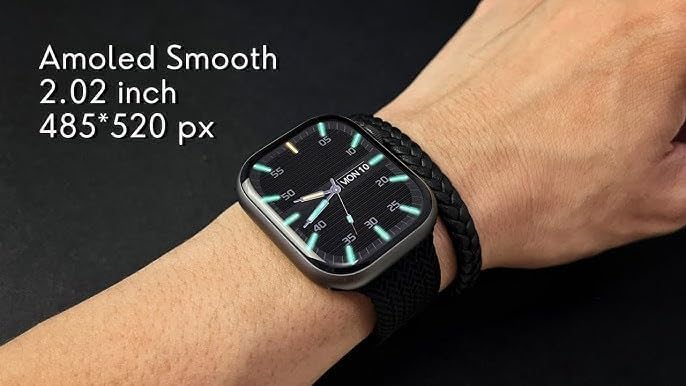
Image: The M59 Pro Max Smartwatch worn on a wrist, showcasing its vibrant 2.02-inch AMOLED display with a resolution of 485x520 pixels.
Дзвінки та сповіщення
Once paired via Bluetooth, you can manage calls and receive notifications directly on your smartwatch.
- Здійснення дзвінків: Use the dialer on the watch or access your phone's contacts through the watch interface.
- Отримання дзвінків: Answer or reject incoming calls directly from your wrist.
- Сповіщення: View messages, app alerts, and other notifications.
Fitness Tracking and Sport Modes
The smartwatch offers comprehensive fitness tracking and multiple sport modes.
- Відстеження активності: Відстежує кроки, відстань та спалені калорії.
- Монітор серцевого ритму: Надає дані про частоту серцевих скорочень у режимі реального часу.
- Відстеження сну: Analyzes sleep patterns and duration.
- Спортивні режими: Select from various activities like running, cycling, and more to track specific workout data.
NFC and GPT Features
The M59 Pro Max supports NFC for convenient transactions and GPT for enhanced interaction. Refer to the companion app for specific setup and usage instructions for these advanced features.
Технічне обслуговування
прибирання
Wipe the smartwatch and straps regularly with a soft, dry cloth. For stubborn dirt, a slightly damp можна використовувати тканину. Уникайте використання агресивних хімікатів або абразивних матеріалів.
Водонепроникність
The M59 Pro Max is water repellent. This means it can withstand splashes, sweat, and light rain. It is not suitable for swimming, showering, or diving. Avoid prolonged exposure to water.
Догляд за ремінцем
The included straps are made of silicone, rubber, and nylon. Clean them according to their material type. Ensure straps are dry before reattaching to the watch.
Усунення несправностей
Якщо у вас виникли проблеми зі своїм смарт-годинником, спробуйте такі рішення:
- Smartwatch not powering on: Переконайтеся, що пристрій повністю заряджено.
- Не вдається з’єднати пристрій зі смартфоном: Make sure Bluetooth is enabled on your phone and the smartwatch is within range. Try restarting both devices.
- Inaccurate fitness data: Ensure the watch is worn snugly on your wrist. Calibrate the app if available.
- Сповіщення не відображаються: Check app permissions on your smartphone and ensure notifications are enabled for the companion app.
- Екран не реагує: Спробуйте перезавантажити смарт-годинник.
For further assistance, please refer to the support section of the companion application or contact your retailer.
Технічні характеристики
| Назва моделі | M59 Pro Макс |
| Торгова марка | загальний |
| Операційна система | Власна ОС |
| Розмір екрана | 2 дюймів |
| Тип дисплея | OLED |
| роздільна здатність | 240 х 280 |
| Технологія підключення | Bluetooth, стільниковий зв'язок (LTE) |
| Стандарт бездротового зв'язку | Bluetooth |
| Особливості підключення | NFC, Bluetooth, Cellular |
| Особливості | Advanced Activity Tracking, Call and Chat Support |
| Склад батареї | Літій-іонний |
| GPS | Немає GPS |
| Форма предмета | Круглий |
| Тип матеріалу стрічки | Silicone, Rubber, Nylon |
| Рівень водонепроникності | Водовідштовхувальний засіб |
| Спортивний тип | Кілька видів спорту |
| Введення людського інтерфейсу | Сенсорний екран |
| Підтримувана програма | Фітнес-трекер |
| Тип контролера | Голосове керування |
| Тип лічильника | Heart Rate Monitor, Sleep Duration, Step Count |
| Тип закриття | Пряжка |
| Колір | чорний |
| Колір стрічки | чорний |
| Сумісні пристрої | Смартфон, планшет |
| Сумісні моделі телефонів | Усі актуальні моделі смартфонів |
Гарантія та підтримка
Інформація про гарантію
This product is provided without an explicit warranty. Please check with your retailer regarding their return and exchange policies.
Підтримка клієнтів
For any questions or issues not covered in this manual, please contact the retailer where you purchased the product or refer to the support section within the companion application.