
вступ
Thank you for choosing the TECKNET TK-MS017 Ergonomic Wireless Vertical Mouse. This manual provides detailed instructions for setting up, operating, maintaining, and troubleshooting your new mouse. Designed for comfort and efficiency, this vertical mouse helps reduce wrist strain during prolonged use.

The TECKNET Ergonomic Vertical Mouse, designed for comfortable use.
Особливості продукту
- Ергономічний вертикальний дизайн: Mimics a natural handshake posture to reduce wrist and arm pressure, preventing discomfort from prolonged use.
- Регульований DPI: 5 levels of DPI (800/1600/2400/3200/4800) for precise tracking and adaptable sensitivity.
- Тихі кліки: 99% noise reduction for a quiet working environment. (Forward/Backward buttons are not silent).
- 6 Кнопки: Includes standard left/right click, scroll wheel, DPI switch, and convenient forward/backward buttons for web навігація.
- Stable 2.4G Wireless Connection: Provides a reliable connection up to 10 meters with a plug-and-play USB receiver.
- Тривалий термін служби батареї: Features an independent power switch and automatic sleep function to conserve battery, offering up to 24 months of use.
- Широка сумісність: Supports Windows 11/10/8/7/XP, Mac OS X10.4, Chrome OS, and Linux.

Comparison of vertical ergonomic grip and traditional mouse grip, highlighting reduced wrist tension with the vertical design.
Інструкції з налаштування
- Встановіть акумулятори:
Locate the battery compartment on the underside of the mouse. Open the cover and insert two AA batteries (not included), ensuring correct polarity. Close the battery cover securely.

The underside of the mouse, illustrating the battery compartment and the storage slot for the USB receiver.
- Підключіть USB-приймач:
Remove the USB receiver from its storage slot next to the battery compartment. Plug the receiver into an available USB port on your computer (PC, laptop, Mac, Chromebook, or tablet).
- Увімкнення:
Flip the ON/OFF switch on the bottom of the mouse to the "ON" position. The mouse should automatically connect to your device. No additional drivers are typically required for most operating systems.
Інструкція з експлуатації
Функції кнопок
- Клацніть лівою кнопкою миші: Стандартний вибір та активація.
- Клацніть правою кнопкою миші: Відкриває контекстні меню.
- Колесо прокрутки: Прокручує документи та web сторінки вертикально. Також можна натиснути для функції клацання середньою кнопкою миші.
- Кнопка перемикання DPI: Located near the scroll wheel. Press to cycle through DPI settings (800/1600/2400/3200/4800). The red indicator light will flash to confirm the change.
- Кнопка вперед: Переміщується вперед web браузери або file explorers. (Not supported on Mac OS).
- Кнопка "Назад": Переміщується назад web браузери або file explorers. (Not supported on Mac OS).
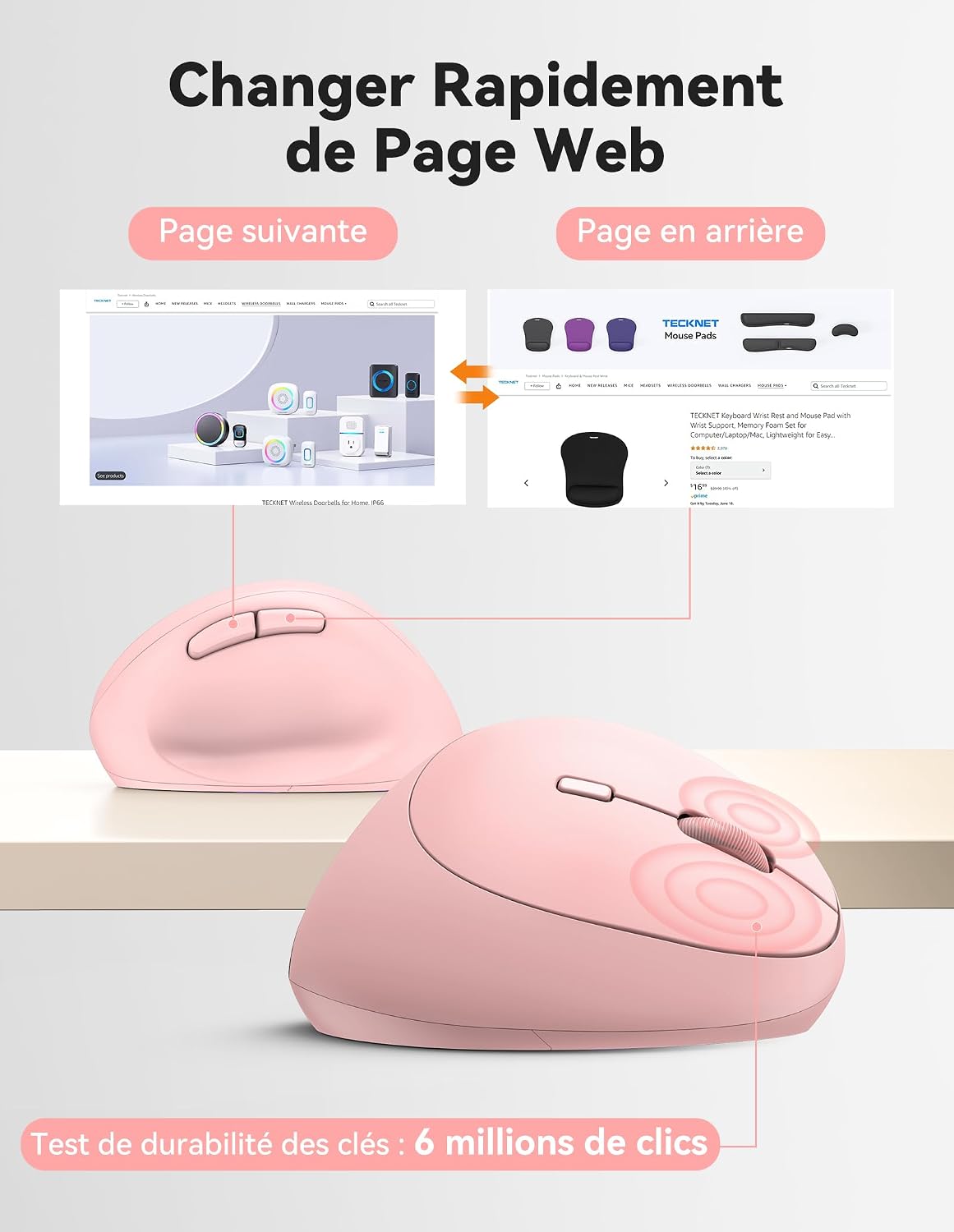
Diagram illustrating the location and function of each button on the TECKNET vertical mouse.
Налаштування DPI
The mouse offers 5 adjustable DPI levels to suit various tasks and preferences. Press the DPI switch button to change the cursor speed. The red indicator light will flash a corresponding number of times to indicate the current DPI setting:
- Flash X1: 800 DPI (Web Navigation)
- Flash X2: 1600 DPI (Excel Editing)
- Flash X3: 2400 DPI (Video Editing)
- Flash X4: 3200 DPI (Photoshop)
- Flash X5: 4800 DPI (Gaming Track)

Visual representation of the 5 adjustable DPI levels for different usage scenarios.
Режим енергозбереження
To conserve battery life, the mouse will automatically enter sleep mode after 8 minutes of inactivity. To wake it up, simply move the mouse or click any button.
Технічне обслуговування
- Прибирання: Використовуйте м’яку суху тканину для очищення миші. Уникайте використання агресивних хімікатів або абразивних матеріалів.
- Заміна батареї: When the mouse performance degrades or the cursor becomes erratic, it's time to replace the batteries. Ensure you use fresh AA batteries and dispose of old batteries responsibly.
- Зберігання: When not in use for extended periods, turn off the mouse using the ON/OFF switch to further conserve battery life. Store the USB receiver inside the mouse's battery compartment to prevent loss.
Усунення несправностей
- Миша не реагує:
- Переконайтеся, що миша увімкнена.
- Перевірте, чи батарейки правильно встановлені та чи мають достатній заряд. За потреби замініть їх.
- Переконайтеся, що USB-приймач надійно підключено до робочого USB-порту. Спробуйте інший USB-порт.
- Перемістіть мишу ближче до USB-приймача, щоб уникнути проблем із діапазоном.
- Перезавантажте комп'ютер.
- Нестабільний рух курсора:
- Очистіть оптичний датчик на нижній частині миші.
- Ensure you are using the mouse on a suitable surface. The mouse is designed to track on various surfaces like resin, wood, fabric, paper, and metal. Avoid highly reflective or transparent surfaces.
- Зменште роздільну здатність (DPI), якщо курсор занадто чутливий.
- Forward/Backward buttons not working on Mac:
These side buttons are not supported by Mac OS. This is a system limitation, not a mouse malfunction.
Технічні характеристики
| Бренд | ТЕКНЕТ |
| Номер моделі | ТК-МС017 |
| Технологія підключення | 2.4G Wireless (Radio-frequency) |
| Технологія виявлення руху | Оптичний |
| Рівні DPI | 800, 1600, 2400, 3200, 4800 |
| Кількість кнопок | 6 |
| Орієнтація руки | правильно |
| Розміри продукту | 10.5Д x 6.5Ш сантиметрів |
| Дальність бездротового зв'язку | До 10 метрів |
| Джерело живлення | 2 батарейки типу АА (не входять в комплект) |
| Середній термін служби батареї | До 24 місяців |
| Сумісні операційні системи | Windows 11/10/8/7/XP, macOS X10.4+, Chrome OS, Linux |
Гарантія та підтримка
TECKNET provides a 36-month support period for registered products. If you encounter any issues during the use of this product, please contact the professional TECKNET customer service team for assistance.
Для отримання додаткової інформації та підтримки відвідайте офіційний веб-сайт TECKNET webсайт або зверніться безпосередньо до служби підтримки клієнтів.
Webсайт: Магазин TECKNET на Amazon