
1. Вступ
Thank you for choosing the Sharkoon AK6 RGB ATX PC Case. This manual provides essential information for the proper installation, operation, and maintenance of your new PC case. Please read this guide thoroughly before beginning the assembly process to ensure optimal performance and longevity of your components.
2. Інформація про безпеку
- Always disconnect the power supply from the wall outlet before installing or removing any components inside the PC case.
- Handle tempered glass panels with care. They are fragile and can break if dropped or subjected to impact.
- Avoid exposing the case to extreme temperatures, humidity, or direct sunlight.
- Зберігайте дрібні деталі та гвинти у недоступному для дітей місці.
- Ensure proper grounding to prevent electrostatic discharge (ESD) damage to sensitive electronic components.
3. Вміст упаковки
Будь ласка, перевірте наявність усіх предметів у вашій упаковці:
- Корпус ПК Sharkoon AK6 RGB ATX
- Коробка з аксесуарами (містить гвинти, кабельні стяжки та інші дрібні деталі)
- Посібник користувача (цей документ)
4. Продукт закінчивсяview
The Sharkoon AK6 RGB ATX PC Case is designed with a modern glass aesthetic, featuring seamless integration of tempered glass on the front and side panels. It includes four pre-installed 120mm addressable RGB PWM fans for optimal airflow and visual appeal. The case supports a wide range of components, including BTF motherboards, and offers ample space for high-performance hardware.

Рисунок 4.1: Передня внутрішня частина view of the Sharkoon AK6 RGB PC case, showcasing the pre-installed addressable RGB fans and the spacious main chamber.

Рисунок 4.2: Кутовий view of the Sharkoon AK6 RGB PC case, highlighting the tempered glass side panel and the top mesh for ventilation.

Малюнок 4.3: Задня частина view of the Sharkoon AK6 RGB PC case, showing the I/O shield cutout, rear exhaust fan mount, and expansion slots.
Передня панель введення/виведення
The front I/O panel is located on the side of the case and includes:
- Кнопка живлення
- Кнопка скидання
- 2 x USB Ports (Type-A)
- 1 порти USB Type-C
- Audio Jacks (TRRS)
5. Налаштування та встановлення
Follow these steps to install your components into the Sharkoon AK6 RGB PC Case.
5.1 Підготовка справи
- Поставте корпус на рівну, стійку поверхню.
- Carefully remove the tempered glass side panel by unscrewing the thumb screws at the rear and gently pulling the panel away.
- Remove the rear metal side panel by unscrewing the thumb screws.
5.2 Встановлення материнської плати
The AK6 RGB supports Mini-ITX, Micro-ATX, ATX, and BTF motherboards.
- Install the I/O shield into the cutout at the rear of the case (if not pre-installed on your motherboard).
- Align your motherboard with the standoffs inside the case. Ensure all standoffs match the motherboard's mounting holes.
- Закріпіть материнську плату відповідними гвинтами з коробки з аксесуарами.
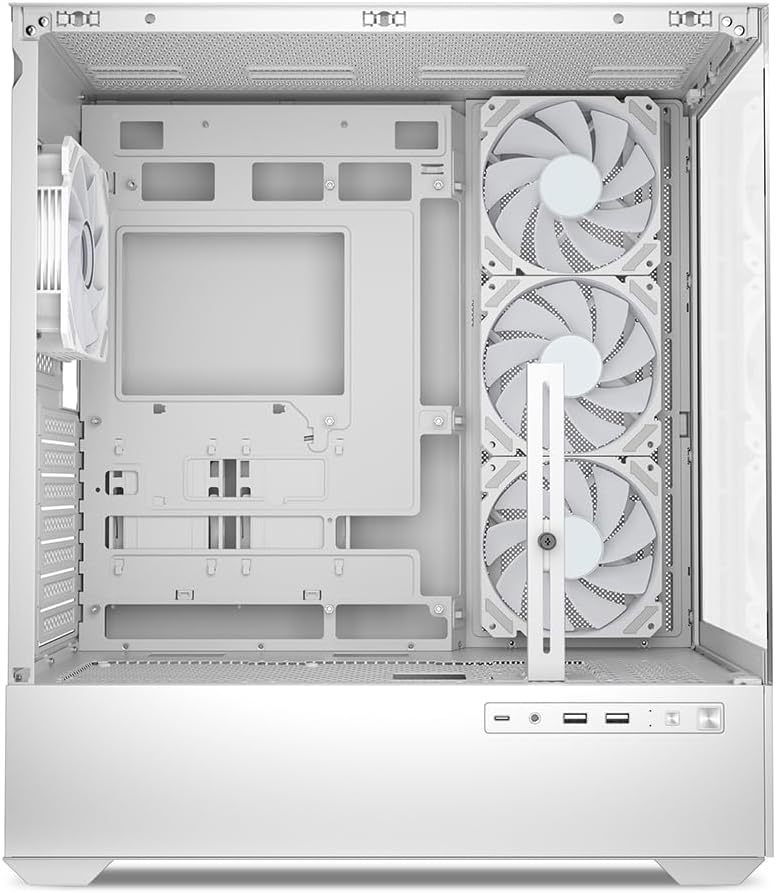
Рисунок 5.1: Інтер'єр view of the Sharkoon AK6 RGB PC case, illustrating the motherboard tray, cable management cutouts, and front fan mounting points.
5.3 Встановлення блоку живлення
The case features a bottom-mount power supply design.
- Вставте блок живлення (PSU) у спеціальний відсік у нижній задній частині корпусу.
- Зіставте блок живлення з отворами для гвинтів на задній панелі корпусу.
- Закріпіть блок живлення за допомогою наданих гвинтів.
5.4 Встановлення запам'ятовуючого пристрою
The AK6 RGB supports up to two 3.5" HDDs or four 2.5" SSDs.
- For 3.5" HDDs: Locate the drive cages beneath the PSU shroud. Slide the HDD into a drive tray and secure it with screws.
- For 2.5" SSDs: SSDs can be mounted on the dedicated brackets behind the motherboard tray or on the 3.5" drive trays using adapter screws.
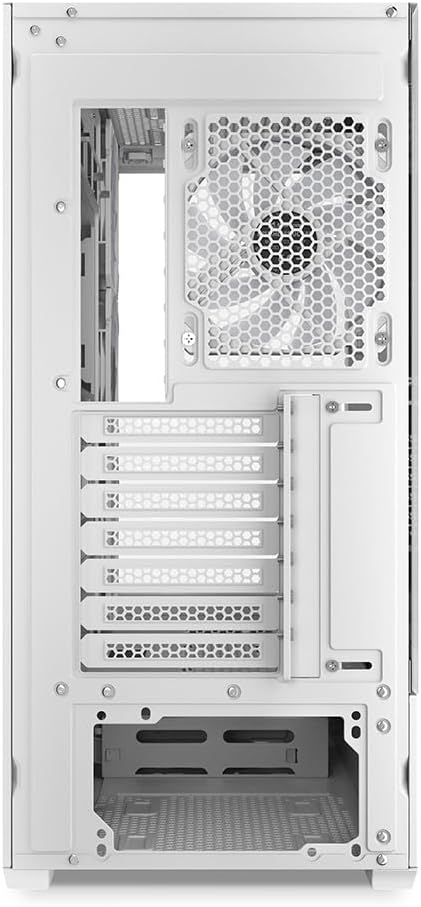
Рисунок 5.2: Задня частина салону view of the Sharkoon AK6 RGB PC case, detailing the drive cages for 3.5-inch HDDs and 2.5-inch SSDs, and the power supply shroud area.
5.5 Встановлення відеокарти та плати розширення
- Зніміть необхідні кришки слотів розширення на задній панелі корпусу.
- Вставте відеокарту або інші карти розширення у відповідні слоти PCIe на материнській платі.
- Secure the cards with screws. The case includes a rubberized graphics card support for larger cards.
5.6 CPU Cooler and Radiator Installation
The case supports CPU coolers up to 17 cm in height and allows for extensive liquid cooling setups.
- Встановіть кулер процесора відповідно до інструкцій виробника.
- For liquid cooling, the case can accommodate a 360mm radiator at the top and an additional 280mm radiator.
5.7 Організація кабелів
Використовуйте вирізи для керування кабелями та точки кріплення за лотком материнської плати, щоб прокласти та закріпити кабелі. Це покращує потік повітря та естетику.
6. Інструкція з експлуатації
6.1 Увімкнення
After all components are installed and cables are connected, replace the side panels. Connect the power cable to your PSU and a wall outlet, then press the power button on the front I/O panel to start your system.
6.2 RGB Fan Control
The AK6 RGB comes with four pre-installed addressable RGB PWM fans. These fans are connected to an RGB controller which also provides connections for up to four LED elements and four PWM fans. The RGB lighting can typically be controlled via your motherboard's RGB software (if compatible) or through a dedicated button on the case (if present and connected).
6.3 Оптимізація повітряного потоку
The case is designed for ideal airflow, with three inverted fans drawing air from the side into the case. The top and rear fan mounts allow for additional exhaust fans. Ensure proper fan orientation for optimal cooling performance.

Малюнок 6.1: Впрample of a fully assembled system within the Sharkoon AK6 RGB PC case, featuring various components and active RGB lighting.
7. Технічне обслуговування
Регулярне технічне обслуговування допомагає забезпечити довговічність та продуктивність компонентів вашого ПК.
- Пилові фільтри: Periodically clean the removable dust filters (e.g., on the top and bottom) to maintain optimal airflow and prevent dust buildup inside the case. Use compressed air or a soft brush.
- Скляні панелі: Clean tempered glass panels with a soft, lint-free cloth and a glass cleaner. Avoid abrasive materials that could scratch the surface.
- Прибирання салону: Використовуйте стиснене повітря для видалення пилу з внутрішніх компонентів і вентиляторів. Перед чищенням переконайтеся, що система вимкнена та відключена від мережі.
8. Вирішення проблем
If you encounter issues with your PC case, refer to the following common troubleshooting steps:
- Немає живлення: Ensure the power supply is properly connected to the wall outlet and the motherboard. Check all internal power cables (24-pin ATX, 8-pin CPU, PCIe power).
- Вентилятори не обертаються/RGB не працює: Verify that all fan and RGB cables are correctly connected to the motherboard or the included RGB controller. Check your motherboard's BIOS/UEFI settings or RGB software for fan speed and lighting control.
- Передні порти вводу/виводу не працюють: Confirm that the front panel connectors (USB, audio, power/reset switches) are correctly plugged into the corresponding headers on your motherboard.
- Перегрів: Ensure all fans are spinning correctly and oriented for proper airflow. Clean dust filters and internal components. Verify CPU cooler installation.
For further assistance, please contact Sharkoon support.
9. Технічні характеристики
| Особливість | Специфікація |
|---|---|
| Бренд | Шаркун |
| Назва моделі | AK6 RGB |
| Номер моделі | C-AK6W |
| Тип корпусу | Вежа ATX |
| Колір | Білий |
| матеріал | Загартоване скло |
| Сумісність материнської плати | Mini ITX, Micro ATX, ATX, BTF |
| Тип кріплення блоку живлення | Нижнє кріплення |
| Спосіб охолодження | повітря |
| Попередньо встановлені вентилятори | 4 x 120mm Addressable RGB PWM Fans |
| Максимальна висота процесорного кулера | 17 см |
| Максимальна довжина відеокарти | 41 cm (with rubberized support) |
| Максимальна довжина блоку живлення | 23.5 см |
| Опора радіатора | Top: up to 360mm, Additional: up to 280mm |
| Привідні відсіки | 2 x 3.5" HDD or 4 x 2.5" SSD |
| Передні порти вводу-виводу | 2 x USB Type-A, 1 x USB Type-C, Audio (TRRS) |
| Вага товару | 6.1 кілограма |
| Особливості | RGB Lighting, Unique Glass Appearance, BTF Motherboard Support |
10. Гарантія
Sharkoon products are manufactured to high quality standards. For detailed warranty information, please refer to the warranty card included with your product or visit the official Sharkoon webсайт. Гарантія зазвичай покриває дефекти матеріалів та виготовлення за умов нормального використання.
11. Підтримка
If you require technical assistance or have questions regarding your Sharkoon AK6 RGB ATX PC Case, please visit the official Sharkoon website for support resources, FAQs, and contact information. You may also find updated drivers or software for the RGB controller there.
Webсайт: www.sharkoon.com