
вступ
Thank you for choosing the BEBANG WX-A01-121A Detachable Kids Handheld Microscope Miniscope. This digital microscope is designed to provide an engaging and educational experience for young explorers, allowing them to observe the micro-world with up to 1000X magnification on a 2.0-inch HD screen. Its versatile design allows for both handheld and stand-mounted use, making it suitable for various indoor and outdoor scientific explorations. This manual provides essential information for the safe and effective operation and maintenance of your new microscope.

The BEBANG WX-A01-121A Detachable Kids Handheld Microscope Miniscope.
Що в коробці
Після відкриття упаковки переконайтеся, що всі наступні предмети присутні:
- BEBANG WX-A01-121A Digital Microscope Unit
- Підставка під мікроскоп
- Slides Set (10 prepared + 5 blank)
- SD-карта на 32 ГБ
- Зарядний кабель (USB-C)
- Коробка колекції
- Чашка Петрі
- Пінцет
- Посібник користувача (цей документ)
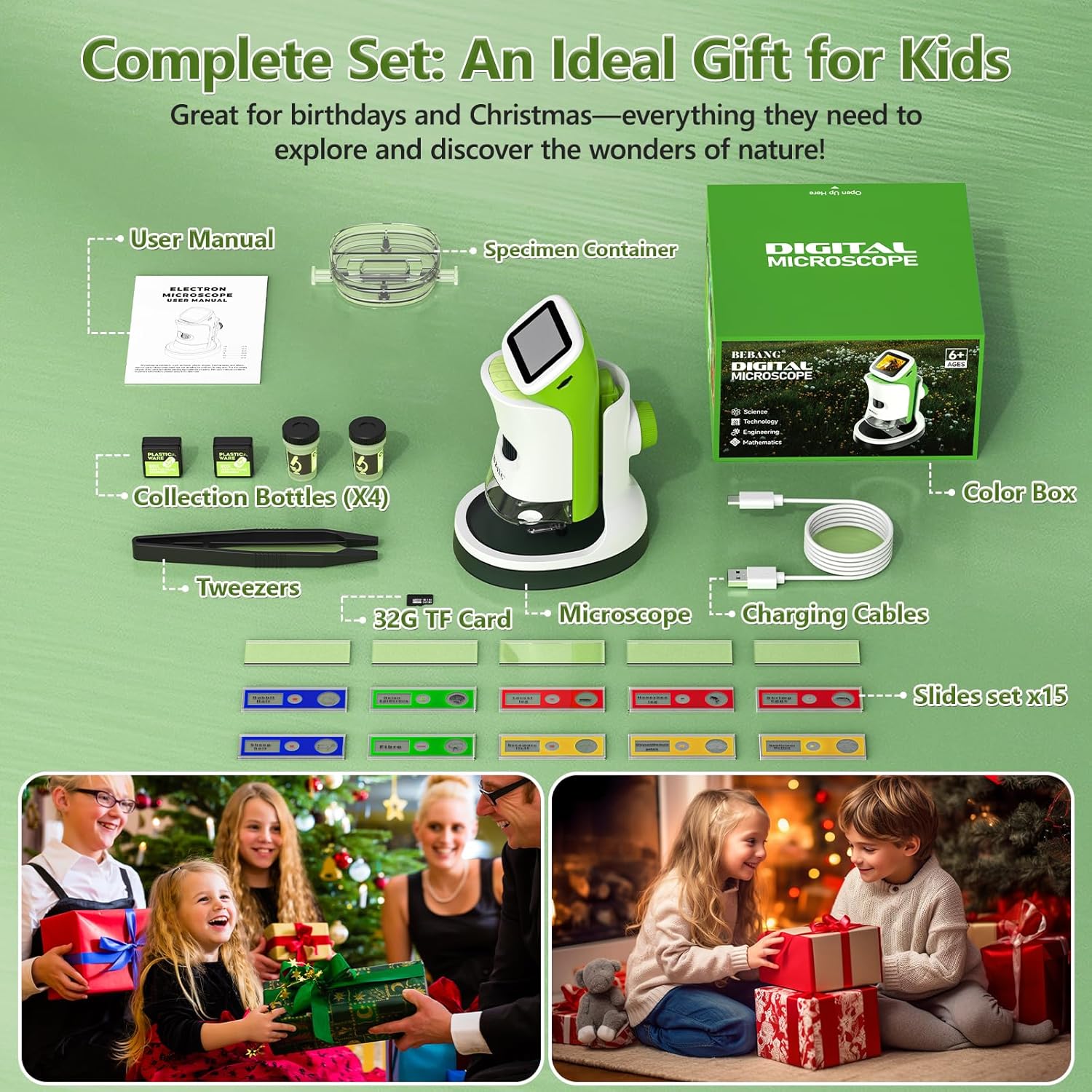
All components included in the BEBANG WX-A01-121A package.
Особливості продукту
The BEBANG WX-A01-121A microscope offers a range of features designed for ease of use and comprehensive observation:
- 4K 2.0" HD Screen: Provides clear, high-definition viewing of magnified specimens.
- 1000-кратне збільшення: Allows for detailed examination of small objects.
- Знімна конструкція: Use as a handheld device for outdoor exploration or attach to the stand for stable indoor observation.
- Зйомка фото та відео: Record discoveries directly onto the included 32GB SD card.
- PC Connectable: Transfer photos and videos to a computer for further analysis or sharing.
- Світлодіодне підсвічування: Built-in LED lights ensure bright and even illumination of specimens.
- Акумуляторна батарея: Portable power for extended use.

The microscope offers up to 1000X magnification and can connect to a PC.
Налаштування
Follow these steps to set up your BEBANG microscope:
- Charge the Microscope: Connect the microscope to a USB power source using the provided USB-C charging cable. The charging indicator light will show the charging status.
- Вставте SD-карту: Locate the SD card slot (usually on the side or back of the microscope unit) and gently insert the included 32GB SD card until it clicks into place.
- Прикріпити до підставки (необов'язково): Для стабільного viewing, align the microscope unit with the stand's base and slide it into position until it securely locks. Ensure the clips on the stand are ready to hold slides.
- Увімкнення: Press and hold the power button (usually located on the side or front) for a few seconds until the screen illuminates.

The microscope unit securely attached to its stand for stable observation.
Інструкція з експлуатації
Operating your BEBANG microscope is straightforward:
1. Observing Specimens with the Stand
- Place a prepared slide or a specimen in the petri dish onto the stage of the microscope stand. Use the clips to secure slides if necessary.
- Adjust the focus knob (typically on the side of the microscope body) until the image on the screen is clear.
- Use the magnification adjustment to zoom in or out as desired.
- Adjust the LED illumination for optimal viewясності.

A child observing a specimen on a slide using the microscope with its stand.
2. Handheld Observation
- Detach the microscope unit from its stand by pressing the release button (if applicable) and sliding it off.
- Hold the microscope directly over the object you wish to observe.
- Adjust the focus knob to achieve a clear image on the screen.
- This mode is ideal for examining larger objects or exploring outdoors.

A child using the microscope in handheld mode to observe plants outdoors.
3. Зйомка фотографій і відео
- While observing a specimen, press the designated photo button to capture a still image.
- Натисніть кнопку відео, щоб розпочати запис. Натисніть її ще раз, щоб зупинити запис.
- All captured media will be saved to the inserted 32GB SD card.

The microscope's 2.0-inch HD screen showing options for photo, video, and playback.
4. Підключення до ПК
- Connect the microscope to your computer using the USB-C cable.
- The microscope should appear as a removable storage device.
- You can then access and transfer your photos and videos from the SD card to your computer.

The microscope connected to a computer, illustrating the PC connectable feature for transferring media.
Video Demonstration: Kids Handheld Microscope with Stand
This video demonstrates the use of the BEBANG Kids Handheld Microscope, showcasing its features and how children can interact with it for exploration and learning.
Технічне обслуговування
Proper care will ensure the longevity of your microscope:
- Прибирання: Use a soft, dry cloth to clean the exterior of the microscope. For the lens and screen, use a specialized lens cleaning cloth and solution. Avoid abrasive materials.
- Зберігання: Store the microscope in a cool, dry place, away from direct sunlight and extreme temperatures. Use the provided EVA case for protection when not in use.
- Догляд за акумулятором: Регулярно заряджайте акумулятор, навіть якщо ви не використовуєте його часто, щоб підтримувати його справність. Уникайте повного розряджання акумулятора протягом тривалого часу.
- Обережно поводьтеся: This is an electronic device. Avoid dropping or subjecting it to strong impacts.
Усунення несправностей
Якщо у вас виникли проблеми, спробуйте ці поширені рішення:
| проблема | Можлива причина | Рішення |
|---|---|---|
| Мікроскоп не вмикається. | Низький заряд батареї або неправильно натиснута кнопка живлення. | Charge the microscope fully. Press and hold the power button for 3-5 seconds. |
| Зображення на екрані розмите. | Out of focus or incorrect working distance. | Adjust the focus knob. Ensure the microscope lens is close enough to the specimen. |
| Не вдається зробити фото/відео. | SD-карта заповнена, неправильно вставлена або пошкоджена. | Check if the SD card is inserted properly. Delete old files or format the SD card (backup important data first). Replace SD card if corrupted. |
| Екран занадто темний/яскравий. | LED illumination not adjusted. | Adjust the LED brightness control (if available) or reposition the specimen for better lighting. |
Технічні характеристики
Key technical specifications for the BEBANG WX-A01-121A microscope:
- Назва моделі: WX-A01-121A
- Бренд: BEBANG
- Максимальне збільшення: 1000x
- екран: 2.0" HD Screen
- Тип джерела світла: LED
- Джерело живлення: Живлення від батареї (3.7 вольт)
- матеріал: ABS
- колір: Зелений
- Вага товару: 0.5 кілограма
- Сумісні пристрої: Laptop, Personal Computer, Smartphone, Tablet (for data transfer)
- Вбудований носій: SD -карта 32G
Гарантія та підтримка
Your BEBANG WX-A01-121A microscope comes with a Гарантія 1 рік з дати покупки, що покриває виробничі дефекти. Будь ласка, збережіть підтвердження покупки для пред'явлення гарантійних претензій.
For technical support, troubleshooting assistance, or warranty inquiries, please contact BEBANG customer service through the retailer where you purchased the product or visit the official BEBANG website for contact information. Our support team is dedicated to assisting you with any questions or concerns you may have.
We encourage you to register your product online to receive updates and ensure efficient service.