
1. Вступ
This manual provides detailed instructions for the installation, operation, and maintenance of your LOFOV 360° 4 Channel Dash Cam, Model RM. Please read this manual thoroughly before using the product to ensure proper function and longevity.

Figure 1: LOFOV 360° 4 Channel Dash Cam and Accessories
2. Вміст упаковки
Перевірте наявність усіх елементів в упаковці:
- 1 x Dual Dash Cam Unit
- 1 x Adjustable Suction Mount
- 1 x задня камера
- 1 кабель задньої камери
- 1 x Lighter Car Charger Power Cable
- 1 x USB кабель зарядки типу C
- 1 х посібник користувача
- 1 x 64GB High-Speed Memory Card (Micro-SD, Class 10 U3)
- 2 х гвинти
- 1 x 3M клейка подушечка

Рисунок 2: Комплектація
3. Налаштування та встановлення
3.1 Memory Card Preparation
The dash cam requires a micro-SD card (Class 10 U3 speed, up to 256GB max). A 64GB card is included. If formatting the TF card on a computer, ensure it is formatted to FAT32. The exFAT format, common on Windows, is not compatible with this device.
3.2 Встановлення відеореєстратора
- Attach the adjustable suction mount to the main dash cam unit.
- Securely mount the dash cam to your vehicle's windscreen, ensuring a clear view of the road and interior.
- Connect the rear camera to the main unit using the provided rear camera cable.
- Position the rear camera as desired, typically on the rear windshield.
- Connect the lighter car charger power cable to the dash cam and your vehicle's 12V power outlet.
- Route all cables neatly to avoid obstructing your view або перешкоджають керуванню автомобілем.
Малюнок 3: Схема встановлення
4. Інструкція з експлуатації
4.1 Увімкнення/вимкнення живлення
The dash cam will automatically power on and begin recording when your vehicle starts. To manually power on/off, press and hold the power button.
4.2 Навігація по меню
Use the arrow buttons to navigate through menu options and the OK button to confirm selections. The 'M' button typically accesses the menu or switches modes.
Video 1: Demonstrates how to navigate the menu options and settings on the LOFOV 4 Channel Dash Cam, including resolution, loop recording, and G-sensor settings.
4.3 Режими та функції запису
- 360° All-Around Coverage: The dash cam features four lenses (front, rear, left, right) capable of simultaneous FHD 1080P recording. The front three lenses are adjustable for optimal angle capture.
- Дисплей HD: Features a 3.0-inch IPS screen for live video feedback.
- Супер нічне бачення: Equipped with 8 LED infrared lights and Wide Dynamic Range (WDR) technology to enhance clarity in low-light conditions and prevent overexposure. Front, inside, and rear cameras record clear images even in unlit environments.
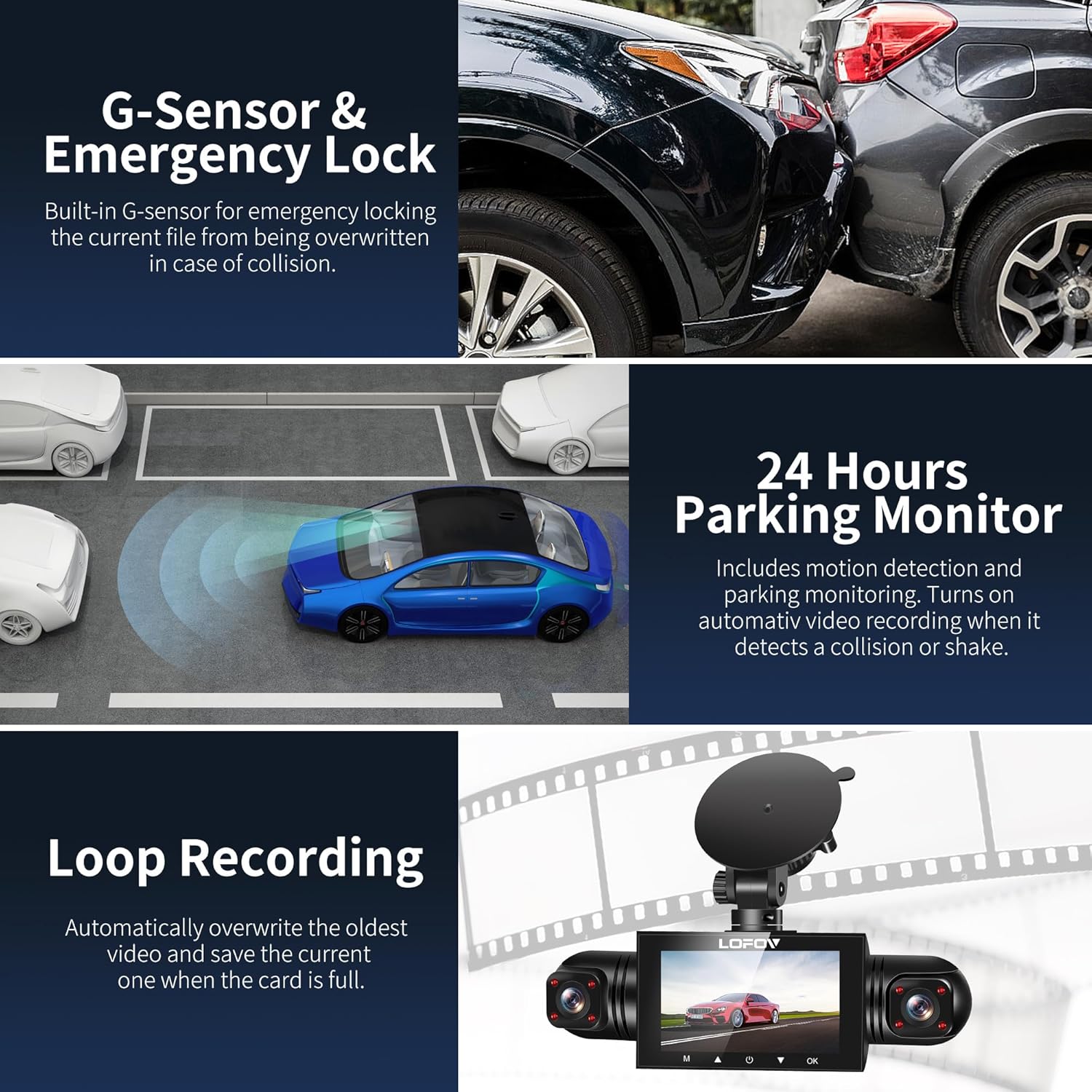
- G-Sensor and Emergency Lock: The built-in G-sensor automatically detects sudden shakes or collisions, locking the current footage to prevent it from being overwritten during loop recording.
- Циклічний запис: Records video in continuous loops (e.g., 3-minute segments). When the memory card is full, the oldest unlocked videos are automatically overwritten.
- Цілодобовий режим паркування: When the vehicle is parked and turned off, the dash cam automatically switches to parking mode. It monitors the area around the car and records video for 1 minute upon detecting motion or impact. This feature requires a continuous power supply via a hardwire kit or external battery.

Figure 4: Quad Camera View
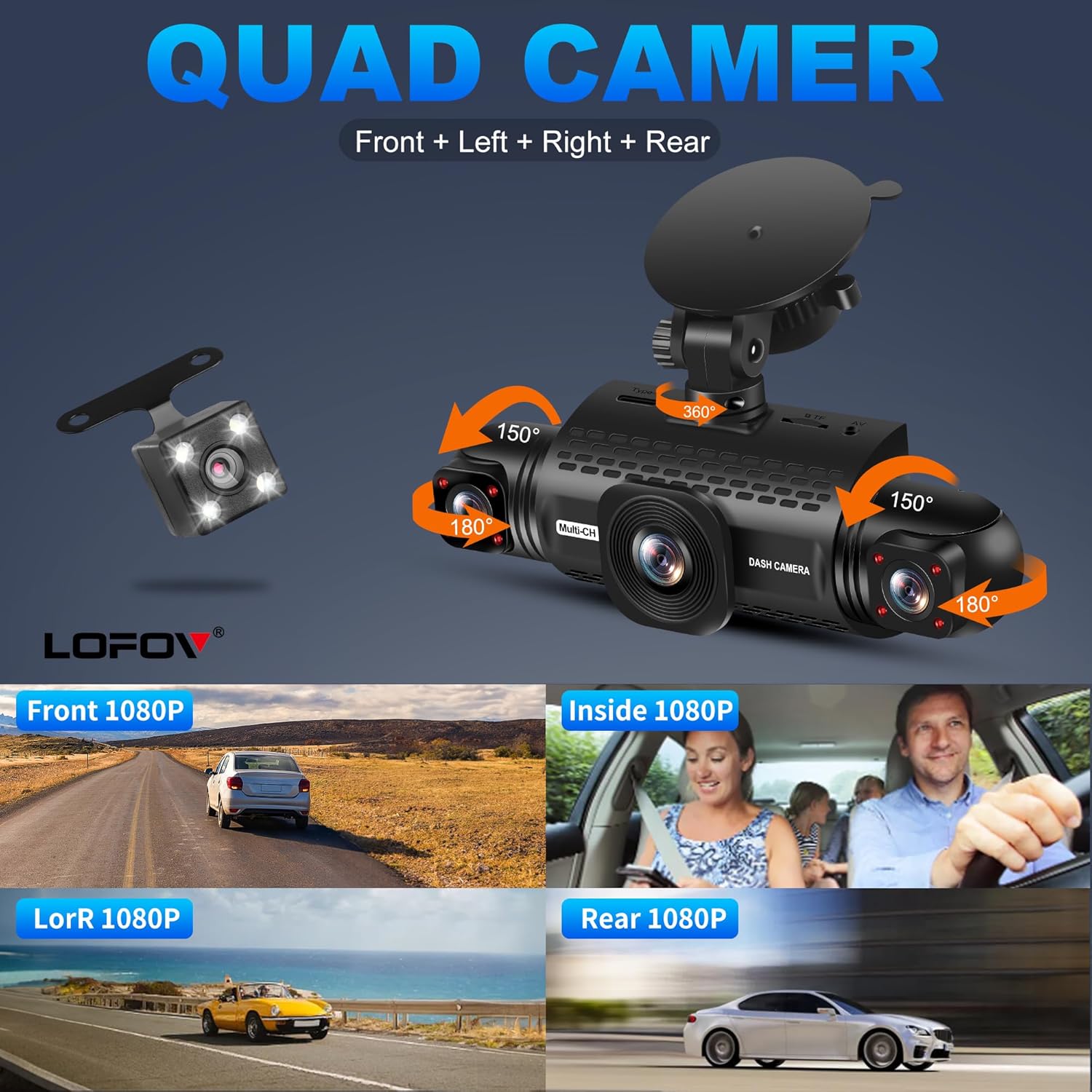
Figure 5: Adjustable Camera Angles

Figure 6: Individual Camera Views (Front, Inside, Left/Right, Rear)

Figure 7: Wide Angle Coverage
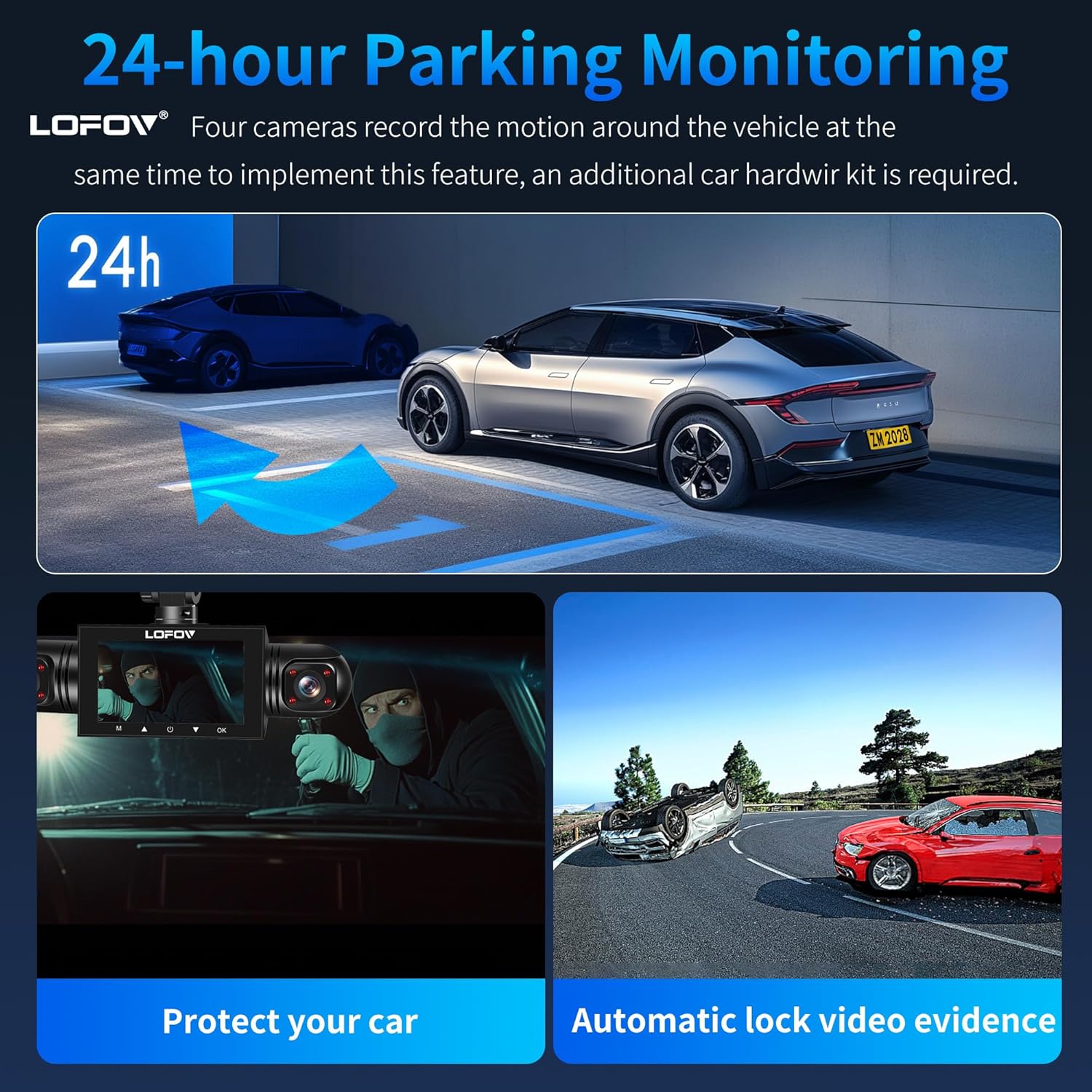
Рисунок 8: Продуктивність супернічного бачення

Figure 9: Super Night Vision 2.0 & WDR Technology
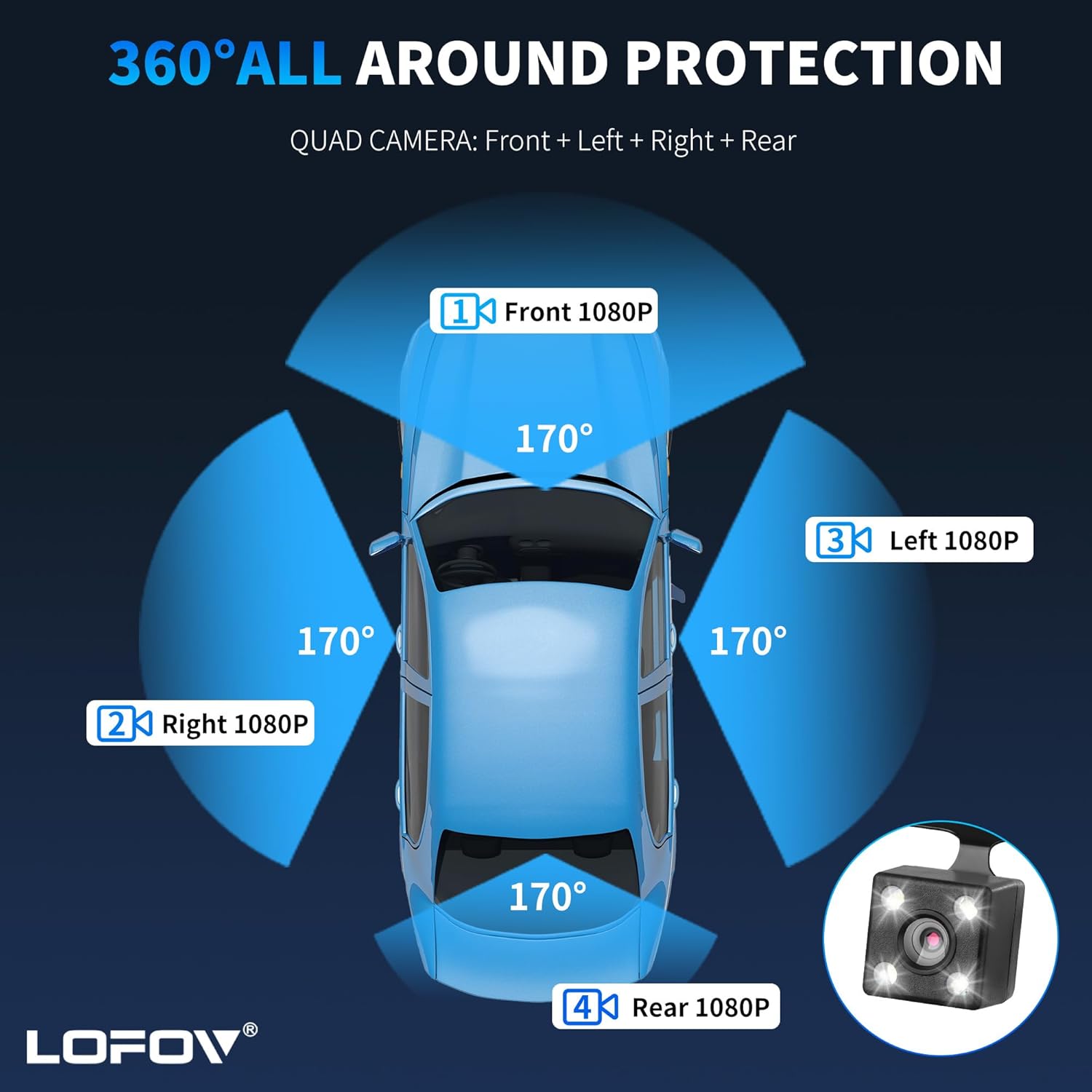
Рисунок 10: Цілодобовий моніторинг паркування

Figure 11: G-Sensor, Parking Monitor, and Loop Recording

Figure 12: Safe Parking Features
5. Технічне обслуговування
5.1 Керування картами пам'яті
Regularly format the memory card within the dash cam's settings to ensure optimal performance and prevent data corruption. Back up important footagе перед форматуванням.
5.2 Очищення
Wipe the camera lenses and screen with a soft, lint-free cloth. Avoid using abrasive cleaners or solvents that could damage the device.
5.3 Термостійкість
The dash cam is designed to operate in temperatures ranging from -4°F to 140°F (-20°C to 60°C). Operating outside this range may affect performance or damage the device.

Figure 13: Temperature Resistance Range
6. Вирішення проблем
- Пристрій не вмикається: Ensure the power cable is securely connected to both the dash cam and the vehicle's power outlet. Check the vehicle's 12V outlet for power.
- Проблеми із записом:
- Ensure the memory card is inserted correctly and is not full.
- Format the memory card regularly to prevent data corruption.
- Verify loop recording settings are configured as desired.
- Погана якість відео:
- Очистіть об'єктиви камери.
- Check the resolution settings in the menu (2K, 1080P, 720P).
- Ensure WDR and Night Vision features are enabled for low-light conditions.
- Чутливість G-сенсора: If the G-sensor is too sensitive, it may lock too many files. Adjust the sensitivity setting in the menu to a lower level if needed.
- Режим паркування не працює: Ensure the dash cam is connected to a continuous power supply (hardwire kit or external battery) for 24-hour parking mode functionality.
- Складність навігації по меню: Refer to Video 1 in the Operating Instructions section for a visual guide on menu navigation.
7. Технічні характеристики
| Бренд | ЛОФОВ |
| Назва моделі | RM |
| Колір | Білий |
| Розміри продукту | 3.15" Г x 4.33" Ш x 8.66" В |
| Вага товару | 14.4 унції |
| Режим роботи | Безперервний |
| Включені компоненти | SD-карта (64 ГБ) |
| Особливості | 360 Degree, Voice Control, 24-Hour Radar Detection Parking Monitoring, Automatic Incident Detection, Blind Spot Detection, Built-In Microphone, Built-In Speaker, Compact Design, G-Sensor, Internal Memory, Loop Recording, Motion Sensing, Mute Function, Night Vision, Parking Monitor, Reverse Assist |
| Діапазон робочих температур | Від -4°F до 140°F (від -20°C до 60°C) |
| UPC | 677899491419 |
| ASIN | B0DL2PFX4H |
8. Гарантія та підтримка
For warranty information or technical support, please refer to the contact details provided with your product packaging or visit the official LOFOV website. Additional protection plans may be available for purchase from authorized retailers.