
1. Вступ
The virtavo VistaFlask 2K Security Camera is a wireless, battery-powered outdoor camera designed to enhance your home security. Featuring 2K QHD imaging, AI motion detection, starlight lens for colorful night vision, and weatherproof construction, it provides reliable surveillance in various conditions. This manual provides detailed instructions for setting up, operating, maintaining, and troubleshooting your camera.

Image: Two virtavo VistaFlask 2K security cameras, designed for outdoor use.
2. Інформація про безпеку
- Ensure the camera is installed securely to prevent falling.
- Use only the specified charging cable and power adapter to charge the battery.
- Не піддавайте камеру впливу екстремальних температур поза межами її робочого діапазону.
- Avoid disassembling or modifying the camera, as this will void the warranty and may cause damage.
- Зберігайте камеру та її аксесуари у недоступному для дітей місці.
3. Вміст упаковки
- virtavo VistaFlask 2K Security Camera(s)
- Монтажний кронштейн(и)
- USB-кабель для зарядки
- Посібник користувача
- Монтажні гвинти та анкери
4. Продукт закінчивсяview
The virtavo VistaFlask camera features a compact design with essential components for optimal performance. Key elements include the lens, IR LEDs for night vision, a microphone for audio input, a speaker for two-way communication, and a motion sensor. The power switch, sync button, and charging port are located at the bottom of the camera, alongside the microSD card slot for local storage.

Зображення: Внутрішнє view highlighting the battery and electronic components.

Зображення: Нижня частина view of the camera with power switch, charging port, sync button, and microSD card slot.
5. Посібник із налаштування
5.1 Початкове налаштування
- Зарядіть фотоапарат: Before first use, fully charge the camera using the provided USB cable. The battery lasts 1-3 months per charge depending on usage.
- Завантажте додаток: шукати 'HOME V' in your smartphone's app store (iOS or Android) and download the application.
- Створити обліковий запис: Open the 'HOME V' app and follow the on-screen instructions to register a new account or log in if you already have one.
5.2 Camera Pairing and Connection
Follow these steps to pair your virtavo VistaFlask camera with the 'HOME V' app. For a visual guide, please refer to the official installation video below.
Video: Official virtavo VistaFlask Installation Guide Setup. This video demonstrates the step-by-step process of binding the camera to the 'HOME V' app using QR codes, including powering on the camera, confirming the red light flashing, connecting to the camera's hotspot, and connecting to your home Wi-Fi network.
- Додати пристрій: In the 'HOME V' app, tap the '+' icon to add a new device.
- Сканувати QR-код: Grant camera access to the app. Scan the QR code located on the back of your virtavo VistaFlask camera.
- Увімкнення: Ensure the camera is powered on. The power switch is located at the bottom.
- Confirm Flashing Light: Confirm that the camera's red indicator light is flashing rapidly. If not, press and hold the 'Sync' button for 5-10 seconds until you hear a 'Du' sound or see rapid flashing.
- Connect to Camera Hotspot: The app will prompt you to connect to the camera's Wi-Fi hotspot (e.g., 'IPC365_AP-XXXX'). Confirm and join this network.
- Select Home Wi-Fi: Choose your home 2.4GHz Wi-Fi network from the list and enter the correct password. Note: This device only supports 2.4GHz Wi-Fi.
- Назвіть свою камеру: Once connected, name your camera for easy identification (e.g., 'Front Door', 'Living Room').
5.3 Фізичне встановлення
The virtavo VistaFlask camera is designed for easy installation, both indoors and outdoors. Its weatherproof design ensures durability.

Image: Easy installation on smooth surfaces like glass or tiles, no drilling required.

Image: Wireless connection for remote access.
- Виберіть місце розташування: Select a location with good Wi-Fi signal strength and a clear view області, яку ви бажаєте контролювати.
- Монтаж: Use the provided mounting bracket, screws, and anchors to securely attach the camera to a wall or other suitable surface. Ensure the camera is positioned to capture the desired field of view.
- Стійкий до погодних умов: The camera is designed to withstand various weather conditions, making it suitable for outdoor use.
6. Інструкція з експлуатації
6.1 Живий View і двостороннє аудіо
Access real-time video feed and communicate through the camera using the 'HOME V' app.
- Жити View: Відкрийте програму та виберіть камеру, щоб view живий корм.
- Двостороннє аудіо: Натисніть значок мікрофона в прямому ефірі view to speak through the camera's speaker, and listen through its microphone.
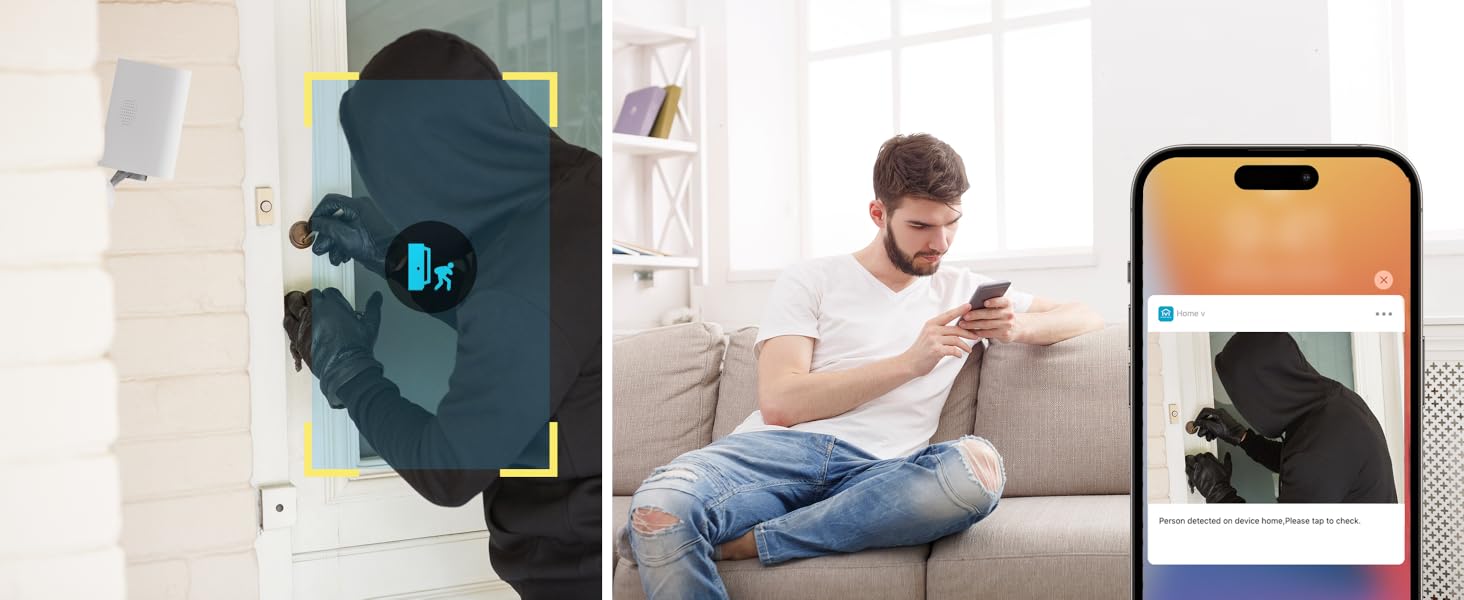
Image: Two-way audio feature for communication.
6.2 Виявлення руху та сповіщення
The camera features advanced PIR motion detection and AI capabilities to minimize false alarms.
- Виявлення руху PIR: Detects motion up to 30 feet.
- Розумні сповіщення: Отримуйте миттєві сповіщення на свій смартфон, коли виявляється рух.
- AI Detection (Cloud Subscription): With an optional cloud subscription, the camera can differentiate between humans, vehicles, and animals, reducing irrelevant alerts.
- Настроювані зони виявлення: Set specific areas for motion detection to focus on critical zones and ignore others.
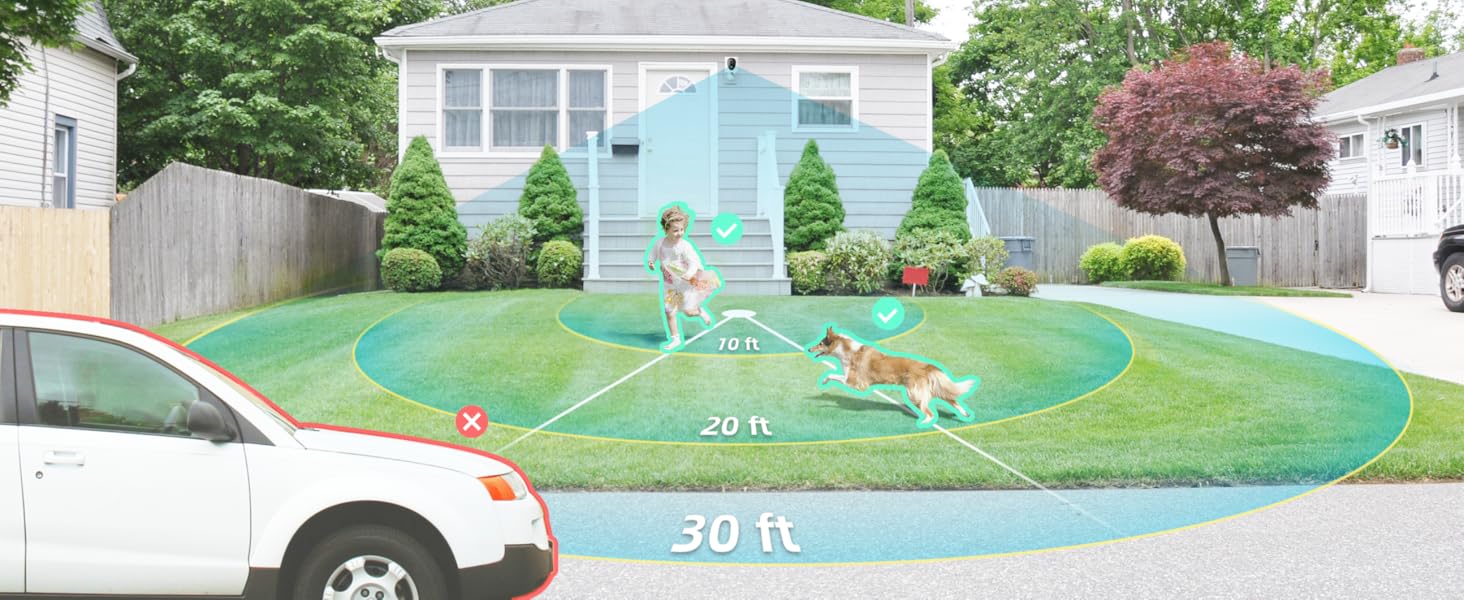
Image: Smart detection distinguishing between people, vehicles, and animals.
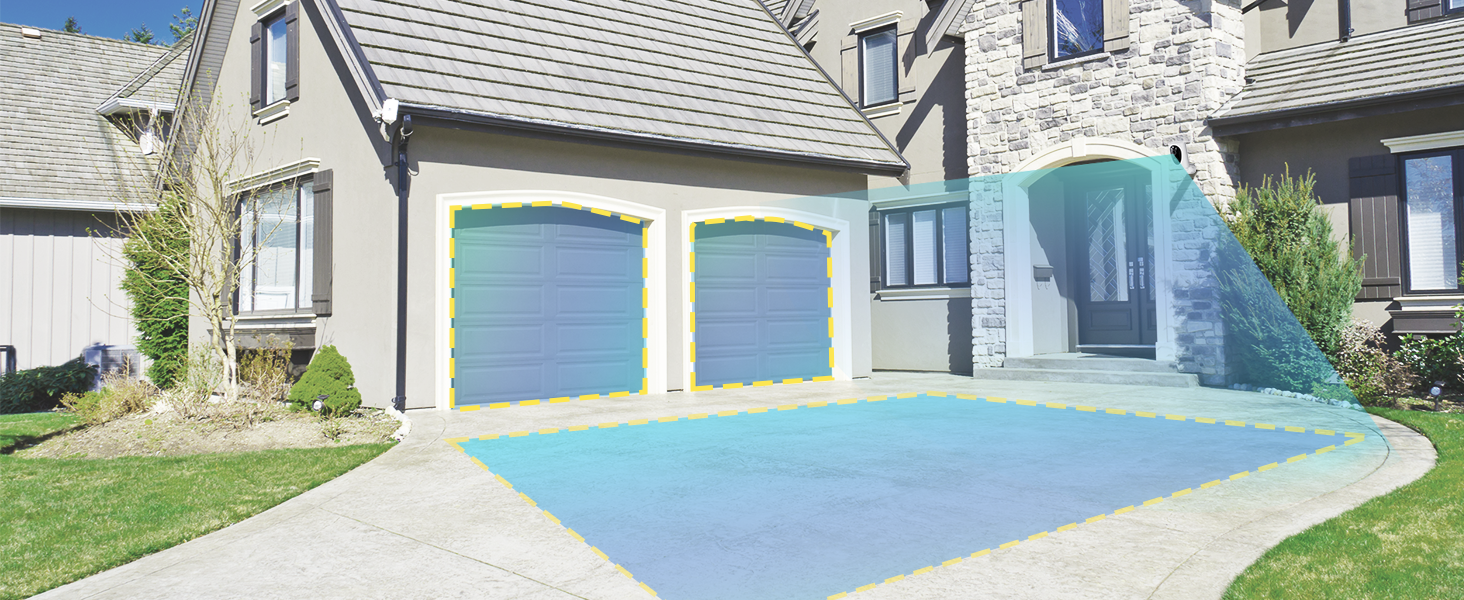
Image: Customizable motion detection zones.

Image: Instant alerts with image previews.
6.3 Нічне бачення
The camera provides clear vision even in low-light conditions.
- Кольорове нічне бачення: Utilizes Starlight technology and a wide F1.6 aperture for vivid, color-rich images in low light.
- ІЧ-нічне бачення: Equipped with 2 high-intensity IR LEDs for clear black-and-white viewing in complete darkness.

Image: Superior 2K QHD imaging and color-rich night vision.
6.4 Запис і зберігання
Your data is secured with flexible storage options.
- Локальна пам'ять: Supports microSD cards from 32GB to 256GB for continuous recording, even without network access. (MicroSD card not included).
- Хмарне сховище: Optional cloud storage plans offer additional features like snapshot alerts and advanced AI capabilities. Video encryption ensures privacy.

Image: Comparison of no-fee basic storage (SD card) and cloud storage options.
6.5 App Features and Remote Access
Manage and control your security remotely via the 'HOME V' app.
- Віддалений моніторинг: Monitor your home from anywhere with an internet connection.
- Доступ для багатьох користувачів: Надайте доступ до камери членам родини.
- Планування: Set schedules for recording or alerts.

Image: Remote access and multi-user monitoring via the 'HOME V' app.
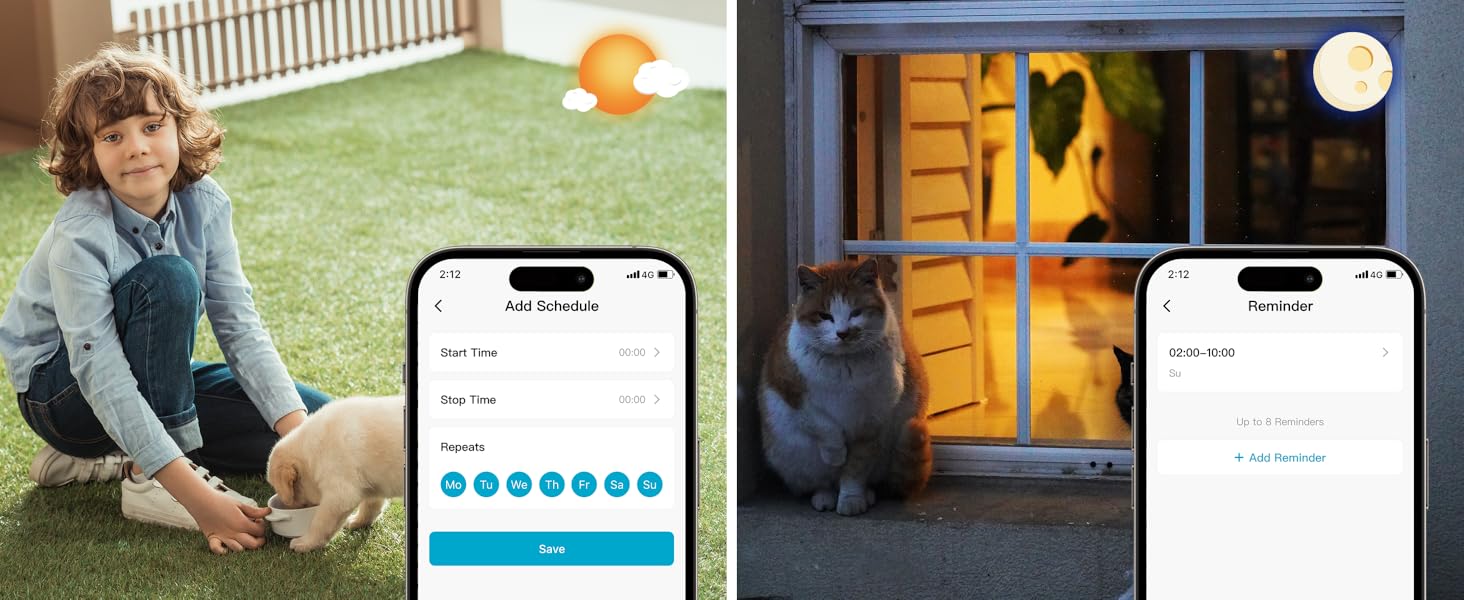
Image: App features including scheduling and reminders.
7. Технічне обслуговування
- Зарядка батареї: Recharge the camera battery when prompted by the app. A full charge can last 1-3 months depending on activity.
- Прибирання: Обережно протріть об'єктив і корпус камери м'якою губкоюamp тканина. Уникайте абразивних очищувачів.
- Оновлення прошивки: Regularly check the 'HOME V' app for firmware updates to ensure optimal performance and security.
8. Вирішення проблем
| Випуск | Можлива причина | Рішення |
|---|---|---|
| Камера не вмикається | Battery depleted; Power switch off | Charge the camera fully; Ensure power switch is in the 'ON' position. |
| Неможливо підключитися до Wi-Fi | Incorrect Wi-Fi password; 5GHz Wi-Fi network; Weak Wi-Fi signal | Verify password; Ensure you are connecting to a 2.4GHz network; Move camera closer to router or use a Wi-Fi extender. |
| Часті помилкові тривоги | High motion sensitivity; Unfiltered motion sources (e.g., trees, animals) | Adjust motion sensitivity in app; Set up detection zones to exclude irrelevant areas; Consider cloud subscription for AI detection. |
| Poor night vision clarity | Dirty lens; Obstruction in front of camera; Insufficient ambient light for color night vision | Clean the lens; Remove obstructions; Ensure adequate ambient light for color mode or switch to IR night vision. |
| Акумулятор швидко розряджається | High activity/recordings; Frequent live view access; Weak Wi-Fi signal | Reduce motion detection sensitivity; Limit live view sessions; Improve Wi-Fi signal strength. |
9. Технічні характеристики
| Особливість | Деталь |
|---|---|
| Назва моделі | LJH10 |
| Використання в приміщенні/зовні | В приміщенні, на відкритому повітрі |
| Джерело живлення | Battery Powered (4400mAh rechargeable Lithium battery) |
| Протокол підключення | Wi-Fi (лише 2.4 ГГц) |
| Тип контролера | Додаток HOME V |
| Тип монтажу | Настінне кріплення |
| Роздільна здатність захоплення відео | 2K QHD |
| Viewкут нахилу | 120 Degrees (Field of View: 130 градусів) |
| Діапазон нічного бачення | 30 футів |
| Технологія низького освітлення | Starlight (F1.6 aperture, 3.0mm focal length) |
| Кількість ІЧ світлодіодів | 2 |
| Рівень водонепроникності | Водостійкий |
| Розміри (Д x Ш x В) | 2.7 x 1.3 x 3.2 дюймів |
| Вага товару | 1.41 фунта |
| Параметри зберігання | MicroSD (32 ГБ-256 ГБ), хмарне сховище |
| Особливості | 2-Way Audio, Battery Powered, Local Recording, Motion Sensor, Night Vision, AI Motion Detection |
10. Гарантія та підтримка
virtavo products are designed for reliability and performance. For information regarding product warranty, please refer to the warranty card included in your product packaging or visit the official virtavo website. If you encounter any issues or have questions not covered in this manual, please contact virtavo customer support through the 'HOME V' app or their official support channels for assistance.