
1. Вступ
This manual provides detailed instructions for the installation, operation, and maintenance of your INQMEGA 2.4G WiFi 20X Optical Zoom 6MP Solar Security Camera. This outdoor camera features dual lenses, 20X optical zoom, 6MP resolution, color night vision, and is powered by a solar panel for continuous operation. Please read this manual thoroughly before use to ensure proper setup and functionality.

Зображення 1.1: закінченоview of the INQMEGA Solar Security Camera system.
2. Компоненти продукту
Carefully unpack the box and verify that all the following components are included:
- 1 x INQMEGA Solar Security Camera
- 1 x Сонячна панель
- 1 х монтажний кронштейн
- 1 x кабель живлення (USB)
- 1 x Extension Cord
- 1 x User Manual (Printed)
- Set of Mounting Screws and Wall Plugs

Зображення 2.1: Усі компоненти входять до комплекту.
3. Налаштування
3.1 Ідентифікація компонентів
Familiarize yourself with the camera's parts before installation.
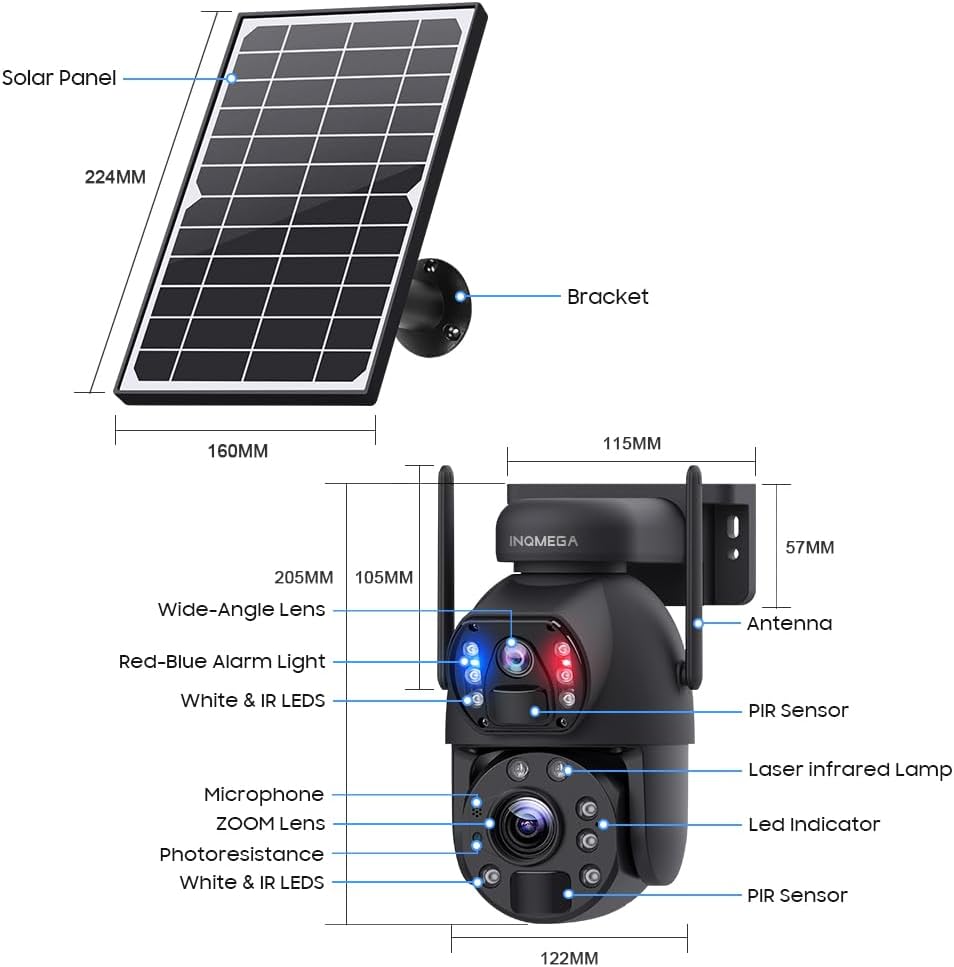
Image 3.1: Camera and Solar Panel Dimensions and Key Components.
3.2 Початкове заряджання
Before first use, ensure the camera's internal battery is fully charged. Connect the solar panel to the camera and place the solar panel in direct sunlight for several hours. Alternatively, you can use the provided power cable to charge the camera via a USB power adapter (not included).
3.3 Завантаження програми та створення облікового запису
- Завантажити UBOX додаток з магазину додатків вашого смартфона (iOS App Store або Google Play Store).
- Open the UBOX app and follow the on-screen instructions to create a new account or log in if you already have one.
3.4 Сполучення камери
- Переконайтеся, що ваш смартфон підключено до Wi-Fi мережа 2.4 ГГцЦя камера не підтримує Wi-Fi 5 ГГц.
- Power on the camera. The camera will enter pairing mode, indicated by a specific LED status (refer to the app for exact indications).
- In the UBOX app, tap the "Add Device" or "+" icon.
- Follow the app's instructions to scan the QR code on the camera or manually select the device type.
- Введіть назву (SSID) та пароль вашої мережі Wi-Fi 2.4 ГГц, коли буде запропоновано.
- The camera will attempt to connect to your Wi-Fi network. Once connected, the app will confirm successful pairing.
3.5 Методи встановлення
The camera supports both wall mounting and ceiling hanging. Choose the method that best suits your installation environment.

Зображення 3.2: Наприкладamples of Ceiling Hanging and Wall Mounting installations.
- Виберіть розташування: Choose an outdoor location with good Wi-Fi signal strength and sufficient direct sunlight exposure for the solar panel.
- Монтаж кронштейна: Use the provided screws and wall plugs to securely attach the mounting bracket to the desired surface.
- Приєднайте камеру: Надійно закріпіть камеру на монтажному кронштейні.
- Розташуйте сонячну панель: Adjust the solar panel's angle to maximize sunlight exposure throughout the day. Ensure the cable connecting the solar panel to the camera is securely fastened and protected from the elements.
4. Інструкція з експлуатації
4.1 Живий View and Dual Screen
Open the UBOX app and select your camera to access the live view. The camera features a dual-lens system, allowing for a dual-screen display within the app to monitor different areas simultaneously.
4.2 Керування панорамуванням, нахилом та масштабуванням (PTZ)
The camera supports 355° horizontal pan and 90° vertical tilt. Use the controls within the UBOX app to adjust the camera's viewing angle. The camera also features a 20-кратний оптичний зум, allowing you to magnify distant objects without significant loss of clarity.

Image 4.1: Demonstration of 20X Optical Zoom capability.
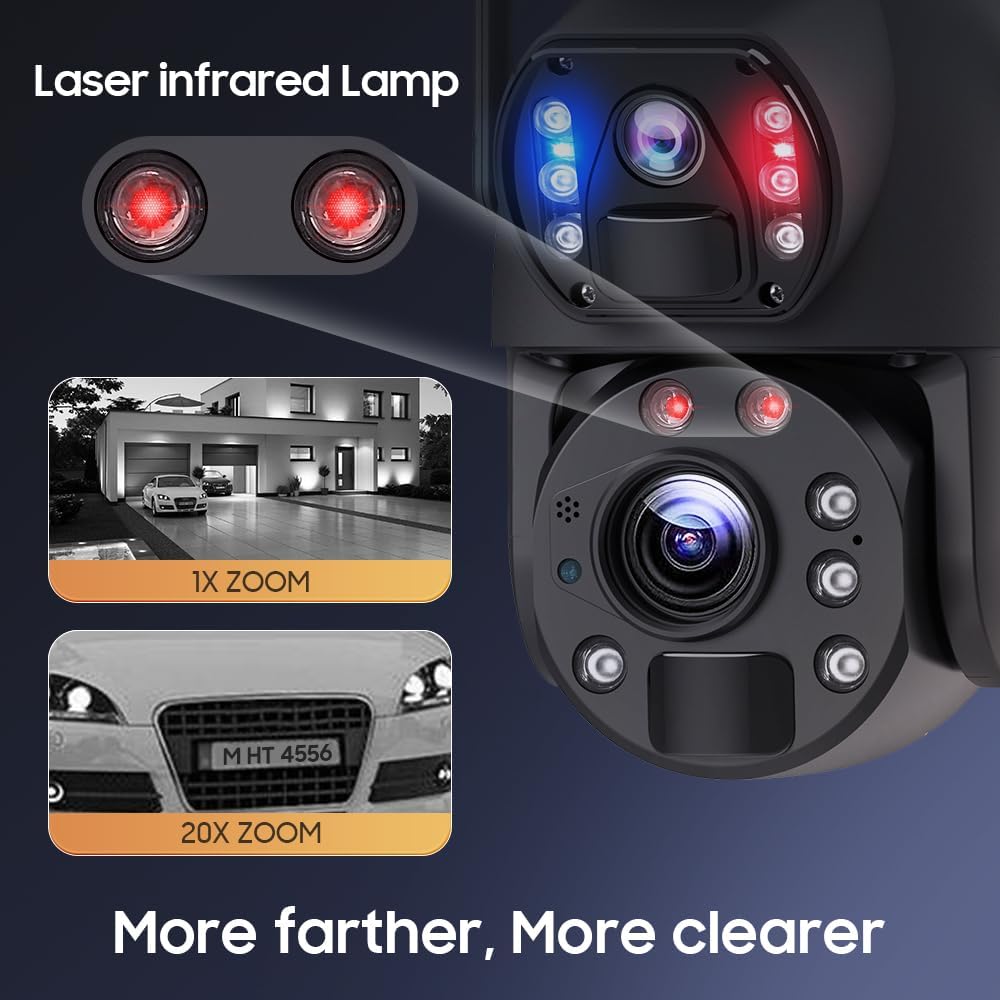
Image 4.2: Enhanced clarity with 20X zoom and laser infrared lamps.
4.3 Режими нічного бачення
Камера пропонує три режими нічного бачення:
- Інфрачервоне нічне бачення: Забезпечує чітке чорно-біле зображення в умовах слабкого освітлення.
- Повнокольорове нічне бачення: Utilizes built-in white lights to provide full-color video even in darkness.
- Інтелектуальне нічне бачення: Автоматично перемикається між інфрачервоним та повнокольоровим режимами на основі виявленого руху або умов освітлення.
4.4 Виявлення руху та сповіщення
The camera features PIR (Passive Infrared) human detection. When motion is detected, the camera will:
- Send an alert notification to your smartphone via the UBOX app.
- Begin recording a short video clip (continuous recording is not supported to conserve battery).
- Activate the siren alarm (if enabled in settings).
You can adjust the sensitivity of motion detection and customize alert settings within the app.
4.5 Двосторонній аудіозв'язок
Utilize the built-in microphone and speaker to communicate with visitors or deter intruders directly through the UBOX app.
4.6 Запис і зберігання
Recorded video clips are stored on a local TF card (up to 128GB, not included) or in the Amazon Cloud (subscription may be required). The camera records only when motion is detected to optimize battery life.
4.7 Preset Points and Guards
You can set specific preset points within the app to quickly navigate the camera to important areas. The 'Guards' function allows the camera to patrol between these preset points.

Image 4.3: Setting preset points for monitoring specific areas.
5. Технічне обслуговування
5.1 Очищення
- Об'єктиви камери: Обережно протріть об’єктиви камери м’якою, чистою тканиною без ворсу. Уникайте абразивних матеріалів або агресивних хімікатів.
- Панель сонячних батарей: Periodically clean the surface of the solar panel to remove dust, dirt, or debris that may reduce charging efficiency. Use a soft cloth and water if necessary.
- Корпус камери: Протріть корпус камери рекламнимamp cloth to remove any accumulated dirt.
5.2 Догляд за акумулятором
The camera is equipped with a built-in 12000mAh battery. To maximize battery life:
- Ensure the solar panel receives adequate direct sunlight daily.
- Minimize unnecessary live view access and frequent motion detections if not critical, as these consume battery power.
- In prolonged periods of low sunlight, consider manually charging the camera via USB if battery levels become critically low.
5.3 оновлень мікропрограми
Check the UBOX app periodically for available firmware updates. Keeping your camera's firmware up-to-date ensures optimal performance, security, and access to new features.
6. Вирішення проблем
- Камера не підключається до Wi-Fi:
- Ensure your Wi-Fi network is 2.4GHz. The camera does not support 5GHz Wi-Fi.
- Verify the Wi-Fi password is correct.
- Check the camera's proximity to the Wi-Fi router (within 15m range).
- Перезавантажте роутер і камеру. - Погана якість зображення:
- Очистіть об'єктиви камери.
- Ensure there are no obstructions in the camera's field of view.
- Check your Wi-Fi signal strength; a weak signal can affect streaming quality. - Motion detection not working or too sensitive:
- Adjust PIR sensitivity settings in the UBOX app.
- Ensure the camera's PIR sensor is not obstructed.
- Avoid placing the camera in areas with constant movement (e.g., tree branches swaying in the wind) if false alarms are an issue. - Акумулятор не заряджається:
- Переконайтеся, що сонячна панель чиста та отримує прямі сонячні промені.
- Check the connection cable between the solar panel and the camera.
- Verify the solar panel is not shaded by trees or buildings. - Siren alarm not activating:
- Check if the siren alarm feature is enabled in the UBOX app settings.
- Ensure the camera has sufficient battery power. - No continuous video recording:
- This camera is designed for event-based recording (motion detection) to conserve battery power. Continuous recording is not supported. - No automatic tracking:
- The camera supports motion detection alerts but does not feature automatic object tracking. Pan and tilt adjustments must be made manually via the app.
7. Технічні характеристики
| Особливість | Специфікація |
|---|---|
| Номер моделі | ST-598-6M-20X-WIFI-914 |
| Використання в приміщенні/зовні | Відкритий |
| Роздільна здатність захоплення відео | 6 МП |
| Оптичний зум | 20x |
| Технологія підключення | Бездротовий зв'язок (2.4G Wi-Fi) |
| Джерело живлення | Solar Powered (with 12000mAh Lithium Ion battery) |
| Тип контролера | UBOX App |
| Тип монтажу | Настінне кріплення |
| Кут панорамування/нахилу | 355° по горизонталі, 90° по вертикалі |
| Нічне бачення | Infrared, Full Color, Intelligent Night Color |
| Виявлення руху | PIR Human Detection (Max 12M) |
| Зберігання | TF Card (Max 128GB, not included), Amazon Cloud |
| Рівень водонепроникності | IP66 |
| матеріал | метал |
| Вага товару | 0.16 унції |
8. Інформація про гарантію
Please refer to the warranty card included with your product or contact INQMEGA customer support for detailed warranty terms and conditions. Typically, products are covered against manufacturing defects for a specified period from the date of purchase.
9. Підтримка
If you encounter any issues or have questions not covered in this manual, please contact INQMEGA customer support through the following channels:
- Електронна пошта: Refer to your product packaging or the INQMEGA official webсайт для адрес електронної пошти служби підтримки.
- Інтернет-ресурси: Visit the INQMEGA official webсайт із поширеними запитаннями, посібниками з усунення несправностей та завантаженням програмного забезпечення.
- Підтримка в додатку: Some support options may be available directly within the UBOX application.