
1. Продукт закінчивсяview
The Riokko YM119 OBD2 Scanner is a diagnostic tool designed for car owners to easily read and clear engine fault codes. It provides real-time data, freeze frame information, and supports various diagnostic functions for OBDII/EOBD compliant vehicles manufactured since 1996. Its intuitive interface and compact design make it suitable for both professional technicians and home users.

Figure 1.1: Riokko YM119 OBD2 Scanner. This image shows the main diagnostic tool with its color screen, control buttons, and the attached OBDII connector cable.
2. Налаштування та перше використання
2.1 Вміст упаковки
- Riokko YM119 OBD2 Scanner Unit
- Посібник користувача (цей документ)
2.2 Підключення сканера
- Locate the vehicle's Data Link Connector (DLC). This is typically located under the dashboard on the driver's side.
- Ensure the vehicle's ignition is turned ON (engine can be off or running, depending on the test).
- Plug the OBDII connector of the YM119 scanner firmly into the vehicle's DLC. The scanner will power on automatically.
2.3 Вибір мови
The YM119 supports 13 national languages. To change the language:
- From the main menu, navigate to "Setting" using the arrow keys.
- Натисніть OK button to enter the Setting menu.
- Select "Language" and choose your preferred language from the list.
- Прес OK щоб підтвердити свій вибір.
3. Робота зі сканером
3.1 Кнопки навігації
- ВИХІД: Returns to the previous screen or main menu.
- Стрілки ВГОРУ/ВНИЗ: Навігація параметрами меню.
- Стрілки ЛІВОРУЧ/ПРАВОРУЧ: Navigate through data screens or adjust settings.
- ОК: Підтверджує вибір або входить до підменю.
- BAT: Initiates the battery voltage тест.

Figure 3.1: Main Menu and Professional Functions. This image illustrates the scanner's main menu interface and highlights its key diagnostic capabilities such as Engine Fault Diagnostics, Quick Clear Fault Code, Real-time Data Stream, and Battery Life Test.
3.2 Діагностичні функції
From the main menu, select "Diagnosis" to access the primary diagnostic functions.

Figure 3.2: OBD II Diagnostic Test Items. This image shows the comprehensive list of diagnostic tests available on the scanner, from reading and erasing codes to advanced sensor and component tests.
3.2.1 Читання кодів
This function retrieves Diagnostic Trouble Codes (DTCs) from the vehicle's computer. These codes indicate specific issues detected by the vehicle's onboard diagnostic system.
- Select "Read Codes" from the Diagnosis menu.
- Сканер відобразить будь-які збережені, очікуючі на розгляд або постійні коди несправностей.
- Використовуйте ВГОРУ/ВНИЗ arrows to scroll through the codes.
- For detailed information on a specific code, use the "DTC Lib" function or refer to a reliable automotive repair database.
3.2.2 Очистити коди
This function erases DTCs from the vehicle's computer and turns off the Malfunction Indicator Lamp (MIL), also known as the Check Engine Light. Note: Clearing codes does not fix the underlying problem. The MIL will illuminate again if the fault persists.

Figure 3.3: Check and Turn Off Engine Light. This image demonstrates the scanner's ability to diagnose and clear engine fault codes, effectively turning off the Check Engine Light on the vehicle's dashboard.
- Select "Erase Codes" from the Diagnosis menu.
- Підтвердьте дію, коли буде запропоновано.
- The MIL should turn off.
3.2.3 Real-time Data (Live Data Stream)
View real-time sensor data from the vehicle's engine control unit (ECU). This data can be displayed in text or graphical format, allowing for dynamic monitoring of vehicle performance.
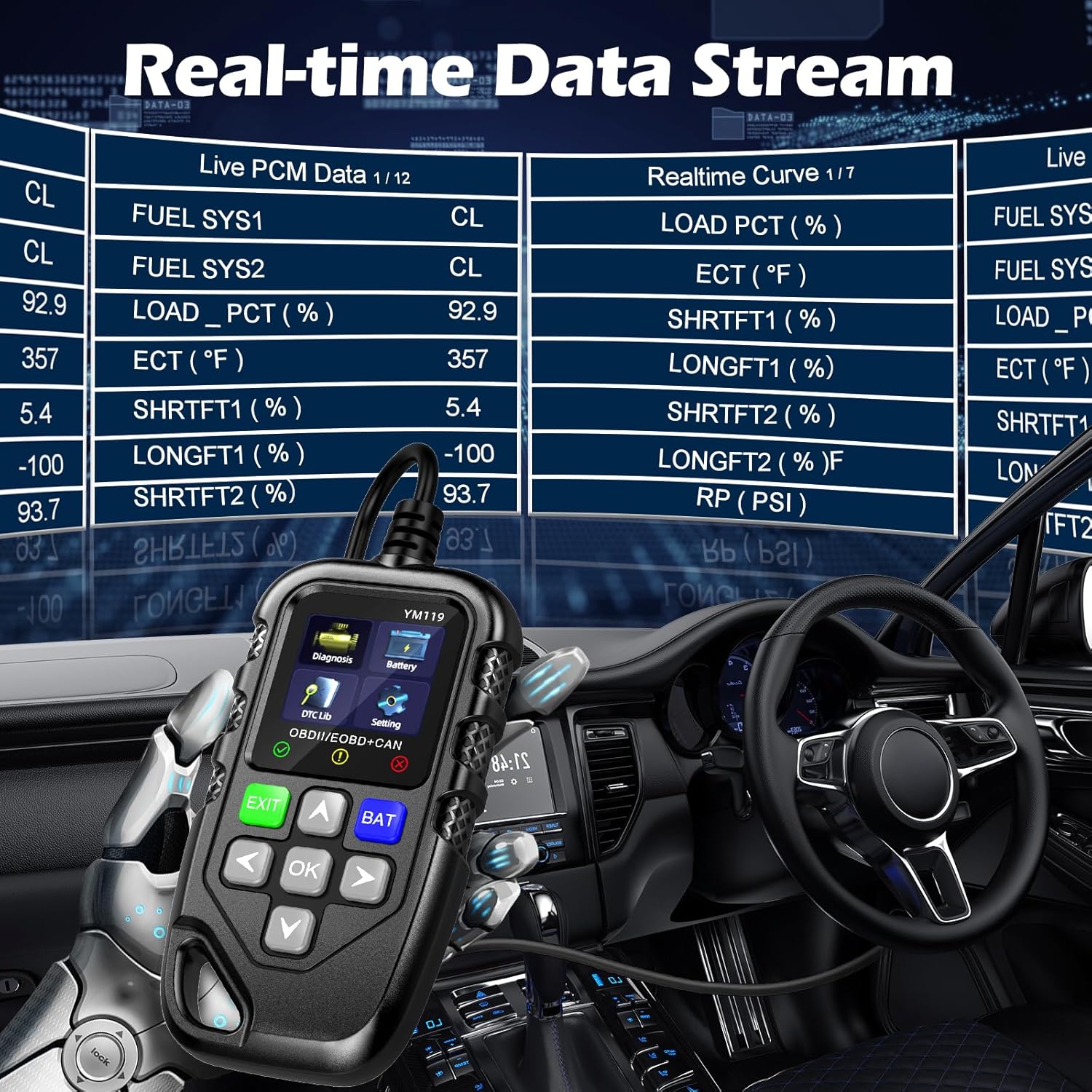
Figure 3.4: Real-time Data Stream. This image shows the scanner's capability to display live engine data, including various sensor readings and their corresponding real-time curves, aiding in dynamic vehicle diagnostics.
- Select "Live Data" or "Realtime Curve" from the Diagnosis menu.
- Використовуйте ВГОРУ/ВНИЗ arrows to scroll through different data parameters.
- Використовуйте ВЛІВО/ВПРАВО arrows to switch between text and graph views (if available for the parameter).
3.2.4 Дані стоп-кадру
When an emission-related fault occurs, the vehicle's computer records a snapshot of operating conditions at the time of the fault. This "freeze frame" data helps in diagnosing intermittent problems.
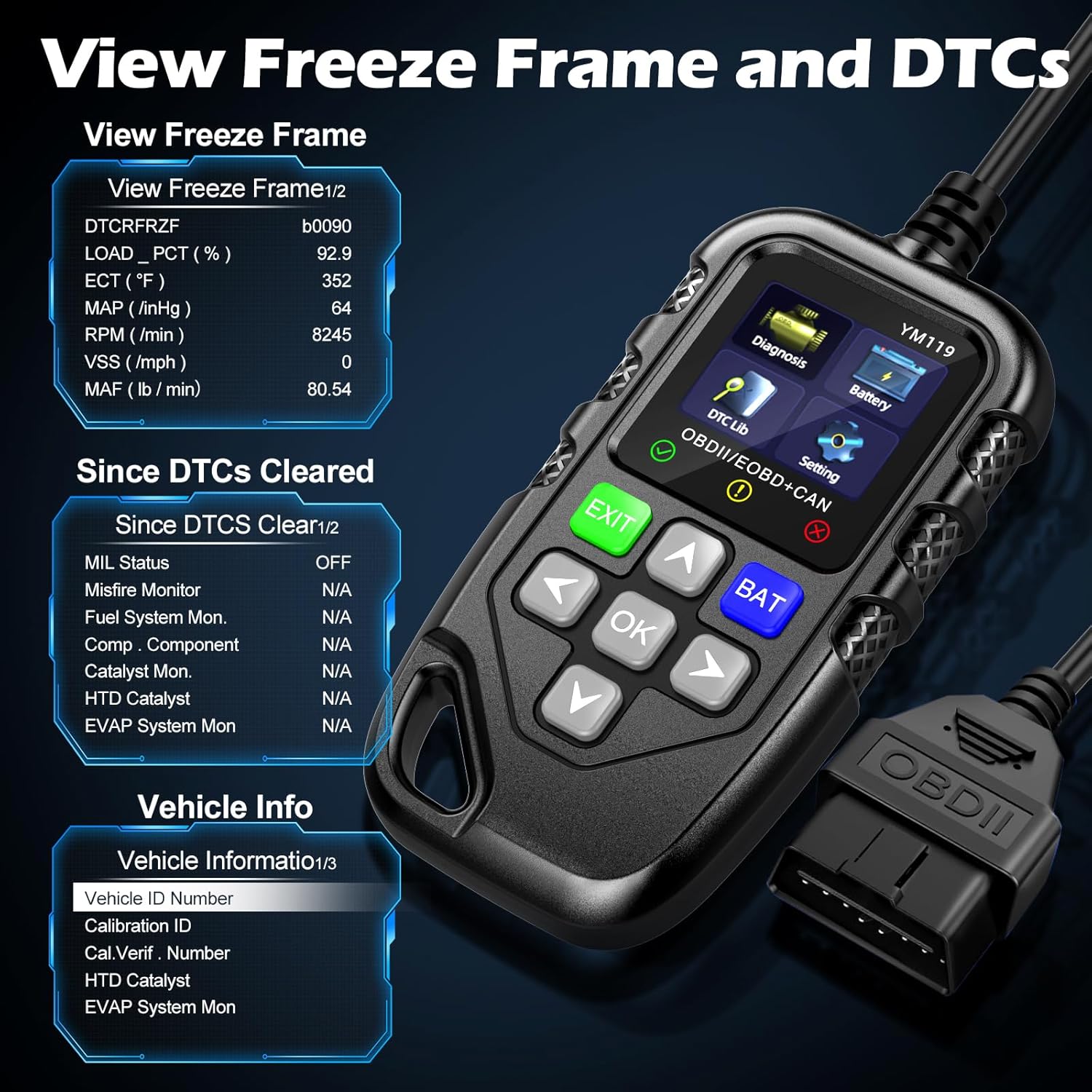
малюнок 3.5: View Freeze Frame and DTCs. This image displays the scanner's ability to capture and show freeze frame data, which provides a snapshot of engine conditions at the moment a fault code was set, aiding in diagnosis.
- Виберіть "View Freeze Frame" from the Diagnosis menu.
- Review the recorded parameters.
3.2.5 DTC Query (DTC Lib)
The built-in DTC Library allows you to look up definitions for generic (P0, P2, P34, B0, C0, U0) and manufacturer-specific (P1, P30-P33, B1, C1, U1) codes.
- From the main menu, select "DTC Lib".
- Enter the DTC code using the arrow keys and OK кнопку.
- The scanner will display the definition of the code.
3.2.6 I / M готовність
This function checks the readiness of the emission-related monitoring systems on the vehicle. It's useful for determining if the vehicle is ready for an emissions test.
- Select "I/M Readiness" from the Diagnosis menu.
- The scanner will display the status of various monitors (e.g., Misfire Monitor, Fuel System Monitor). "OK" indicates the monitor has completed its test, "INC" indicates incomplete, and "N/A" indicates not applicable.
3.2.7 Обсяг акумулятораtage Тест
The YM119 can perform a basic battery voltage test to assess the vehicle's battery health.

Figure 3.6: Estimate Battery Life Test. This image shows the scanner's dedicated function for monitoring and assessing the vehicle's battery voltage and overall health.
- From the main menu, select "Battery" or press the BAT кнопку.
- Сканер відобразить поточний рівень заряду батареїtage.
3.2.8 Інформація про транспортний засіб
This function retrieves the Vehicle Identification Number (VIN), Calibration ID (CALID), and Calibration Verification Number (CVN) of the vehicle.
- Select "Vehicle Info" from the Diagnosis menu.
- Сканер відобразить доступну інформацію про транспортний засіб.
4. Технічне обслуговування
4.1 Очищення пристрою
To maintain the scanner's performance and appearance:
- Протріть пристрій м'якою гумкою, damp тканина.
- Не використовуйте абразивні засоби чи розчинники.
- Ensure the device is dry before storage.
4.2 Зберігання
Store the scanner in a clean, dry environment away from extreme temperatures and direct sunlight. Keep the OBDII connector free from dust and debris.
5. Вирішення проблем
| проблема | Можлива причина | Рішення |
|---|---|---|
| Сканер не вмикається. |
|
|
| Повідомлення «Помилка з’єднання» або «Помилка зв’язку». |
|
|
| Engine light reappears after clearing codes. | Underlying fault has not been repaired. | Clearing codes only turns off the light; it does not fix the problem. Diagnose and repair the underlying issue before clearing codes again. |
| Inaccurate or missing data readings. |
|
|
6. Технічні характеристики
| Особливість | Деталь |
|---|---|
| Номер моделі | AE0004L (YM119) |
| Бренд | Riokko |
| Розмір екрана | 2.8 дюймів |
| Підтримувані протоколи | Nine standard OBDII/EOBD protocols |
| Підтримувані мови | 13 національні мови |
| Вага товару | 7.8 унції (приблизно 221 грамів) |
| Розміри упаковки | 8.11 x 5.35 x 1.14 дюймів (приблизно 20.6 x 13.6 x 2.9 см) |
| Перша доступна дата | 16 жовтня 2024 р |
7. Гарантія та підтримка
7.1 Інформація про гарантію
The Riokko YM119 OBD2 Scanner comes with a Гарантія 3 рік з дати покупки. Ця гарантія поширюється на дефекти матеріалів і виготовлення за нормального використання.
7.2 Політика повернення
A 30-day no-questions-asked return policy is offered for your purchase. Please refer to your retailer's specific return instructions.
7.3 Підтримка клієнтів
For technical assistance, warranty claims, or any other inquiries, please contact Riokko customer service. Цілодобове обслуговування клієнтів готовий допомогти вам.
Please visit the official Riokko webсайт або зверніться до упаковки вашого продукту, щоб отримати найактуальнішу контактну інформацію.