
1. Вступ
The SENSTREE Digital Temperature Humidity Controller (Model THT103-ZJ) is a versatile 3-in-1 device designed for precise environmental control. It integrates temperature, humidity, and timer functions into a single unit, making it ideal for various applications such as mushroom cultivation, reptile habitats, greenhouse management, and more. This manual provides detailed instructions for setup, operation, and maintenance to ensure optimal performance and longevity of your controller.
The controller features three independent outlets: Outlet 1 for temperature control (heating/cooling), Outlet 2 for humidity control (humidification/dehumidification), and Outlet 3 for timer functions. Its user-friendly interface allows for easy programming, and settings are retained even after a power outage.
2. Продукт закінчивсяview
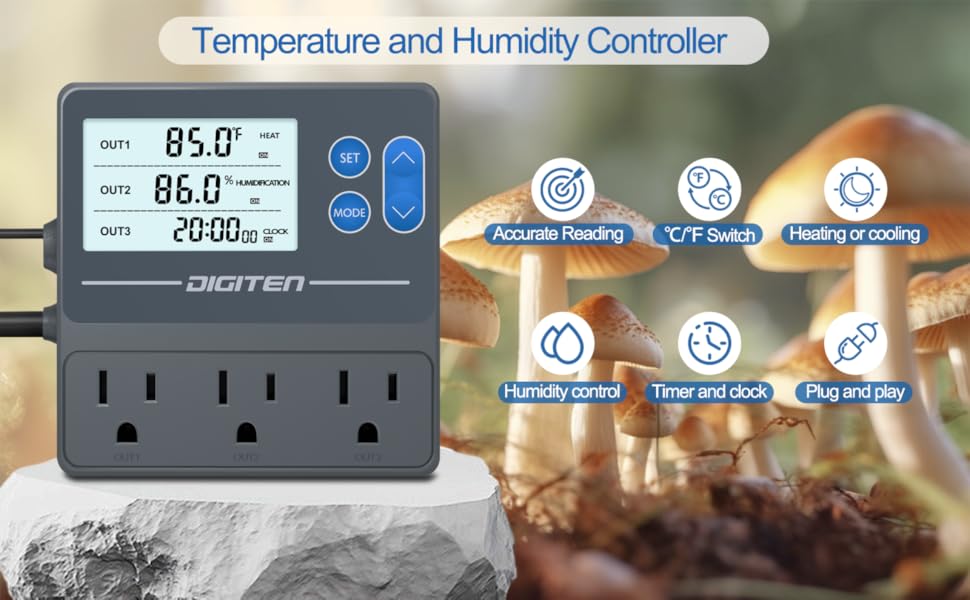
Image: The SENSTREE Digital Temperature Humidity Controller displaying its main features and three control modes.
The SENSTREE THT103-ZJ controller offers comprehensive environmental management:
- Outlet 1 (Temperature Control): Manages heating or cooling devices to maintain a set temperature range. Ideal for controlling space heaters, heating pads, fans, or coolers.
- Outlet 2 (Humidity Control): Manages humidifiers or dehumidifiers to maintain a desired humidity level. Suitable for grow tents, greenhouses, basements, or reptile enclosures.
- Outlet 3 (Timer Function): Controls devices based on a set schedule, perfect for lighting (e.g., UVA/UVB lights) or other timed equipment.
- Пам'ять про збій живлення: All programmed settings are saved automatically and restored upon power return.
- Легке програмування: Plug-and-play design with intuitive controls for quick setup and adjustment.
3. Налаштування

Image: Components of the SENSTREE controller package, including the main unit, sensor, and mounting accessories.
- Розпакувати: Carefully remove all components from the packaging. Verify that you have the controller unit, temperature/humidity sensor, and any included mounting accessories (suction cup, screws).
- Підключення живлення: Plug the controller's main power cord into a standard 120V AC power outlet.
- Підключення датчика: Connect the temperature/humidity sensor cable to the designated port on the controller. Ensure the connection is secure.
- Розміщення пристрою: Position the sensor probe in the environment you wish to monitor, ensuring it is not directly exposed to heating/cooling elements or water, which could affect readings. The controller unit can be hung using the integrated hanging design on the back.
- Підключити прилади: Plug your heating/cooling device into Outlet 1, your humidification/dehumidification device into Outlet 2, and your timed device into Outlet 3. Ensure devices do not exceed the rated current of 15A total.

Image: The back of the controller unit highlighting the hanging design for easy installation.
4. Інструкція з експлуатації
The controller features a clear LCD display and intuitive buttons for easy programming. The display shows current temperature (OUT1), current humidity (OUT2), and current time (OUT3).
4.1. General Button Functions
- Кнопка SET: Used to enter setting mode for each outlet and confirm selections.
- Кнопка MODE: Used to switch between different operating modes (e.g., Heat/Cool, Humidify/Dehumidify, Clock/Timer).
- Кнопки ВГОРУ/ВНИЗ: Used to adjust numerical values during setting.
4.2. Перемикання одиниць вимірювання температури (°C/°F)
To switch between Celsius (°C) and Fahrenheit (°F), press and hold the UP and DOWN buttons simultaneously for 3 seconds.
4.3. Setting Temperature (Outlet 1)
- Натисніть НАБІР button to select OUT1.
- Тривале натискання НАБІР button for 3 seconds until the LCD screen displays "SET TO".
- Використовуйте ВГОРУ/ВНИЗ buttons to adjust your target temperature.
- Натисніть РЕЖИМ button to switch between HEATING (heat icon) or COOLING (snowflake icon) mode.
- Тривале натискання НАБІР кнопку для збереження налаштувань і виходу.
4.4. Setting Humidity (Outlet 2)
- Натисніть НАБІР button to select OUT2.
- Тривале натискання НАБІР button for 3 seconds until the LCD screen displays "SET TO".
- Використовуйте ВГОРУ/ВНИЗ buttons to adjust your target humidity percentage.
- Натисніть РЕЖИМ button to switch between HUMIDIFICATION (water drop icon) or DEHUMIDIFICATION (fan icon) mode.
- Тривале натискання НАБІР кнопку для збереження налаштувань і виходу.
4.5. Setting Timer (Outlet 3)
- Натисніть НАБІР button to select OUT3.
- Тривале натискання НАБІР протягом 3 секунд, доки не почне блимати індикація годин.
- Використовуйте ВГОРУ/ВНИЗ buttons to set the desired ON time (hour and minute).
- Натисніть РЕЖИМ button to switch to OFF time setting.
- Використовуйте ВГОРУ/ВНИЗ buttons to set the desired OFF time (hour and minute).
- Тривале натискання НАБІР кнопку для збереження налаштувань і виходу.
5. Технічні характеристики
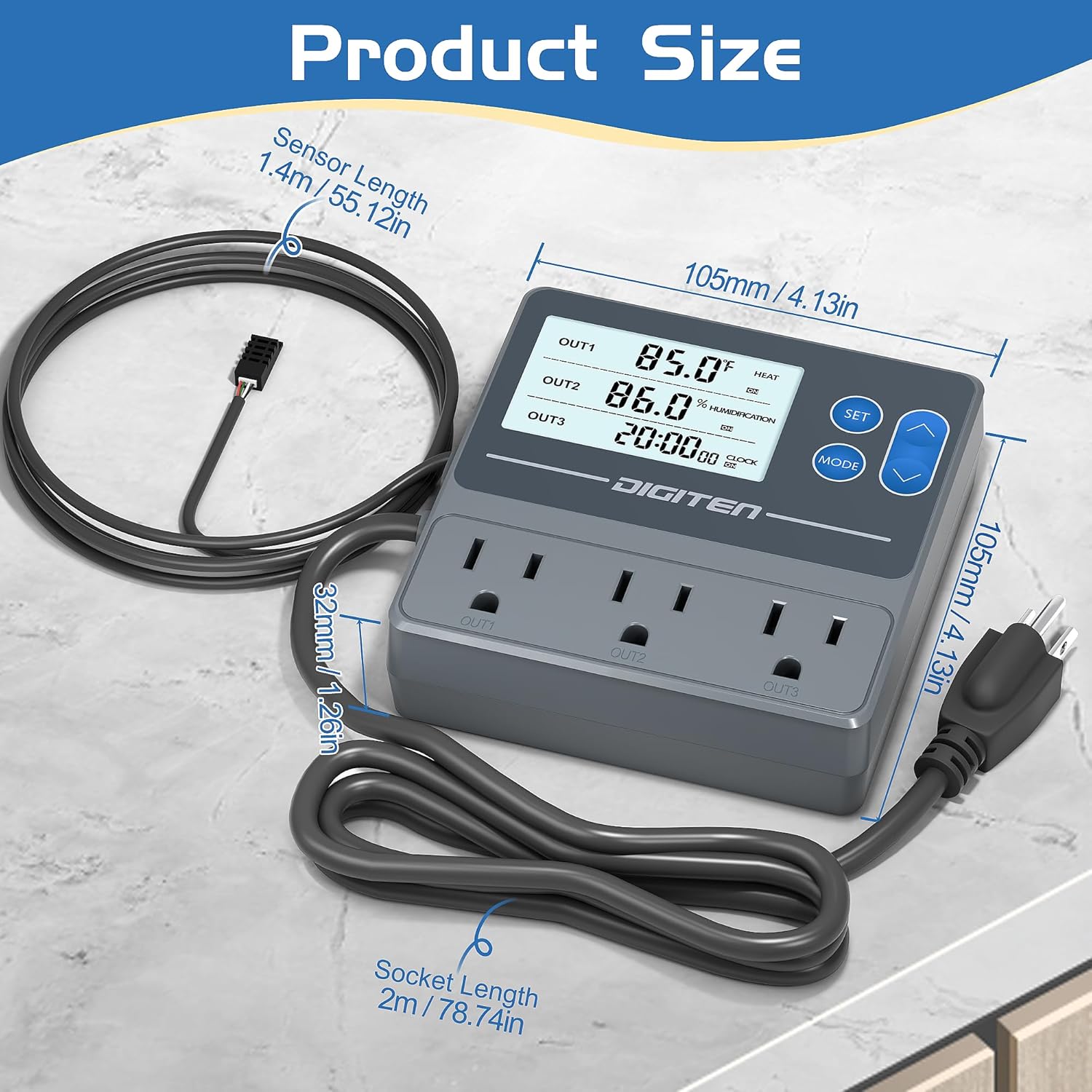
Image: Detailed dimensions of the controller unit and sensor probe.
| Особливість | Деталь |
|---|---|
| Номер моделі | THT103-ZJ |
| Джерело живлення | 100-240 В змінного струму |
| Номінальний струм | 15A макс |
| Діапазон контролю температури | від -10°C до 120°C (від -14°F до 248°F) |
| Точність температури | ±0.7°F |
| Діапазон контролю вологості | 5-99% відносної вологості |
| Точність вологості | ±3% відносної вологості |
| Довжина датчика | 1.4 м / 55.12 дюйма |
| Socket Length | 2 м / 78.74 дюйма |
| Розміри упаковки | 6.57 x 6.26 x 2.05 дюймів |
| Вага товару | 14.1 унції |
6. Вирішення проблем
- Overload Error: If an overload error occurs (e.g., when connecting a high-wattage space heater), ensure the total current draw of all connected devices does not exceed 15A. Consider using lower wattage devices or distributing loads across multiple circuits if possible.
- Неточні показання: Ensure the sensor probe is clean and free from debris. Verify it is placed in a location that accurately reflects the environment's temperature and humidity, away from direct heat/cold sources or strong airflow.
- Налаштування не зберігаються: After adjusting any settings, always long press the SET button to confirm and save the changes before exiting the setting mode.
- Спрацювала сигналізація: If an alarm sounds, check the current temperature and humidity against your set high/low alarm thresholds. Adjust settings or environmental conditions as needed.
7. Технічне обслуговування
- Прибирання: Regularly wipe the controller unit and sensor probe with a soft, dry cloth. Avoid using abrasive cleaners or solvents.
- Догляд за датчиком: Keep the sensor probe free from dust, dirt, and moisture buildup to ensure accurate readings.
- Зберігання: Коли контролер не використовується, зберігайте його в прохолодному, сухому місці, подалі від прямих сонячних променів та екстремальних температур.
8. Гарантія та підтримка
For warranty information, technical support, or service inquiries, please contact SENSTREE customer service directly. Refer to the product packaging or the official SENSTREE webсайт, щоб отримати найактуальнішу контактну інформацію та гарантійні умови.