
1. Вступ
This manual provides detailed instructions for the installation, operation, and maintenance of your Surakey 10-inch Android 13 Car Stereo. Please read this manual thoroughly before using the product to ensure proper function and safety. This car stereo is designed for Nissan Versa Sedan models from 2015 to 2019, offering advanced features such as Wireless Carplay, Android Auto, GPS Navigation, and a high-resolution IPS touch screen.
2. Що в коробці
Обережно розпакуйте коробку та переконайтеся, що всі перелічені нижче предмети присутні та знаходяться у належному стані. Якщо будь-які предмети відсутні або пошкоджені, зверніться до служби підтримки клієнтів.
- 1 х Автомобільна стереосистема
- 1 х кабель живлення
- 1 x кабель входу/виходу RCA
- 2 кабелі USB
- 1 x вхідний кабель камери
- 1 x GPS антена
- 1 x Інструкція з експлуатації (цей документ)

Image: Contents of the package, showing the car stereo unit and all included accessories for installation.
3. Налаштування та встановлення
Professional installation is recommended for this car stereo. Ensure the vehicle's power is disconnected before beginning installation. Refer to your vehicle's specific wiring diagrams if necessary.
3.1 Підключення проводів
- Connect the main power cable to the vehicle's power harness.
- Attach the RCA input/output cables for external audio/video devices.
- Connect the USB cables for media playback and device charging.
- Встановіть GPS-антену в місці з чітким view неба для оптимального прийому сигналу.
- If using a backup camera (optional, not included), connect the camera input cable.

Image: Rear connections of the car stereo, illustrating where various cables like power, RCA, USB, and GPS antenna connect.
3.2 Встановлення пристрою
The car stereo is designed to fit the dashboard of Nissan Versa Sedan models from 2015-2019. Carefully remove the original stereo and install the new unit, ensuring all connections are secure and the unit is properly seated in the dashboard.

Зображення: До та після встановлення view of the car stereo in a Nissan Versa Sedan dashboard, showing the seamless integration.
4. Інструкція з експлуатації
The Surakey car stereo features an intuitive Android 13 interface. Navigate through menus using the touch screen. Key functions are detailed below.
4.1 Бездротовий Carplay та Android Auto
Connect your smartphone wirelessly via Bluetooth to access Apple CarPlay or Android Auto. This allows you to use your phone's navigation, music, messages, and other compatible apps directly on the car stereo's display.

Image: Display showing both Apple CarPlay and Android Auto interfaces, highlighting app integration.
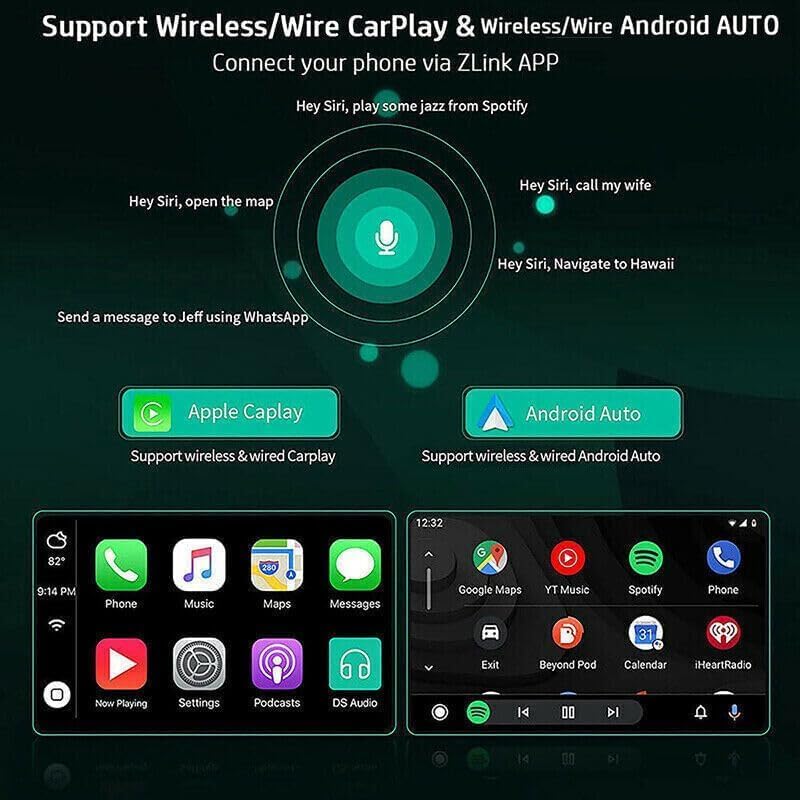
Image: Voice command functionality for CarPlay and Android Auto, demonstrating hands-free operation.
4.2 GPS-навігація та підключення до Wi-Fi
The unit supports both online and offline GPS navigation. Download offline maps for use without an internet connection, or connect to a mobile hotspot via WiFi for real-time map updates and access to online services.

Image: GPS navigation interface and WiFi connection feature, showing how to access maps and internet.
4.3 FM/RDS радіо
Access FM radio stations with RDS (Radio Data System) support. Tune into your favorite stations for news, music, and traffic updates. The unit allows for easy station scanning and saving presets.

Image: FM/RDS radio interface on the car stereo screen, displaying current frequency and controls.
4.4 Функціональність Bluetooth
Connect your phone via Bluetooth 5.0 for hands-free calling, music streaming (A2DP), and automatic phonebook loading. This enhances safety and convenience while driving.
4.5 Розділений екран
The split-screen feature allows you to run two applications simultaneously on the display, such as navigation and music playback, or a video and another app. Long-press an app icon to activate split-screen mode.
4.6 Налаштування еквалайзера
Customize your audio experience with the built-in Equalizer (EQ) adjustment. Select from various preset sound modes (e.g., Jazz, Pop, Rock) or manually adjust frequency bands to suit your preferences.
4.7 Налаштування системи
Access the system settings menu to configure various aspects of the stereo, including Wi-Fi, device settings, general preferences (like default volume, boot volume, lantern settings), and user profiles. The factory setting keyword is 8888, 3368, or 1234.
Video: Demonstration of key operating features including media playback, FM radio, EQ adjustment, system settings, map navigation selection, and split-screen display.
5. Технічні характеристики
| Особливість | Специфікація |
|---|---|
| система | Android 13 |
| Розмір екрана | 10 дюймів |
| Пам'ять (RAM+ROM) | 2GB RAM + 32GB ROM |
| Роздільна здатність екрана | 1024x600 |
| Тип екрану | IPS 2.5D HD Capacitive Touch Screen |
| Радіодіапазон | FM/RDS |
| Вихідна потужність | 4x45W |
| Версія Bluetooth | 5.0 |
| Підключення | Bluetooth, USB, WiFi |
| Навігація | GPS (Offline maps supported) |
| Робоча температура | -40℃ до 80℃ |
| Управління кермом | Підтримується |
| Відеовихід | Підтримується |
| Аудіоформати | APE/FLAC/WAV/MP3/WMA тощо. |
| Формати відео | MKV/RMVB/AVI/MP4/MDV тощо. |
| Формати зображення | PNG/JPEG/JPG/GIF/WBMP/BNP тощо. |
| Мови | Multi-language support (Chinese, English, French, Italian, Korean, Japanese, Arabic, Spanish, Portuguese, Russian, Turkish, Vietnamese, Hebrew, Polish, German) |
| Сумісний автомобіль | Nissan Versa Sedan 2015-2019 |

Image: Screen comparison highlighting color gamut and resolution differences between standard IPS and QLED displays.
6. Вирішення проблем
If you encounter issues with your car stereo, please refer to the following common troubleshooting steps:
- Немає живлення: Перевірте всі підключення живлення та переконайтеся, що запалювання автомобіля увімкнено. Переконайтеся, що запобіжник справний.
- Немає звуку: Check speaker connections and volume settings. Ensure the mute function is not active.
- Проблеми з сигналом GPS: Переконайтеся, що GPS-антена встановлена в місці з чітким view неба. Перевірте підключення антени.
- Проблеми з підключенням Bluetooth: Ensure Bluetooth is enabled on both the stereo and your smartphone. Try unpairing and re-pairing the devices.
- Сенсорний екран не відповідає: Try restarting the unit. If the issue persists, a factory reset may be necessary (refer to System Settings).
- Повільна/зависає система: Close unnecessary applications. If the problem continues, consider a factory reset.
For persistent issues not resolved by these steps, please contact Surakey customer support.
7. Гарантія та підтримка
Your Surakey car stereo comes with a standard manufacturer's warranty. Please retain your proof of purchase for warranty claims. For technical support, warranty inquiries, or service, please refer to the contact information provided with your purchase or visit the official Surakey webсайт.