
1. Вступ
Thank you for choosing the RUJIXU Large Digital Kitchen Scale. This precision instrument is designed for accurate weighing in various settings, from home kitchens to commercial environments. With a maximum capacity of 30kg (66lb) and multiple functions including tare, unit conversion, price computing, and counting, this scale offers versatility and reliability. Please read this manual thoroughly before use to ensure proper operation and longevity of your device.
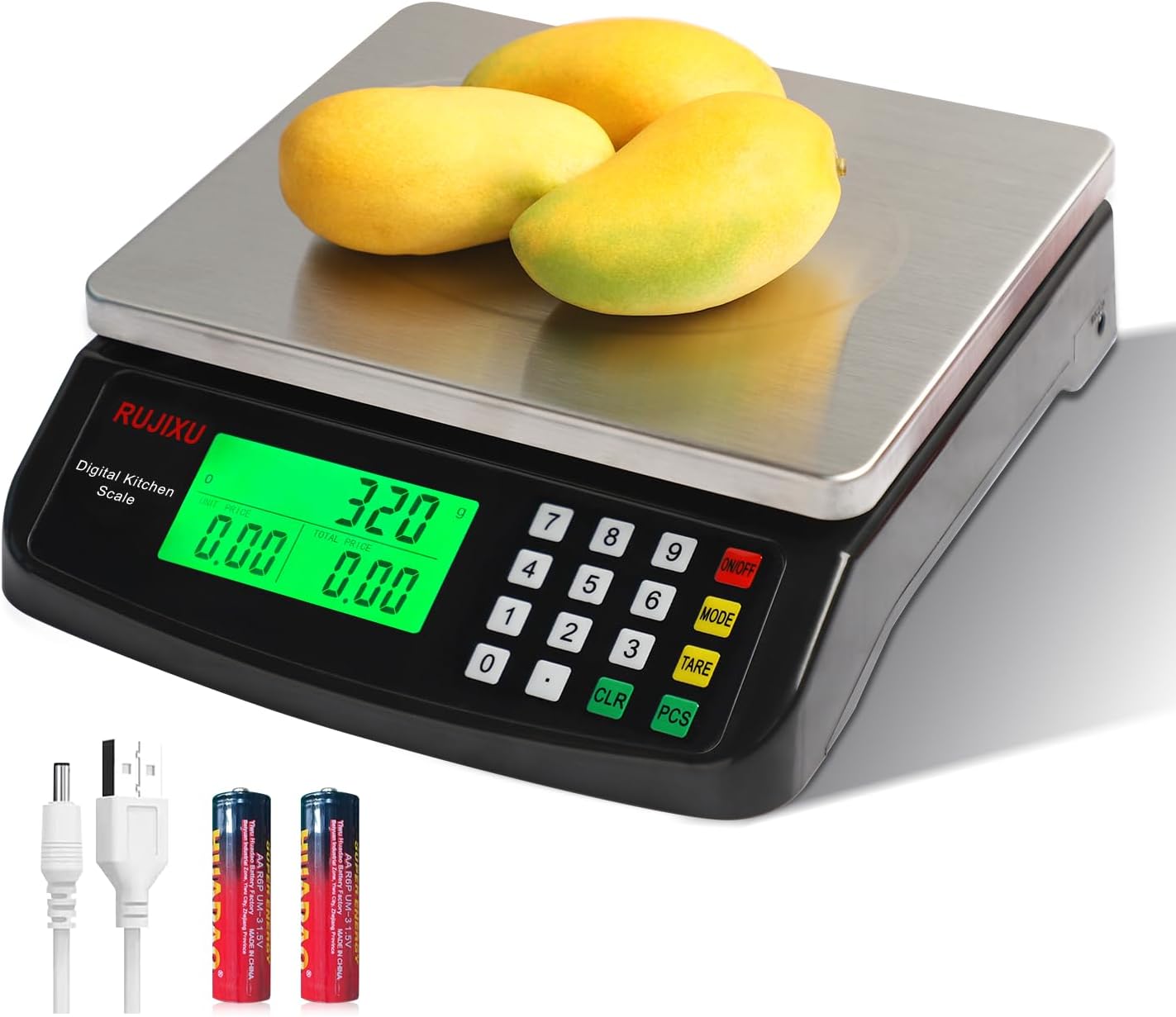
Image 1.1: RUJIXU Large Digital Kitchen Scale (Model DT-580)
2. Компоненти та характеристики продукту
2.1 Основні характеристики
- Висока місткість: Weighs items from 3g up to 30kg (66lb).
- Кілька одиниць: Supports grams (G), kilograms (KG), pounds (LB), and ounces (OZ).
- Функція тарування: Allows subtraction of container weight for net measurements.
- Counting Function (PCS): Enables counting of small, identical items.
- Price Computing: Calculates price based on weight and unit price input.
- РК-дисплей з підсвічуванням: Provides clear and easy-to-read measurements, even in varying light conditions.
- Міцна конструкція: Features a stainless steel platform and ABS plastic frame.
- Подвійне джерело живлення: Operates with an AC power adapter or 2x 1.5V AA batteries (not included).
- Автовимкнення: Automatically shuts off after 120 seconds of inactivity to conserve power.
2.2 Розміри

Image 2.1: Scale Dimensions
The scale features a stainless steel weighing surface measuring approximately 7 inches by 8.7 inches (18cm by 22cm). The overall product dimensions are 9.8 x 9 x 2.5 inches (24.9 x 22.9 x 6.4 cm).
3. Налаштування
3.1 Розпакування
Carefully remove all components from the packaging. Ensure that the scale, AC power adapter, and user manual are present.
3.2 Джерело живлення
The scale can be powered by either the included AC power adapter or two 1.5V AA batteries (not included).
- Живлення змінного струму: Connect the AC power adapter to the scale's power input port and then plug it into a standard electrical outlet.
- Потужність батареї: Open the battery compartment on the underside of the scale and insert two 1.5V AA batteries, observing the correct polarity.
Примітка: The two power sources cannot be used simultaneously. If both are connected, the scale will prioritize AC power.

Image 3.1: Power Supply Modes
3.3 Розміщення
Place the scale on a firm, flat, and stable surface to ensure accurate readings. Avoid placing it near strong electromagnetic fields, vibrations, or extreme temperature changes.
4. Операція
4.1 Увімкнення/вимкнення
- Щоб увімкнути ваги, натисніть кнопку УВІМК./ВИМК button. The display will light up and show "0.000".
- Щоб вимкнути ваги, натисніть і утримуйте УВІМК./ВИМК кнопку протягом кількох секунд, поки дисплей не вимкнеться.
4.2 Перемикання блоків
The scale supports four units of measurement: grams (G), kilograms (KG), pounds (LB), and ounces (OZ).
- Увімкнувши ваги, натисніть кнопку РЕЖИМ button to cycle through the available units. The selected unit will be displayed on the LCD screen.

Image 4.1: Unit Switching
4.3 Функція тарування
Функція тари дозволяє віднімати вагу контейнера, таким чином вимірюючи лише вагу нетто його вмісту.
- Place the empty container on the weighing platform. The display will show the container's weight.
- Натисніть ТАРЕ кнопка. Дисплей скине значення до "0.000".
- Додайте в контейнер предмети, які ви хочете зважити. На дисплеї тепер відображатиметься лише вага предметів.

Image 4.2: Tare Function Steps
4.4 Функція підрахунку (PCS)
The PCS function is useful for counting small, identical items such as screws, coins, or beads.
- Turn on the scale and ensure it reads "0.000".
- Натисніть і утримуйте PCS button for approximately 5 seconds. The display will show a sample size (e.g., "25").
- Use the number pad to enter the quantity of items you will use as a sample (e.g., "10", "20", "50", "100").
- Розмістіть sample quantity of items on the platform.
- Натисніть PCS button again to confirm the sample. The scale is now calibrated for counting.
- Видаліть sample and place the bulk quantity of items you wish to count on the platform. The display will show the total count.
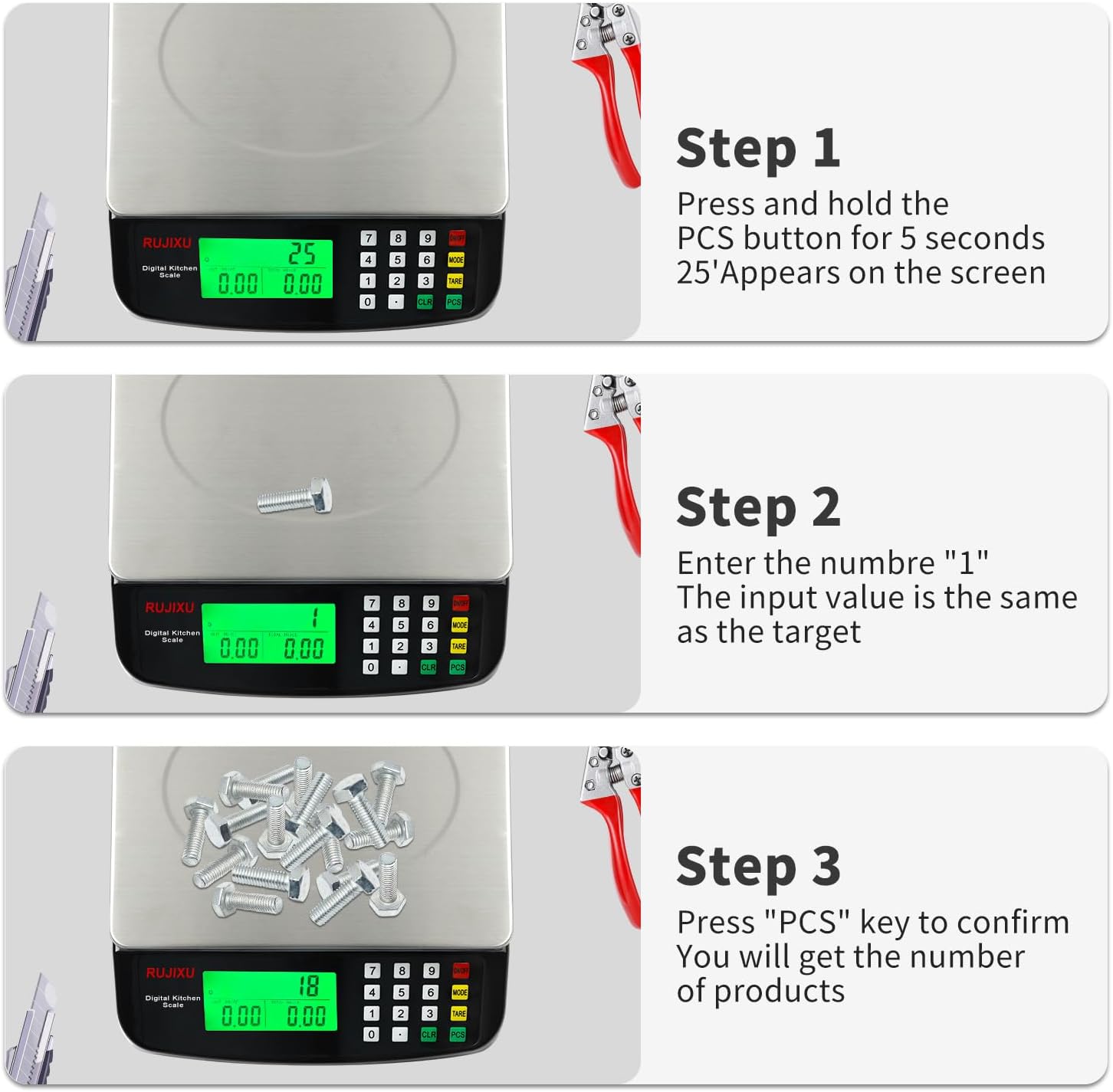
Image 4.3: Counting Function Steps
4.5 Price Computing Function
This function allows you to calculate the total price of items based on their weight and a set unit price.
- Turn on the scale and ensure it reads "0.000".
- Place the item(s) to be weighed on the platform. The scale will display the weight.
- Using the number pad, enter the unit price (e.g., price per KG or LB).
- The scale will automatically calculate and display the total price.

Image 4.4: Price Computing in Use
4.6 Функція автоматичного вимкнення
To conserve battery life, the scale is equipped with an automatic shut-off feature. If no operation is performed for approximately 120 seconds, the scale will power down.
5. Технічне обслуговування
5.1 Очищення
The stainless steel platform and ABS plastic body are designed for easy cleaning.
- Протріть поверхню ваг м’якою тканиноюamp тканина.
- For stubborn stains, a mild detergent can be used.
- Do not immerse the scale in water or use abrasive cleaners, as this can damage the electronic components.
- Переконайтеся, що ваги повністю сухі перед зберіганням або наступним використанням.

Image 5.1: Food-Grade Stainless Steel Platform
5.2 Зберігання
Store the scale in a cool, dry place away from direct sunlight and extreme temperatures. If storing for an extended period, remove the batteries to prevent leakage.
6. Вирішення проблем
- Ваги не вмикаються:
- Перевірте, чи адаптер змінного струму надійно підключено.
- If using batteries, ensure they are inserted correctly with the right polarity and are not depleted. Replace if necessary.
- Неточні показники:
- Ensure the scale is placed on a flat, stable, and level surface.
- Avoid placing the scale near sources of vibration or drafts.
- Make sure no objects are touching the scale or platform during weighing.
- Recalibrate the scale if possible (refer to specific instructions if available, otherwise, turn off and on).
- Ensure the weight limit (30kg/66lb) is not exceeded.
- Дисплей тьмяний або нечитабельний:
- Check battery level if operating on batteries.
- Ensure the scale is not in direct sunlight or extremely bright conditions that might wash out the display. The LCD is designed for full view, but extreme glare can still affect visibility.
- "EEEE" or "O-Ld" error message:
- This indicates an overload. Remove items from the platform immediately to prevent damage.

Image 6.1: Improved LCD Display Visibility
7. Технічні характеристики
| Особливість | Деталь |
|---|---|
| Модель продукту | DT-580 |
| одиниця | G, KG, LB, OZ |
| Максимальна вага | 30 кг / 66 фунта |
| Мінімальна вага | 2г-3г |
| Точне вимірювання | 1g |
| особливості | Tare function, Price Calculator, Accurate Counting |
| Екран дисплея | Повний view LCD display (7.5x3.8cm) |
| Автоматичне вимкнення | 120 seconds automatic shut-off when no operation |
| Рекомендоване використання | Food baking, market business, cooking meal |
| Food Scale Size | 24 × 21.6 × 6.5 см (9.8 x 9 x 2.5 дюйма) |
| Stainless Weighing Surface | 21.6 × 17.5 cm (8.5 x 6.9 inches) |
| Вага товару | 1.16 кг (2.55 фунта) |
| Food Scale Material | АБС-пластик і нержавіюча сталь |
| Джерело живлення | AC6V Power Adapter, 2x 1.5V AA battery (Batteries not included) |
| Пакет включає | 1x Kitchen Scale, 1x Power Adapter, 1x User Manual |

Image 7.1: Product Specifications Table