
1. Вступ
Дякуємо за покупкуasing the STN-28 Colorful Cat Ear Luminous Bluetooth Headset. This headset combines wireless audio technology with a unique luminous cat ear design, offering a comfortable and immersive listening experience. This manual provides essential information on how to set up, operate, and maintain your new headset.
2. Інформація про безпеку
- Не піддавайте гарнітуру впливу екстремальних температур, вологості або агресивних речовин.
- Уникайте падіння або сильних ударів гарнітури.
- Не розбирайте та не намагайтеся самостійно ремонтувати гарнітуру. Це призведе до анулювання гарантії.
- Протирайте гарнітуру м’якою сухою тканиною. Не використовуйте агресивні хімікати або абразивні матеріали.
- Тривале прослуховування на високих рівнях гучності може пошкодити слух. Відрегулюйте гучність до безпечного рівня.
3. Вміст упаковки
- STN-28 Wireless Headset Body
- USB-кабель для зарядки
- Посібник користувача (цей документ)
4. Продукт закінчивсяview та елементи керування
Familiarize yourself with the headset's components and control buttons.
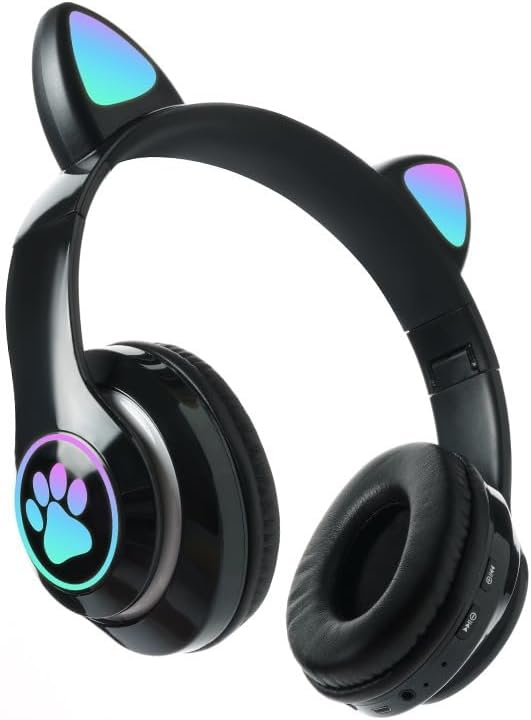
Зображення: спереду view of the STN-28 headset in black, showcasing the luminous cat ears and paw print design on the earcups.

Image: Two STN-28 headsets, one in purple and one in pink, displayed on a wooden stand, highlighting their colorful design and cat ear feature.
Control Buttons (Typical Layout - Refer to your specific model for exact placement):
- Кнопка живлення: Увімкнення/вимкнення, відтворення/пауза, відповідь/завершення виклику.
- Збільшення гучності (+): Збільшення гучності, наступний трек (довге натискання).
- Зменшення гучності (-): Зменшення гучності, Попередній трек (довге натискання).
- Кнопка режиму (M): Switch between Bluetooth and TF Card mode.
- Порт заряджання USB: Для зарядки гарнітури.
- Слот для картки TF: Insert external TF card for music playback.
- Світлодіодний індикатор: Shows power, connection, and charging status.
5. Налаштування
5.1 Заряджання гарнітури
- Connect the USB charging cable to the headset's USB charging port.
- Підключіть інший кінець кабелю до джерела живлення USB (наприклад, USB-порту комп'ютера, настінного USB-адаптера).
- The LED indicator light will show a red light during charging.
- A full charge takes approximately 2 hours. The red light will turn off when fully charged.
Note: Ensure the headset is fully charged before first use for optimal battery life.
5.2 Увімкнення/вимкнення
- Щоб увімкнути: Press and hold the Power button for a few seconds until the LED indicator lights flash red and blue.
- Щоб вимкнути: Press and hold the Power button for a few seconds until the LED indicator light turns off.
5.3 Створення пари Bluetooth
- Переконайтеся, що гарнітура повністю заряджена та вимкнена.
- Press and hold the Power button until the LED indicator lights flash red and blue alternately. This indicates the headset is in pairing mode.
- На вашому пристрої (смартфоні, планшеті, ноутбуці) увімкніть Bluetooth та знайдіть доступні пристрої.
- Select "STN-28" or "LX-B39C" from the list of found devices.
- Once successfully paired, the LED indicator light on the headset will flash blue slowly.
Note: The headset supports Bluetooth 5.0+EDR for stable and efficient connection.
6. Інструкція з експлуатації
6.1 Відтворення музики (режим Bluetooth)
- Відтворення/пауза: Коротко натисніть кнопку живлення.
- Збільшення гучності: Короткочасно натисніть кнопку «+».
- Зменшення гучності: Короткочасно натисніть кнопку «-».
- Наступний трек: Довго натискайте кнопку «+».
- Попередній трек: Довго натискайте кнопку «-».
6.2 Телефонні дзвінки
- Відповісти на дзвінок: Коротко натисніть кнопку живлення, коли дзвонить вхідний дзвінок.
- Завершити виклик: Короткочасно натисніть кнопку живлення під час дзвінка.
- Відхилити виклик: Довго натисніть кнопку живлення, коли дзвонить вхідний дзвінок.
6.3 Відтворення з TF-картки
- Вставте карту TF (MicroSD) з аудіофайлами у форматі MP3 files у слот для карти TF.
- The headset will automatically switch to TF card playback mode, or you may need to short press the "M" (Mode) button to switch.
- Use the Play/Pause, Volume Up/Down, and Next/Previous Track buttons as described in section 6.1.
6.4 Luminous Cat Ear Feature
The cat ears and paw print on the earcups feature luminous accents. This feature is typically activated automatically when the headset is powered on. There is no specific control mentioned for this feature, implying it's always on when the headset is active.
7. Технічне обслуговування та догляд
- Прибирання: Wipe the headset regularly with a soft, dry, lint-free cloth. Do not use liquid cleaners or sprays.
- Зберігання: Коли гарнітура не використовується, зберігайте її в прохолодному, сухому місці, подалі від прямих сонячних променів та екстремальних температур.
- Догляд за акумулятором: Щоб подовжити термін служби акумулятора, уникайте частого повного розряджання акумулятора. Регулярно заряджайте гарнітуру, навіть якщо вона не використовується протягом тривалого часу.
- Водонепроникність: The headset is listed as "Waterproof". While it offers protection against water, avoid submerging it in water or exposing it to heavy rain for prolonged periods to prevent damage.
8. Вирішення проблем
| проблема | Можлива причина | Рішення |
|---|---|---|
| Гарнітура не вмикається. | Низький заряд батареї. | Повністю зарядіть гарнітуру (приблизно 2 години). |
| Не вдається з’єднати пристрій. | Гарнітура не в режимі сполучення; Bluetooth вимкнено на пристрої; пристрій занадто далеко. | Ensure headset is flashing red/blue; enable Bluetooth on device; keep devices within 10 meters. Try forgetting the device on your phone and re-pairing. |
| Немає звуку або гучність низька. | Занадто низька гучність на гарнітурі або пристрої; гарнітура не підключена. | Increase volume on both headset and connected device. Ensure headset is properly paired. |
| TF-карта не відтворюється. | Картка вставлена неправильно; не підтримується file format; headset not in TF card mode. | Reinsert TF card; ensure files are MP3; press 'M' button to switch to TF card mode. |
9. Технічні характеристики
| Модель | STN-28 / LX-B39C |
| Спосіб носіння | Head-mounted folding |
| Версія Bluetooth | Bluetooth 5.0+EDR |
| Supported Bluetooth Modes | A2DP 1.2, AVRCP 1.0, HSP, HSF 1.5 |
| Ємність акумулятора | 400mAh Polymer A-grade Lithium Battery |
| Speaker Size / Impedance | 40 мм / 32 Ом |
| Діапазон передачі | ≤10 meters (33 feet) |
| Час зарядки | прибл. 2 години |
| Час відтворення музики | ≤6 годин |
| Час розмови | ≤6 годин |
| Час очікування | 200 години |
| Діапазон частот | 20 Гц - 20 000 Гц |
| Рівень водонепроникності | Водостійкий |
| Тип управління | Media Control, Touch (via buttons) |
| Особливості | Luminous Cat Ears, TF Card Playback |
10. Гарантія та підтримка
This product comes with a standard manufacturer's warranty. For specific warranty terms, conditions, and duration, please refer to the warranty card included with your purchase or contact the retailer where you purchased the product.
For technical support or inquiries, please contact your retailer or the manufacturer directly. Keep your purchase receipt as proof of purchase for warranty claims.