
1. Вступ
This manual provides comprehensive instructions for the setup, operation, maintenance, and troubleshooting of your Lamzu Maya X Wireless Gaming Mouse. Please read this manual carefully to ensure proper use and to maximize the performance of your device.
2. Продукт закінчивсяview
2.1 Основні характеристики
- Ультралегкий дизайн: Weighs approximately 47g for extended comfort during use.
- Симетрична форма: Accommodates various grip styles including palm, claw, and fingertip.
- Оптичні перемикачі: Durable and responsive, rated for over 70 million clicks.
- Dust-Proof Encoder: 30-grid roller for precise and responsive scroll wheel actions.
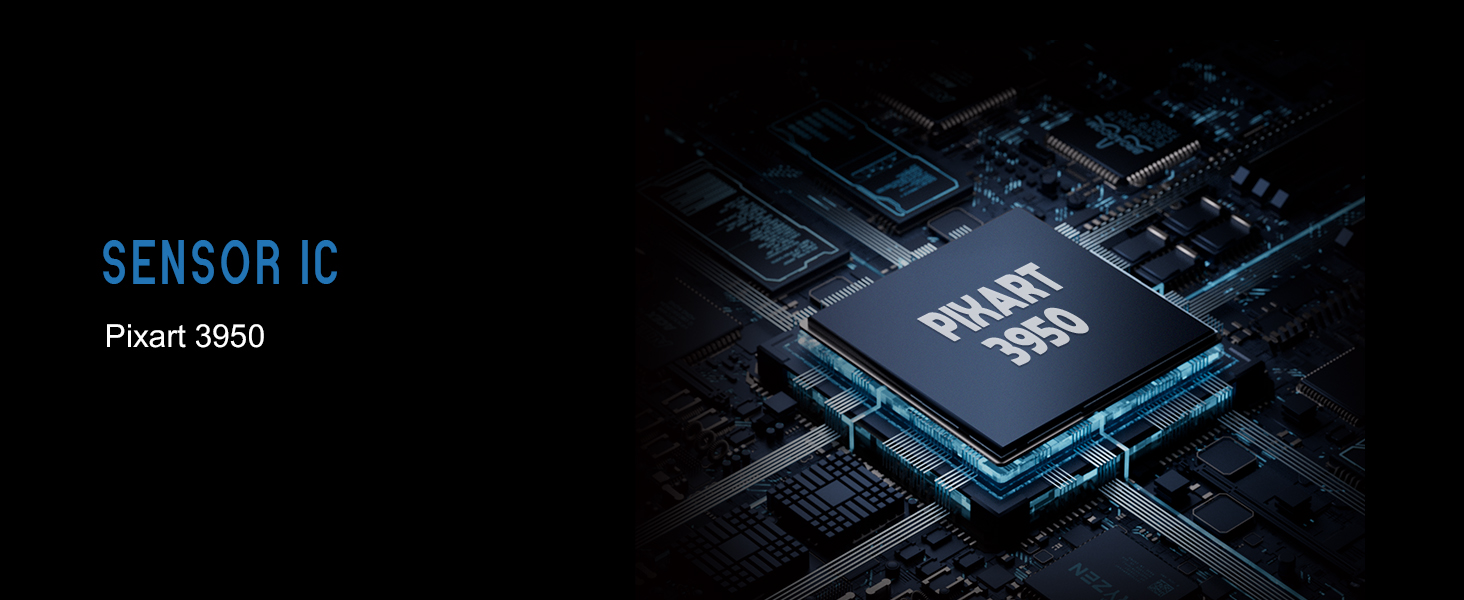
- Pixart PAW 3950 Sensor: Supports up to 30,000 DPI and 750 IPS.
- Nordic 52840 MCU: Ensures power efficiency, fast response times, and accurate motion tracking.
- Високий коефіцієнт опитування: Up to 8,000 Hz with the optional 8K dongle.
2.2 Вміст упаковки
- Бездротова ігрова миша Lamzu Maya X
- PTFE Skates (x1 set)
- 8K Dongle (x1)
- MAYA X Dustproof Seal
- 1.8m Type-C Paracord Cable
- Оксамитова сумка
- MAYA X Mouse Grip
2.3 Компоненти миші
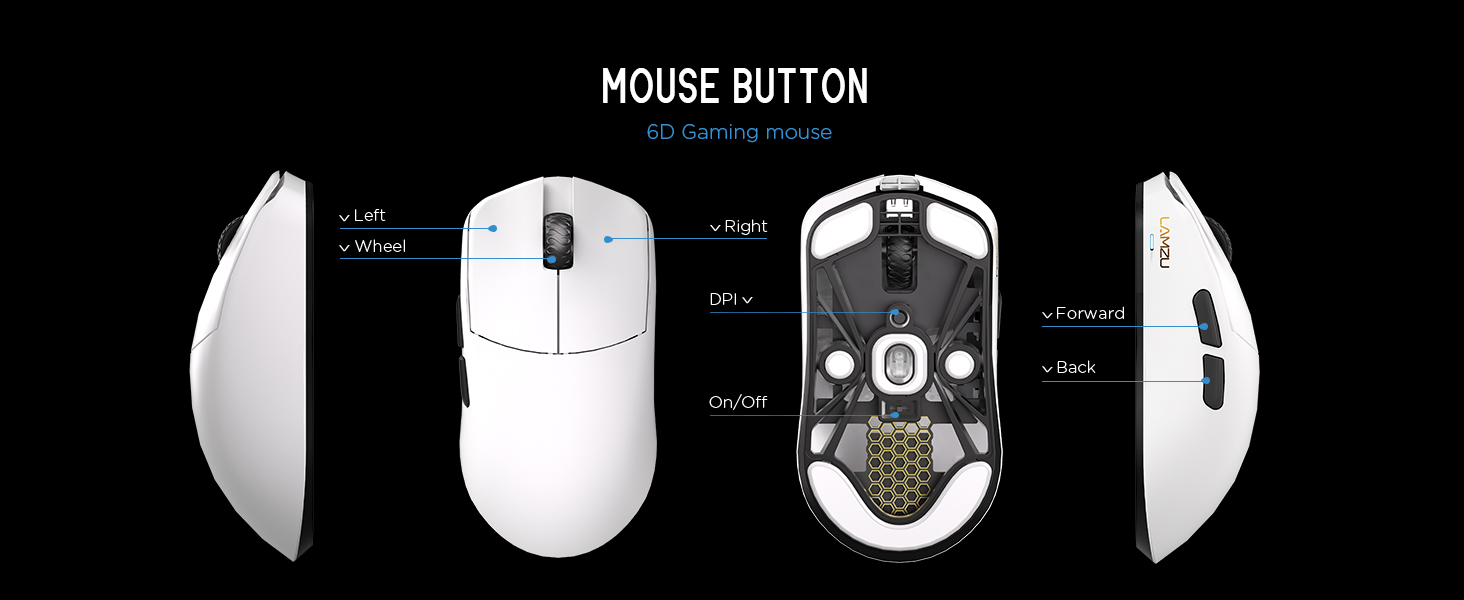
Зображення 2.3.1: Diagram illustrating the various buttons and internal structure of the Lamzu Maya X mouse, including left click, right click, scroll wheel, DPI button, forward, back buttons, and the on/off switch.
- Ліва кнопка: Основна функція клацання.
- Права кнопка: Функція вторинного клацання.
- Колесо прокрутки: Для прокручування та функції клацання середньою кнопкою миші.
- Кнопка DPI: Adjusts Dots Per Inch sensitivity.
- Кнопка вперед: Navigational function (e.g., browser forward).
- Кнопка Назад: Navigational function (e.g., browser back).
- Вмикання/вимкнення: Powers the mouse on or off.
3. Налаштування
3.1 Початкове підключення та заряджання
- Зарядіть мишку: Connect the provided Type-C paracord cable to the mouse and a USB port on your computer. The mouse will charge while connected.
- Увімкнення: Locate the On/Off switch on the underside of the mouse and slide it to the "On" position.
- Підключення бездротового адаптера: Insert the 8K wireless dongle into an available USB port on your computer. The mouse should automatically pair.
- Wired Mode (Optional): To use the mouse in wired mode, connect the Type-C paracord cable directly to the mouse and your computer. The mouse will function as a wired device and charge simultaneously.
Зображення 3.1.1: The Lamzu Maya X mouse connected via its Type-C paracord cable, illustrating both wired operation and charging capabilities.
3.2 Встановлення драйверів та програмного забезпечення
Миша Lamzu Maya X використовує web-based driver for customization. To access the software and update firmware:
- Visit the official Lamzu webсайт.
- Navigate to the support or downloads section for the Maya X model.
- Завантажити web driver application. This application allows for DPI adjustment, polling rate settings, macro programming, and firmware updates.
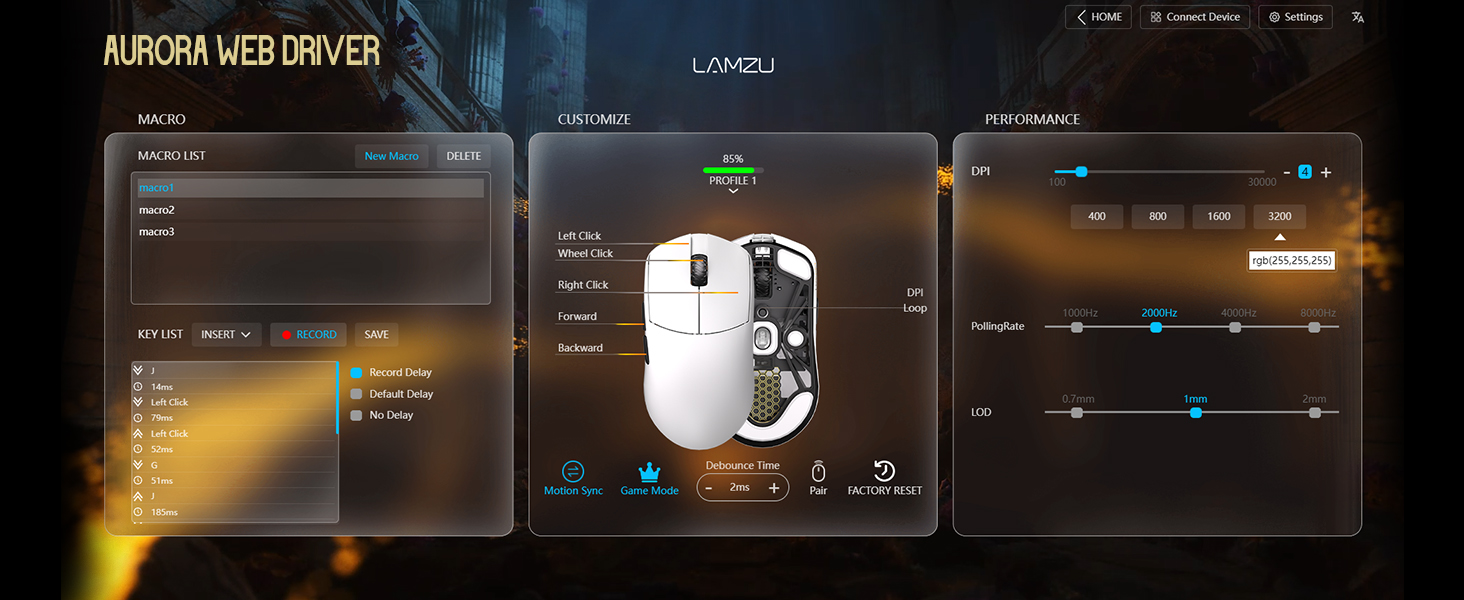
Зображення 3.2.1: Screenshot of the Aurora Web Driver interface, displaying options for macro creation, button customization, DPI settings (up to 30000), polling rate selection (up to 8000Hz), and Lift-Off Distance (LOD).
4. Інструкція з експлуатації
4.1 Налаштування DPI
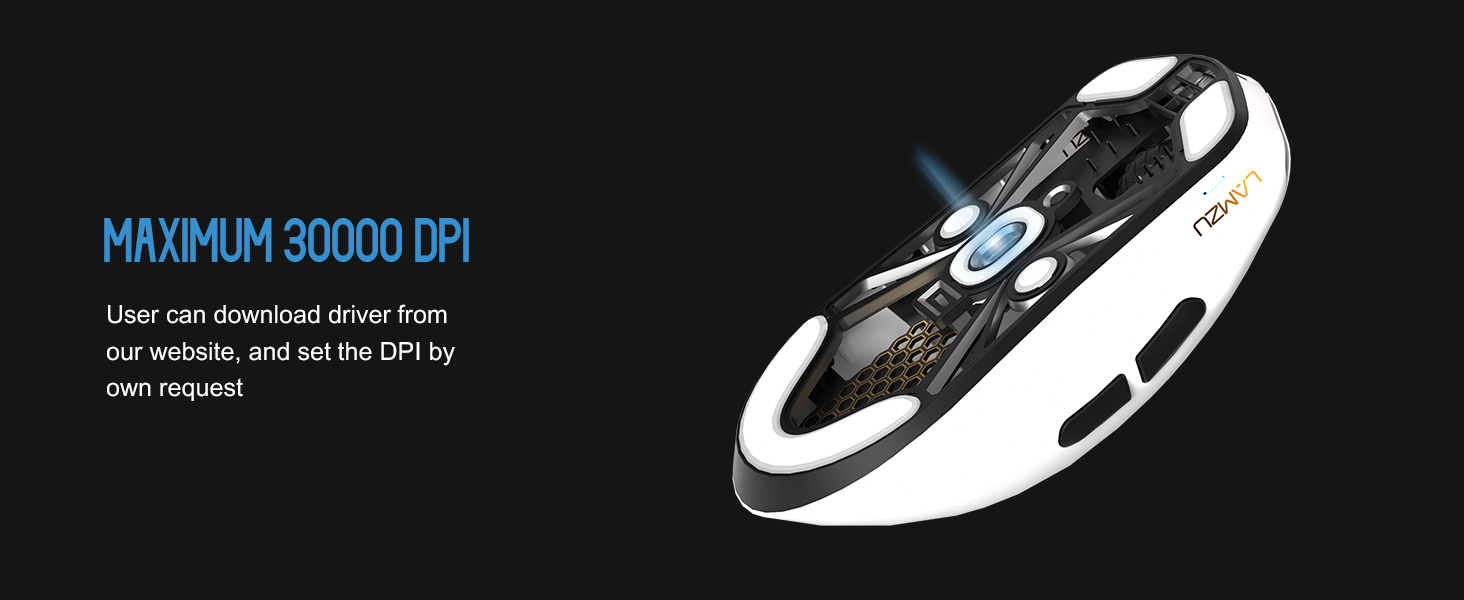
The DPI (Dots Per Inch) setting controls the mouse cursor's sensitivity. You can adjust the DPI using the dedicated DPI button on the mouse or through the Aurora Web Driver software. The Pixart PAW 3950 sensor supports up to 30,000 DPI.
Зображення 4.1.1: Нижня сторона view of the Lamzu Maya X mouse, emphasizing its optical sensor and the capability to reach a maximum of 30,000 DPI, configurable via software.
4.2 Частота опитування
The polling rate determines how often the mouse reports its position to the computer. The Maya X supports up to 8,000 Hz polling rate when using the included 8K dongle. Higher polling rates result in smoother cursor movement and reduced input lag.
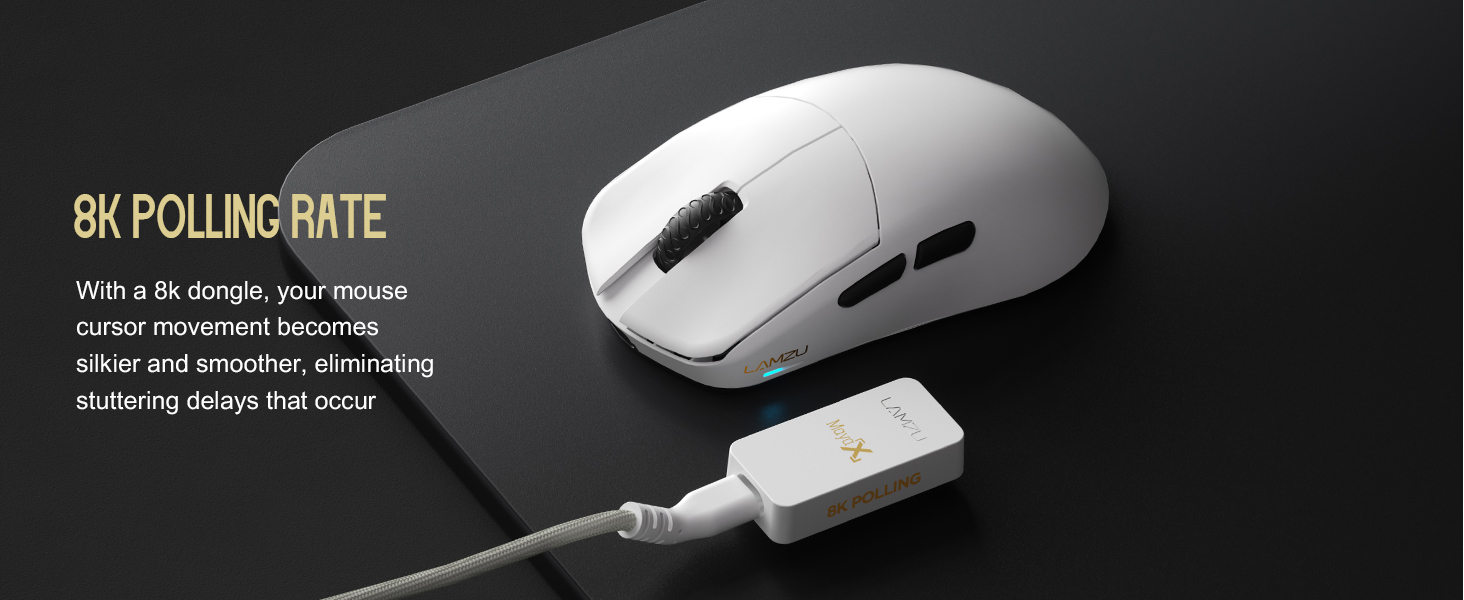
Зображення 4.2.1: The Lamzu Maya X mouse positioned next to its 8K polling rate dongle, highlighting the benefit of smoother and more responsive cursor movement provided by high polling rates.
4.3 Стилі захоплення
The symmetrical design of the Maya X mouse is engineered to accommodate various common grip styles:
- Хват долоні: The entire palm rests on the mouse.
- Кігтеподібний захват: Fingers are arched, and the palm rests on the back of the mouse.
- Fingertip Grip: Only the fingertips make contact with the mouse.
Зображення 4.3.1: A visual guide demonstrating the three primary mouse grip styles—Palm Grip, Claw Grip, and Fingertip Grip—and how the Maya X mouse is designed to be compatible with each.
4.4 Wired and Wireless Modes
The Maya X mouse supports both 2.4G wireless and wired (USB Type-C) connectivity. You can switch between modes by connecting or disconnecting the Type-C cable. In wired mode, the mouse operates at a 1K polling rate, while wireless mode with the 8K dongle supports up to 8K polling.
5. Технічне обслуговування
5.1 Очищення
- Перед чищенням переконайтеся, що миша вимкнена.
- Злегка протріть м’якою тканиною без ворсу dampводою або м’яким миючим розчином, щоб протерти поверхню миші.
- Уникайте використання агресивних хімікатів, абразивів або розчинників.
- Використовуйте стиснене повітря, щоб очистити пил від щілин та навколо кнопок.
- Для оптичного датчика використовуйте ватний тампон, злегка промокнутийampзмочений ізопропіловим спиртом для дбайливого очищення лінзи.
5.2 Догляд за акумулятором
- Щоб продовжити термін служби батареї, уникайте частого повного розряджання миші.
- Зберігайте мишу за кімнатної температури, якщо вона не використовується протягом тривалого часу.
- If storing for a long time, charge the battery to approximately 50% before storage.
6. Вирішення проблем
- Миша не реагує:
- Переконайтеся, що миша увімкнена.
- Перевірте рівень заряду акумулятора та за потреби зарядіть його.
- Verify the wireless dongle is securely plugged into a USB port.
- Try connecting the mouse in wired mode to confirm functionality.
- Перезавантажте комп'ютер.
- Переривчасте підключення:
- Ensure the wireless dongle is not obstructed and is close to the mouse.
- Avoid placing the dongle near other wireless devices that may cause interference.
- Update mouse firmware via the Aurora Web Водій.
- Cursor Jumps or Lag:
- Clean the optical sensor (refer to Section 5.1).
- Ensure the mousepad surface is clean and uniform.
- Adjust the polling rate in the software.
- Check for any background applications consuming excessive system resources.
- Кнопки не працюють:
- Check button assignments in the Aurora Web Водій.
- Ensure no physical obstructions are preventing button presses.
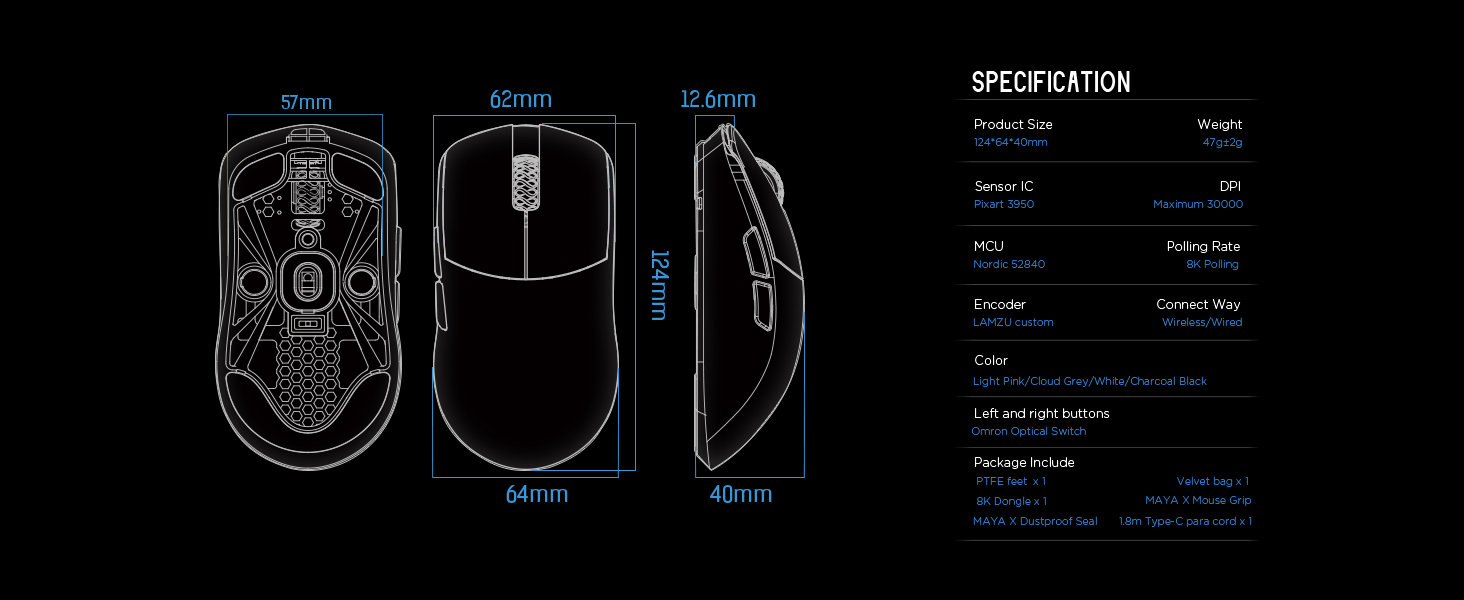
7. Технічні характеристики
| Розміри продукту | 4.88 x 2.52 x 0.04 дюйма (124 x 64 x 40 мм) |
| Вага товару | 1.66 унцій (47 г) |
| Датчик IC | Pixart PAW 3950 |
| Максимальний DPI | 30,000 |
| MCU | Північна 52840 |
| Швидкість опитування | До 8,000 Гц (з 8K-адаптером) |
| Технологія підключення | 2.4G Wireless, USB Type-C Wired |
| Перемикачі | Optical Switches (Left/Right buttons) |
| Кодувальник | Dust-Proof Encoder |
| Акумулятор | 1 літій-іонний акумулятор (у комплекті) |
| Виробник | Ламзу |

Зображення 7.1.1: A technical diagram detailing the dimensions (length, width, height) of the Lamzu Maya X mouse and a summary of its key specifications, including weight, sensor, MCU, DPI, and polling rate.
8. Гарантія та підтримка
For warranty information and technical support, please refer to the official Lamzu website or contact their customer service directly. Details regarding product registration, warranty claims, and frequently asked questions can typically be found in the support section of the webсайт.
Офіційний Webсайт: www.lamzu.com