
1. Вступ
This manual provides detailed instructions for the proper use, setup, operation, and maintenance of your EBTOOLS Bluetooth Headset. Please read this manual thoroughly before using the product to ensure optimal performance and longevity.
2. Продукт закінчивсяview
2.1 Основні характеристики
- Поворотний мікрофон: Easily adjust the microphone to the optimal angle for clear voice capture.
- Технологія Bluetooth 5.0: Ensures faster, more efficient, and stable wireless connectivity with compatible devices.
- Зручний дизайн: Single-ear design with padded ear cushion and flexible headband for extended wear without discomfort.
- Тривалий термін служби батареї: Up to 17 hours of talk time and 200 hours of standby time on a 2-hour charge.
- Універсальна сумісність: Works with laptops, cell phones, PCs, tablets, and other Bluetooth-enabled devices. Ideal for office, home, remote work, call centers, VoIP, and Skype.
2.2 Вміст упаковки
Перевірте наявність усіх предметів у вашій упаковці:
- EBTOOLS Bluetooth Headset
- Зарядна база
- Зарядний кабель Micro USB
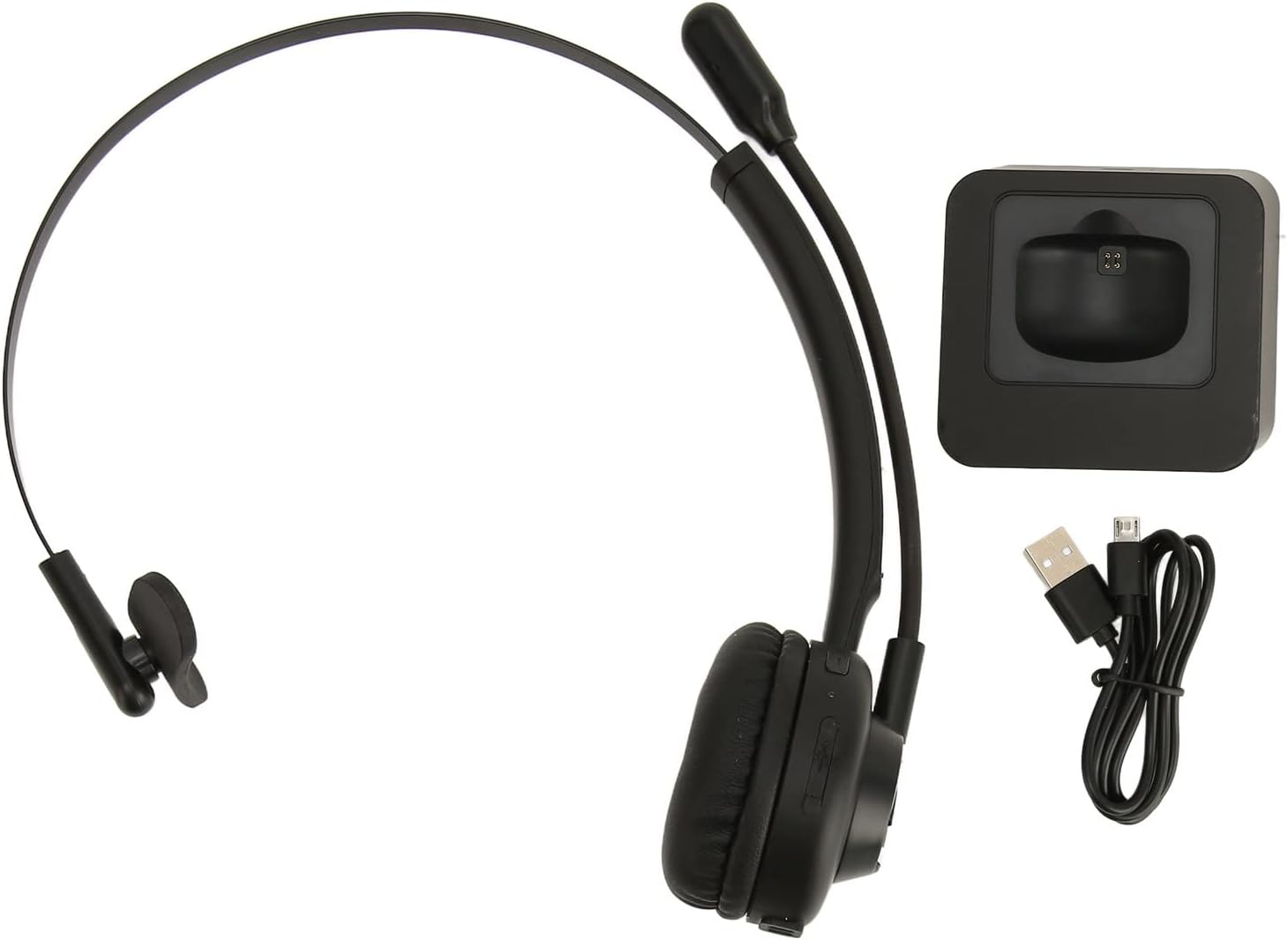
Image: The EBTOOLS Bluetooth Headset, its dedicated charging base, and a Micro USB charging cable, illustrating the complete package contents.
2.3 Headset Controls and Indicators

Image: A detailed diagram highlighting the Micro USB port, LED indicator, Volume Down button, Multifunctional button, and Volume Up button on the EBTOOLS Bluetooth Headset.
- Порт Micro USB: For direct charging of the headset.
- Світлодіодний індикатор: Відображає стан живлення, заряджання та сполучення.
- Кнопка гучності: Зменшує гучність звуку.
- Багатофункціональна кнопка: Controls power, pairing, call answer/end, and music playback.
- Гучність + кнопка: Збільшує гучність звуку.
3. Налаштування
3.1 Заряджання гарнітури
Before first use, fully charge the headset. You can charge it using the included charging base or directly via the Micro USB port.
- Connect the Micro USB cable to the charging base and a power source (e.g., computer USB port, USB wall adapter).
- Place the headset onto the charging base, ensuring the charging contacts align. The LED indicator on the headset will show charging status.
- Alternatively, connect the Micro USB cable directly to the headset's Micro USB port and a power source.
- A full charge typically takes approximately 2 hours. The LED indicator will change color or turn off once fully charged.

Зображення: Крупний план view of the headset's earcup, showing the charging contacts designed to connect with the charging base.
3.2 Сполучення з пристроєм Bluetooth
Щоб підключити гарнітуру до пристрою:
- Переконайтеся, що гарнітуру вимкнено.
- Натисніть і утримуйте Багатофункціональна кнопка for approximately 5-7 seconds until the LED indicator flashes red and blue alternately, indicating pairing mode.
- On your device (phone, PC, tablet), enable Bluetooth and search for new devices.
- Select "EBTOOLS Headset" (or similar name) from the list of available devices.
- Once connected, the LED indicator on the headset will typically flash blue slowly or turn solid blue.
- Якщо буде запропоновано ввести пароль, введіть «0000».
3.3 Носіння гарнітури
The headset is designed for comfort and flexibility.
- Adjust the flexible headband to fit comfortably over your head.
- The single ear design allows you to remain aware of your surroundings.
- Rotate the microphone boom to position it close to your mouth for optimal voice clarity. The microphone can be rotated 180 degrees to be worn on either the left or right ear.

Image: A person wearing the EBTOOLS Bluetooth Headset, demonstrating the comfortable fit and the adjustable, rotatable microphone positioned for clear communication.
4. Інструкція з експлуатації
4.1 Увімкнення/вимкнення живлення
- Увімкнення: Натисніть і утримуйте Багатофункціональна кнопка for approximately 3 seconds until the LED indicator flashes blue.
- Вимкнення живлення: Натисніть і утримуйте Багатофункціональна кнопка for approximately 3-5 seconds until the LED indicator flashes red and then turns off.
4.2 Регулювання гучності
- Натисніть Гучність + Кнопка to increase the listening volume.
- Натисніть Гучність - кнопка щоб зменшити гучність прослуховування.
4.3 Керування викликами
- Відповісти на дзвінок: Коротко натисніть кнопку Багатофункціональна кнопка коли дзвонить вхідний дзвінок.
- Завершити виклик: Коротко натисніть кнопку Багатофункціональна кнопка під час дзвінка.
- Відхилити виклик: Натисніть і утримуйте Багатофункціональна кнопка for approximately 2 seconds when an incoming call rings.
- Повторний набір останнього номера: Двічі натисніть кнопку Багатофункціональна кнопка коли не на дзвінку.
4.4 Music Playback (if supported by device)
- Відтворення/пауза: Коротко натисніть кнопку Багатофункціональна кнопка.
- Наступний трек: Натисніть і утримуйте Гучність + Кнопка.
- Попередній трек: Натисніть і утримуйте Гучність - кнопка.
4.5 Використання мікрофона
The rotatable microphone ensures your voice is captured clearly.
- Adjust the microphone boom to be approximately 1-2 inches from your mouth.
- The microphone can be rotated 180 degrees to allow wearing the headset on either the left or right ear.

Зображення: Крупний план view of the EBTOOLS headset's flexible microphone boom, highlighting its design for optimal voice pickup.
5. Технічне обслуговування
5.1 Очищення
- Протріть гарнітуру м’якою, сухою або злегка вологою ганчіркоюamp тканина.
- Не використовуйте агресивні хімікати, розчинники для чищення або сильні мийні засоби.
- Уникайте потрапляння вологи в будь-які отвори.
5.2 Догляд за акумулятором
- Регулярно заряджайте гарнітуру, навіть якщо вона використовується нечасто, щоб підтримувати справність акумулятора.
- Уникайте частого повного розряджання акумулятора.
- Зберігайте гарнітуру в прохолодному, сухому місці, подалі від екстремальних температур.
6. Вирішення проблем
Якщо у вас виникли проблеми з гарнітурою, зверніться до наступних поширених рішень:
| проблема | Можливе рішення |
|---|---|
| Гарнітура не вмикається. | Ensure the headset is charged. Connect it to the charging base or directly via USB. |
| Не вдається з’єднати пристрій. | Ensure the headset is in pairing mode (LED flashing red/blue). Turn off and on your device's Bluetooth. Delete previous pairings on your device and try again. Ensure the headset is within range (typically 10 meters). |
| Немає звуку або гучність низька. | Increase volume on both the headset and your connected device. Ensure the headset is selected as the audio output device on your computer or phone. Re-pair the headset. |
| Мікрофон не працює. | Ensure the microphone is positioned correctly. Check microphone settings on your connected device to ensure the headset is selected as the input device. |
| Періодичне з'єднання. | Move closer to your connected device. Avoid obstacles between the headset and device. Reduce interference from other wireless devices. |
7. Технічні характеристики
| Особливість | Деталь |
|---|---|
| Торгова марка | EBTOS |
| Номер моделі | EBTOOLSrsgvuyg5fc |
| Технологія підключення | Bluetooth 5.0 |
| Вага товару | 11.6 унції |
| Розміри упаковки | 7.09 x 6.69 x 2.36 дюймів |
| Час розмови | До 17 годин |
| Час очікування | До 200 годин |
| Час зарядки | Приблизно 2 годин |
8. Гарантія та підтримка
For warranty information or technical support, please refer to the documentation included with your purchase or contact EBTOOLS customer service through the retailer where the product was purchased. Keep your proof of purchase for warranty claims.