
1. Вступ
Цей посібник містить інструкції для ELECOM MPA-C35DSMWH USB-C to 3.5mm Audio Converter Cable. This device allows you to connect 3.5mm audio devices, such as headphones or earphones, to USB Type-C enabled smartphones, tablets, and other compatible devices that lack a dedicated 3.5mm audio jack. It is designed to deliver high-resolution audio quality.
2. особливості
- Підтримка звуку високої роздільної здатності: Compliant with Japanese Audio Association's high-resolution definitions, allowing enjoyment of high-resolution sound sources.
- Integrated DAC: Equipped with a Digital-to-Analog Converter (DAC) that supports PCM up to 384 kHz/32 bit for superior music and movie audio quality. Supports both digital and analog signals.
- Сумісність мікрофона: Supports earphones with a microphone, enabling not only audio listening but also phone calls and video conferences.
- Durable Silicone Mesh Cable: Features a soft silicone material that resists folding and a durable nylon mesh outer layer to prevent scratches and enhance longevity.
- Робота Plug and Play: No driver installation required; simply connect the devices to begin use.
- Компактний дизайн: Approximately 5 cm cable length (excluding connectors) for portability.
- Екологічна відповідність: EU RoHS Compliant (10 materials) and marked with the THINK ECOLOGY mark, indicating reduced plastic in packaging.

Image 2.1: The ELECOM MPA-C35DSMWH cable highlighting Hi-Res Audio and DAC features.
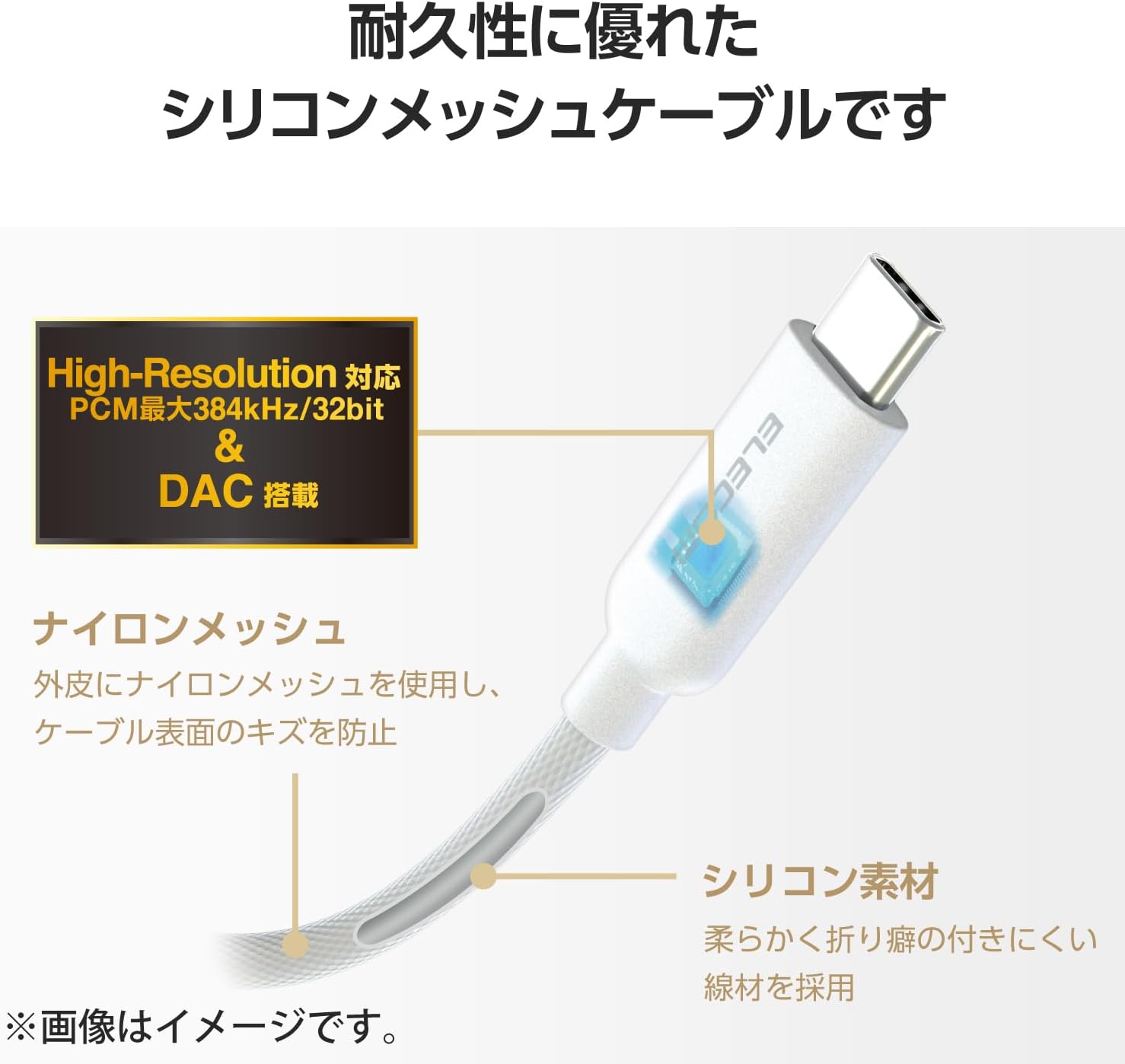
Зображення 2.2: Детальний опис view of the cable's durable silicone mesh and integrated DAC.

Image 2.3: The converter cable in use, demonstrating its high-resolution audio capability.
3. Налаштування
Follow these steps to connect your ELECOM MPA-C35DSMWH audio converter cable:
- Locate the USB Type-C Port: Identify the USB Type-C port on your smartphone, tablet, or other compatible device.
- Connect the Converter Cable: Insert the USB Type-C plug of the MPA-C35DSMWH converter cable firmly into your device's USB Type-C port.
- Підключення аудіопристрою: Plug your 3.5mm headphones, earphones, or other audio accessory into the 3.5mm stereo mini jack of the converter cable.
The device should automatically recognize the converter cable upon connection.

Image 3.1: A user connecting the ELECOM MPA-C35DSMWH cable to a tablet for audio output.
4. Інструкція з експлуатації
4.1 Відтворення аудіо
Once the converter cable and your audio device are connected, your smartphone or tablet should automatically route audio through the connected earphones/headphones. You can now play music, videos, or any other audio content as usual.
4.2 Making Calls (with microphone-compatible earphones)
If your connected earphones feature a built-in microphone, you can use them for voice calls, video conferences, or voice commands. Ensure your device's audio settings are configured to use the connected earphones for both audio output and input (microphone).
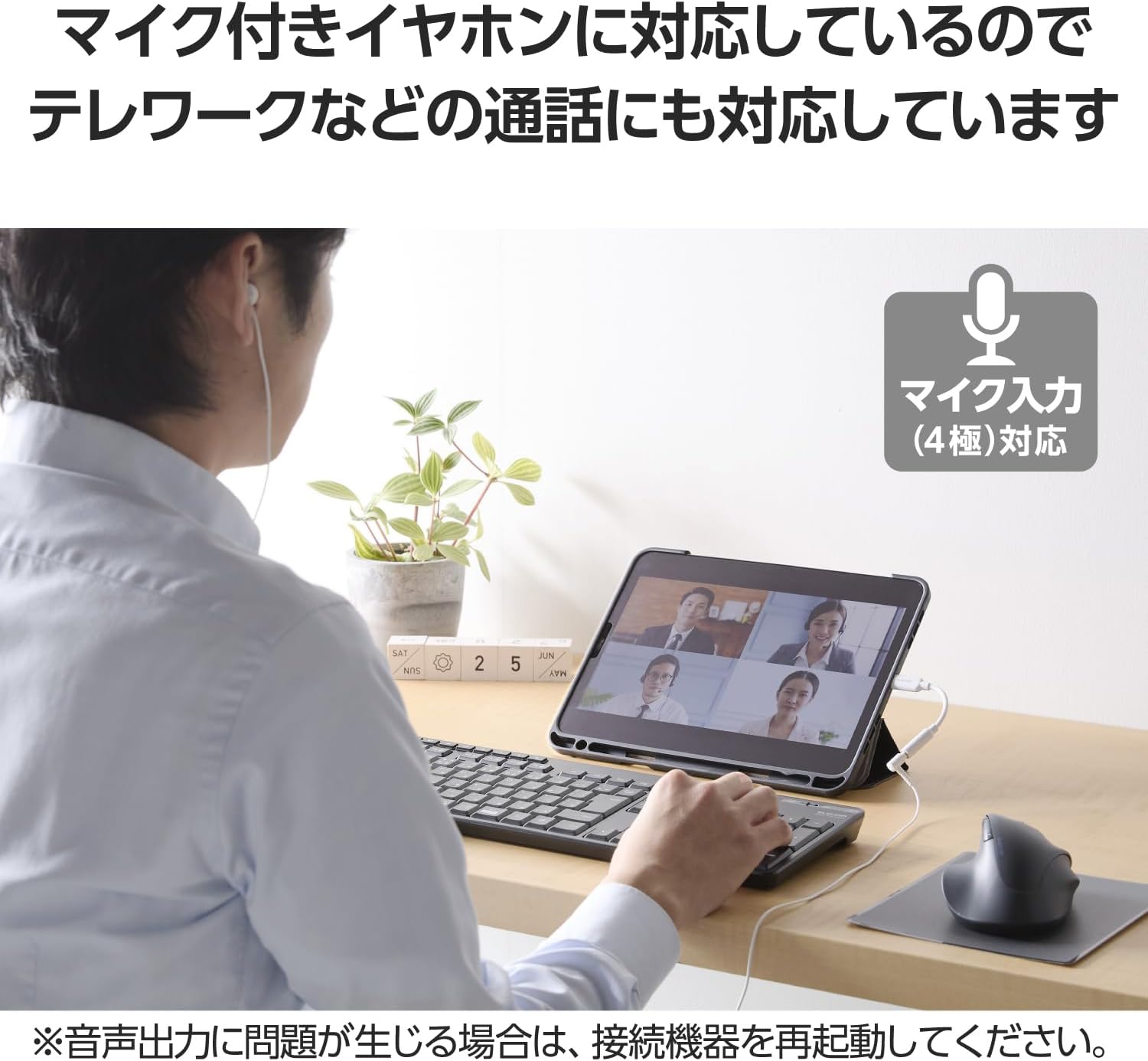
Image 4.1: A user participating in a video call using the converter cable with microphone-enabled earphones.
5. Сумісність
The ELECOM MPA-C35DSMWH is compatible with smartphones and tablets that support audio output from their USB Type-C port. This includes a wide range of devices from various manufacturers.
Важлива примітка: This product cannot be used with models that do not support audio output from the USB Type-C port. Compatibility may also be affected by OS or software updates on your device.

Image 5.1: A visual guide to compatible iPhone, Android, and iPad models.
6. Технічне обслуговування
To ensure the longevity and optimal performance of your converter cable, follow these maintenance guidelines:
- Прибирання: Gently wipe the cable and connectors with a soft, dry cloth to remove dust and debris. Avoid using harsh chemicals or abrasive materials.
- Зберігання: Зберігайте кабель у прохолодному, сухому місці, подалі від прямих сонячних променів та екстремальних температур, коли він не використовується.
- Обробка: Avoid excessive bending, twisting, or pulling of the cable, especially near the connectors, to prevent internal damage. Do not apply excessive force when connecting or disconnecting.
7. Вирішення проблем
If you encounter issues while using your ELECOM MPA-C35DSMWH converter cable, please refer to the following common solutions:
- Немає аудіовиходу:
- Ensure the converter cable is securely connected to both your device's USB Type-C port and your 3.5mm audio accessory.
- Verify that your device (smartphone, tablet) supports audio output via its USB Type-C port. Not all USB-C ports support audio.
- Check your device's audio settings to ensure the correct output device is selected.
- If audio output problems persist, try restarting your smartphone or computer.
- Мікрофон не працює:
- Confirm that your connected earphones or headphones have a built-in microphone.
- Check your device's audio input settings to ensure the microphone from the connected earphones is selected.
- Переривчасте підключення:
- Ensure all connections are firm and free from dust or debris.
- Test the cable with another compatible device or audio accessory to isolate the issue.
8. Технічні характеристики
| Номер моделі | MPA-C35DSMWH |
| Бренд | ELECOM |
| Connector Type 1 | Штекер USB Type-C |
| Connector Type 2 | φ3.5mm stereo mini jack |
| Тип кабелю | Silicone mesh |
| Довжина кабелю | Approx. 5 cm (excluding connectors) |
| Підтримка ЦАП | Up to 384 kHz/32 bit PCM |
| Audio Signal Support | Цифровий і аналоговий |
| Колір | Білий |
| Екологічна відповідність | EU RoHS Compliant (10 materials), THINK ECOLOGY Mark |
9. Гарантія та підтримка
For product inquiries, technical support, or warranty information, please contact the ELECOM General Information Center:
- Телефон: 0570-084-465
- ФАКС: 0570-050-012
- Reception Time: 10:00 - 19:00 (Japan Standard Time)
- Підтримка в чаті: 24/7 chat support is also available. Please check 8056.jp for details.