
1. Вступ
This manual provides detailed instructions for the installation, operation, maintenance, and troubleshooting of your Generic H61 Motherboard Combo. This combo includes an H61 Express motherboard, an Intel Core i3 3rd Gen processor (3240/3220), 4GB DDR3 RAM, and a high-performance CPU fan. It is designed for stability and reliability in both home and office environments.
2. Продукт закінчивсяview
The Generic H61 Motherboard Combo is a pre-assembled set of core computer components, offering a solid foundation for building or upgrading a personal computer. It supports Intel's 2nd and 3rd generation Core i3, i5, and i7 processors.
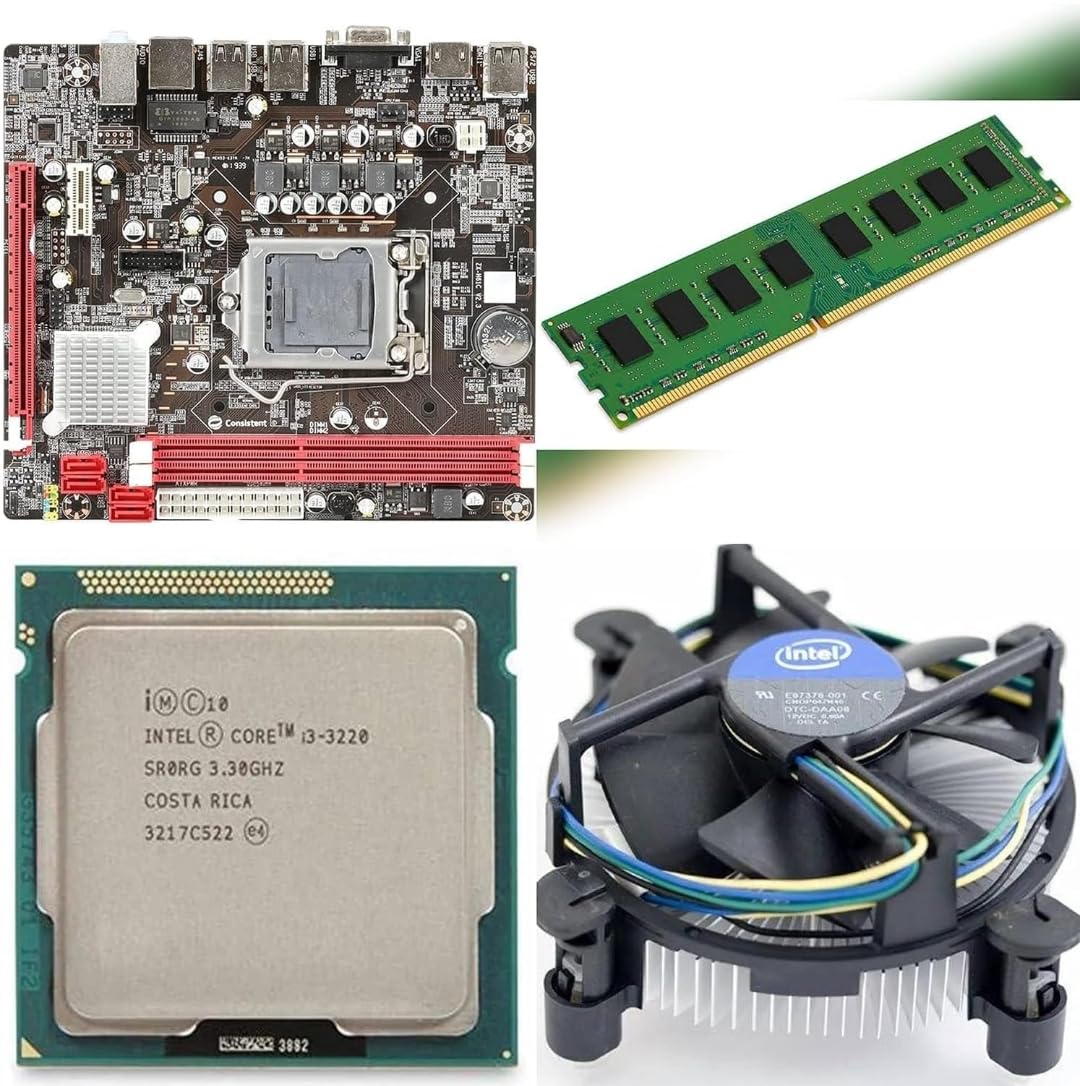
Image: Generic H61 Motherboard Combo, showcasing the motherboard, CPU, RAM, and CPU fan.
Ключові характеристики:
- Сумісність: Supports Intel 2nd and 3rd generation Core i3, i5, and i7 processors.
- Чіпсет: Intel H61 Express chipset.
- Пам'ять: Supports DDR3 memory up to 16 GB, with a clock speed of 1600 MHz.
- Підключення: Multiple ports including HDMI, VGA, USB 2.0, and LAN.
- Розширення: PCI Express x16 and PCI Express x1 slots for graphics cards or other components.
- Зберігання: Features NVMe M.2 chip support and SATA 2.
3. Посібник із налаштування
Follow these steps to properly install and set up your motherboard combo into a computer chassis.
3.1. Підготовка
- Переконайтеся, що ваш блок живлення (БЖ) сумісний і забезпечує достатню потужністьtage.
- Gather necessary tools: screwdriver, thermal paste (if not pre-applied to CPU fan), anti-static wrist strap.
- Працюйте на чистій поверхні, вільній від статичної електрики.
3.2. Встановлення материнської плати
- Carefully place the motherboard into your PC case, aligning it with the standoffs.
- Закріпіть материнську плату гвинтами, переконавшись, що вона міцно закріплена, але не перетягнута.
3.3. CPU, RAM, and CPU Fan Installation (Pre-installed in combo)
The CPU (Intel Core i3 3rd Gen), RAM (4GB DDR3), and CPU fan are pre-installed on the motherboard as part of this combo. If you need to re-seat or replace these components, refer to the following general guidelines:
- ЦП: Open the CPU socket lever, align the CPU with the triangular mark on the socket, gently place it in, and close the lever.
- Оперативна пам'ять: Open the clips on the DDR3 memory slots, align the RAM module notch with the slot key, and press down firmly until the clips snap into place.
- CPU Fan: Apply a thin layer of thermal paste to the CPU (if not pre-applied). Align the fan's mounting pins with the motherboard holes and press down until secured. Connect the CPU fan cable to the 'CPU_FAN' header on the motherboard.
3.4. Підключення джерела живлення
- Підключіть 24-контактний роз'єм живлення ATX від блоку живлення до основного роз'єму живлення на материнській платі.
- Connect the 4-pin or 8-pin CPU power connector (EPS12V) from your PSU to the corresponding socket near the CPU.
3.5. Storage and Peripherals
- Твердотільний накопичувач NVMe M.2: If using an NVMe M.2 SSD, insert it into the M.2 slot and secure it with the provided screw.
- Накопичувачі SATA: Connect SATA data cables from your hard drives or SSDs to the SATA ports on the motherboard. Connect SATA power cables from your PSU to the drives.
- Роз'єми передньої панелі: Connect the power button, reset button, USB ports, and audio jacks from your PC case to the corresponding headers on the motherboard. Refer to your PC case manual for specific pin layouts.
- Graphics Card (Optional): If installing a dedicated graphics card, insert it into the PCI Express x16 slot and secure it. Connect any required PCIe power cables from your PSU.
- Зовнішні периферійні пристрої: Connect your monitor to the HDMI or VGA port, and connect USB devices (keyboard, mouse) and LAN cable.
4. Initial System Boot and BIOS Configuration
After all components are connected, you can proceed with the initial boot.
- Увімкнення: Connect the power cord to your PSU and turn on the power switch. Press the power button on your PC case.
- Доступ до BIOS/UEFI: During startup, repeatedly press the designated key (usually DEL, F2, або F10), щоб увійти до утиліти налаштування BIOS/UEFI.
- Основні налаштування:
- Verify that the CPU, RAM, and storage devices are correctly detected.
- Встановіть правильну дату та час.
- Налаштуйте порядок завантаження, щоб надати пріоритет інсталяційному носію операційної системи (USB-накопичувачу або DVD-диску).
- Зберегти та вийти: Збережіть зміни та вийдіть з BIOS. Система перезавантажиться.
- Встановлення операційної системи: Proceed with the installation of your preferred operating system.
- Встановлення драйвера: After OS installation, install all necessary drivers for the motherboard chipset, audio, LAN, and any discrete graphics card. Drivers can typically be found on the manufacturer's webсайт.
5. Технічне обслуговування
Regular maintenance ensures the longevity and optimal performance of your motherboard combo.
- Видалення пилу: Periodically clean dust from the CPU fan, heatsinks, and other components using compressed air. Ensure the system is powered off and unplugged before cleaning.
- Потік повітря: Ensure your PC case has adequate airflow to prevent overheating. Keep vents clear of obstructions.
- Оновлення BIOS: Check the motherboard manufacturer's website for BIOS/UEFI updates. Updates can improve stability, compatibility, and performance. Follow update instructions carefully to avoid system damage.
- Управління кабелем: Організуйте внутрішні кабелі для покращення потоку повітря та запобігання перешкодам.
6. Вирішення проблем
Якщо у вас виникли проблеми, зверніться до наступних поширених кроків з усунення несправностей.
6.1. Немає живлення
- Check if the power cord is securely connected to the PSU and the wall outlet.
- Переконайтеся, що перемикач блоку живлення знаходиться в положенні «УВІМК.».
- Verify that the 24-pin and CPU power connectors are firmly seated on the motherboard.
- Confirm that the front panel power button cable is correctly connected to the motherboard.
6.2. Немає дисплея
- Ensure the monitor is powered on and the video cable (HDMI/VGA) is securely connected to the motherboard's output and the monitor's input.
- If using a discrete graphics card, connect the monitor to the graphics card's output, not the motherboard's.
- Reseat the RAM modules. Try booting with only one RAM module installed.
- Clear the CMOS (Complementary Metal-Oxide-Semiconductor) by removing the motherboard battery for 30 seconds or using the CMOS clear jumper.
6.3. System Instability / Random Restarts
- Check CPU and system temperatures. Overheating can cause instability.
- Run a memory diagnostic tool to check for faulty RAM.
- Переконайтеся, що всі драйвери оновлені.
- Перевірте стан блоку живленняtage достатньо для всіх компонентів.
7. Технічні характеристики
Detailed technical specifications for the Generic H61 Motherboard Combo.
| Особливість | Специфікація |
|---|---|
| Бренд | загальний |
| Гніздо ЦП | LGA 1155 |
| Сумісні пристрої | Персональний комп'ютер |
| Технологія оперативної пам'яті | DDR3 |
| Тип чіпсета | Intel H61 Express |
| Процесорний сокет | LGA 1155 |
| Тактова частота пам'яті | 1600 МГц |
| CPU Model (Included) | Core i3 3rd Gen (3240/3220) |
| Drive Memory Storage Capacity (Max) | 16 ГБ |
| Максимальний розмір оперативної пам'яті | 16 ГБ |
| Тип основного роз'єму живлення | 24-контактний |
| Інтерфейс графічної карти | PCI-Express x16 |
| Доступні слоти пам'яті | 2 |
| Підтримуваний стандарт системної шини | SATA 2 |
| Розміри предмета Д х Ш х В | 38 Д x 12 Ш x 38 В Сантиметрів |
| Вага товару | 900 грамів |
8. Гарантія та підтримка
This Generic H61 Motherboard Combo comes with a 2-річна гарантія бренду. For warranty claims or technical support, please contact your retailer or the brand's customer service channel. Ensure you retain your proof of purchase for warranty validation.