
Продукт закінченийview
The TP-Link Archer MR505 is a 4G+ Cat6 AC1200 Wireless Dual Band Gigabit Router designed to provide reliable internet connectivity. This router supports dual-band Wi-Fi (2.4 GHz and 5 GHz) and features Gigabit Ethernet ports for high-speed wired connections. It is compatible with 4G+ Cat6 networks, offering mobile broadband access.

Малюнок 1: Спереду view of the Archer MR505 router.
Малюнок 2: Сторона view of the Archer MR505 router.
Вміст упаковки
Перевірте наявність усіх предметів у вашій упаковці:
- TP-Link Archer MR505 Router
- Адаптер живлення
- Посібник із швидкого встановлення
- Ethernet-кабель RJ45

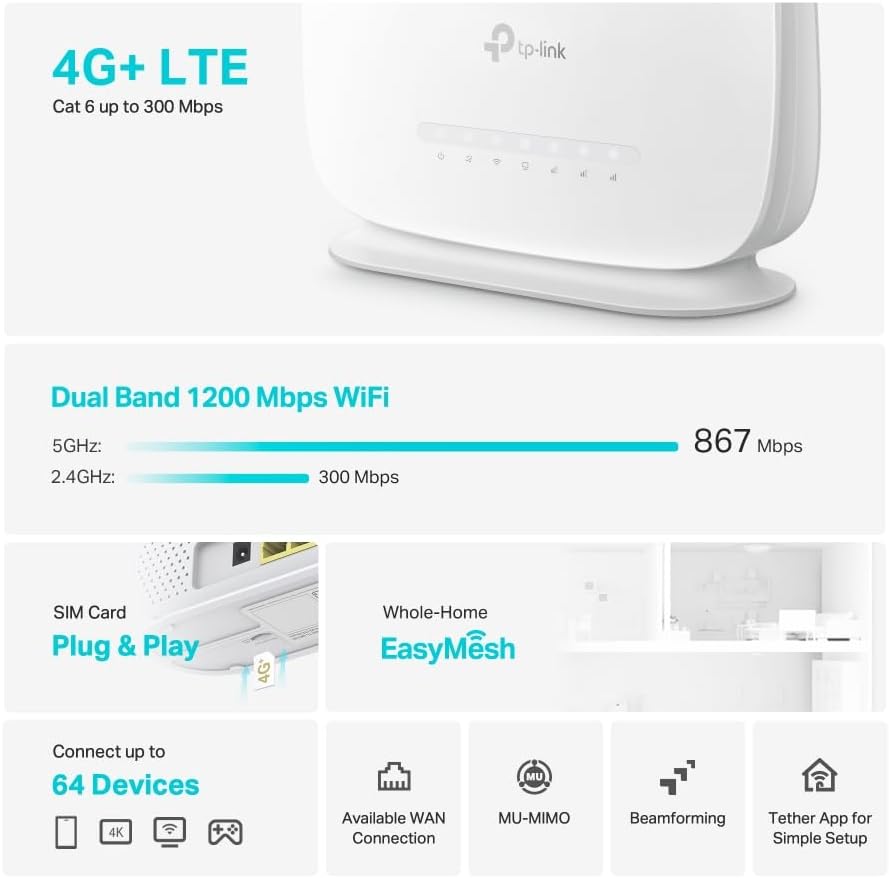
Figure 3: Key features and components of the Archer MR505.
Інструкції з налаштування
Follow these steps to set up your Archer MR505 router:
- Вставте SIM-карту: Locate the SIM card slot on the router. Insert your 4G/LTE SIM card into the slot until it clicks into place. Ensure the SIM card is a normal data SIM for optimal compatibility. Some data-only SIM cards may require specific configurations or may not be fully compatible.
- Підключіть живлення: Підключіть наданий адаптер живлення до порту живлення маршрутизатора, а потім підключіть його до розетки. Маршрутизатор увімкнеться автоматично.
- Зачекайте ініціалізації: Allow a few minutes for the router to boot up and establish a connection to the 4G/LTE network. The LED indicators on the front panel will show the connection status.
- Початкове підключення до Wi-Fi:
- Find the default Wi-Fi network name (SSID) and password printed on the label at the bottom of the router.
- Підключіть свій комп’ютер або мобільний пристрій до цієї мережі Wi-Fi.
- Керування маршрутизатором доступу:
- Відкрийте a web браузер і введіть адресу керування за замовчуванням (наприклад, http://tplinkwifi.net or http://192.168.1.1).
- Увійдіть, використовуючи ім’я користувача та пароль за умовчанням (зазвичай адмін/адмін or specified on the label).
- Налаштувати параметри мережі: Follow the on-screen Quick Setup wizard to configure your internet connection, change the Wi-Fi network name (SSID), and set a strong, unique password for both your Wi-Fi and router management interface.
- Tether App Setup (Optional): Download the TP-Link Tether app from your device's app store. The app provides an intuitive way to manage your router settings from your smartphone or tablet.
- External Antenna (Optional): If using external antennas (not included), connect them to the designated ports on the back of the router. You may need to manually enable external antenna usage through the router's web interface or Tether app.
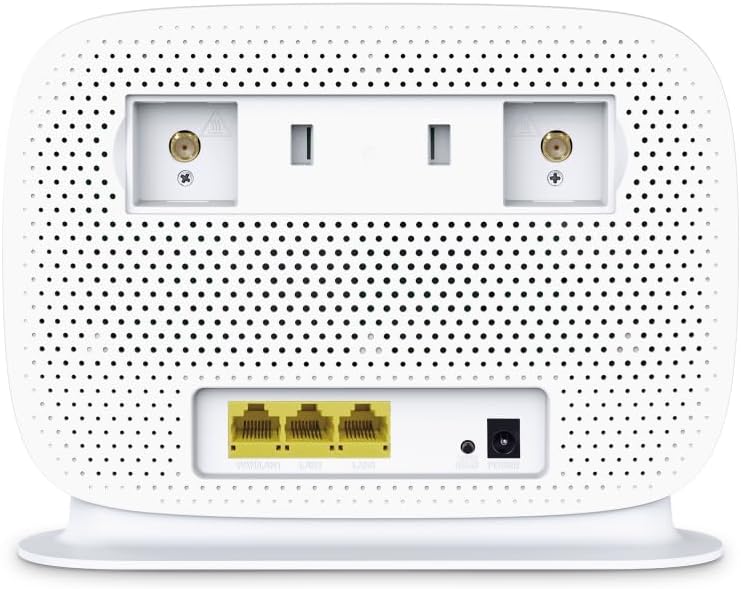
Figure 4: Rear panel of the Archer MR505 with ports and SIM slot.

Figure 5: Archer MR505 in various usage scenarios.
Інструкція з експлуатації
The Archer MR505 provides robust wireless and wired connectivity:
- Дводіапазонний Wi-Fi: The router operates on both 2.4 GHz and 5 GHz bands, offering speeds up to 300 Mbps and 867 Mbps respectively, for a total of AC1200 Wi-Fi.
- 4G+ Cat6 Connectivity: Enjoy mobile broadband speeds up to 300 Mbps download and 300 Mbps upload (maximum upstream data transfer rate).
- Порти Gigabit Ethernet: Four Gigabit LAN ports (1000 Mbps) are available for high-speed wired connections to devices like computers, gaming consoles, or smart TVs. One port can also function as a WAN port for traditional broadband connections.
- Ємність пристрою: The router can support connectivity for up to 64 devices simultaneously.
- Smart Connect: This feature automatically assigns devices to the best available Wi-Fi band (2.4 GHz or 5 GHz) for optimized performance.
- Сумісність з EasyMesh: The Archer MR505 is compatible with TP-Link EasyMesh, allowing you to create a seamless whole-home mesh Wi-Fi network by adding compatible range extenders.
- Передові технології: Features like MU-MIMO and Beamforming enhance Wi-Fi efficiency and range, especially for multiple connected devices.
- Безпека: The router supports WPA3 encryption for enhanced network security.

Figure 6: Versatile connectivity and speed capabilities.

Figure 7: Whole-Home EasyMesh integration.
Технічне обслуговування
To ensure optimal performance and security of your router:
- Оновлення прошивки: Регулярно перевіряйте наявність та встановлюйте останні оновлення прошивки від офіційного постачальника TP-Link. website or via the Tether app. Firmware updates often include security patches and performance improvements.
- Безпечні паролі: Use strong, unique passwords for your Wi-Fi network and router management interface. Change them periodically.
- Фізичне розміщення: Розмістіть роутер у центральному місці, подалі від перешкод та джерел перешкод (наприклад, мікрохвильових печей, бездротових телефонів), щоб максимізувати покриття Wi-Fi.
- Прибирання: Keep the router clean and free from dust. Ensure ventilation holes are not blocked.
- Періодично перезапускати: Restarting the router occasionally can help resolve minor network issues and improve performance.
Усунення несправностей
If you encounter issues with your Archer MR505 router, consider the following:
- No Internet Connection via 4G/LTE:
- Переконайтеся, що ваша SIM-картка правильно вставлена та активована.
- Verify that your SIM card is a normal data SIM. Some data-only SIM cards may require specific APN settings or might not be fully compatible. Contact your mobile service provider for details.
- Check the 4G/LTE signal strength indicated by the router's LEDs. If the signal is weak, try repositioning the router or consider using external antennas (if supported and configured).
- Перезавантажте маршрутизатор та підключені пристрої.
- Проблеми з підключенням Wi-Fi:
- Ensure your device is within the router's Wi-Fi range.
- Перевірте, чи використовуєте ви правильний пароль Wi-Fi.
- If a device frequently connects and disconnects, try restarting that specific device.
- Перевірте наявність перешкод від інших електронних пристроїв.
- Повільна швидкість Інтернету:
- Check your 4G/LTE signal strength. Weak signal can significantly reduce speed.
- Переконайтеся, що жодні інші програми чи пристрої не споживають надмірну пропускну здатність.
- If using Wi-Fi, try connecting to the 5 GHz band for faster speeds, if your device supports it.
- Виконайте тест швидкості, щоб підтвердити фактичну швидкість, яку ви отримуєте.
- Не вдається отримати доступ до сторінки керування маршрутизатором:
- Переконайтеся, що ваш пристрій підключено до мережі маршрутизатора (через Wi-Fi або кабель Ethernet).
- Verify you are entering the correct management address (e.g., http://tplinkwifi.net).
- Спробуйте очистити кеш браузера або скористатися іншим браузером.
Технічні характеристики
| Бренд | TP-Link |
| Назва моделі | Archer MR505 |
| Бездротовий стандарт | 802.11ac (Wi-Fi 5) |
| Клас діапазону частот | Дводіапазонний (2.4 ГГц та 5 ГГц) |
| Швидкість передачі даних Wi-Fi | Up to 300 Mbps (2.4 GHz), Up to 867 Mbps (5 GHz) - AC1200 Total |
| 4G+ Cat6 Speed | Up to 300 Mbps Download, Up to 300 Mbps Upload |
| Порти Ethernet | 4 x Gigabit LAN Ports (1000 Mbps), 1 x WAN/LAN Port |
| Тип антени | Internal (External antenna support available) |
| Протокол безпеки | WPA3 |
| Спосіб контролю | App (TP-Link Tether) |
| Сумісні пристрої | Laptop, Personal Computer, Smart Television, Smartphone, Tablet |
| Вхідна потужність | 12 вольт |
| Вага товару | 0.93 кілограма |
| Включені компоненти | Archer MR505, Power Adapter, Quick Installation Guide, RJ45 Ethernet Cable |
Гарантія та підтримка
Щоб отримати інформацію про гарантію, зверніться до гарантійного талона, що додається до вашого продукту, або відвідайте офіційний веб-сайт TP-Link. website for your region. Support resources, including FAQs, firmware downloads, and contact information, are available on the TP-Link support website and through the TP-Link Tether app.
Офіційний TP-Link Webсайт: https://www.tp-link.com
Додаток TP-Link Tether: Available on iOS App Store and Google Play Store.