
FONGWAH U1-CU-71
FONGWAH UHF RFID Reader/Writer Model U1-CU-71 Instruction Manual
Model: U1-CU-71 | Brand: FONGWAH
1. Вступ
This manual provides comprehensive instructions for the FONGWAH UHF RFID Reader/Writer, Model U1-CU-71. This device is designed for efficient reading and writing of UHF RFID tags, supporting both keyboard emulation and advanced read-write integration modes. It is compliant with ISO18000-6C and EPC C1 Gen 2 protocols, making it suitable for various applications such as inventory management, asset tracking, and access control.
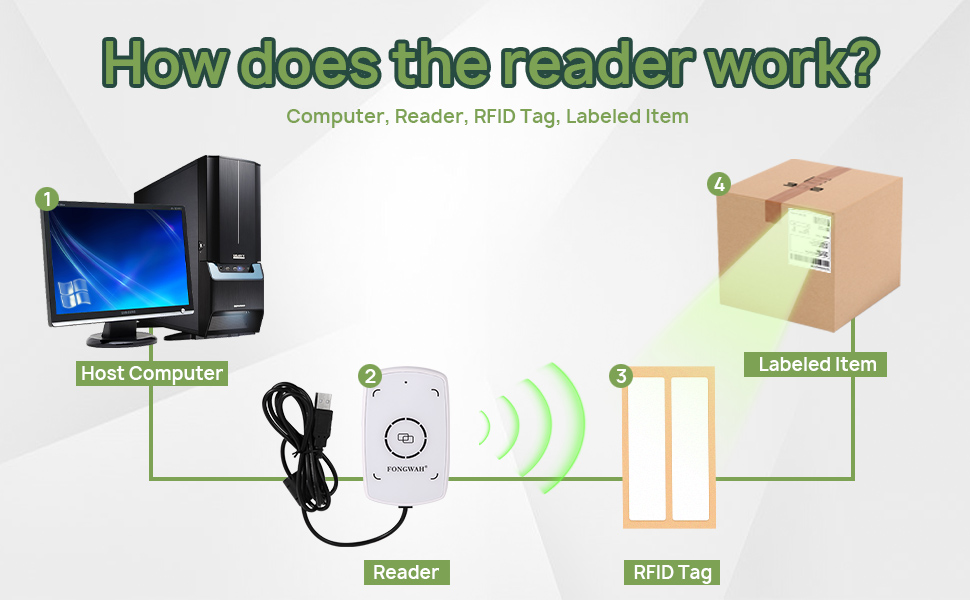
Figure 1: Basic operation diagram of the FONGWAH UHF RFID Reader/Writer.
2. Особливості продукту
- Plug-and-Play Keyboard Emulation: Automatically recognized by Windows and Linux as a Human Interface Device (HID), allowing direct data input into applications like Excel or Notepad without driver installation.
- Exceptional 50cm Long-Range Reading: Equipped with a high-gain antenna for a reading distance of up to 50cm (approximately 20 inches).
- Flexible Modes & Software Support: Easily switch between Keyboard Emulator and Read-Write Integration modes using the provided configuration tool. Technical libraries and SDK are available for developers.
- Adjustable Power for Precision: Output power is adjustable from 0 to 20dBm with 1dB accuracy, enabling fine-tuning of detection range to prevent interference.
- Wide Protocol Support: Fully compatible with ISO18000-6C and EPC Gen2 (C1G2) protocols, supporting reading and writing of various UHF tags.

Figure 2: The FONGWAH UHF RFID Reader/Writer demonstrating its 50cm reading distance.
3. Інструкції з налаштування
3.1 Вміст упаковки
Перш ніж продовжувати, переконайтеся, що всі компоненти присутні:
- FONGWAH UHF RFID Reader/Writer (Model U1-CU-71)
- USB-кабель (інтегрований)
- Sample UHF RFID Tags (typically 2)
- Mini CD with Configuration Tool and Drivers (or download link)
3.2 Підключення пристрою
- Connect the USB cable from the U1-CU-71 reader to an available USB port on your computer (Windows or Linux).
- The operating system should automatically detect the device and install necessary drivers for keyboard emulation mode. No manual driver installation is typically required for this mode.
- For advanced features or Read-Write Integration mode, install the provided configuration tool and SDK from the mini CD or the manufacturer's webсайт.

Figure 3: FONGWAH UHF RFID Reader/Writer connected via USB.
4. Інструкція з експлуатації
4.1 Keyboard Emulation Mode (Default)
In this mode, the reader acts like a keyboard, inputting the RFID tag's data directly into any active text field.
- Ensure the reader is connected to your computer.
- Open any text-editing application (e.g., Notepad, Microsoft Excel, Word).
- Place an RFID tag within the reading range (up to 50cm) of the device. The tag's data will automatically appear in the active text field.
Video 1: Demonstration of the Fongwah UHF Reader U1-CU-71 in keyboard emulation mode, showing RFID tag data being entered into an Excel spreadsheet.
4.2 Read-Write Integration Mode
For advanced operations like writing data to tags or integrating with custom software, you need to switch to Read-Write Integration mode using the configuration tool.
- Install and launch the FONGWAH Configuration Tool on your Windows computer.
- In the software interface, navigate to the 'Settings' section.
- Locate the 'Read card mode' options. To disable keyboard emulation, uncheck the 'Auto' checkbox and click 'Set'. This will enable the device for command-based read/write operations.
- Refer to the SDK documentation for programming instructions to interact with the reader in this mode.

Figure 4: Disabling Keyboard Emulation in the Configuration Tool.
4.3 Adjusting UHF RFID Power
The output power can be adjusted to control the reading range and minimize interference in dense environments.
- In the FONGWAH Configuration Tool, navigate to the 'Settings' section.
- Find the 'Set UHF RFID Power' option.
- Adjust the power value (0-20dBm) as needed and click 'Set' to apply the changes. Lower power reduces read range, higher power increases it.
5. Технічне обслуговування
To ensure optimal performance and longevity of your FONGWAH UHF RFID Reader/Writer, follow these simple maintenance guidelines:
- Прибирання: Use a soft, dry, lint-free cloth to clean the device. Do not use abrasive cleaners, solvents, or harsh chemicals, as these can damage the surface or internal components.
- Зберігання: Зберігайте пристрій у прохолодному, сухому місці, подалі від прямих сонячних променів та екстремальних температур.
- Обробка: Не кидайте пристрій і не піддавайте його сильним ударам.
6. Вирішення проблем
| Випуск | Можлива причина | Рішення |
|---|---|---|
| Пристрій не розпізнається комп'ютером. | Нещільне з'єднання USB, несправний порт USB або проблема з драйвером. | Ensure the USB cable is securely connected. Try a different USB port. Restart your computer. For advanced modes, ensure the configuration tool/SDK is correctly installed. |
| No data output in keyboard emulation mode. | No active text field, tag out of range, or device in Read-Write Integration mode. | Click into a text field (e.g., Notepad). Ensure the RFID tag is within 50cm of the reader. Check the configuration tool to ensure keyboard emulation ('Auto' in 'Read card mode') is enabled. |
| Cannot write data to RFID tags. | Device in keyboard emulation mode, incorrect software usage, or incompatible tag. | Switch the device to Read-Write Integration mode using the configuration tool. Refer to the SDK documentation for proper writing procedures. Ensure the tag is a writable UHF tag compatible with ISO18000-6C/EPC Gen2. |
| Reading range is shorter than expected. | Low output power setting, environmental interference, or tag орієнтація. | Increase the UHF RFID power setting in the configuration tool. Minimize electromagnetic interference from other devices. Adjust the orientation of the RFID tag relative to the reader. |
7. Технічні характеристики
| Атрибут | Деталь |
|---|---|
| Модель | U1-CU-71 |
| Бренд | FONGWAH |
| Сумісні пристрої | Desktop (Windows, Linux) |
| Джерело живлення | Живлення від USB |
| Технологія підключення | USB кабель |
| Виробник | Shenzhen Fongwah Technology Company |
| Підтримувані протоколи | ISO18000-6C, EPC Global C1 Gen 2 |
| Частота | 860-960 МГц |
| Відстань читання | До 50 см (20 дюймів) |
| Writing Distance | 0-20 cm (depending on tag та навколишнє середовище) |
| Вихідна потужність | Adjustable 0-20dBm (1dB accuracy) |

Figure 5: FONGWAH U1-CU-71 Key Specifications.
8. Гарантія та підтримка
FONGWAH products are designed for reliability and performance. For technical support, SDK inquiries, or any questions regarding your U1-CU-71 reader/writer, please contact the manufacturer directly. Information regarding specific warranty terms may be available through your point of purchase or the official FONGWAH webсайт.
For SDK files and programming examples, please refer to the resources provided on the manufacturer's website or the included mini CD.
Ask a question about this manual
Ask about setup, troubleshooting, compatibility, parts, safety, or missing instructions. Manuals+ will review the question and use this page’s manual context to help answer it.