
1. Вступ
The FIYAPOO Miracast Dongle M7-5G is a 4K wireless display adapter designed for seamless screen mirroring from your compatible devices to a larger display. It supports 4K (3840 x 2160) resolution with High Dynamic Range (HDR) for clear, vibrant, and realistic images. This device offers broad compatibility across multiple operating systems, including iOS, Android, Windows, and Mac OS, and integrates Miracast, AirPlay, and DLNA functionalities. Equipped with advanced 2.4G+5GHz dual-band technology (802.11AC protocol), it ensures stable and high-speed data transmission. Its compact and portable design makes it convenient for various environments, whether at home, in the office, or during travel.

Image 1: The FIYAPOO Miracast Dongle M7-5G, a compact wireless display adapter.
2. Інструкції з налаштування
Follow these steps to set up your FIYAPOO Miracast Dongle M7-5G:
- Підключення до дисплея: Insert the Miracast Dongle into an available HDMI port on your television, monitor, or projector.
- Увімкнення: Connect the integrated USB power cable from the dongle to a USB port on your display device or to a 5V/1.5A USB power adapter (not included). Ensure the dongle receives sufficient power.
- Виберіть вхід: Use your display device's remote control to select the corresponding HDMI input source where the dongle is connected.
- Початкова конфігурація: The dongle's setup screen will appear on your display. This screen will show the device's Wi-Fi SSID and password.
- Підключіть свій пристрій: On your smartphone, tablet, or computer, go to your Wi-Fi settings and connect to the dongle's Wi-Fi network using the provided SSID and password.
- Сторінка конфігурації доступу: Відкрийте a web browser on your connected device and enter the IP address displayed on the setup screen (e.g., http://192.168.203.1). This page allows you to connect the dongle to your home Wi-Fi network for internet access and firmware updates.

Image 2: Visual guide illustrating the connection and initial setup steps for the Miracast Dongle.
3. Інструкція з експлуатації
3.1 Screen Mirroring Modes
The dongle supports two primary screen projection modes:
- Same Screen Mode (Mirroring): This mode synchronizes your device's screen directly to the large display, showing identical content. It is suitable for presentations, sharing photos, or watching videos with others.
- Розширений режим: In this mode, your large display can show different content from your source device, allowing for multitasking. For example, you can work on your laptop while a video plays on the TV. This mode may require specific settings adjustments on your source device.
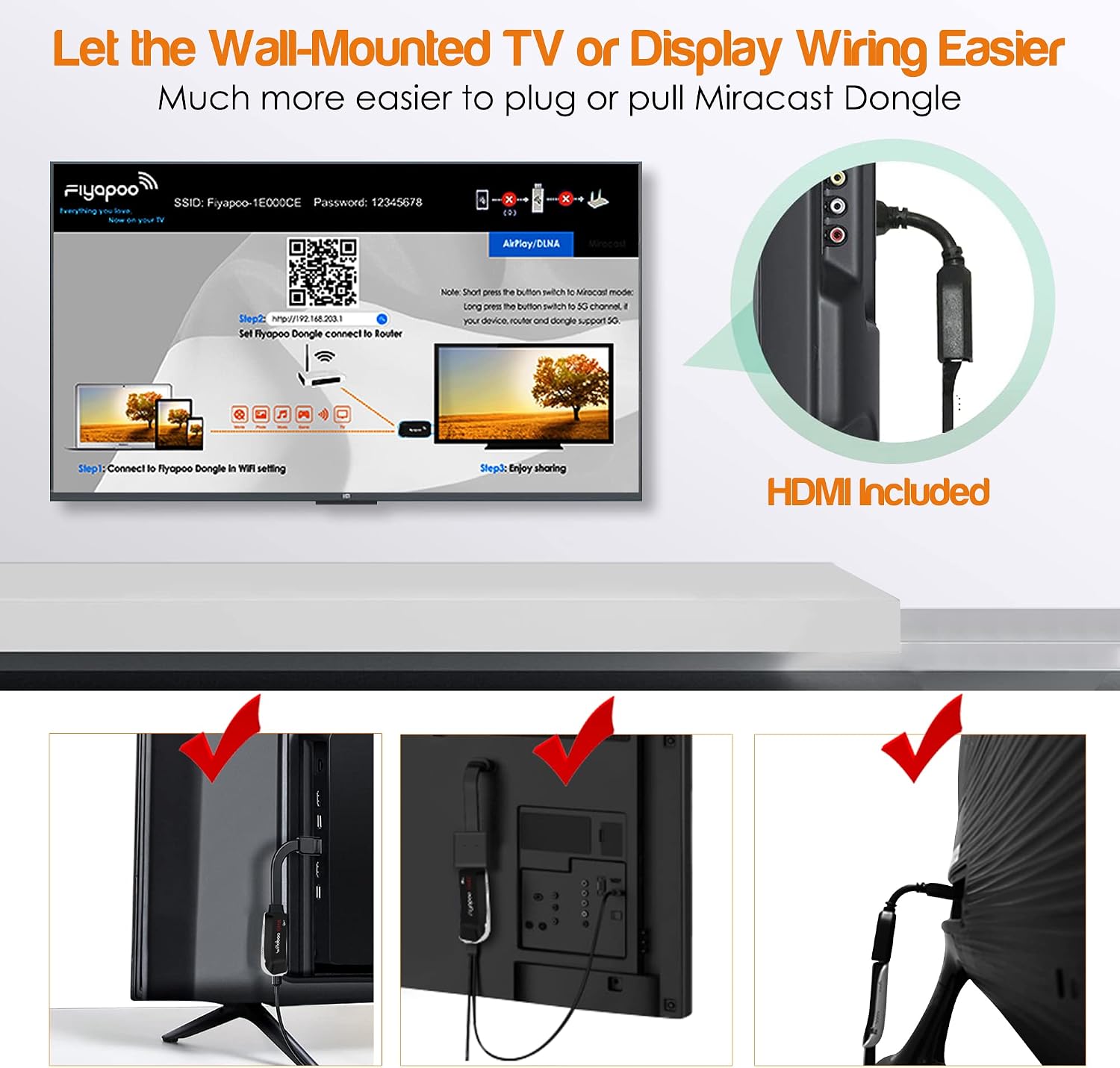
Image 3: Illustration of the 'Same Screen' and 'Extended Mode' functionalities.
3.2 Compatibility and Protocols
The FIYAPOO Miracast Dongle is compatible with a wide range of devices and supports various wireless display protocols:
- Підтримувані операційні системи: iOS, Android, Windows, and Mac OS.
- Підтримувані протоколи: Miracast, AirPlay, and DLNA.
- Обмін вмістом: Easily transfer and display movies, images, music, documents, or games from your devices to a large screen.
3.3 Specific Application Notes
- Netflix: Netflix is compatible with Android devices using Chromecast. It is not compatible with Apple AirPlay.
- Домашня сторінка Google: This feature is supported for Android devices only.
- Обмеження щодо авторських прав: Please note that some video applications may not be compatible with screen mirroring due to digital rights management (DRM) or copyright restrictions.

Image 4: Collage demonstrating the dongle's versatility in various settings, including gaming, presentations, and home entertainment.
4. Технічне обслуговування
To ensure the longevity and optimal performance of your FIYAPOO Miracast Dongle, follow these general maintenance guidelines:
- Прибирання: Use a soft, dry cloth to gently clean the device. Avoid using liquid cleaners or abrasive materials.
- Зберігання: Store the dongle in a cool, dry place away from direct sunlight and extreme temperatures.
- Обробка: Поводьтеся з пристроєм обережно. Уникайте падінь та сильних ударів.
- Оновлення прошивки: Periodically check for firmware updates through the dongle's configuration page (http://192.168.203.1) для забезпечення оптимальної продуктивності та сумісності.
5. Вирішення проблем
If you encounter issues with your Miracast Dongle, refer to the following troubleshooting tips:
- No Display or Signal:
- Ensure the dongle is securely connected to an HDMI port on your display.
- Verify that the dongle is receiving power via the USB cable.
- Confirm that your display device is set to the correct HDMI input source.
- Unstable Connection or Lag:
- Ensure your source device and the dongle are within close proximity to your Wi-Fi router.
- Minimize interference from other wireless devices or networks.
- The dongle supports both 2.4GHz and 5GHz Wi-Fi bands. If your router supports it, try connecting to the 5GHz band for better performance.
- Restart both the dongle and your source device.
- Unable to Connect to Dongle's Wi-Fi:
- Double-check the Wi-Fi SSID and password displayed on the setup screen.
- Ensure your device's Wi-Fi is enabled and scanning for networks.
- Streaming Service (e.g., Netflix) Issues:
- Remember that Netflix is not compatible with Apple AirPlay. For Android, ensure Chromecast is correctly configured.
- Some streaming applications may have content protection that prevents mirroring.
- Initial Choppiness or Delay:
- A slight delay or choppiness may occur during the initial connection or when starting a new stream. This typically resolves as the connection stabilizes.
6. Технічні характеристики
| Номер моделі | М7-5Г |
| Розміри | 17 х 13.5 х 1.8 см |
| вага | 130 г |
| Технологія підключення | HDMI |
| Тип роз'єму | HDMI |
| Особливості | 4K and HDR Support, Miracast, DLNA, Airplay, User-friendly design |
| роздільна здатність | 4K (3840 x 2160 пікселів) |
| Сумісні інтернет-сервіси | Google TV |
| Сумісні пристрої | Smartphones, Tablets, Laptops, Android TVs |
| Відеокодек | H.264, H.265/HEVC |
| Бездротова передача | 2.4G+5GHz Dual Band (802.11AC protocol) |
| Виробник | FIYAPOO |
| Країна походження | Китай |
| Вміст коробки | Miracast Dongle |

Image 5: Diagram explaining the 2.4GHz and 5GHz dual-band technology and their respective transmission rates.

Image 6: Visual representation of 5GHz WiFi capabilities, emphasizing fast and delay-free streaming.
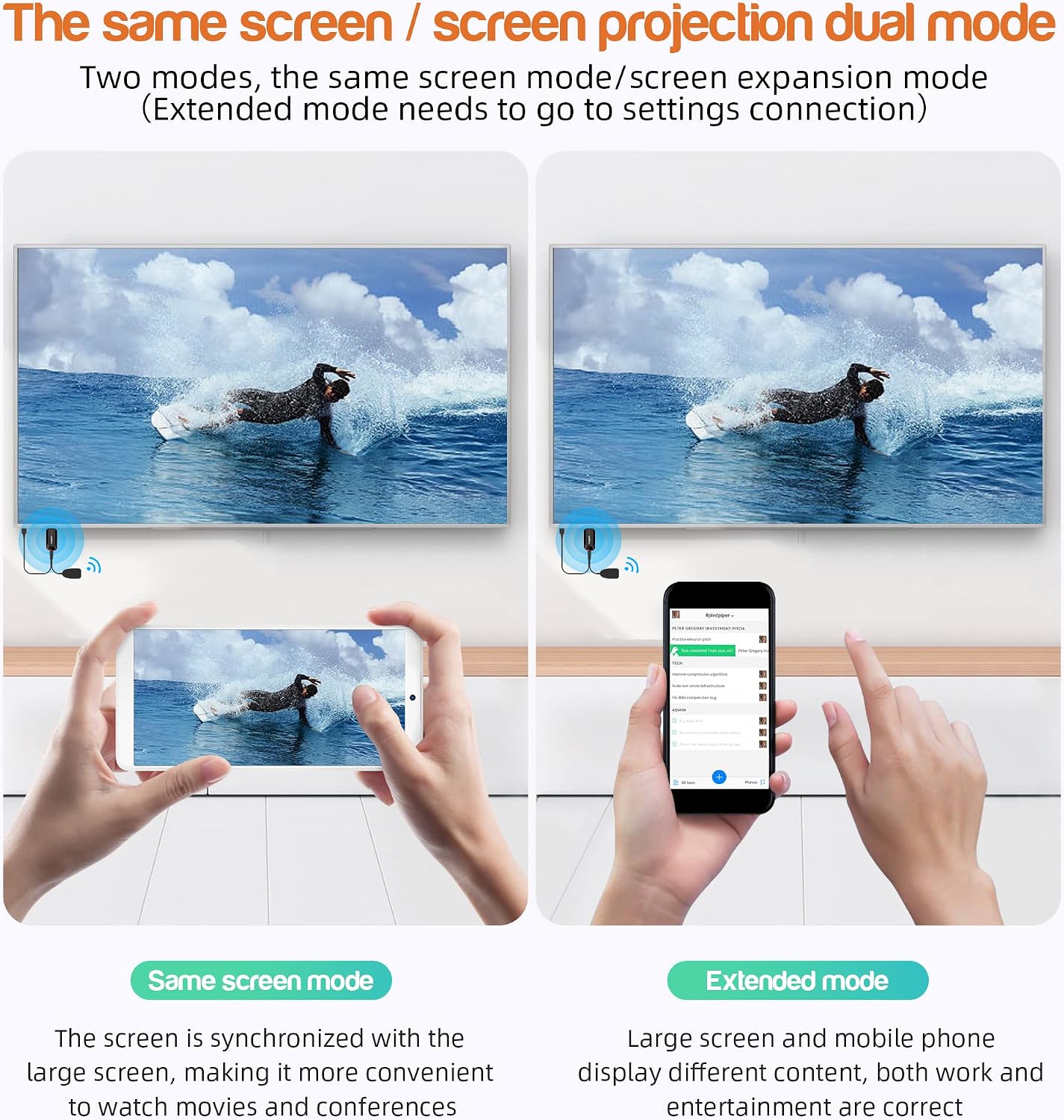
Image 7: Comparison showing the enhanced clarity and detail of 4K Ultra HD with HDR versus 1080P Full HD.
7. Інформація про гарантію
The FIYAPOO Miracast Dongle M7-5G comes with a Гарантія 1 рік from the date of purchase. This warranty covers manufacturing defects and malfunctions under normal use. Please retain your proof of purchase for warranty claims. The warranty does not cover damage caused by misuse, accidents, unauthorized modifications, or improper installation.
8. Підтримка клієнтів
Щоб отримати додаткову допомогу, технічну підтримку або запити щодо гарантії, зверніться до таких ресурсів:
- Від виробника Webсайт: Visit the official FIYAPOO webсайт із поширеними запитаннями, оновленими посібниками та контактною інформацією служби підтримки.
- Підтримка роздрібних продавців: Зверніться за допомогою до продавця, у якого ви придбали товар.
- Інтернет-ресурси: шукати community forums or online guides related to Miracast dongles for additional tips and solutions.